






Best AI Image Generators in 2026: Quality, Pricing and Commercial Use Compared
Compare the best AI image generators in 2026 for image quality, pricing, creative workflows, and commercial use, with insights from hands-on testing.
AI | Software | Paid Partnership | By Jeff Collier | Last Updated: November 27, 2026
Shotkit may earn a commission on affiliate links. Learn more.
With so many AI image generators now capable of producing impressive results, choosing the right one increasingly comes down to how you intend to use those images.
For professional creators, my top pick is Adobe Firefly, particularly if you already work with Photoshop or Premiere and want to incorporate AI-generated imagery into your existing workflow.
ChatGPT Images is a great starting point if you prefer a conversational approach to image creation, while Midjourney excels at visual experimentation and Ideogram is particularly useful for designs involving text.
In this guide, I’ll compare each tool’s image quality, creative controls, pricing, and commercial usage terms to help you decide which is right for you.
Tested on 26 November 2026 using macOS Tahoe 26.5.1.
Best AI Image Generators
The table below compares the best AI image generators based on their key strengths and suitability for different creative workflows.
| AI image generator | Best for | Key strength | Main consideration |
|---|---|---|---|
| Adobe Firefly | Professional Adobe creators | Connected Photoshop and Premiere workflows | Premium generation credit limits vary by plan |
| ChatGPT Images | Conversational image creation | Natural-language revisions | Image generation subject to usage limits |
| Midjourney | Creative exploration | Visual concepts and aesthetic experimentation | Private generation requires a higher-tier plan |
| Ideogram | Graphic and promotional assets | Text generation within images | Image quality may vary between generations |
1. Adobe Firefly
Firefly is particularly well suited to professional creators who need to incorporate AI-generated images into Photoshop for detailed editing or Premiere (formerly Premiere Pro) for video production, whether for individual projects or larger commercial campaigns.
My assessment
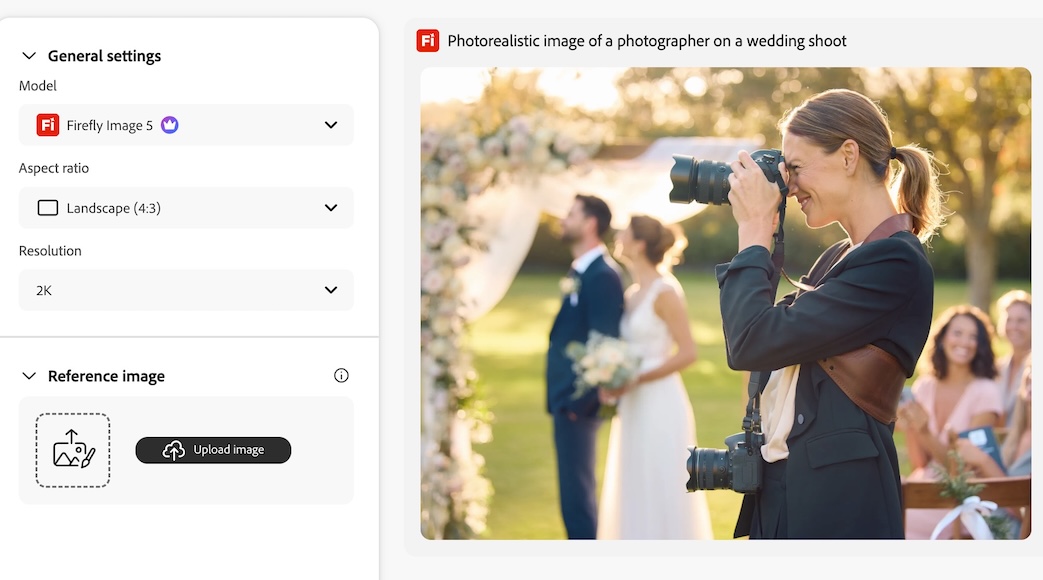
Prompt used: “Photorealistic image of a photographer on a wedding shoot”.
Firefly Image 5 produced a realistic warmly lit scene with a photographer in the foreground and a wedding couple behind her.
The natural lighting, convincing skin tones and realistic proportions were what impressed me most about the photographic quality of the image.
The background separation also gives the image a clear subject, making it suitable for an opening visual in a wedding-photography tutorial, an educational video or a concept presentation.
Further refinements can be made within Firefly using additional prompts or through Photoshop on the web for more detailed editing. For this test, I downloaded the generated image to use in a Premiere video editing workflow.
How to Use Firefly-Generated Images in Premiere
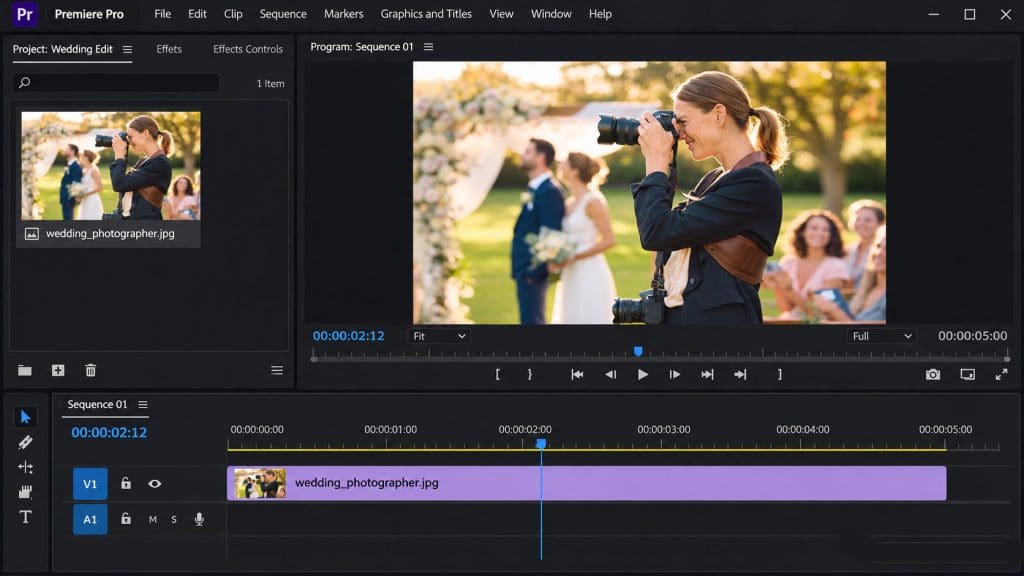
To use the generated image in Premiere, I downloaded it from Firefly, selected File → Import in Premiere and dragged the image onto my timeline.
I then extended the still image to approximately five seconds and created a gentle push-in effect using Scale keyframes under Effect Controls → Motion.
For professional video editors, generating imagery in Firefly and incorporating it into Premiere can help reduce production time when additional visual assets are needed.
This workflow is particularly useful for supporting visuals, opening sequences, concept presentations and illustrative content, while retaining control over the final edit within Premiere.
What I particularly like about Adobe’s approach to generative AI is that it complements the creative tools professionals already know and use.
As a company with more than 40 years of experience developing creative technology, Adobe continues to build on established workflows, integrating AI capabilities while keeping creative decisions in the hands of the creator.
Moving from Firefly to Photoshop or Premiere Pro is a practical example of how this works.
Commercial use
Adobe permits commercial use of Firefly outputs from features without a beta label. Beta outputs can also be used commercially unless the product explicitly says otherwise.
My verdict: Firefly is an excellent choice for professional creators who need commercially usable imagery, flexible creative controls, and seamless integration with established Adobe workflows.
2. ChatGPT Images
ChatGPT Images is appealing for users already familiar with a conversational AI workflow.
My assessment
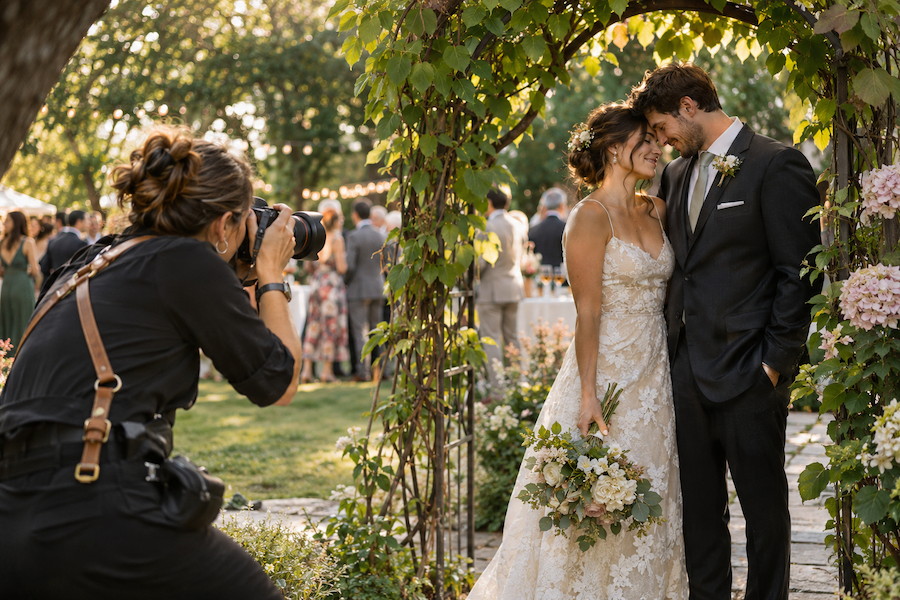
Prompt: Photorealistic image of a photographer on a wedding shoot
The generated image works well as a polished, realistic editorial-style wedding photograph. The photographer is clearly in the act of shooting, while the couple’s affectionate pose, leafy arch and warm late afternoon light help establish the setting.
The foreground framing gives the scene a documentary feel, and the softly blurred guests add depth.
Commercial use
OpenAI’s terms assign its rights in output to the user, to the extent permitted by applicable law. They also explain that outputs may not be unique. This supports commercial workflows subject to the applicable terms, policies and third-party rights – it does not establish exclusive copyright in every generated image.
My verdict: A sensible first option if you already subscribe to ChatGPT and prefer describing revisions via chat.
3. Midjourney
Midjourney belongs on the shortlist for mood boards, experimentation and editorial concepts.
My assessment
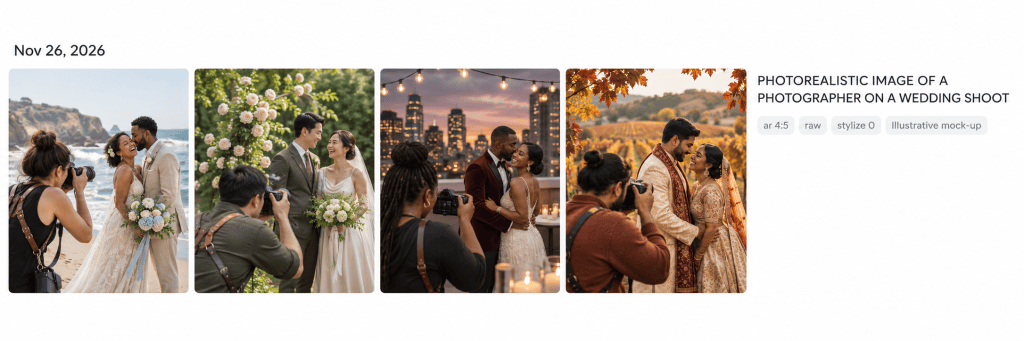
Prompt used: “Photorealistic image of a photographer on a wedding shoot”.
I found Midjourney handy for producing several images rapidly – the above results were generated in less than 5 seconds. Depending on your settings, up to 24 images can be generated at one time with a single prompt, which can be useful for aesthetic exploration.
I found Midjourney particularly useful for generating multiple visual concepts quickly. The ability to explore several variations of the same prompt makes it a valuable tool for developing mood boards, creative concepts and visual directions.
However, image quality and consistency can vary between generations, particularly when producing multiple variations.
Commercial use
Midjourney allows commercial use subject to its terms. Businesses grossing more than $1 million annually need a Pro or Mega plan for company commercial use.
My verdict: A strong choice for visual exploration, mood boards and creative concept development, although additional refinement may be required for final commercial delivery.
4. Ideogram
Ideogram is another AI image generator worth exploring, particularly for creators producing graphic concepts, promotional assets and imagery that incorporates text.
My assessment

Prompt: Photorealistic image of a photographer on a wedding shoot.
The image has appealing golden-hour light and clearly places the photographer at a wedding reception, with the tables and guests suggesting the setting.
However, the heavy background blur and bright highlights make the image feel soft overall.
While the seating, guests and reception details clearly establish the wedding setting, the absence of the couple makes the image feel more like a portrait of a wedding photographer at work than a candid moment of wedding photography.
Commercial use
Ideogram states that it does not claim ownership of generated images and permits commercial use.
My verdict: Worth testing with multiple images to achieve desired quality output.
AI Image Generator Pricing Compared
Pricing varies considerably between AI image generators, depending on generation limits, privacy options and subscription commitments. The table below compares selected paid plans to help you determine which offers the best value for your creative workflow.
Pricing was checked against official software provider websites on 26 November 2026.
| Software plan | Monthly subscription (USD) | Annual plan (USD per month) | Key features |
|---|---|---|---|
| Firefly Standard | $9.99 | Check regional pricing | Unlimited standard generations; 2,000 monthly premium generative credits |
| Firefly Pro | $19.99 | $16.99 | Unlimited standard generations; 4,000 monthly premium generative credits |
| Firefly Pro Plus | $49.99 | $41.99 | Unlimited standard generations; 10,000 monthly premium generative credits |
| ChatGPT Plus | $20 | Not available | Image generation included, subject to usage limits |
| Midjourney Basic | $10 | $8 | 3.3 hours of Fast GPU time |
| Midjourney Standard | $30 | $24 | Unlimited Relax Mode image generation |
| Midjourney Pro | $60 | $48 | Stealth Mode and unlimited Relax Mode image generation |
| Midjourney Mega | $120 | $96 | Stealth Mode and increased Fast GPU time |
| Ideogram Plus | $20 | $15 | 2,400 monthly priority credits and private generation |
| Ideogram Pro | $60 | $42 | 7,500 monthly priority credits and batch generation |
All prices are listed in US dollars, excluding applicable taxes and promotional discounts. Annual subscription rates may require upfront payment or a 12-month commitment. Pricing, features and generation limits are subject to change.
FAQs
Which AI image generator should I try first?
Start with Firefly if you already work in Adobe applications. Start with ChatGPT if you prefer conversational creation and revisions. Test Midjourney for aesthetic exploration.
Can I use AI-generated images in commercial projects?
Often, yes, subject to the provider’s terms, plan requirements, content policies and third-party rights. Check the specific service and model used, rather than assuming all AI images share one licence.
Does a paid plan guarantee private images?
No. Privacy depends on the service and plan. Midjourney reserves Stealth Mode for Pro and Mega, while Ideogram documents public free-plan generation and private new generations on paid plans.
Can I animate a generated image in Premiere Pro?
Yes. You can animate its scale, position and other effect properties. A pan or zoom remains an animated still; generating movement within the scene requires a different process, such as image-to-video generation. See: helpx.adobe.com
Is a 4-megapixel image enough for 4K video?
Not for native full-frame 4K detail: a 3840 × 2160 frame contains approximately 8.3 megapixels. Aspect ratio, cropping and movement also affect the required source dimensions. Inspect any enlarged image at the actual delivery size.
What is the best AI image generator for professional video editors?
Adobe Firefly is a strong option for professional video editors working within Adobe Creative Cloud. Generated images can be incorporated into Premiere Pro for supporting visuals, opening sequences, animated stills and other creative assets.
Can I use Adobe Firefly with Photoshop and Premiere Pro?
Yes. Creators can generate images using Adobe Firefly, refine them in Photoshop and incorporate the resulting assets into Premiere Pro. This connected workflow allows creators to use generative AI alongside established professional editing tools.
Conclusion
For professional creators working within Adobe Creative Cloud, Adobe Firefly is my first recommendation because of its ability to support the creative process from initial concept through to final production.
The ability to generate imagery, refine assets in Photoshop and incorporate them into Premiere Pro makes Firefly particularly useful for photographers, video editors, content creators and creative teams.
ChatGPT Images is a strong alternative for conversational image creation, while Midjourney is particularly useful for visual exploration and Ideogram is worth considering for graphic and promotional assets.
Ultimately, the best AI image generator depends not only on the quality of its output but also on how effectively it fits into your existing creative workflow.
Ready to incorporate AI-generated imagery into your next creative project? Explore Adobe Firefly and discover how you can bring your generated assets into Adobe Premiere Pro.
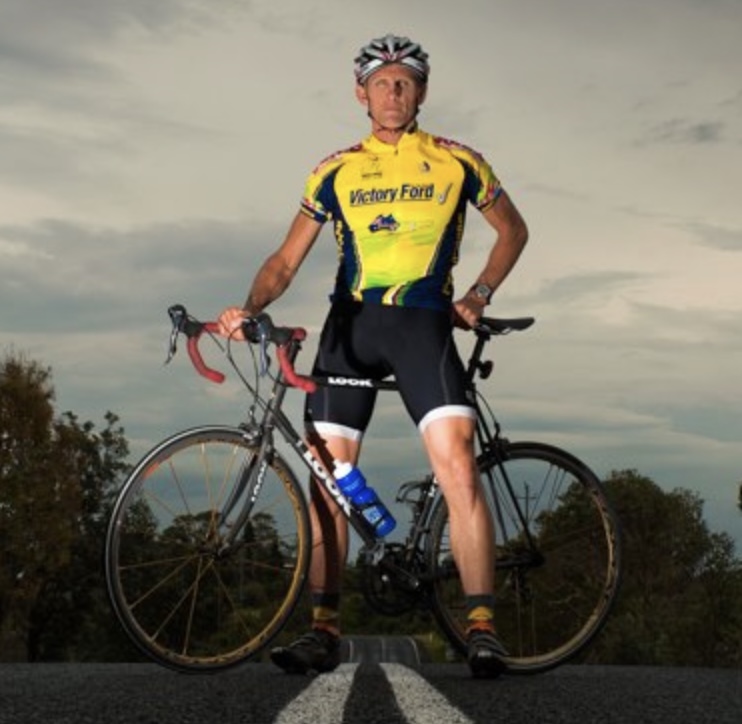
Jeff Collier is an experienced film photographer who enjoys experimenting with modern digital photography equipment, software and apps. He’s also an ex-world champion triathlete and avid cyclist, clocking hundreds of km each week in the beautiful Tweed Valley of northern NSW, Australia.
👋 WELCOME TO SHOTKIT!

🔥 Popular NOW: