






DJI Mic Mini 2 Review: A Tiny Wireless Mic for Creators
Is the DJI Mic Mini 2 worth it? We put this tiny, affordable wireless mic through its paces to see how it performs in real-world use.
Photography Gear Reviews | By Tommy Williams | Last Updated: August 23, 2026
Shotkit may earn a commission on affiliate links. Learn more.
The DJI Mic Mini 2 might just be one of the most practical upgrades for creators constantly on the move.
DJI has spent years building an ecosystem around content creation, refining its audio solutions to make high-quality recording more accessible without the need for complicated setups.
The original DJI Mic helped bring wireless audio into a more compact and approachable package, and the Mic Mini 2 continues that progression with an even smaller, lightweight design that’s easy to carry and quick to set up.


Compact mic offering clear sound and creator-ready features in a lightweight package.
Whether you’re vlogging, recording reviews, capturing family memories or creating content professionally, reliable audio is just as important as the footage itself. The Mic Mini 2 aims to deliver that confidence in a compact form, offering clear sound, simple operation and the flexibility to work across a wide range of devices.
This article will take a closer look at the DJI Mic Mini 2, exploring its features, performance and whether it earns a place in your creator setup.
What is the DJI Mic Mini 2?
- Small and Lightweight
- Long battery life
- Charging case stores everything
- 8 multi-colour magnetic front covers
- Mics can directly connect to DJI products
- Receiver is compatible with most other devices
- No internal storage like the full spec models, therefore no backup if there’s a dropout.
DJI Mic Mini 2 Specs
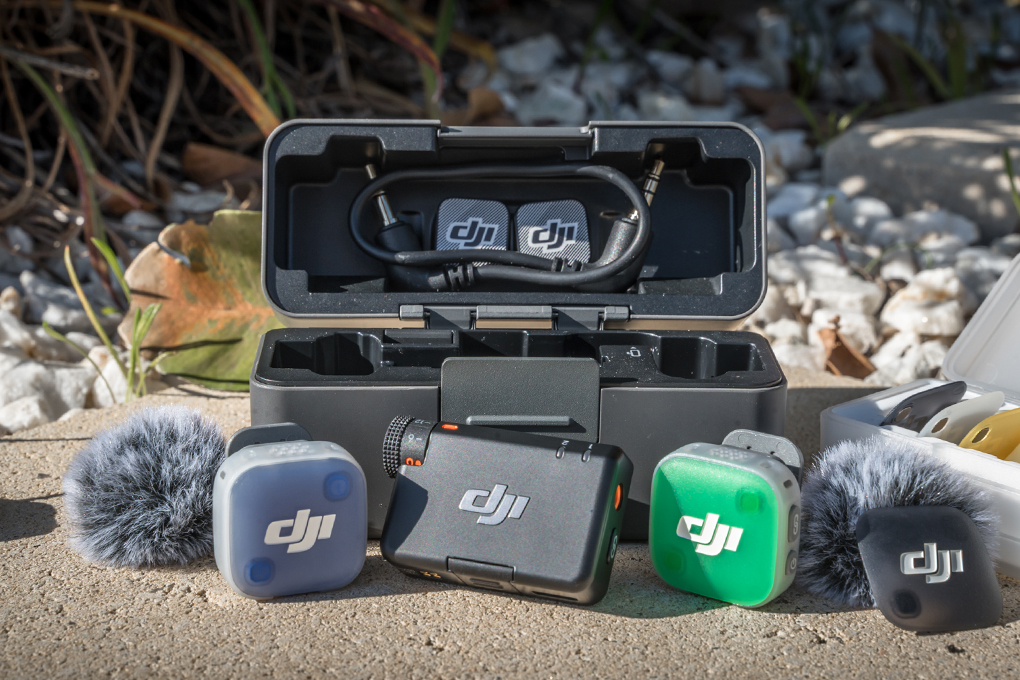
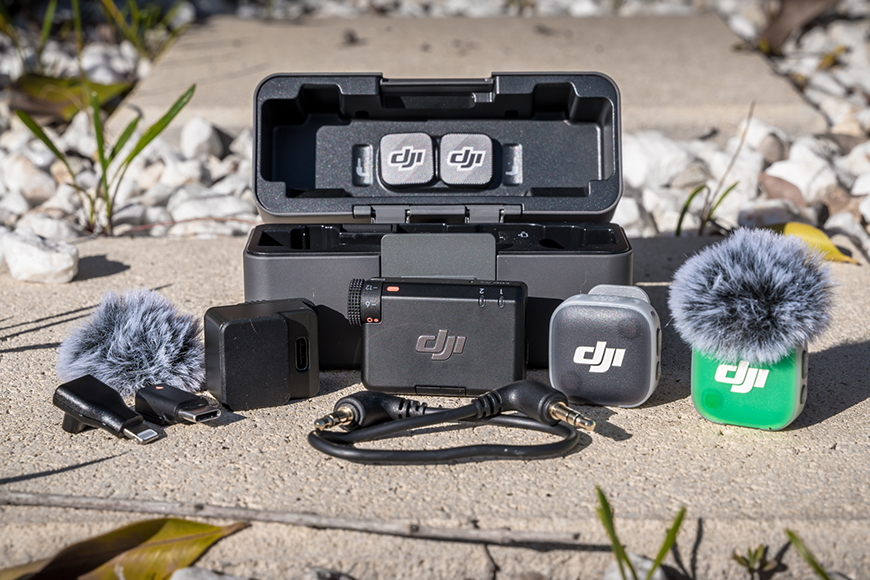
Pictured here is everything you get with the DJI Mic Mini 2 (2 TX + 1 RX + Charging Case) bundle, without showing the Multi-Colour Mag Front Covers or Windshields.
DJI Mic Mini 2 Transmitter
Model: DMMT02
Dimensions (L×W×H): 28.58×28.04×13.52 mm (1.13 × 1.10 × 0.53″)
Weight: Approx. 11 g (excluding the magnet clip and magnet)
Equivalent Isotropic Radiated Power (EIRP): < 20 dBm
Battery Capacity: 114 mAh
Charging Time: Approx. 70 minutes
Operating Time: Approx. 11.5 hours
DJI Mic Mini Receiver
Model: DMMR01
Dimensions (L×W×H): 46.50×29.61×19.32 mm (1.83 × 1.17 × 0.76″)
Weight: Approx. 17.8 g (including the interface cover)
Equivalent Isotropic Radiated Power (EIRP): < 20 dBm
Battery Capacity: 170 mAh
Charging Time: Approx. 100 minutes
Operating Time: Approx. 10.5 hours
DJI Mic Mini 2 Charging Case
Model: DMMC02
Dimensions (L×W×H): 106.30×42.50×59.20 mm (4.19 × 1.67 × 2.33″)
Weight: Approx. 159.3 g (charging case only)
Battery Capacity: 1950 mAh
Charging Time: Approx. 2 hours
Charging Cycles for TX and RX: When charging two transmitters and one receiver simultaneously, a fully charged charging case can fully charge them around 3.6 times.
DJI Mic Series Mobile Receiver
Model: DMMR02
Dimensions (L×W×H): 39.26×27.26×8.97 mm (1.55 × 1.07 × 0.35″)
Weight: Approx. 6.5 g
Equivalent Isotropic Radiated Power (EIRP): < 20 dBm
General
Polar Pattern: Omnidirectional
Frequency Response: Low Cut Off: 20 Hz – 20 kHz / Low Cut On: 100 Hz – 20 kHz
Maximum Sound Pressure Level (SPL): 120 dB SPL@1% THD
Equivalent Noise: 24 dBA
Monitor Interface Output Power: 20 mW@1 kHz, 32 Ω (DJI Mic Series Mobile Receiver)
Max Transmission Distance:
400 m (DJI Mic Mini Receiver in DJI Mic Mini 2 (2 TX + 1 RX))
300 m (DJI Mic Series Mobile Receiver in green light mode with two DJI Mic Mini 2 or two DJI Mic Mini transmitters)
200 m ( DJI Mic Series Mobile Receiver in blue light mode, mixing any two from DJI Mic Mini 2, DJI Mic 3, DJI Mic Mini, or DJI Mic 2 transmitters)
- Lightweight 11g Transmitter
- Compact Storage Design
- High-Quality Audio Recording
- Mixed Device Transmission
- Three Voice Tone Presets
- Two-Level Noise Cancelling
- Automatic Audio Limiting
- DJI OsmoAudio Direct Connection
- Up to 48-Hour Operating Time
- Plug-and-Play Mobile Receiver
- Omnidirectional Recording
- Bluetooth Connectivity
- Wide Device Compatibility
- Colourful Magnetic Front Covers
- Power Saving Mode
Build & Appearance
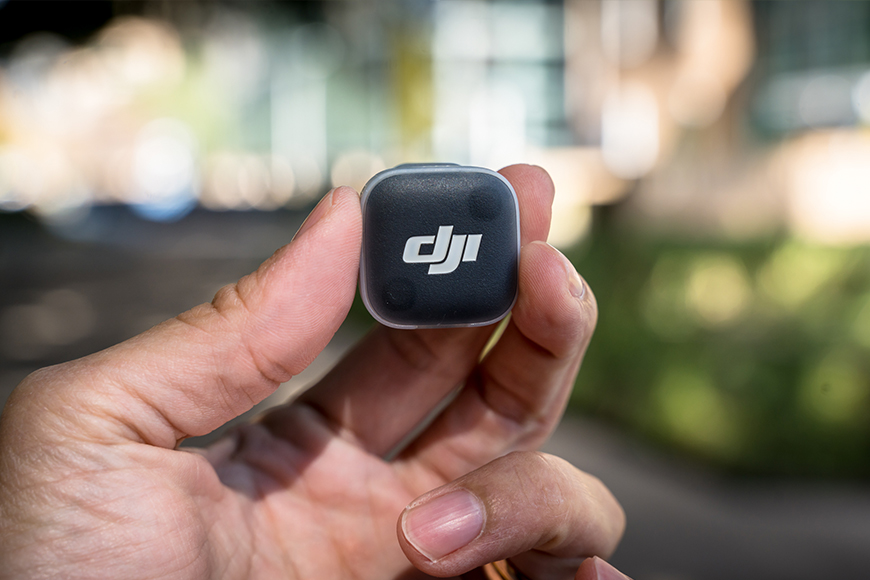
I still find it impressive just how small the Mic Mini 2 transmitters are, especially considering how reliable they are and the quality of audio they can capture.
Big recording performance, teeny-tiny little package.
Originally released in 2021, the DJI Mic has continued to evolve over the years. Its compact transmitters and straightforward setup made high-quality wireless audio accessible to more creators, while the introduction of the Mic Mini trimmed things down even further by removing some advanced features in favour of a simpler, lighter design.
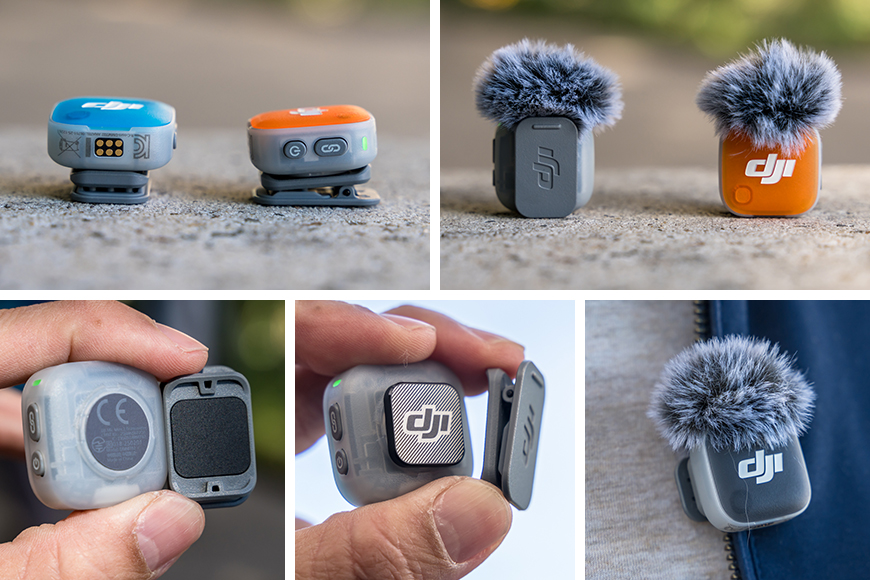
The Mic Mini 2 transmitters feature a strong magnet on the back, which securely holds either the clip or magnetic tab in place. They’re pretty strong magnets, too!
Whether you’re a vlogger, reviewer, capturing family memories or a professional looking for a discreet recording solution, clear, reliable audio is just as important as the footage itself. Unless, of course, you’re planning to cover everything with music!
The DJI Mic Mini 2 builds on that lightweight approach, with each transmitter weighing just 11g while adding a range of smarter features. They can be attached using either the rotatable magnetic clip or magnetic tab, making them quick to secure, easy to reposition and comfortable to wear for extended periods.
The magnetic tab is particularly useful when you need to position the transmitter wherever is most convenient, especially on garments such as T-shirts where clipping it to the collar may place it too high. The clip, meanwhile, works well on jackets, pockets and button-up shirts, or even for attaching the transmitter to other objects.
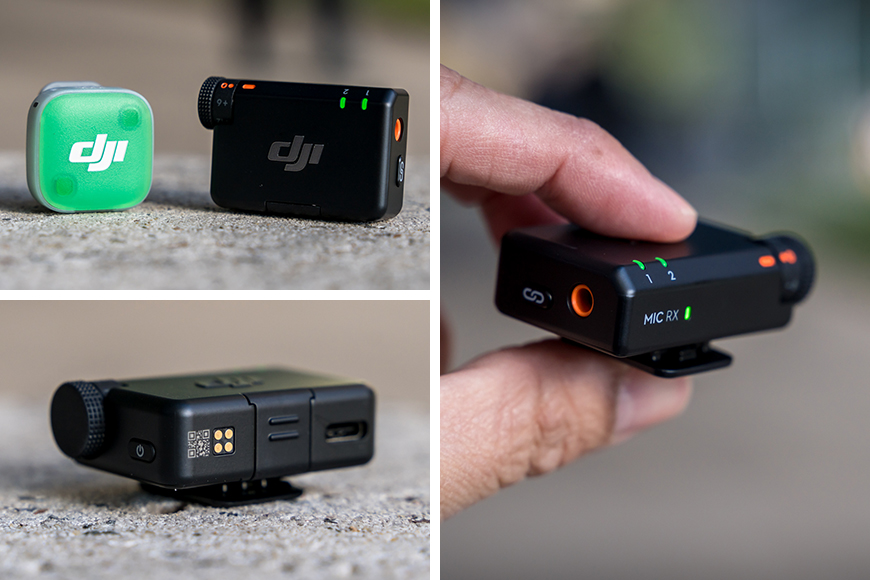
The DJI Mic Mini 2 Receiver is the key point of contact between the Transmitters and any devices you wish to use it with.
To connect the DJI Mic Mini 2 to non-DJI devices such as smartphones, cameras and computers, the Mini Receiver is your main connection point. It offers a five-step manual gain control for easy audio level adjustments and can connect to up to two transmitters simultaneously.
The receiver also features a 3.5mm audio jack, USB-C port, USB-C adaptor slot and an integrated clip that can also be mounted in a camera’s hot shoe.
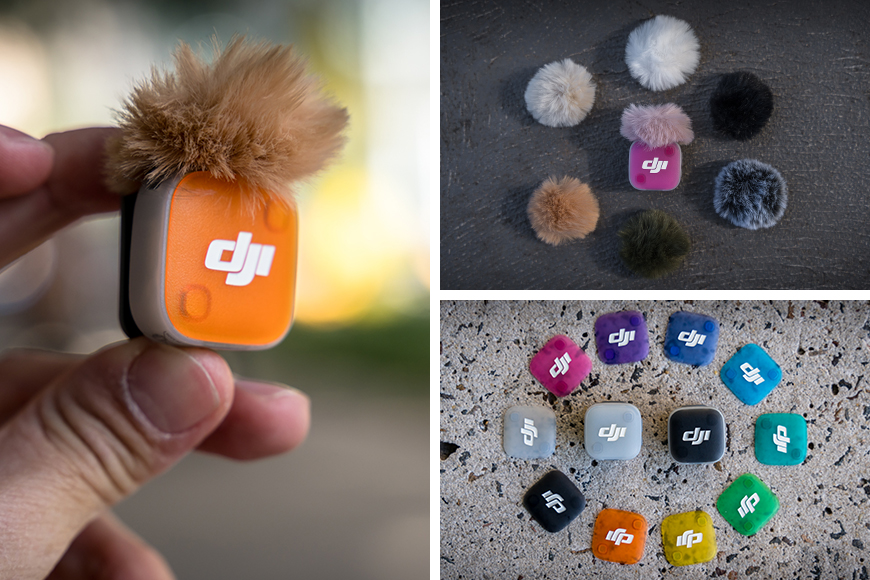
Personalising the DJI Mic Mini 2 transmitters is quick and easy. The windshields snap on and off effortlessly, while the Mag Front Covers attach securely with magnets.
Depending on the bundle you choose, you’ll also get a selection of colourful magnetic covers, with optional coloured windscreens available too. This lets you match your outfit or simply add a bit of personality to your recording setup.
With standout features like three voice tone presets, mixed device connection and DJI OsmoAudio, the Mic Mini 2 delivers high-quality audio with very little effort. Add in its impressive wireless range and excellent battery life, and it’s an easy microphone to keep with you wherever you film.

The DJI Charging Case not only stores your items, but it also charges them quickly too.
If you opt for the Charging Case, you’ll receive a sturdy storage case that neatly houses the transmitters, receiver, mobile adaptors, magnetic tabs and the 3.5mm cable, while also keeping everything charged and ready to go.
The receiver and transmitters slot into magnetic charging bays, making them easy to insert while securely holding them in place. Better still, the fuzzy windscreens can remain attached while charging, saving you from having to remove and refit them each time.
Features, Power & Performance

Connecting the DJI Mic Mini 2 to your smartphone through the DJI Mimo app is quick and easy.
The DJI Mic Mini 2 records in 48kHz 24-bit quality using an omnidirectional microphone. It also includes a range of built-in tools, accessible through the DJI Mimo App or DJI Camera, to help keep recordings sounding clear and consistent, including three voice tone presets, noise cancellation and automatic limiting.
The DJI Mimo app is your gateway to getting the most out of the Mic Mini 2… and keeping it up to date. Connect through the receiver and it becomes your main hub for monitoring audio levels, enabling aforementioned features, adjusting settings, and installing the latest firmware updates.
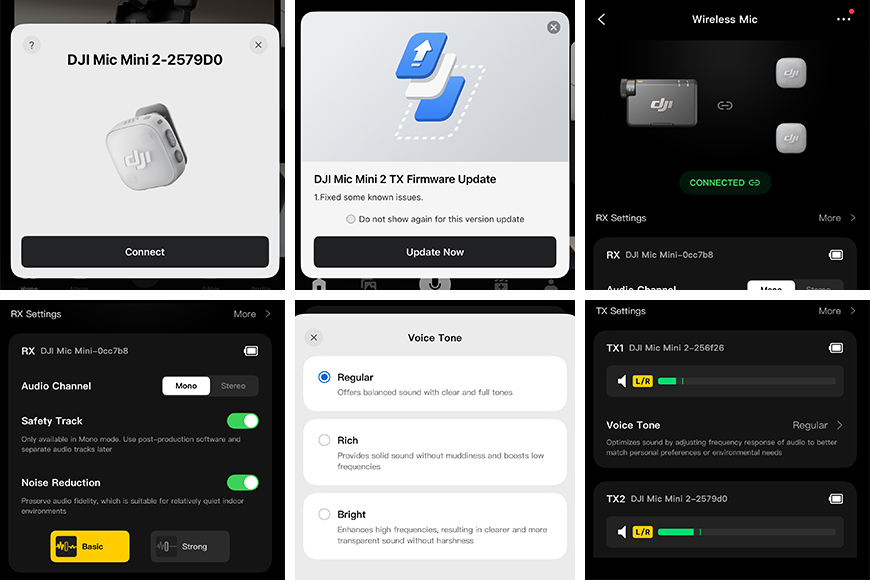
The DJI Mimo software is your key control centre and means of updating and managing your Mini Receiver and Transmitters.
The three tone presets help to tailor the sound to suit your recording style and your environment. Regular mode delivers a clean and natural sound, Rich mode adds extra warmth and depth, while Bright mode lifts the higher frequencies for added clarity.
The Mic Mini 2 also includes two levels of noise cancellation. The Basic setting is well suited to quieter indoor environments, helping reduce hums such as fans, air conditioning and room echo while keeping voices sounding natural.
Strong mode is designed for noisier locations, doing a much better job of reducing background distractions when recording outdoors or in busy public spaces.
To help avoid ruined recordings by excessively loud sounds, be it expected or not, DJI has included Automatic Limiting. When enabled, this feature automatically lowers the recording level whenever the audio becomes too loud, helping to prevent clipping.
There’s also a Safety Track mode that records a second audio track 6dB lower than the main recording, providing a backup should any unexpected peaks cause distortion.
Audio levels can conveniently be adjusted from the receiver itself using a simple five-step gain control, making it quick to fine tune during recording without digging through software menus. The receiver also supports up to two transmitters simultaneously, making it ideal for interviews, podcasts or conversations between two people.
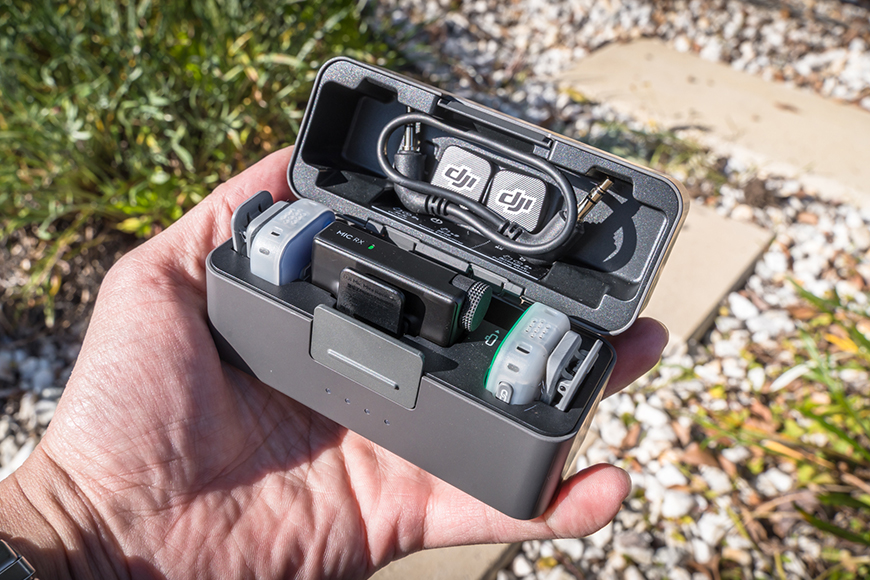
The Charging Case automatically starts recharging the Mini Receiver and transmitters as soon as they’re placed inside.
Battery life is another highlight. Each transmitter offers up to 11.5 hours of recording, while the receiver lasts up to 10.5 hours. Combined with the Charging Case, you can expect up to an impressive 48 hours of total operating time, making it easy to get through several days of recording before needing to recharge.
Simply placing the transmitters and receiver back into the Charging Case starts the recharging process. The case itself can be recharged via the USB-C port on the side.
Speaking of charging, just five minutes in the case gives you around an hour of recording time. Better still, the Mini Receiver can continue operating while charging through your phone, so you won’t have to interrupt your recording.
To help conserve power, the transmitters will automatically enter sleep mode when they lose connection to the receiver. You can also configure the receiver to synchronise its power on and off with a connected camera or device, so there’s no need to remember to switch the receiver off once you’re done with your camera gear.
Transmission & Compatibility
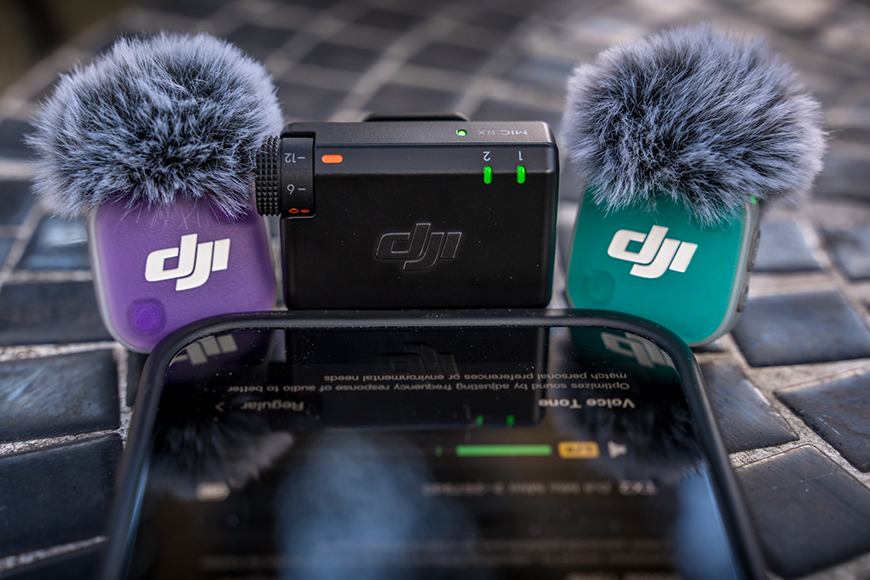
The DJI Mic Mini 2 can connect with a wide range of devices through the Mini Receiver.
Wireless recording at quite the distance, that certainly opens up a world of options!
Whether you’re creating product content, exploring your city and sharing food recommendations, capturing family memories, recording interviews, working in a corporate setting, or travelling solo, the DJI Mic Mini 2 is versatile enough to adapt.
With broad compatibility and a flexible design, it’s equally at home recording a quick social media clip as it is producing more polished professional content. Swapping between uses is so easy too!
When used with the receiver, the Mic Mini 2 offers an impressive transmission range of up to 400 metres in ideal conditions, or up to 300 metres when using the mobile receiver.
While you’re probably unlikely to ever push those distances in everyday use, it does provide plenty of confidence that your audio connection should remain stable, even when your uncontrollable subject decides to beeline towards something shiny located well away from the camera.
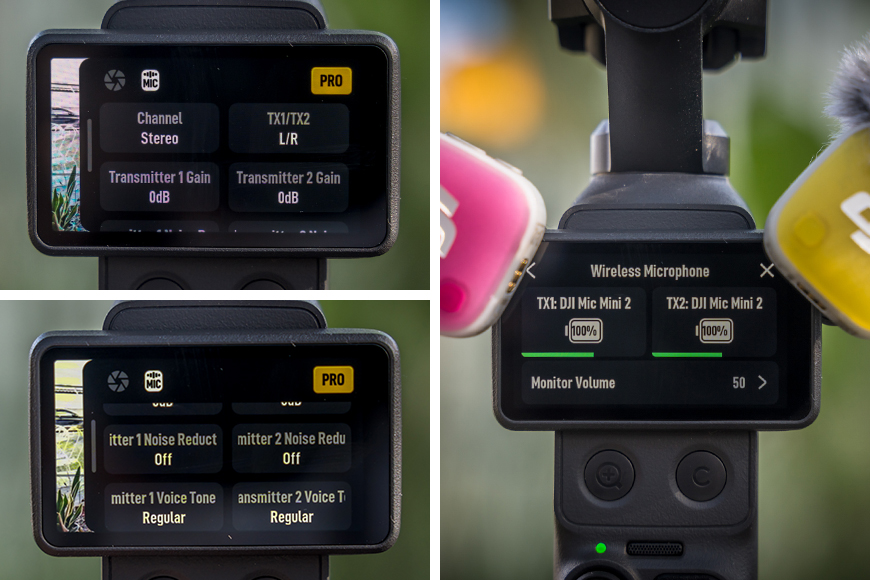
OsmoAudio not only provides seamless connectivity, but also lets you adjust the DJI Mic Mini 2’s settings and features directly through your DJI camera.
One of the biggest advantages of the Mic Mini 2 for DJI users is support for DJI OsmoAudio. This allows it to connect directly to a range of compatible DJI cameras, including the Osmo Pocket 4, Osmo 360, Osmo Nano and Osmo Action (4+) series, without requiring a separate receiver.
Compatible models such as the Osmo Pocket 3, Osmo Pocket 4, Osmo 360, Osmo Nano and Osmo Action 6 can connect to up to two DJI microphone transmitters simultaneously, including a mix-and-match of other DJI Mic models, such as a DJI Mic Mini 2 Transmitter with a classic DJI Mic.
Better still, once paired using OsmoAudio, the transmitters automatically reconnect whenever they’re powered on. There’s no need to pair them again each time you head out to film, making the whole process feel quick and effortless.
The DJI Mic Mini 2 isn’t limited to DJI cameras. With either available receiver, it can also be used with smartphones, tablets, cameras and computers over USB.
When purchasing, you can choose between the DJI Mini Receiver or the DJI Mic Series Mobile Receiver, unless you buy either separately. Both feature USB-C connectivity, making them compatible with modern smartphones and tablets. You can connect directly using the Mobile Receiver, or by connecting the Mini Receiver with the USB-C Smartphone Adapter or included USB-C cable.
Bluetooth connectivity is also available for smartphone users, although it comes with some limitations. The wireless range is more limited, and there’s a greater risk of drop-outs compared with using the receiver.
Noise cancellation also defaults to Strong and cannot be adjusted in the DJI Mimo app, while Low Cut is also not supported.
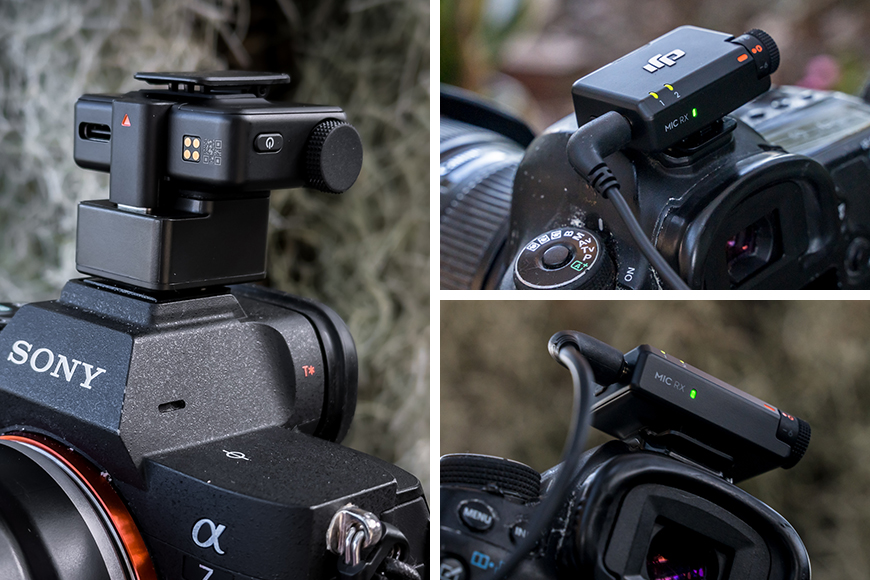
The Mini Receiver is compatible with digital cameras, either through USB, the 3.5mm cable, or the Sony MI hot shoe-compatible DJI Mic Series Camera Adapter.
Traditional cameras can be connected using the included 3.5mm audio cable, while compatible cameras can receive digital audio over USB-C. Sony users can also use the DJI Mic Series Camera Adapter for a clean digital connection through the MI hot shoe.
Computers are just as simple. Connect the receiver via USB and it’ll be recognised as a standard USB audio device, ready to use with recording software, video editing applications, or online meeting software.
It even makes those weekly team meetings from a noisy café or airport lounge sound far clearer thanks to the Mic Mini 2’s built-in noise reduction.
While USB-C to USB-A adaptors and cables may work, compatibility isn’t guaranteed due to the huge variation in cable quality and USB implementations.
Whether you need a microphone for one specific task or a range of different workflows, the DJI Mic Mini 2 is flexible enough to adapt to almost any recording setup.
Bundles & Accessories
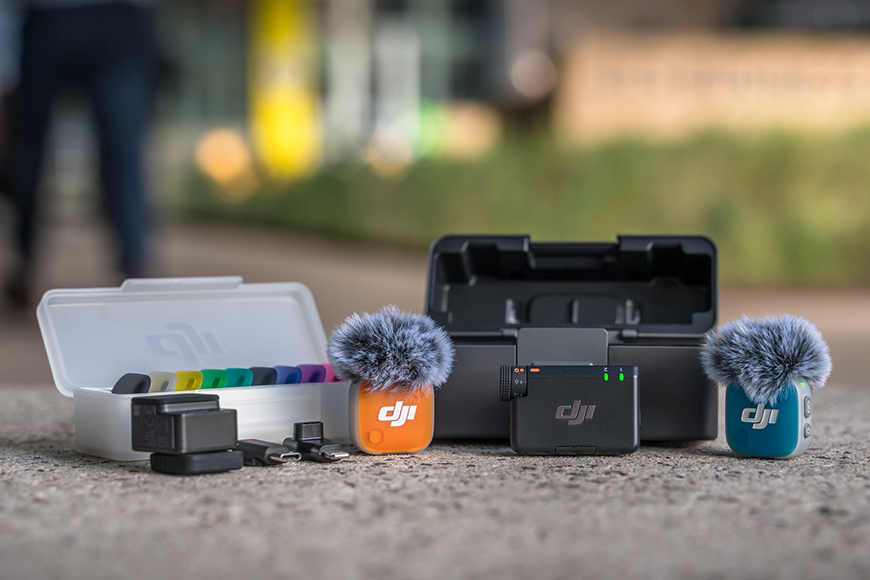
The DJI Mic Mini 2 has several bundles and accessories that suit different needs and budgets.
The DJI Mic Mini 2 is available in several different bundles, making it easy to choose one that suits both your recording style and budget. Solo creators can opt for a single transmitter and receiver, while those recording interviews or working with two speakers will appreciate the dual-transmitter kit, complete with the Charging Case for extended battery life.
I really rate the Charging Case though, because it does more than just top up the battery. It keeps the transmitters, receiver, mobile adaptors and 3.5mm cable neatly organised in one place, with magnetic charging bays that make docking each component quick and secure.
A thoughtful touch is that the fuzzy windscreens can remain attached too, so there’s no need to remove and reinstall them between shoots.

The Multi-Colour Magnetic front covers and coloured windshields help bring out your subjects personality, match an outfit, or use it as a way to make the microphone a little more discrete.
If you’d like to add a little personality to your Mic Mini 2 transmitters, or help them blend in with an outfit, selected bundles also include a range of colourful magnetic front covers. An additional pack of five colourful windscreens is also available separately, giving you even more options to customise your setup.
For those primarily recording on a smartphone, DJI also offers a mobile bundle that replaces the standard Mini Receiver with a DJI Mic Mini Mobile Phone Adapter. Although, the standard Receiver can still connect to your mobile using the included USB-C adaptor, it’s just more bulky.
And if your needs change over time, additional transmitters, covers and accessories can be purchased separately later on, allowing you to expand your kit without replacing the entire system.
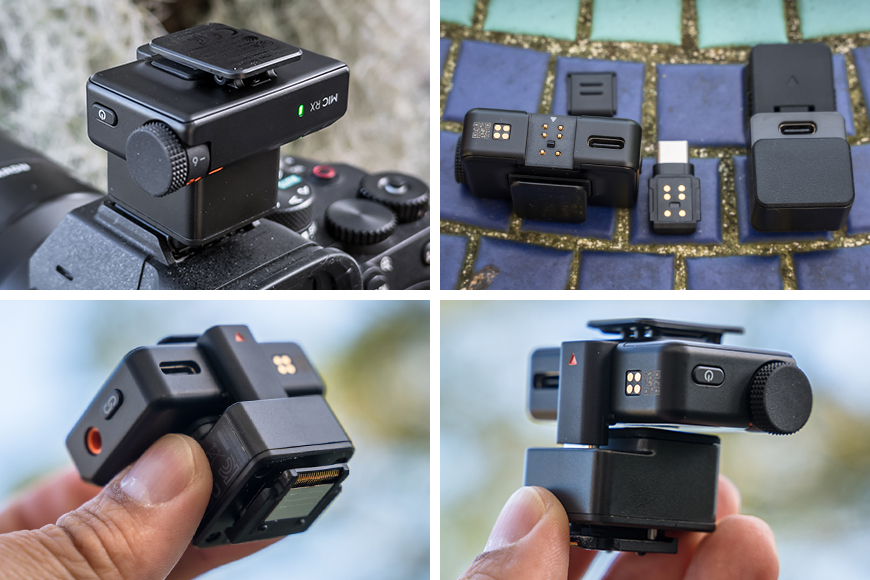
If your Sony camera features the MI hot shoe, the DJI Mic Series Camera Adapter is a wireless solution.
Sony users can also pick up the optional DJI Mic Series Camera Adapter, which replaces the traditional 3.5mm cable with a direct digital connection through the camera’s MI hot shoe, creating a cleaner wireless setup.
No additional camera setup is required, so you can simply attach the adaptor and start recording. Just keep in mind that it’s only compatible with Sony cameras featuring an MI hot shoe.
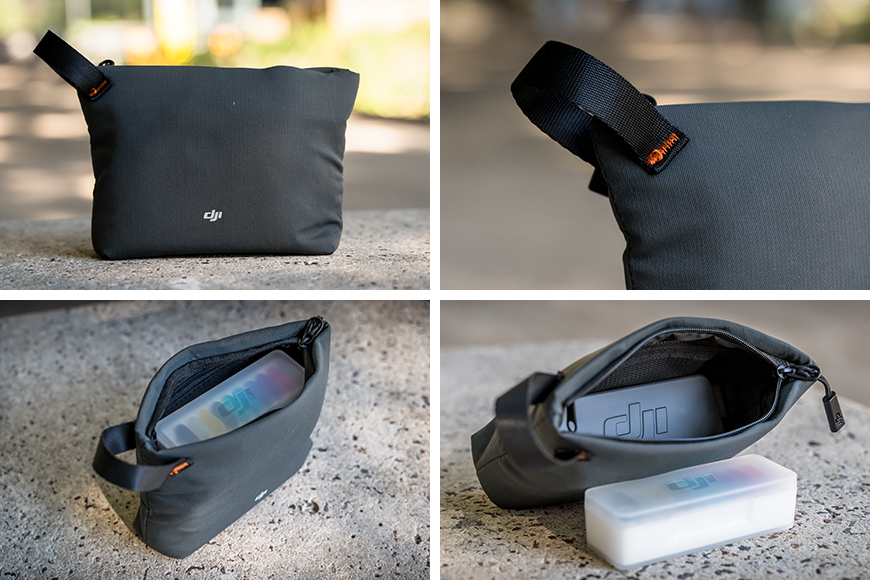
I was surprised to find the Carrying Pouch fits both the Charging Case and the box of replacement covers.
For added convenience, the DJI Mic Mini 2 Carrying Pouch, which is included in select bundles, is surprisingly spacious.
It has enough room to fit the Charging Case, Multi-Color Mag Front Cover case, Mic Series Camera Adapter, additional windscreens and a charging cable. A couple of internal pockets also help keep smaller accessories organised, making it a handy way to store your entire kit in one place.
Value for Money
The DJI Mic Mini 2 is already in a reasonably affordable price range. While higher-spec models offer additional features, if you don’t need internal recording, the Mic Mini 2 offers great bang for your buck.
The DJI Mic Mini 2 is relatively accessible, especially considering the price of microphone setups and just how portable this kit is.
Starting from around AU$89 for a single transmitter and receiver, with the various bundles ranging from approximately AU$119 to AU$189.
Within the DJI ecosystem, OsmoAudio makes it incredibly simple to connect the Mic Mini 2 directly to a compatible DJI device without a receiver. Place the Mic Mini 2 transmitter into pairing mode, select it through the Mic function on your DJI device, and you’re ready to go.
Once paired, the transmitter automatically reconnects whenever both devices are powered on, removing the need for the receiver entirely. Depending on the device, such as the DJI Osmo Pocket 4 or DJI Osmo Action 5+, two DJI Mic transmitters can be connected simultaneously.
The Mic Mini 2 is incredibly versatile as it can also work with most other devices that accept audio input, including most digital cameras, smart phones, tablets, and computers using the Mini Receiver connected by USB-C.
Another way to look at the value of this combination is to consider how much gear it can replace, particularly if you’re looking to downsize a larger recording setup. What once required bulky microphones mounted on top of cameras or positioned on stands can now be replaced by small, discreet transmitters tucked under a lapel or hidden out of sight.
While they may not completely replace the quality of finely tuned, high-end equipment, they make quality audio recording much more accessible to a wider range of people, without the need for an expensive setup.
FAQs
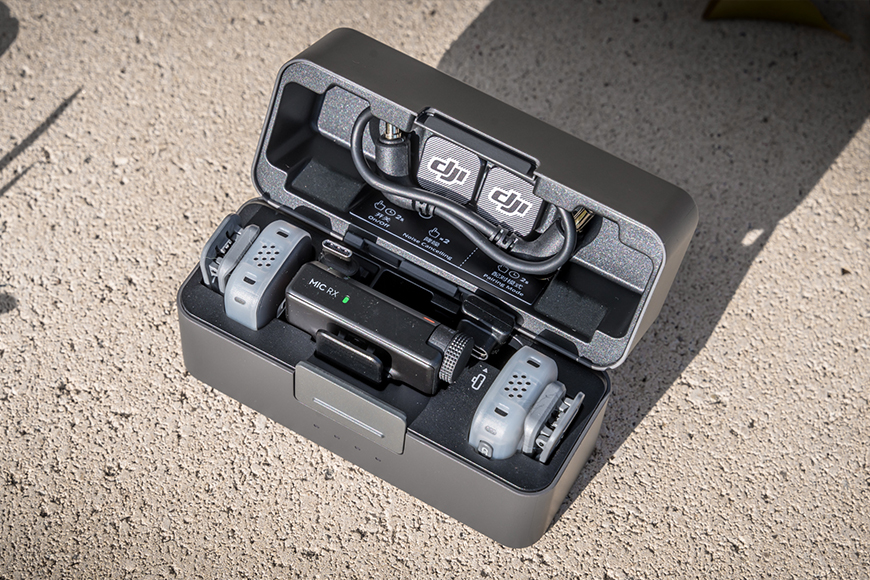
While the Charging Case may not be necessary for everyone, it does add quite a lot of convenience if you have more than one Transmitter.
Is the DJI Mic Mini 2 compatible with non-DJI devices?
Absolutely. The DJI Mic Mini 2 is compatible with a wide range of devices, provided the receiver can be connected.
For computers, simply connect the receiver to a USB-C port using the supplied cable and it will function as a USB audio device. If your computer only has USB-A ports, a suitable USB-C to USB-A cable or adaptor should also work, although compatibility may vary depending on the adaptor used.
Smartphone users have several connection options. You can use the dedicated DJI Mic Series Mobile Receiver, the standard Mini Receiver with the included USB-C Smartphone Adaptor or a USB-C cable. Connecting directly via Bluetooth is also an option, although that comes with some limitations.
For cameras, most models can be connected using the 3.5mm audio cable, while compatible Sony cameras can use the optional DJI Mic Series Camera Adapter for a clean digital connection through the MI hot shoe. Some newer cameras also support digital audio over USB-C.
How easy is it to pair a DJI Mic Mini 2 Transmitter to a DJI camera?
Connecting the DJI Mic Mini 2 to compatible DJI cameras is a straightforward process thanks to DJI OsmoAudio. Once the transmitter is placed into pairing mode, simply access the camera’s Mic function and the connection should establish.
After the initial pairing, the transmitter will automatically reconnect whenever both devices are powered on, removing the need for a separate receiver. Compatible DJI cameras can also connect to up to two transmitters simultaneously.
Is the Charging Case or buying a bundle necessary?
Not really. The Charging Case simply adds some useful extras that can make using the Mic Mini 2 a little easier and more convenient.
If you only need one or two transmitters for your DJI gear, you can purchase them separately and without the Mini Receiver. They’ll come with a USB charging cable.
For those with the intent of using them with a non-DJI device, a Mini Receiver will be required. There’s a single Transmitter and Receiver combo that can be purchased, and that too comes with a USB charging cable.
However, once you start using two transmitters regularly, and have also considered the price of buying said two with a Mini Receiver, the bundles that include the Charging Case become a more practical option.
DJI Mic Mini 2 Review | Conclusion

The DJI Mic Mini 2 lets personalities shine while delivering high-quality wireless audio through whichever device you connect it to.
The DJI Mic Mini 2 is an excellent choice for anyone who needs a compact, reliable wireless microphone.
Whether you’re a vlogger filming behind a high-end camera, a traveller capturing family memories with the DJI Osmo Pocket 4, working remotely on video calls, or a content creator interviewing people in busy locations, it adapts to a wide range of recording situations with ease.
Despite its small size, it consistently delivers clear, professional-quality audio. If you’re already invested in the DJI ecosystem, OsmoAudio makes the experience even more seamless by removing the need for a receiver with compatible devices.
Even if you’re not, the Mic Mini 2 remains a versatile and dependable option that works with a broad range of cameras, smartphones and computers, all without the cost or bulk of larger wireless audio systems.
Compact mic offering clear sound and creator-ready features in a lightweight package.

Tommy Williams is a travel photographer from Sydney, Australia. He is pretty chill, and admits he really needs to get around to updating his website more often.
👋 WELCOME TO SHOTKIT!
🔥 Popular NOW:
