





Adobe Premiere: AI Editing Tools for Creative Professionals in 2026
Explore Adobe Premiere's AI editing tools and discover how creative professionals can streamline production and bring their creative vision to life in 2026.
Premiere Pro | Software | Paid Partnership | By Andrew Dilks | Last Updated: November 26, 2026
Shotkit may earn a commission on affiliate links. Learn more.
Adobe Premiere is one of the best AI video editors for professional creators, combining AI-assisted editing with advanced timeline, colour correction and audio tools. Features such as Media Intelligence, Generative Extend, Text-Based Editing and Enhance Speech help editors save time while retaining creative control.
In this guide, I’ll explore its AI tools, practical applications, Creative Cloud integrations and how it compares with other video editors.
What Is Adobe Premiere and Why Is It a Leading AI Video Editor in 2026?
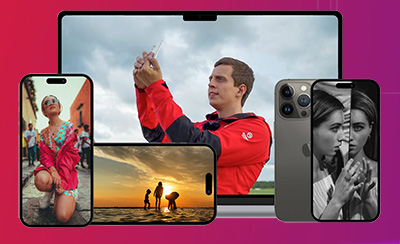
Adobe Premiere is a professional video editing application for everything from documentaries and corporate films to social media campaigns.
Adobe has more than 40 years of experience developing creative technology. Premiere builds on that heritage by integrating AI into established professional workflows rather than replacing the editor’s creative decisions.
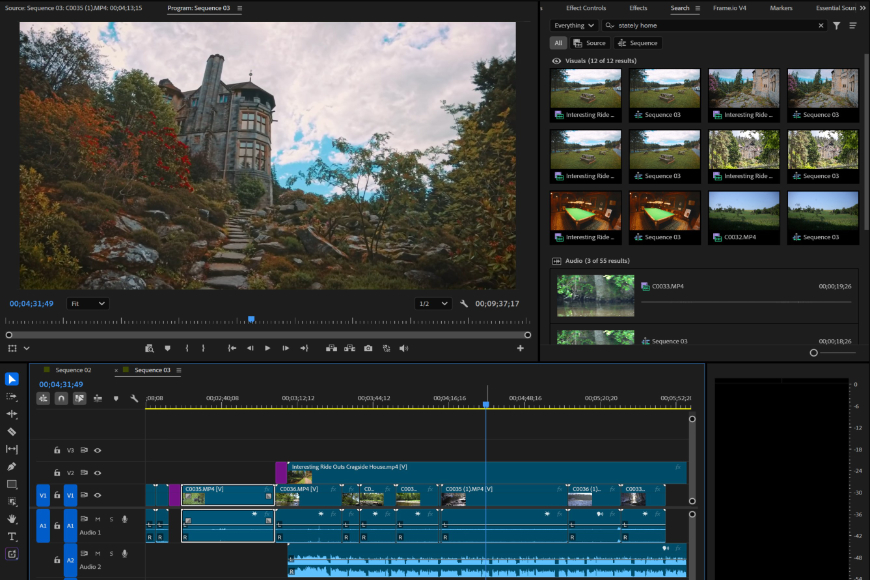
Its AI tools support footage search, transcription, dialogue enhancement and timing adjustments alongside multitrack editing, effects and colour correction.
What Are the Best AI Editing Tools in Adobe Premiere?
Premiere’s AI capabilities span multiple stages of video production, from locating footage and dialogue to generating new media.
The following table provides an overview of the principal tools and their applications.
| AI tool | Main function | Practical application |
|---|---|---|
| Generative Media | Generates supporting media using available models | Filling visual gaps and exploring creative concepts |
| Generative Extend | Extends suitable video and audio clips | Adjusting timing and transitions |
| Media Intelligence | Searches footage using visual descriptions | Finding specific shots in large projects |
| Enhance Speech | Improves dialogue quality | Interviews and voice recordings |
| Text-Based Editing | Uses transcripts to edit dialogue | Interviews, podcasts and tutorials |
| Speech-to-Text | Creates transcripts and captions | Accessibility and social media |
| Translate Captions | Translates captions into other languages | Multilingual content |
| AI Assistant | Helps with supported editing and organisational tasks (beta) | Project preparation and workflow assistance |
Tested in November 2026 with Adobe Premiere v27.0 on Windows 11.
Generative Media: Create and Explore Video Content with AI
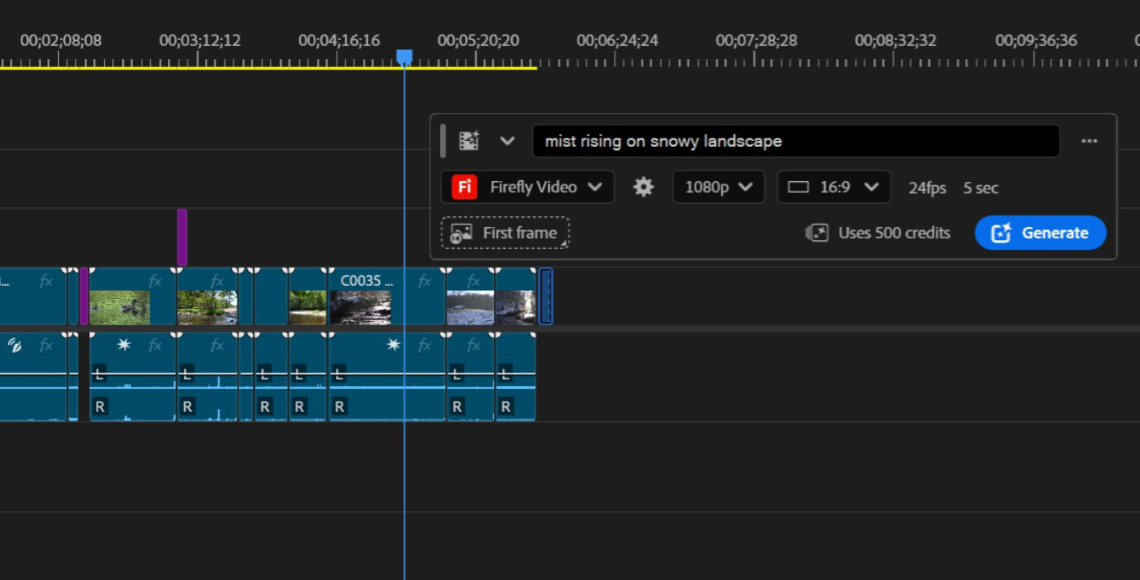
Powered by Adobe Firefly, Generative Media is ideal for project conceptualisation and creating new clips.
Generative Media brings AI-generated assets into the editing timeline using Adobe Firefly and supported partner models. Available media types and controls depend on the selected model and software version.
For example, if existing B-roll lacks the visual impact needed to complement a voice-over, editors can generate supporting footage or explore alternative visual concepts.
- Select the Generative Media Tool and identify where the asset should appear on the timeline.
- Enter a prompt and select an available model, adding reference frames where supported.
- Review credit usage, generate the media and assess the result in context.
Generated footage should be reviewed for continuity, visual accuracy and commercial suitability before use.
Generative Extend: Extend Video and Audio Clips with AI

Generative Extend allows editors to extend video clips by up to 2 seconds, bridging unwanted gaps.
Generative Extend can add up to two seconds to eligible video clips and up to ten seconds to compatible audio clips. Spoken dialogue and audio containing music cannot be extended using the audio extension feature.
I’ve used Generative Extend on several projects when B-roll footage falls short of the narration length. In my experience, the generated extensions have consistently matched the original footage’s visual style, camera movement and subject matter.
Other practical uses include:
- Adding breathing room before transitions.
- Extending reaction shots or ambient audio.
- Adjusting cuts to match musical beats.
Results depend on the footage and supported technical settings. Fast movement or significant scene changes can introduce inconsistencies, so I recommend using it for minor timing adjustments rather than as a replacement for filming additional footage.
Media Intelligence: Find and Organise Footage More Efficiently
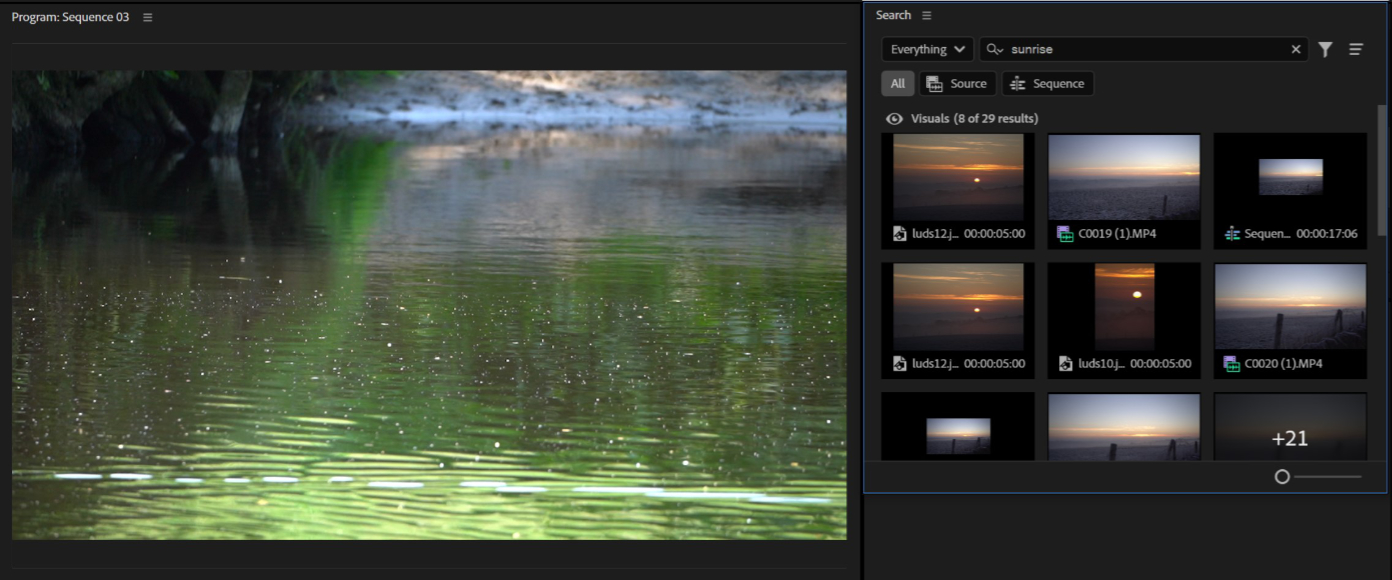
Media Intelligence elevates basic keyword searching with descriptive searches across all project media.
Media Intelligence analyses footage locally and lets editors search indexed clips using natural-language descriptions instead of relying solely on filenames.
I’ve used this tool frequently when selecting clips for projects. Examples of searches that produced accurate results on my footage include:
- People crossing a bridge in a forest.
- Mist flowing over landscapes.
- Sunrise on a winter morning.
- A person taking photographs in the woods.
Media Intelligence displayed matching clips from my indexed footage. This is particularly useful for documentaries, weddings and multicamera productions, where reviewing every clip manually can be time-consuming.
Combining visual search with transcript search helps editors locate relevant shots and dialogue. Visual search does not identify individual people or perform optical character recognition.
Text-Based Editing and AI-Assisted Captions
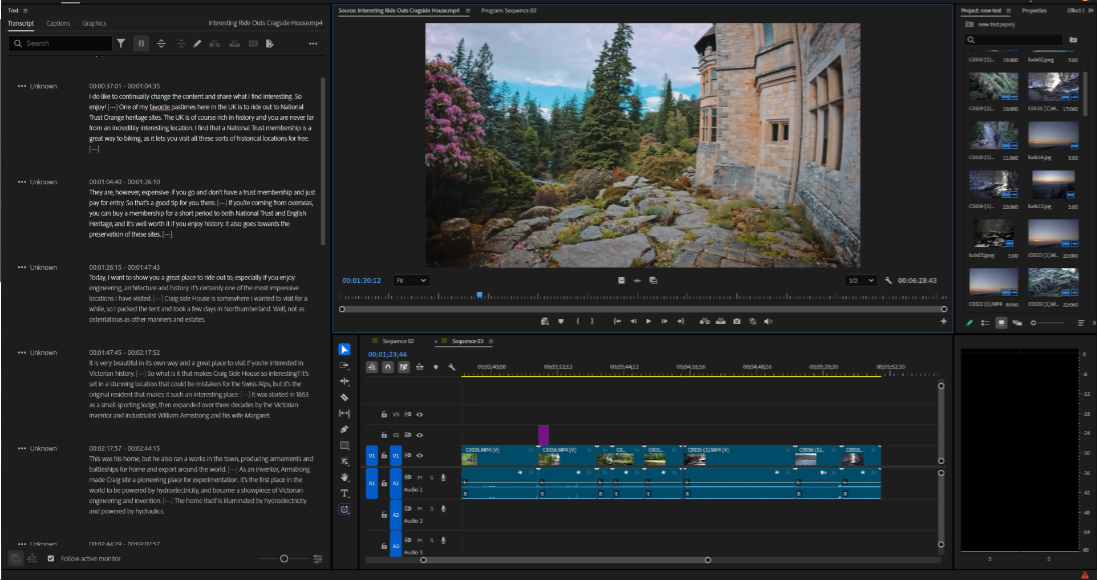
Transcription-based editing streamlines the process, directly removing words and sentences from the audio.
Speech-to-Text automatically transcribes supported footage, while Text-Based Editing allows editors to search, select and edit dialogue directly through the transcript.
When producing narration-heavy video essays, I’ve used Text-Based Editing to locate relevant dialogue quickly and build sequences around specific sections of the transcript.
Paper Edit also allows editors to select multiple transcript sections to create a new sequence. Once the dialogue is refined, automatic captions and supported caption translation tools can help adapt content for different audiences.
Always review transcripts and captions for technical terminology, unfamiliar accents and overlapping speech.
Enhance Speech: Improve Dialogue Quality with AI

Premiere’s Enhance Speech includes plenty of options to control the dynamics of your vocal performances.
Enhance Speech improves dialogue clarity and reduces unwanted background noise, particularly in interviews and recordings captured in challenging environments.
Processing options include on-device Enhance Speech V1 and cloud-based Enhance Speech V2. Availability and credit requirements depend on the version and plan.
Compare processed audio with the original using suitable monitoring headphones to ensure voices remain natural. Enhance Speech is useful for improving recordings, but it isn’t a substitute for good recording practices.
AI Assistant: Automate Editing Tasks with Natural-Language Prompts
AI Assistant is a beta feature that supports selected project-management and editing tasks through natural-language instructions. Potential uses include organising bins, labelling clips, adding markers and preparing rough assemblies.
Access depends on account eligibility, organisational permissions and beta availability. Check the supported tasks and applicable credit requirements before relying on it in a production workflow.
How Does AI Improve Professional Video Editing Workflows?
Premiere’s AI tools are most useful when combined throughout a project, from organising footage to delivering the final edit.
Automate Repetitive Editing Tasks
For a corporate video or documentary, editors can use Media Intelligence to locate shots, Text-Based Editing to select interview quotes and Enhance Speech to improve dialogue. Generative Extend can help refine the timing of eligible clips.
This reduces manual searching and repetitive adjustments, leaving more time for storytelling and pacing. Time savings depend on the project and source material.
Create Marketing Videos and Social Content
Marketing teams often need a full-length promotional video alongside shorter versions for Instagram, TikTok and YouTube Shorts. Transcript search helps identify strong excerpts, while captions and aspect-ratio tools support platform-specific edits.
Review framing, captions, audio and brand messaging separately for each version.
Maintain Professional Editing Control
Premiere combines AI assistance with multitrack editing, keyframes, transitions, colour grading and audio mixing. Editors retain responsibility for the final creative decisions rather than relying on automated output.
How Does Premiere Compare with Other AI Video Editors in 2026?
| Software | AI capabilities | Professional editing features | Best suited to | Pricing |
|---|---|---|---|---|
| Adobe Premiere | Generative Media, Generative Extend, Media Intelligence, Enhance Speech, and Text-Based Editing. | Advanced timeline editing, colour correction, audio mixing, effects, and professional export options. | Professional video editors, freelancers, content creators, and marketing teams. | 7-day free trial; $22.99/month (annual plan, billed monthly) |
| DaVinci Resolve | Neural Engine, Magic Mask, voice isolation, and AI-assisted image and audio processing. | Professional editing, advanced colour grading, Fusion visual effects and Fairlight audio. | Filmmakers, colourists and professional editors. | Free plan; Studio: $295 one-time |
| CapCut | AI-assisted editing, automatic captions, templates and generative features. | Accessible timeline editing, effects, transitions and social media export workflows. | Social media creators and beginners. | Free plan; Pro: $19.99/month |
| Descript | AI transcription, Studio Sound, filler-word removal, and AI co-editing. | Transcript-based audio and video editing with timeline functionality. | Podcasters, interview editors, and educational content creators. | Free plan; Hobbyist: $16/month billed annually ($24 monthly); Creator: $24/month billed annually ($35 monthly) |
Prices shown are US list prices in November 2026. Annual subscriptions are billed upfront or monthly according to the selected plan; taxes, promotions, and regional pricing may vary.
Premiere vs. DaVinci Resolve
DaVinci Resolve offers professional editing, advanced colour grading, Fusion visual effects and Fairlight audio tools. Its AI features include Magic Mask and image and audio processing.
I’ve used DaVinci Resolve alongside Premiere and find Premiere more intuitive for my workflow, particularly for footage selection and dialogue editing. Resolve may suit editors prioritising colour grading or a one-time Studio purchase, while Premiere is a strong option for those working across Creative Cloud applications.
Premiere vs. CapCut
CapCut is useful for quick short-form videos, with templates, automatic captions and accessible editing tools. Its free and paid plans suit creators who prioritise speed and simplicity.
Premiere offers more extensive timeline, audio and finishing controls for complex projects, including multicamera productions and commercial campaigns.
Premiere vs. Descript
Descript centres its workflow on transcript-based editing, with Studio Sound, filler-word removal and AI co-editing tools. It is particularly useful for podcasts, interviews and talking-head videos.
Premiere combines Text-Based Editing and Enhance Speech with a more extensive professional timeline and finishing environment, making it suitable for projects involving complex visuals, multiple cameras or detailed sound design.
How Does Premiere Fit into the Adobe Creative Cloud Ecosystem?
Premiere connects with other Creative Cloud applications, allowing professionals to move between asset creation, editing, sound design and delivery.
Connect Video Creation with Other Adobe Creative Tools
- Adobe Firefly: Explore visual concepts and generate supporting footage or images for use in Premiere.
- After Effects: Create motion graphics, branded titles and visual effects.
- Photoshop: Prepare product images, graphics and other still assets.
- Audition: Perform specialised audio editing, recording and restoration.
For example, a creative team can explore campaign concepts in Firefly, prepare branded graphics in Photoshop and After Effects, then assemble and refine the final video in Premiere. This connected workflow reflects Adobe’s approach to building AI into professional creative tools while keeping creators in control.
Collaborate on Projects with Frame.io
Frame.io supports timecode-based feedback and version stacks, helping editors manage client reviews and revisions. Supported Mounted Storage workflows can also provide access to cloud-hosted media without downloading every asset locally.
Work Across Professional Camera Formats
Premiere supports a broad range of media formats from professional cameras and smartphones. This is useful for productions combining cinema cameras, mirrorless cameras, drones and mobile footage. Check Adobe’s documentation for specific format compatibility.
Who Should Use Adobe Premiere?
Premiere is best suited to creators who need detailed editing control alongside AI-assisted efficiency.
- Aspiring video editors: Develop professional timeline editing skills while using AI to streamline routine tasks.
- Freelancers and content creators: Manage recurring client work, YouTube videos and multi-platform campaigns.
- Established creative professionals: Combine advanced editing, collaborative reviews and connected Creative Cloud workflows.
Casual creators who only need simple template-based edits may prefer a less complex application.
Is Adobe Premiere Worth the Subscription in 2026?
Premiere is listed at US$22.99 per month on an annual plan billed monthly. Its value depends on your editing requirements and how frequently you use its professional tools.
Creative Cloud Pro may offer better value for professionals who also need Photoshop, After Effects, Audition and other Adobe applications.
Some AI features require generative credits. The following table summarises the credit considerations for these features. Check current plan terms before purchasing.
| Feature | Credit considerations |
|---|---|
| Media Intelligence | AI-assisted media analysis; check applicable service requirements |
| Text-Based Editing | Included editing workflow |
| Speech-to-Text | Included feature, subject to supported functionality |
| Enhance Speech V1 | On-device processing without generative credits |
| Enhance Speech V2 | Uses generative credits; check current rates |
| Generative Extend | Uses generative credits |
| Generative Media | Credit consumption varies by model and generation settings |
| AI Assistant | Availability and usage depend on the applicable beta access and service terms |
Adobe offers a seven-day free trial for eligible users to explore its editing tools. Check which AI features and credit allowances are available with your selected plan.
Final Verdict: Is Adobe Premiere the Best AI Video Editor in 2026?
Adobe Premiere is a very strong choice for professional creators who want AI-assisted efficiency alongside detailed editing control. Media Intelligence, Text-Based Editing, Enhance Speech and Generative Extend address practical production challenges, while Firefly supports creative exploration and asset generation.
Its greatest strength is how these tools fit into a professional editing workflow, from initial concept to final delivery.

Andy Dilks is an experienced landscape photographer and former games industry veteran. When he isn’t taking photos or reviewing the latest tech gadgets, you can find him hiking and wild camping in the Peak District.
👋 WELCOME TO SHOTKIT!

🔥 Popular NOW: