






Top 4 AI-Poisoning Tools to Stop Content Scraping and Protect Your Portfolio
AI poisoning tools can help photographers protect their photographs from being used to train AI. Discover the best AI poisoning solutions in my guide.
AI | Software | By India Mantle | Last Updated: June 16, 2026
Shotkit may earn a commission on affiliate links. Learn more.
AI has thoroughly transformed the photography landscape. It has brought benefits like AI-powered editors and automated workflows that make life easier for photographers, saving them hours of time and effort by simplifying complex tasks.
Yet it has also delivered challenges. One of the most pressing problems is the fact that photographers’ work can sometimes be used for training AI models, without the permission of the original owner, and without any kind of compensation, either.
Fortunately, there’s a way for photographers to fight back against this troublesome trend. It’s called AI poisoning, and in this guide, I’ll explain how it works and list some of the best AI poisoning tools for photographers to use.
What Are AI-Poisoning Tools?
Before I examine the best tools to use, let’s first explore the technology they rely on. Some readers may already be familiar with AI poisoning, but for those who haven’t yet heard of it or aren’t entirely sure of how it works, here’s a quick primer.
AI poisoning is a way for individuals and organizations to disrupt the AI training process by “poisoning” data that these models train on. It doesn’t stop the training process, but it makes it far less effective, since AI models are more likely to misinterpret poisoned data and actually become less intelligent.
While AI poisoning tools can work slightly differently from one another, here’s a simple step-by-step illustration of how the general poisoning process works:
- A photographer uses an AI poisoning tool to alter one of their images at the pixel level. The changes it makes are invisible to the human eye, but are often enough to confuse any AI model that tries to learn from the image.
- When an AI model is fed this photo, the “poisoned pixels” confuse it. This can lead to completely misinterpreting subjects and failing to identify obvious objects. It might think that a car is a tree, for example.
- Over time, as it learns from more and more poisoned data, the AI model may become less reliable and effective at generating accurate content. This, in turn, can possibly lower the profit margins of the company that operates the model.
The Importance of Using These Tools
Some of the many reasons to use AI poisoning tools include:
- Fighting the AI System: People have wildly different views about the ethics and implications of AI. For those who feel that it’s growing too fast or being used in ways that are exploitative and unfair, AI poisoning tools represent one of the few useful ways to fight back. By directly disrupting AI training, these tools help creators send a clear message to AI companies.
- Protecting Your Portfolio: You can’t necessarily stop AI models and web scrapers from finding and using your photos, especially if you or any of your clients share them online where they may eventually be collected by web crawlers, dataset builders, or other systems used to train AI models. By using AI poisoning tools, however, you can take back some level of control, actively making your unique portfolio detrimental to AI’s progression.
- Safeguarding Your Style: Some AI poisoning tools work by applying a kind of invisible “cloak” or “shield” over your images. This means that even if the AI is able to interpret the contents of the photo, it may not be able to copy your distinctive style and learn the exact way you like to light, frame, and edit your shots.
- Creating Change: In the long-term, creators hope that if enough people use AI poisoning tools, AI companies may begin to change the way they work. Rather than simply scraping all available data and attempting to use people’s pictures without permission, these firms may start to actually pay license fees to photographers.
More: How to copyright your photos (Protect your images online)
Best AI Poisoning Tools for Photographers in 2026
Now you know the value of AI poisoning, you might be eager to start using this technology.
To help out, I’ve listed four of the best AI poisoning solutions available today.
Glaze
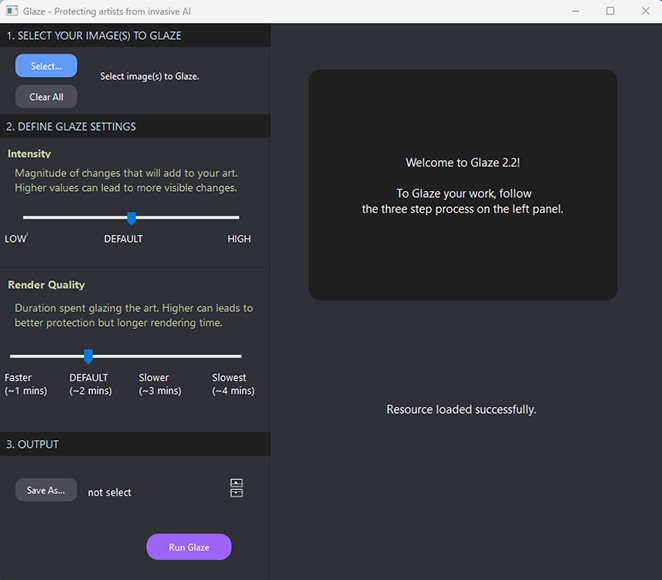
Glaze is a free-to-use AI poisoning tool developed by a research team from the University of Chicago. It’s positioned as a defensive tool, rather than an offensive one, which means that its primary purpose is to protect users’ photographs, art, and other creations, rather than actively trying to damage AI.
This makes it a useful AI poisoning tool to consider if you’re mainly focusing on safeguarding your distinctive photographic style and signature. AI may still be able to see and learn from your photos, but it won’t be able to mimic your unique way of framing, lighting, and capturing them.
The way it works is quite simple: Glaze analyzes each image and alters specific pixel values, creating imperceptible noise in the image that tricks machine learning models. They’ll still see the general content of the image, but may have difficulty fully understanding what makes it unique.
Many artists have taken to using Glaze to protect their sketches, paintings, and graphic art, and it’s equally valuable for photographers. The only major downside is that some AI developers have found ways to work around this tool and undo some of the changes it makes.
Download link for Glaze: https://glaze.cs.uchicago.edu/downloads.html
WebGlaze/Cara Glaze
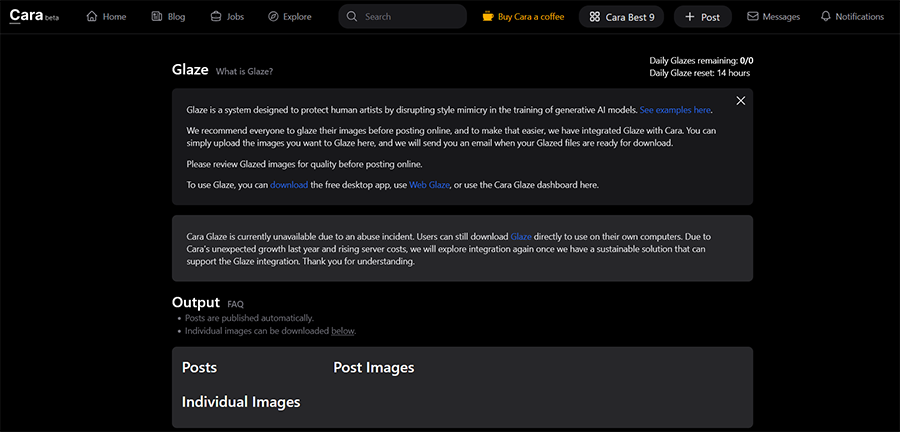
WebGlaze and Cara Glaze aren’t exactly separate, distinct AI poisoning tools. They’re just different versions of the Glaze software that are designed to be more accessible for users on a wide range of devices, like phones and tablets.
They’re made by the same University of Chicago lab team, and they work in the same basic way: they apply a kind of cloak to your images, adjusting pixels in ways that don’t impact the aesthetics of your images but make them harder for AI to accurately interpret.
The reason these tools exist is that, after publishing the original version of Glaze, the developers realized that not everyone wanted to have a desktop app to protect their pictures; they might, instead, want to use a web app that consumed fewer resources and was easier to access on other platforms.
So, they made WebGlaze, which is a browser-based version of Glaze, hosted on cloud servers. It’s sleeker and less resource-intensive than the original version, but access is offered on an invite-only basis, so it’s not simply open for everyone to use.
I struggled to obtain an invite, but was recommended to try Cara Glaze instead. This is the same software, but built into the AI-filtering Cara app, made specifically to help artists and creators protect their work.
Set-up link for Cara Glaze: https://cara.app/glaze/
Nightshade
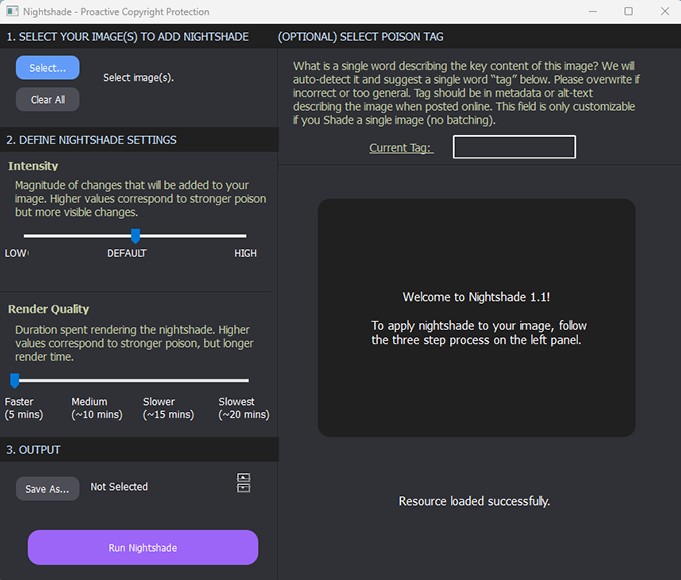
Nightshade is another free AI poisoning tool that was also created by a team from the University of Chicago, just like Glaze. However, it works in a completely different way and is much more offensive in its methodology.
For example, while Glaze mainly focuses on cloaking the users’ work to protect their signature style, Nightshade intentionally attempts to misdirect AI and make its training less effective. When it works correctly, it can make AI completely misinterpret obvious objects.
The way it does this is, again, relatively simple: Nightshade processes each picture and makes pixel-level adjustments before the image is uploaded online, ready to be found and exploited by AI scrapers. These changes aren’t usually visible to a human, but make a massive difference in the eyes of AI.
As a result, as AI models attempt to read and understand these poisoned images, they end up with completely incorrect associations. A picture might show a person standing next to a tree, but Nightshade makes the AI think it’s something completely different.
The long-term objective of this tool isn’t just to protect users’ rights, but to make AI text-to-image generation worse. One of the downsides to Nightshade that I encountered is that it runs quite slowly on a typical computer or laptop; you need quite a high-end device to use this software.
Download link for Nightshade: https://nightshade.cs.uchicago.edu/downloads.html
PhotoGuard
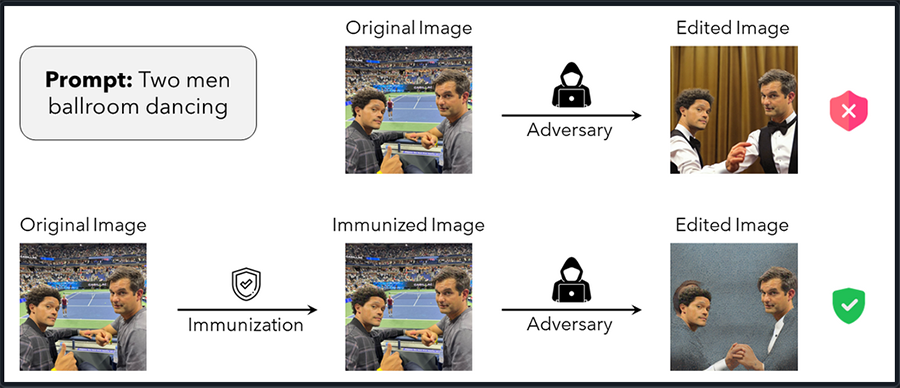
PhotoGuard is an adversarial image-protection system developed by MIT researchers. While Nightshade targets AI training processes, PhotoGuard was designed to make images resistant to unauthorized AI-based editing and manipulation. Like Glaze, this tool works by making the slightest adjustments to individual pixels, introducing tiny amounts of noise and distortions. The idea is that these minute changes will confuse AI models when they try to learn from any affected images or recreate them.
It’s both an offensive and defensive tool in that it can help you protect your portfolio while also slowly degrading AI’s effectiveness.
I tried it out and couldn’t notice any visible difference in the images it processed. It’s therefore difficult to know just how impactful it is, but the developers claim that it can make a real difference. As with Nightshade, I found this app quite slow on my usual work laptop, so you may need quite a powerful PC if you want to make the most of it.
Download link for PhotoGuard: https://github.com/madrylab/photoguard
Pricing of AI Poisoning Tools
One of the best parts about the four tools listed above is that all of them are free to use.
As explained, most are made by teams of researchers, engineers, and developers from some of the world’s top universities, and they make their work available for free to help as many people as possible protect their content. Thanks to that, you don’t have to worry about any additional expenses if you want to start working with AI poisoning technology.
With that said, however, some of the teams behind these tools will happily accept donations. They may use any donated funds to cover the costs of hosting their apps, developing updates, or working on even more useful AI poisoning products in the future. If you’d like to donate, you can visit the respective official websites for each tool to find out how.
Caveats and Considerations for Photographers to Keep in Mind
While AI poisoning tools like Glaze and Nightshade are useful for photographers who want to take back control of their portfolios, it’s important to understand that these applications have their limits:
- Not a Panacea: AI poisoning tools can help you combat one specific problem caused by AI, which is when models train using your pictures without your permission. However, they can’t defend you against other threats. Human users, for example, might still steal your pictures and use them without paying.
- Limited Impact: For tools like Nightshade and Glaze to prove truly effective, they depend on large numbers of users downloading and using them. For now, these are relatively niche applications, so their impact is limited. AI models are still training on a daily basis, using vast quantities of data, and most of it has not been poisoned.
- Workarounds Exist: Unfortunately, AI developers have created countermeasures to AI poisoning technologies. The LightShed method, for example, is a known technique through which AI models can detect if an image has been distorted somehow and undo the changes to make it usable once more.
- AI is Getting Smarter: AI models are gradually becoming more intelligent, efficient, and capable. As they do so, they become better at filtering high-quality, unaltered content and content that has been designed to trick them. In effect, a technological arms race is unfolding, and AI may eventually become too smart to fool.
- May Impact Aesthetics: I haven’t experienced this very often when working with AI poisoning tools, as they usually make changes that are effectively invisible to the naked eye. In some rare cases, however, you may be able to see slight changes after putting your photos through the poisoning process. They might not look quite as crisp or may contain some slightly visible noise.
Final Word: Embrace AI Poisoning to Protect Your Portfolio
The rise of AI has undoubtedly introduced new challenges for photographers. Like many in the profession, I certainly don’t enjoy the idea of my work being taken without my permission and utilized in ways that I never agreed to. Unfortunately, that’s exactly what’s happening daily.
AI poisoning tools like Glaze and Nightshade can’t stop this process entirely, but they can make a difference. They force AI models to work harder and prove to AI companies that creators aren’t simply going to allow themselves to be exploited without standing up for themselves.
So, if you’re frustrated about AI peeking into your portfolio and nabbing your pictures whenever it wants, it’s worth giving one or more of these tools a try. They won’t solve all of your AI-related issues, but they can, at least, provide some peace of mind.

As the General Manager of Shotkit, India Mantle brings with her a lifelong love for photography that she developed during her childhood, watching her father document their family moments with his Nikon EM. In her free time, you find her enjoying the awe-inspiring natural beauty of her home, Northern Rivers, Australia.
👋 WELCOME TO SHOTKIT!
🔥 Popular NOW:
