







AI Wedding Photo Editing Software & Tools To Try in 2026
Discover the essential tools used in wedding photography, from AI editing and culling software to online galleries, album design, and workflow management.
Software | Paid Partnership | By Jeff Collier | Last Updated: April 10, 2026
Shotkit may earn a commission on affiliate links. Learn more.
I’ve second-shot several weddings and engagement sessions over the years, and if there’s one thing I learned quickly, it’s this: the editing is almost, if not more important than the shooting.
Obviously you need to be able to take great wedding photos at the event itself, but knowing how to edit and what software to use is the other half of the battle.
A single wedding can mean 2,000–4,000 RAW files, often shot across wildly different lighting conditions.
The smartest wedding workflows today aren’t just about choosing the right editing software – they’re about building a post-production stack: culling, editing, delivery, backups, and client communication.
Below is a practical, real-world look at some of the tools that actually help wedding photographers move faster and deliver consistently without losing creative control.
AI Wedding Culling Tool

Imagen (AI Culling)
Although Imagen can handle AI photo editing, it's probably best known for its AI-powered culling workflows.
The appeal is simple: you tell the AI what you need (or how you typically select), and it helps reduce a huge set into a manageable selection of strong picks based on factors like sharpness, expressions, composition, and variety.
For weddings and engagement shoots where you often have long bursts of near-identical frames, this can save serious time before you even open Lightroom.
Best for: Wedding photographers who want to speed up the “first pass” of selecting keepers from large galleries.
Pros: Cuts down time spent comparing near-identical frames; helps prioritise strong expressions and sharp images; can give you a fast shortlist to review rather than starting from scratch.
Cons: Exact selection logic can feel a bit opaque compared to manual culling.
Photo Editing Software for Weddings
Adobe Lightroom Classic
Lightroom Classic is still the centre of most wedding workflows for a reason: it’s built for high-volume work.
If you’re editing thousands of images, the ability to sync edits across scenes, copy/paste settings, and keep everything organised in one place is hard to beat.
Most wedding photographers would be lost without Lightroom, despite that pesky recurring billing.
Best for: High-volume wedding editing with strong organisation and batch editing.
Pros: Fast batch syncing; solid cataloguing; powerful AI masking and noise reduction; huge ecosystem of presets and plugins.
Cons: Subscription model adds up; not ideal for heavy retouching or compositing.
Imagen
Imagen also fits into the wedding workflow right after culling, where the real-time sink begins: editing thousands of images consistently.
Rather than relying on presets alone, Imagen learns your editing style and applies it across full wedding galleries automatically. This is especially useful when dealing with mixed lighting conditions across a full wedding day, from prep to reception.
Used alongside Lightroom, it can dramatically reduce the amount of manual adjustment needed, getting your images close to final before you start fine-tuning.
Best for: Wedding photographers who want consistent edits across large galleries without spending hours on repetitive adjustments.
Pros: Learns and applies your personal editing style; speeds up batch editing significantly; improves consistency across different lighting conditions; integrates with Lightroom workflows. Offers RAW image cloud backup for an additional fee.
Cons: Not a standalone editor; requires a trained profile for best results; still needs review and fine-tuning; cloud-based workflow requires uploads.
Adobe Photoshop
Photoshop is what you reach for when an image is worth “finishing properly” – removing distractions, cleaning up backgrounds, or doing more detailed retouching.
Although Lightroom Classic's latest updates mean it can handle a few of these AI-powered tasks already, Photoshop offers much finer precision for edits.
For weddings, Photoshop is definitely not an entire-edit tool, but it’s still the go-to for hero images.
Best for: Hero shots, album cover images, and advanced retouching.
Pros: Best-in-class retouching and object removal; layers for complex edits; full creative control.
Cons: Too slow for bulk editing; easy to over-edit if you’re not careful. Confusing interface. Need subscription.
Capture One Pro
Capture One is popular with some portrait and commercial shooters for its colour tools and tethering workflow.
For weddings it’s less common than Lightroom, but if you love its colour rendering and want tight control, it can be a strong option.
Best for: Photographers who want precise colour control and prefer Capture One’s workflow.
Pros: Excellent colour tools; strong RAW processing; flexible sessions/catalogs.
Cons: Steeper learning curve; less “wedding standard” than Lightroom (preset ecosystem and shared workflows can be smaller).
Noise Reduction and Sharpening Tools

Topaz Photo AI (or DeNoise AI)
Indoor receptions and dim dance floors are where wedding files often fall apart. Topaz tools can rescue noisy images, sharpen borderline frames, and clean up high ISO files, especially if your camera struggled.
Best for: Low-light wedding images that need extra help.
Pros: Strong noise reduction; can salvage difficult files; good for occasional “problem shots.”
Cons: Adds another step; can look unnatural if pushed too far; slower on large batches.
DxO PhotoLab (DeepPRIME)
If high ISO noise is a constant issue in your wedding work, DxO’s noise reduction is one of the best available. It can preserve detail while cleaning up files in a way that often looks more natural than basic noise reduction.
Best for: Wedding photographers regularly shooting in low light.
Pros: Excellent noise reduction and lens corrections; strong detail retention.
Cons: Different workflow to Lightroom; not always ideal for fast, large wedding batches unless you build a system around it.
Online Wedding Galleries and Client Delivery
ShootProof
ShootProof is a popular choice for delivering galleries, handling client proofing, and managing print sales.
If you’ve second-shot, you’ve probably seen a main shooter relying on something like this to keep delivery simple and professional.
Best for: Proofing, client delivery, and print sales in one place.
Pros: Clean client experience; proofing and favourites; print sales integration; professional delivery workflow.
Cons: Ongoing cost; the platform you choose can lock in how you deliver and sell.
Pixieset
Pixieset is a favourite for photographers who want galleries that look beautiful and feel premium. It’s easy to share, easy for clients to use, and strong for brand presentation.
Best for: Beautiful client galleries with a premium feel.
Pros: Great presentation; simple client sharing; strong gallery UX; can integrate with store/website tools.
Cons: Costs can increase as storage and feature needs grow.
Wedding Album Design Software

Fundy Designer
Album design is one of those tasks that can consume a weekend if you let it. Fundy is built specifically for speeding up album and slideshow design, with templates and automation that help you get a draft done quickly.
Best for: Fast album design and slideshows.
Pros: Speeds up album layouts; good templates; client-friendly proofing options.
Cons: Another app to learn; can feel expensive if you only design albums occasionally.
SmartAlbums
SmartAlbums is another popular option for fast album layout with a streamlined interface. If albums are a core part of your wedding offering, tools like this can pay for themselves in saved time.
Best for: Photographers who design albums regularly.
Pros: Fast layout workflow; easy revisions; clean designs.
Cons: Less relevant if you rarely deliver albums.
Backup and Workflow Safety

Backblaze (Cloud Backup)
After shooting weddings, I’m always reminded how fragile a “workflow” can be if your backups aren’t solid. Backblaze is a simple, set-and-forget cloud backup that can save you from a catastrophic drive failure or natural disaster.
Best for: Automatic offsite backup.
Pros: Runs in the background; simple; protects you from hardware failure.
Cons: Initial upload can take time; restore is only as fast as your internet (or shipped drive option).
Final Thoughts
Wedding post-production isn’t about finding one magic tool – it’s about building a stack that saves time without sacrificing quality.
If you want a simple, practical workflow, don't be intimidated to try multiple tools to really refine your post-wedding workflow.
Imagen (cull shortlist) → Lightroom (edit) → Photoshop (hero shots) → ShootProof or Pixieset (deliver) → Fundy/SmartAlbums (albums) → Backblaze (backup)
The best setup is the one that helps you deliver consistently, keep clients happy, and still have a life after wedding season ends!
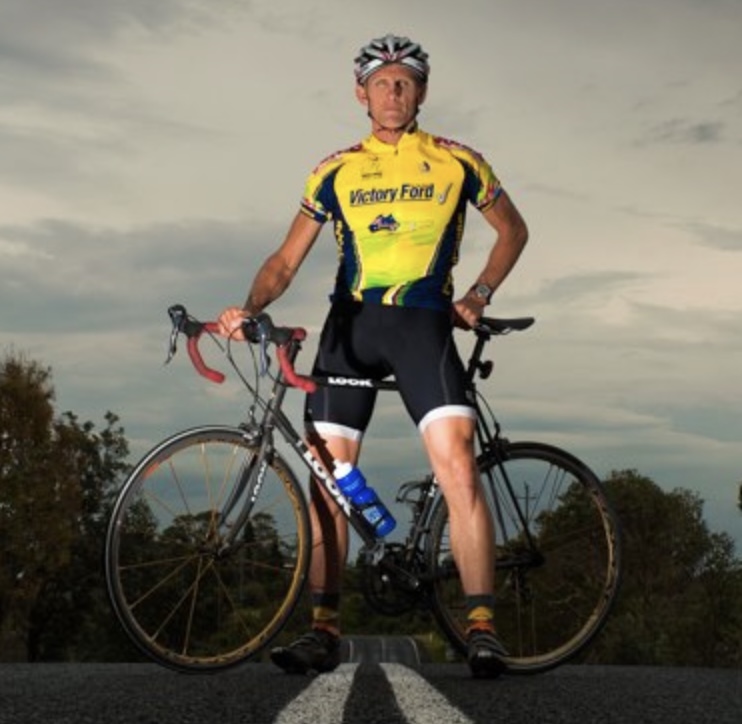
Jeff Collier is an experienced film photographer who enjoys experimenting with modern digital photography equipment, software and apps. He’s also an ex-world champion triathlete and avid cyclist, clocking hundreds of km each week in the beautiful Tweed Valley of northern NSW, Australia.
👋 WELCOME TO SHOTKIT!
🔥 Popular NOW:
