





Best AI Video Creation Tools for Professional Social Media Production in 2026
Discover the best AI video creation tools for social media in 2026, from generating original content to streamlining professional video production.
AI | Software | Paid Partnership | By Andrew Dilks | Last Updated: November 26, 2026
Shotkit may earn a commission on affiliate links. Learn more.
Adobe Premiere is our top choice for professional social media video editing, combining AI-assisted features with advanced editing, audio enhancement and multi-platform export capabilities. Adobe Firefly makes this workflow even quicker and easier by generating original footage and supporting visual assets.
Other tools in our list include Runway for generative video, CapCut for short-form editing, Descript for dialogue-led content, Canva for branded videos and OpusClip for repurposing long-form recordings.
This guide compares their AI capabilities, creative control, pricing and suitability for professional social media production.
Best AI Video Creation Tools for Professional Social Media Production
| Tool | Best for | Key AI features | Pricing (USD) |
| Adobe Premiere | Professional social media production | Generative Extend, Media Intelligence, Speech-to-Text, Enhance Speech, Auto Reframe | From $22.99/month |
| Runway | Generative video creation | Text-to-video, image-to-video, generative editing | Free plan; Standard $15/month; Pro $35/month; Max $95/month |
| CapCut | Fast social media editing | Automatic captions, templates, AI editing and generation | Free plan; Pro from $19.99/month |
| Descript | Talking-head videos and podcasts | Text-based editing, transcription, Studio Sound, AI clips | Free plan; Hobbyist $24/month; Creator $35/month; Business $65/month |
| Canva | Branded social media videos | AI-assisted design, video generation, templates and resizing | Free plan; paid pricing varies |
| OpusClip | Repurposing long-form | AI clip selection, animated captions, reframing and social publishing | Free plan; Starter $15/month; Pro $29/month |
Pricing is indicative US list pricing, not a guaranteed checkout price. Some prices shown are monthly billing rates; annual subscriptions can reduce the effective monthly cost. Taxes, regional pricing, promotions, AI credits, and feature allowances vary. Check each provider’s pricing page before purchasing.
1. Adobe Premiere | Best for Professional Social Media Production
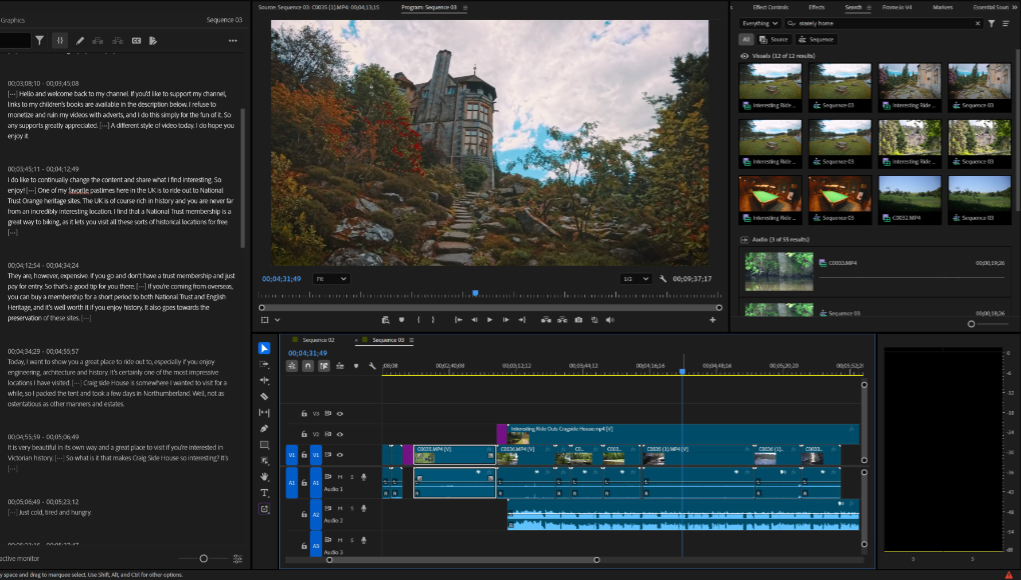
Adobe Premiere’s professional video editing workspace.
Best for: Professional creators, marketing teams, video editors, and businesses producing polished, multi-platform social media campaigns.
Adobe Premiere combines professional timeline editing, colour correction and audio mixing with AI-assisted tools that help creators work more efficiently without sacrificing creative control.
Its AI features help editors locate footage, refine dialogue, generate captions and adapt content for multiple platforms.
Key AI features
Generative Extend
Powered by Adobe Firefly, Generative Extend adds extra frames to eligible clips. It’s particularly useful when a B-roll shot ends too quickly or an edit requires a little extra footage without a reshoot.
Media Intelligence
AI-powered visual search helps editors locate footage using natural-language descriptions. Editors can also search transcripts for specific spoken phrases, making it easier to navigate large commercial projects.
Speech-to-Text and Text-Based Editing
Automatically transcribe footage and edit dialogue directly through the transcript. These features are particularly useful for interviews, tutorials and talking-head videos.
Enhance Speech
Improve dialogue clarity and reduce unwanted background noise. Review processed audio to ensure voices sound natural.
Auto Reframe
Automatically adapt sequences to different aspect ratios, helping creators repurpose landscape videos for Instagram Reels, TikTok and YouTube Shorts.
Professional editing and export controls
Premiere is a professional non-linear video editing platform used across a range of commercial, broadcast and digital video production workflows.
The AI-assisted tools outlined above are designed to work in tandem with traditional editing capabilities, including:
- Multitrack timeline editing.
- Advanced trimming and sequencing.
- Audio mixing and effects.
- Motion graphics, animations, and titles.
- Professional media management and export settings.
- Video review and collaboration through supported Frame.io integrations.
Where Adobe Firefly fits into the workflow
Adobe Firefly and Premiere serve complementary roles in professional video production. Firefly enables creators to generate original footage, explore visual concepts and develop supporting assets, while Premiere provides the editing environment to assemble, refine and deliver the finished production.
With more than 40 years of experience developing creative tools, Adobe continues to build AI into professional workflows with an emphasis on creative control. The connected Creative Cloud ecosystem allows creators to move between generative tools and professional editing applications while retaining control over the final output.
Pros
- Professional editing and finishing controls.
- Seamless integration of AI features into production workflow.
- Useful footage searching and organisation capabilities.
- Automatic transcription and caption-generation tools, with translation available through supported workflows.
- AI-assisted audio enhancement to salvage poor recordings.
- Flexible aspect ratio adaptation for multiple formats.
- Excellent options for professional collaboration and delivery.
Cons
- More complex than template-based social editors.
- Requires a capable computer for demanding projects.
- Subscription costs may be hard to justify for occasional content creation.
Pricing
Adobe Premiere is listed at US$22.99 per month in the US for an individual annual subscription billed monthly. The plan includes 25 monthly generative credits and 100GB of cloud storage, with a seven-day free trial available to eligible new subscribers.
Creative Cloud Pro is an alternative for creators who also need applications such as Photoshop and After Effects alongside Premiere, with additional creative tools and generative credit allowances.
Adobe Firefly has separate free and paid subscription options, with access to generative features and usage allowances varying by plan and model.
2. Runway | Best for Generative Video Creation

Runway can generate video from reference images.
Best for: Creators, filmmakers, advertisers, and creative teams who want to generate original video sequences from prompts or reference images.
Runway is an AI-powered video generator and creative platform. It offers text-to-video, image-to-video, and video-to-video generation tools for creators developing original visual content.
Key AI features
- Text-to-video and image-to-video generation for original footage and B-roll.
- Reference images and motion controls, depending on the selected model.
- Video transformation tools for experimenting with existing footage.
- Workflow-building tools for repeatable creative processes.
Practical example: A marketing team could use Runway to animate a static product photograph, generate supporting B-roll or experiment with visual treatments before importing the footage into a professional editor.
Pros
- Useful for exploring initial concepts.
- Text-to-video and image-to-video workflows.
- Several generative models for creative options.
- Can be used to produce supporting visual assets.
- Useful during pre-production and brainstorming.
Cons
- Generated footage can contain visual inconsistencies.
- Credit consumption limits high-volume production.
- Controlling exact brand appearances can be challenging.
- Doesn’t replace the editorial control of a professional non-linear editor.
Pricing
Runway offers a free plan with a one-time allocation of 125 credits. Its main individual plans include Standard at US$15/month, Pro at US$35/month, and Max at US$95/month when billed monthly, with lower effective monthly prices available on annual billing.
These are monthly list prices, and the number of generations available depends on the model, duration, and selected output settings.
3. CapCut | Best for Fast Social Media Editing

CapCut combines AI-assisted design tools with social media-friendly templates and graphics.
Best for: Social media creators, influencers, small businesses, and individuals who need to produce short-form content quickly.
CapCut is designed for fast-paced social media editing, particularly short-form content for TikTok and Instagram Reels, with editing options across mobile, desktop, and web.
Key AI features
- Automatic captions with animated word highlights.
- Auto Cut for rhythm-synchronised edits.
- Background removal, templates and visual effects.
- AI image and video generation, subject to plan and region.
- Auto Reframe for vertical video.
Practical example: A creator could use CapCut to turn smartphone footage into a short promotional video, adding automatic captions, licensed music and transitions before exporting for TikTok or Instagram Reels.
Pros
- Accessible and intuitive user interface.
- Fast short-form editing capabilities.
- Large selection of templates and built-in effects.
- Automatic captions.
- Suitable for mobile-first creators and frequent social media publishing.
Cons
- Timeline and finishing control are less advanced than Premiere.
- Paid subscriptions required for some features.
- Template-driven content can look repetitive and generic.
- Additional editing software may be required for complex commercial projects.
Pricing
CapCut offers a free plan with basic editing tools and templates, while CapCut Pro is listed at US$19.99/month on its US pricing page, although the final subscription price may vary by account, device, region, and promotion.
- Read more: How to Use CapCut to Edit Videos for Free
4. Descript | Best for Talking-Head Videos and Interviews
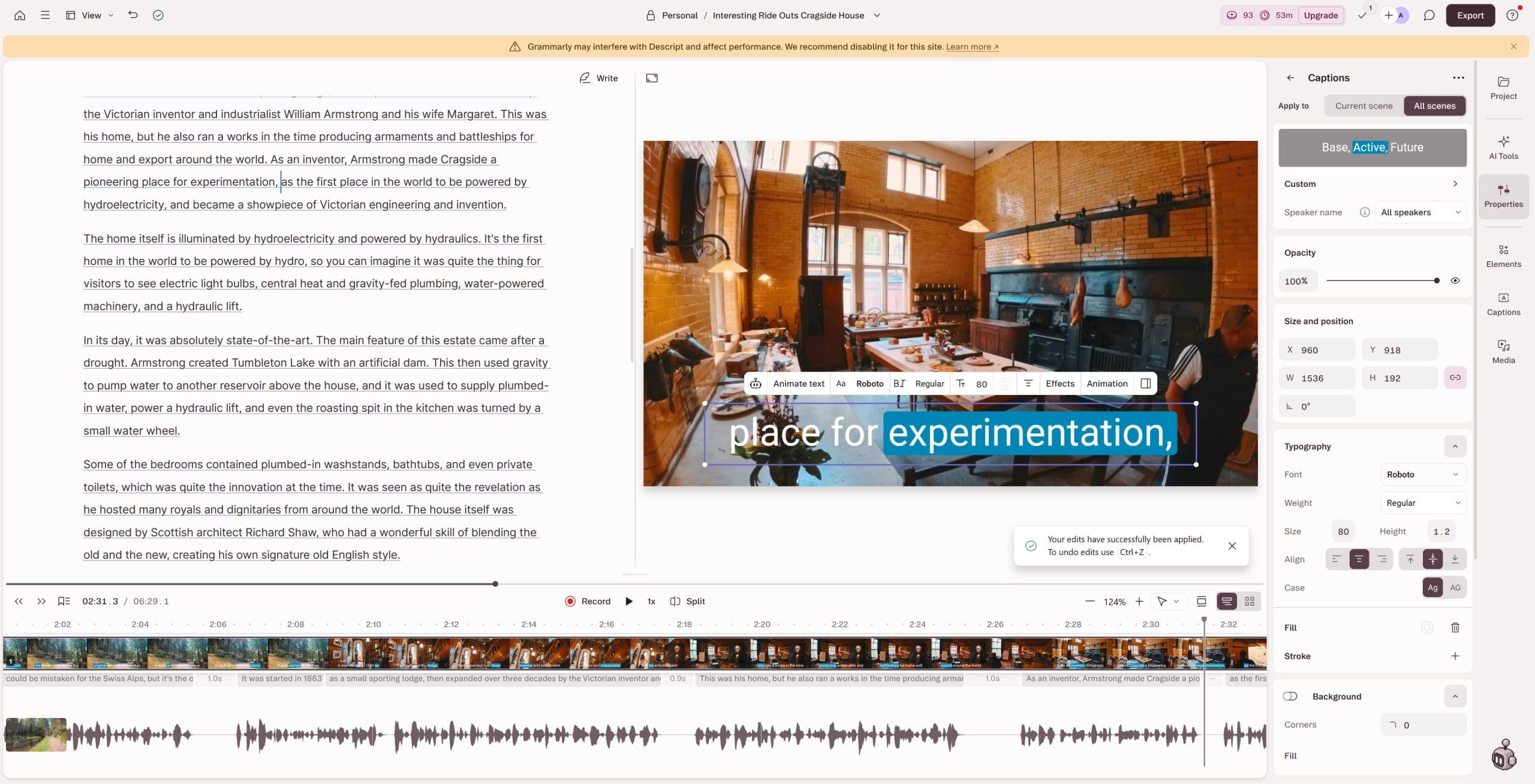
Descript’s text-based approach is best suited for dialogue-heavy social media content.
Best for: Podcasters, educators, interviewers, marketers, and creators producing dialogue-led content.
Descript uses a transcript-based editing approach similar to Premiere’s Text-Based Editing feature, allowing creators to edit audio and video by modifying the corresponding text.
Key AI features
- Automatic transcription and transcript-based editing.
- Customisable animated captions.
- Studio Sound for dialogue enhancement.
- Filler-word removal and AI-assisted clip creation with Underlord.
- Voice generation and correction in supported workflows.
Practical example: A marketing team could edit a recorded interview through its transcript, remove filler words, improve dialogue clarity and identify highlights for short-form content.
Pros
- Intuitive transcript-based editing tools.
- Automatic transcription and caption generation.
- Useful for longer recordings.
- Helpful speech clean-up tools.
- Reduces the necessity for manual timeline navigation.
Cons
- Lacks the comprehensiveness of traditional professional editing platforms.
- Transcriptions need to be checked.
- AI audio processing can alter natural voice characteristics.
- Not suitable for visually complex productions.
Pricing
Descript offers a free plan alongside paid Hobbyist, Creator, and Business subscriptions. The paid plans provide different monthly media allowances, AI credits, export resolutions, and collaboration features.
| Plan | Monthly billing | Annual billing equivalent |
| Hobbyist | US$24/month | US$16/month |
| Creator | US$35/month | US$24/month |
| Business | US$65/month | US$50/month |
The plans differ in monthly media hours, AI credits, export quality, and collaboration features, so verify these factors when deciding.
5. Canva | Best for Branded Social Video Content
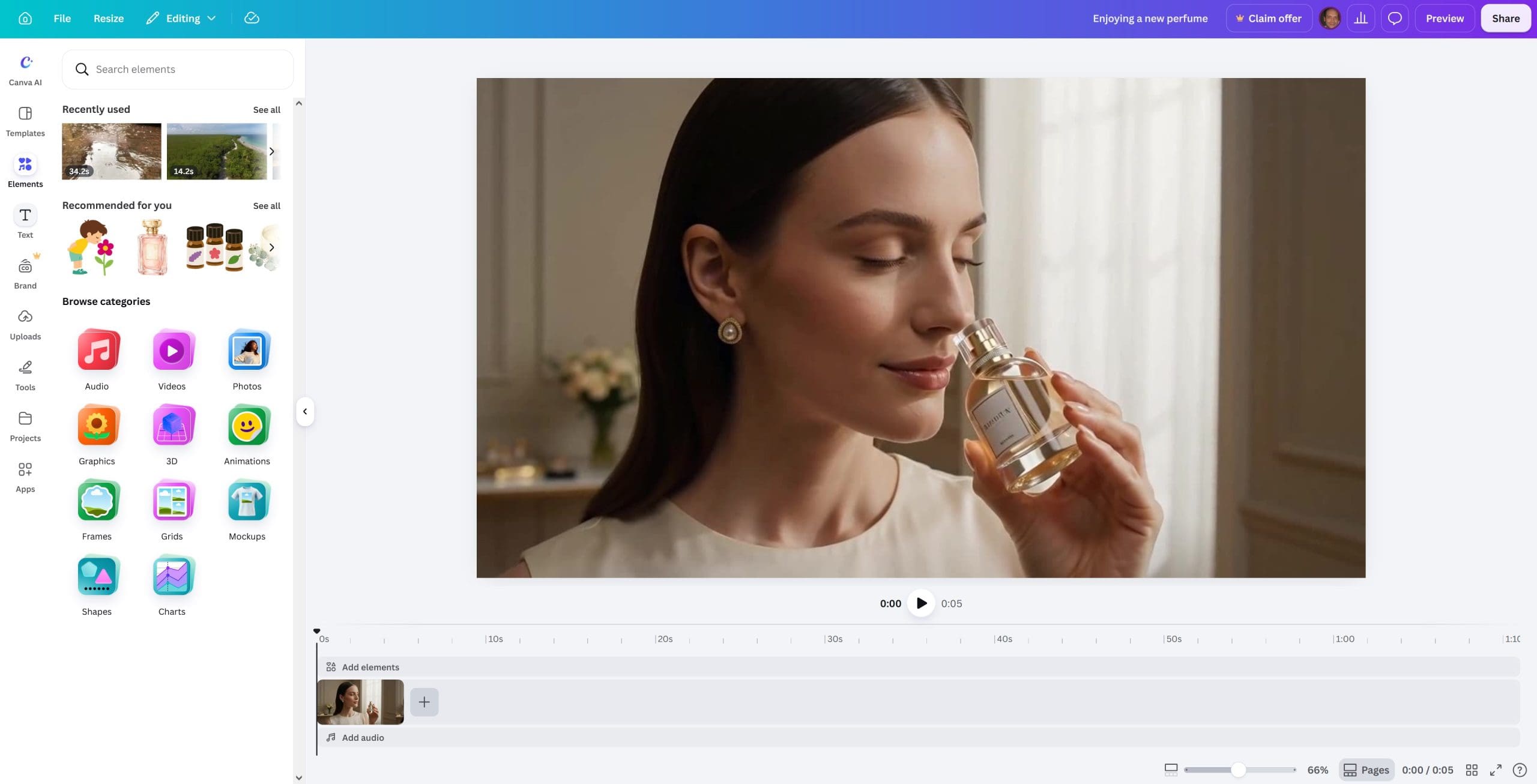
Canva carries across its graphic design roots and includes AI tools for creation, layout, and video editing.
Best for: Marketing teams, small businesses, social media managers, and creators producing consistent branded content.
Originally known for its graphic design tools, Canva has expanded into presentations, video editing, and AI-assisted content creation through a single accessible platform.
Key AI features
- Magic Write for scripts, captions and opening hooks.
- Magic Media for generating short video clips.
- Magic Animate for adding movement to graphics.
- Background removal and AI-assisted resizing.
- Templates, Brand Kits and supported social scheduling.
Practical example: A social media manager could use Canva’s video templates, Brand Kit and AI-assisted design tools to create consistent branded promotional videos.
Pros
- Shallow learning curve.
- Large library of templates and other assets.
- Helpful brand consistency features.
- Incorporates graphic design tools.
- Suitable for collaborative marketing projects and workflows.
Cons
- Basic editing controls.
- Template designs often require customisation.
- Usage limits on some AI tools.
- Brand consistency still requires human oversight.
Pricing
Canva offers a free plan and paid Canva Pro and Canva Business subscriptions. US pricing and billing options vary, so check the current subscription page for the applicable monthly or annual rate.
Canva Business is priced separately, with team features and per-user subscription costs. AI usage allowances and additional AI services should be checked before purchase.
6. OpusClip | Best for Repurposing Long-Form Videos
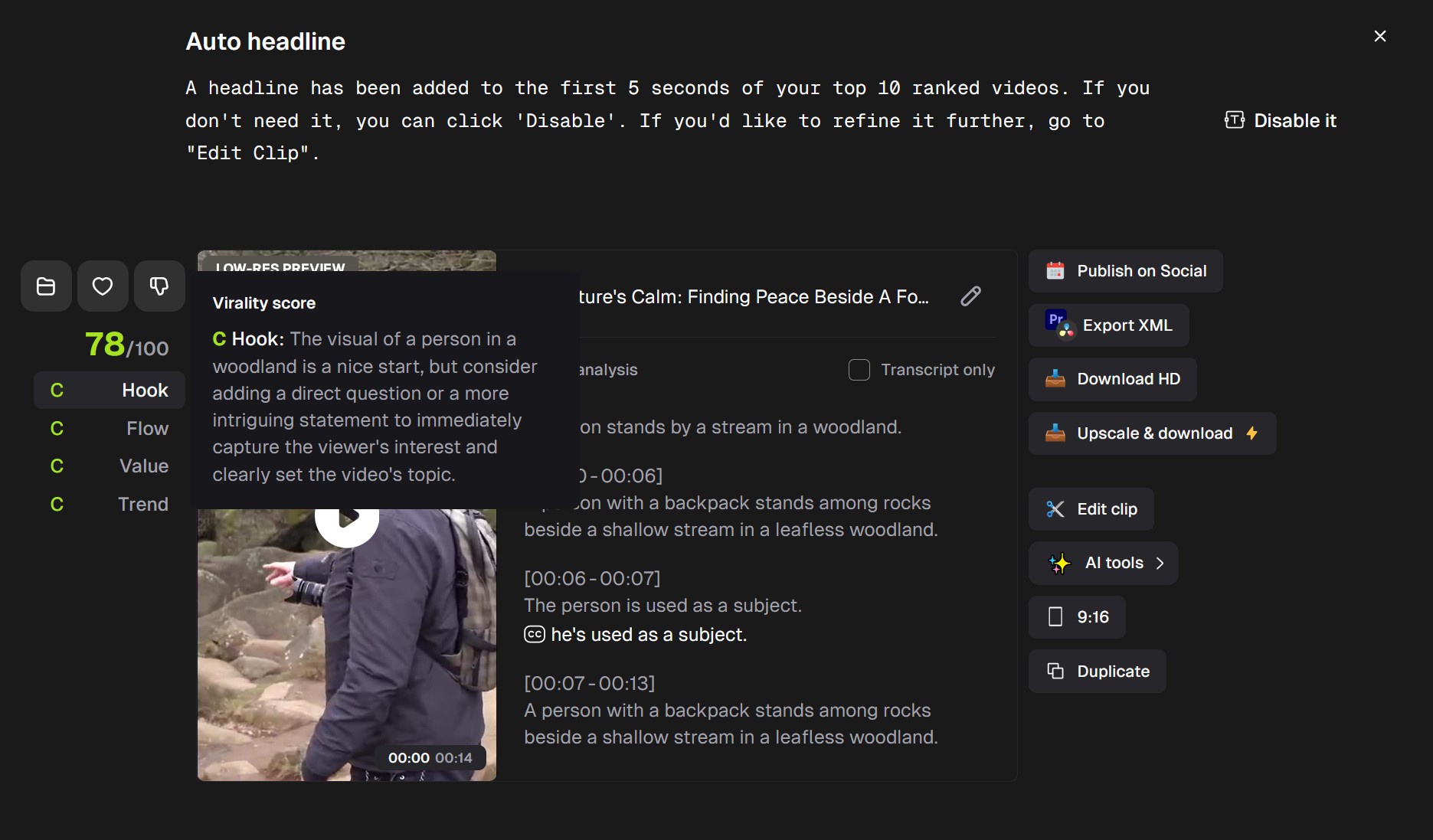
OpusClip’s virality scoring and text suggestions make it easier to choose which assets work best for a campaign.
Best for: Podcasters, YouTubers, interviewers, coaches, and marketing teams turning longer recordings into short-form social media content.
OpusClip focuses on repurposing long-form recordings by identifying potential highlights and turning them into shorter videos suitable for social media.
Key AI features
- ClipAnything and automatic highlight selection.
- Animated captions and filler or silence removal.
- AI reframing using speaker detection and tracking.
- Virality Scores as guidance, not predictions of performance.
- Publishing and scheduling for supported platforms.
Practical example: A podcaster could use OpusClip to identify highlights from a long recording, generate captions and reframe selected clips for vertical social platforms.
Pros
- Speeds up repurposing long-form content.
- Automatically identifies elements to highlight.
- Can be used to generate captions.
- Supports formats from multiple social media platforms.
- Useful for high-volume publishing.
Cons
- Context may be missing from AI-selected highlights.
- Automatic framing may require manual correction.
- Additional branding and editing may be needed for generated clips.
- Restrictions on exports on the free plan.
Pricing
OpusClip offers a free plan with 60 monthly credits, alongside Starter at US$15/month and Pro at US$29/month on monthly billing. Business pricing is available on request, while annual subscriptions offer reduced effective monthly rates.
The free plan includes 60 monthly credits, watermarked exports of up to 1080p, and a limited export window.
Paid plans add watermark-free exports, more editing options, additional credits, and expanded publishing capabilities.
How I Tested These AI Video Tools
I evaluated each tool according to its primary purpose and suitability for professional social media production. The evaluation focused on AI accuracy, editing efficiency, creative control, output quality, export capabilities and value.
Hands-on testing was conducted in November 2026 on a Windows 11 PC. Features that could not be tested directly were assessed using official product documentation and independent user reviews.
AI Video Generation vs AI-Assisted Professional Editing
AI video generation and AI-assisted editing serve different purposes in social media production.
AI video generators such as Adobe Firefly and Runway create new footage from text prompts or reference images. They’re particularly useful for exploring creative concepts, animating product photographs, and generating supplementary footage without arranging additional shoots.
AI-assisted editing tools, meanwhile, help refine and assemble existing footage. Applications like Adobe Premiere and DaVinci Resolve incorporate AI into professional editing workflows, helping with tasks such as footage selection, audio enhancement, and subject masking.
The distinction is becoming less pronounced as professional editing applications incorporate generative capabilities. Premiere, for example, allows editors to generate media directly within the timeline alongside original footage.
For professional social media production, combining both approaches can be particularly effective, giving creators more flexibility to experiment while retaining precise control over the final video.
Example AI Video Workflow for Professional Social Media Production
Combining generative AI with professional editing tools can help creative teams produce content efficiently while maintaining creative control and brand consistency.
For this example workflow, I’ll use Adobe Premiere because it combines generative media tools with professional timeline editing and supports the production of multiple deliverables from a single project. However, many of these principles apply to other AI-assisted editing platforms.
Step 1: Plan the Creative Direction
Define the audience, campaign objectives, messaging and intended platforms. Use Adobe Firefly to explore visual concepts, develop mood boards and experiment with creative directions before production.
Step 2: Create or Source Video Assets
Gather original footage, interviews, B-roll and approved brand assets. Where additional footage is required, use Firefly or Premiere’s built-in Generative Media tool to generate clips from text prompts or supported reference images. Review generated assets for visual consistency and commercial suitability.
Step 3: Edit and Refine in Premiere
Import original footage and generated assets into Premiere. Use Media Intelligence to locate clips, Text-Based Editing to refine dialogue, Enhance Speech to improve audio clarity and Generative Extend to extend eligible shots. Refine the sequence using professional editing, colour correction and audio tools.
Step 4: Adapt Content for Different Platforms
Use Auto Reframe to adapt sequences for different platforms and generate captions for accessibility. Review framing, caption placement, pacing and branding for each version.
| Platform | Suggested format | Production considerations |
| Instagram Reels | 9:16 vertical | Strong opening, captions, and mobile-first framing |
| TikTok | 9:16 vertical | Immediate hook, natural pacing, and readable text |
| YouTube Shorts | 9:16 vertical | Clear storytelling and concise messaging |
| YouTube standard video | 16:9 landscape | More room for demonstrations and supporting information |
Step 5: Review and Export
Check visual consistency, audio quality, caption accuracy and brand messaging before exporting. Review AI-generated footage for unwanted artifacts, and save project files and reusable assets for future campaigns.
What to Look for in a Professional AI Video Creation Tool
- Creative control: Sufficient control over editing, branding and the finished output.
- AI capabilities: Features that improve efficiency or support original content creation.
- Output quality: Support for required resolutions, aspect ratios and export formats.
- Workflow compatibility: Integration with existing creative tools and collaboration processes.
- Commercial usage rights: Applicable licensing terms for client work and commercial campaigns.
- Pricing: Subscription costs, generative credits and feature allowances.
Frequently Asked Questions
What is the best AI video creation tool for professional social media production?
Adobe Premiere is a leading choice for professional social media editing, offering AI-assisted features alongside advanced editing and finishing controls. Adobe Firefly complements this workflow by generating original footage and supporting assets.
Can Adobe Premiere be used to create social media videos?
Yes. Premiere supports video production for Instagram, TikTok, YouTube and other platforms. Auto Reframe, automatic captions and Enhance Speech help streamline multi-platform content creation.
Can AI create professional-quality social media videos?
Yes. AI can generate supporting footage and automate editing tasks. Professional results still require human oversight to ensure visual consistency, accurate messaging and creative control.
Can AI help create multiple versions of the same social media video?
Yes. Premiere’s Auto Reframe helps adapt existing sequences into vertical, square and landscape formats. Review each version before publishing.
Can AI-generated videos be used commercially?
Commercial usage rights depend on the platform, model and licensing terms. Adobe Firefly‘s own generative models are designed with commercial use in mind, but creators should review applicable terms and third-party rights. Content Credentials provide provenance information, not a guarantee of rights clearance.
Conclusion
The best AI video creation tool depends on your production requirements, whether that’s generating original footage, editing professional videos or repurposing long-form content.
For professional social media production, Adobe Premiere is our top pick. It combines AI-assisted efficiency with advanced creative control – and when paired with Adobe Firefly, it provides a connected workflow from initial concept through to final delivery.

Andy Dilks is an experienced landscape photographer and former games industry veteran. When he isn’t taking photos or reviewing the latest tech gadgets, you can find him hiking and wild camping in the Peak District.
👋 WELCOME TO SHOTKIT!

🔥 Popular NOW: