






Contextual Soundscapes: The Next AI Trend for Photography Galleries
Contextual soundscapes use AI to match ambient audio to your photos. Here’s how the tech works and which tools to use.
AI | Software | By India Mantle | Last Updated: August 25, 2026
Shotkit may earn a commission on affiliate links. Learn more.
The main benefit of sending a photo gallery is that it gives a client the full experience of what you, as a photographer, can accomplish.
But there’s always a problem with visual-only styles where you don’t have the opportunity to impact the overall “feeling” of the gallery. And that can usually be done through sound.
The lack of sound can be the biggest difference-maker in trying to get a client to choose a particular style or bounce off to another option entirely.
You can agonize over color grading, sequencing, cover crops, and font choices, and it won’t matter if they end up watching the gallery in the middle of the night when they’re already tired and overstimulated.
This is where the theory behind contextual soundscapes comes in. The premise is to let AI read the mood, pace, and color palette of a photo set, then generate or select ambient audio to fit.
Whether that’s a good idea depends enormously on what you shoot and who’s looking. So let’s work through what the concept means, which tools can do it right now, and whether you should incorporate it into your workflow.
What Is a Contextual Soundscape?
The easiest way to explain this is to delineate it from what it isn’t, and that’s dropping a licensed pop track over a slideshow. Photographers have been doing that for years, and the main “choice” was whether the music was catchy or popular at the time (regardless of what is being photographed).
But the soundscape is ambient audio built to sit underneath something else. It can be room tone, weather, distant voices, a slow bed of strings, or a general hum, designed more around the “feel” rather than the music itself.
The “contextual” part is doing the heavy lifting here, requiring the audio to be purposefully picked based on the image rather than a broad dropdown menu.
Here’s an example: take a wedding gallery of 300 photos that moves from quiet morning prep, to a ceremony, to golden hour portraits, to a loud reception.
You wouldn’t use a single backing track for all of those. A truly contextual system would need to note the shift in colors, structure, and location and change with it.
It’s the same reason you don’t grade the reception the way you grade the vows, only applied to picking the music.
How AI Actually “Reads” a Photo
Modern AI models convert an image into an embedding. That’s just a long list of numbers describing what’s in the frame and, loosely, how it feels.
Two photos of a foggy pine forest may end up with similar numbers. A photo of a foggy forest and a photo of a market would probably end up very far apart.
But audio can be described with the same kind of numbers. Once both live in the number space, it becomes easy to manipulate the scoring system so close numbers actually have the same “vibe.”
For photography, there should be three main “sets” of numbers to look at.
The first is palette and luminance. Warm and high-key reads very differently from cool and desaturated.
The second is content, like locations or notable objects inside. Luckily for sound generators, AI is already pretty good at this since image generation training data depends on determining objects.
The third is pace, which is partly in your EXIF data. Timestamps can tell whether frames were shot across two minutes or two hours, which should influence cadence.
However, the third signal is so far relatively meaningless, since there’s no tool that allows you to drop a client gallery (as a series of images) in one end and get a soundtrack. Most will end up having to assemble on a per-image basis.
Main Approaches in Image-to-Sound Soundscaping
While the keyword “AI” here implies that it picks music, there are two main routes most will take.
The first is the generative route, which creates audio that has (likely) never existed. You feed in an image and an accompanying prompt, maybe tweak a few numbers, and the AI composes something original.
The matching route searches an existing licensed library and finds the closest fit. It’s less glamorous, but it comes with the advantage of having fewer issues where the sound generator spews out garbled sounds. The libraries are also generally commercially available with no copyright issues.
Notable Image-to-Sound Tools
Adobe Firefly Generate Soundtrack
Adobe’s Generate Music composes original instrumental music timed to a video you upload, which is both the tool’s biggest benefit and its weakness.
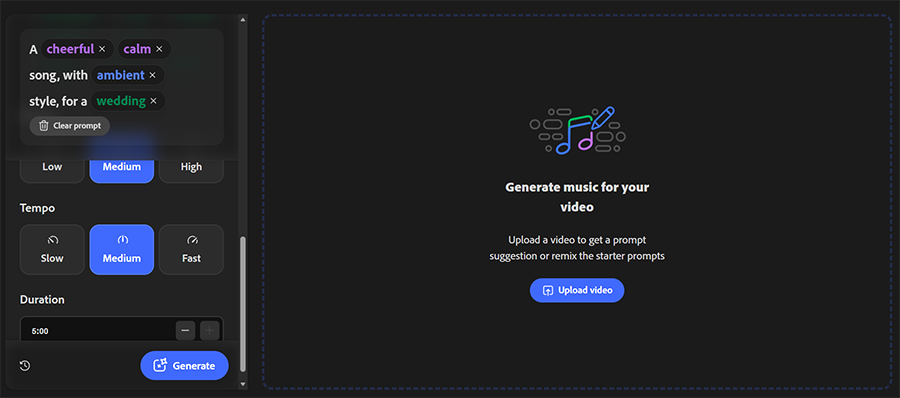
On the plus side, the tool can trim the track to the exact runtime, supporting durations from five seconds to five minutes.
And since Adobe trains its audio model on purchased and licensed material, it markets the output as commercially safe. You can use it without worrying about copyright issues.
But there’s the video catch. If your product is a still gallery (as usual), you’ll need to build a slideshow export first.
As with most Adobe products, generating sounds is firmly in the Premium-only category, which costs $34.97 per month for the first year. You can get away with a brief video to get a taste of what the platform can accomplish, but you’ll need to get a paid tier and work in credits.
ElevenLabs
ElevenLabs approaches this from the opposite direction, where you describe the music you want in text prompts. You can technically get around this by using another AI tool to “decompose” your photos.
The tool generates sound effects, soundscapes, and ambient sounds. Even something like “quiet coastal wind with distant gulls, no music” is a valid prompt, and the tool will happily give you as many generations as your plan and credits allow.
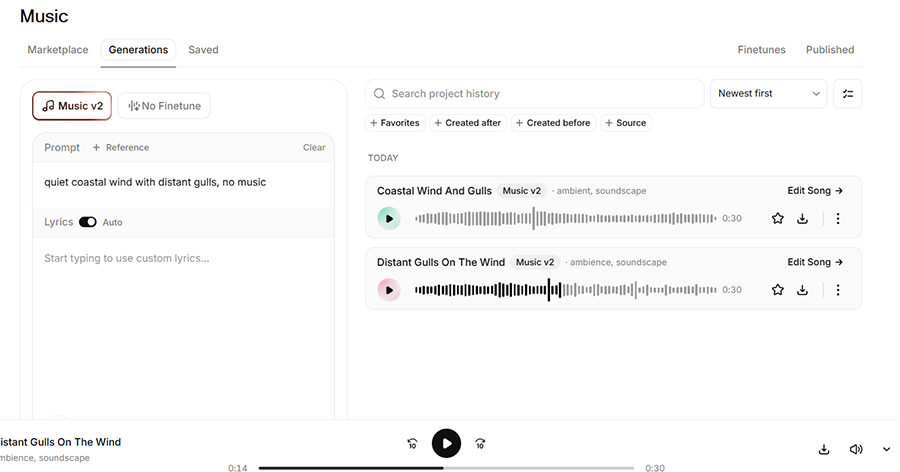
This is arguably the “purest” version of contextual soundscapes: all feels and environment rather than a song with lyrics.
The Starter plan currently costs $6 a month and includes a commercial license; the free tier is limited to personal use.
Melobytes
Melobytes is arguably the “cleanest” tool you can find for image-to-audio conversion.
It has two main benefits: the upload allows you to choose between images and video content (where you’d upload the slideshow), and it has a clean “Generate” button that simplifies the process.
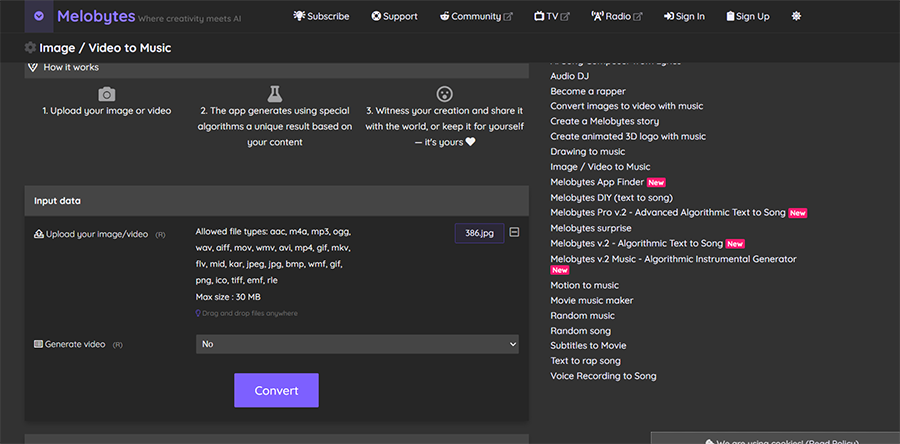
The tool’s major draw is its direct image-to-music functionality, which makes it particularly easy to experiment with visual-to-audio conversion.
If you have some editing knowledge, you can clean up or cut the result to fit the intended duration.
The main issue of the platform that I see is that it heavily prioritizes piano instrumentals above all else. The tool can also take the “more is better” approach where if the photo has a lot going on, it seems to pile on multiple instruments in a seemingly random fashion.
Melobytes also has other audio-generation solutions, including text-to-music, so you can try using that instead. The free tier has MIDI file download restrictions, while the paid tier is $19.90 per month or $89 per year.
MMAudio’s Two-Step-Process
If you’re willing to spend a bit more time, MMAudio is one of the most promising options on the list because it was one of the most cited research tools used for sound generation.
But regardless of its specifics, the main issue with MMAudio is that it doesn’t have direct image-to-sound generation.
Instead, you need to convert an image into a video, then put that video into a video-to-sound converter.
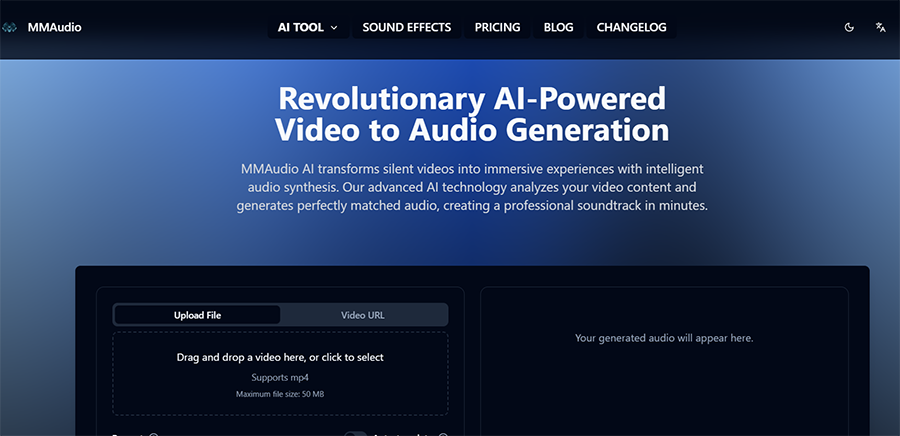
From there on, it can provide sound effects or background music based on textual prompts.
Alternatively, you can bypass the process and use the text-to-background-music converter, which allows you to manually input the “mood” and get a decent result.
The MMAudio code is MIT licensed, but the pretrained checkpoints are released under CC BY-NC 4.0 and developers do not guarantee that the pretrained models are suitable for commercial use. That makes it generally unsuitable for client work unless you have independently acquired the necessary rights.
Plans start at $4.16 per month for the Starter tier.
Pic-Time’s In-Gallery Matching
This is the one most photographers can use today with no new subscriptions.
Pic-Time integrates the full Soundstripe library of over 10,000 licensed tracks on its higher tiers, and its AI syncs audio to visuals automatically. A “Similar Tracks” function lets you find more music matching a vibe you’ve already landed on, and there’s dedicated auto-beatmatching for vertical social exports.
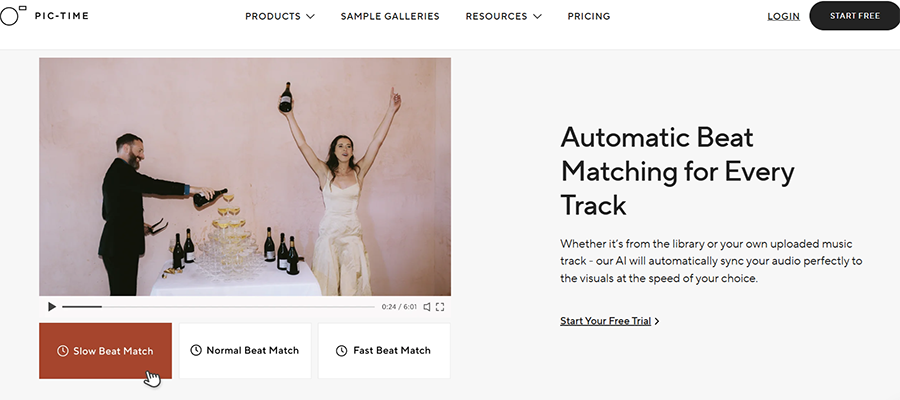
As you might’ve guessed, the tool isn’t generative but matching, and it won’t read your palette. But it’s licensed, and it allows you to create slideshows out of your pictures and then tack on background music to match, which solves most of the problem.
The Professional ($21 per month) and Advanced ($42 per month) tiers offer slideshows and automatic gallery designers.
How to Choose Soundscapes Based on Photography Genre
Wedding Photography
Weddings are the strongest use case, full stop. The galleries are long, the emotional arc is built in, and the client might open the link dozens of times.
This means you need to structure the audio the way you structured the gallery. Sparse piano or soft room tone for prep, something warmer and more sustained through the ceremony, air and space through portraits, and rhythm for the reception.
The main issue you might have here is that the soundtrack might be longer than what most AI generators can provide, so you’ll need to mix and match between generative and matching models.
For this, it’s best to match the audio’s tempo to your grade. If you shoot warm and filmic, music that is slower might fight your color work rather than support it.
Portrait, Family, and Newborn Sessions
Even looking through 40 images, a viewer still might go through the set in under a minute.
This is where tracks that have a distinct opening and ending might be too long, and where generative AI will usually give something that’s relatively constant in tempo.
Shots of newborns, on the other hand, benefit from an almost non-musical approach, closer to a soft hum than a composition.
Family sessions with kids are the one place I’d argue for more rhythm rather than less. The images are usually chaotic and joyful, and the ambient wash makes them feel oddly solemn.
Landscape and Nature Photography
This is the natural home of the contextual soundscape, and the one place where generated audio can genuinely outperform library music.
Sound effects models handle environments better than they handle songs. They can create wind across an exposed ridge, water over rock, or emulate birdsong at the correct density for the season.
Note that even here, text-to-sound might perform better, as you can just pick out the few notable aspects of the photo that get properly fed into the model.
However, most landscape audio ends up with a lot of low-frequency “wind sounds” that might get muddied on phone speakers. If your clients are more mobile-based, avoid that part of the prompt entirely – some image-to-music AIs allow for “negative prompts” to do the same.
Street and Documentary Photography
For street work, I’d argue against generating sound entirely.
Instead, you’re already carrying a device with a decent microphone: your phone. Thirty seconds of ambience captured while you’re shooting will beat anything a model invents, and it costs you nothing.
If you do go generative, either keep it more abstract or go for the matching route to find artists that are specifically from the area you’re shooting in.
Travel Photography
Travel sets often span multiple countries, climates, and times of day, which can be hard to emulate in a single track.
This is where you need to work in sections. Generate three or four short tracks and assign them to chapters within the gallery, then combine them using editing software.
It’s more work than one track, but it will deliver the same journey as the travel photography implies.
You may need to be careful with cultural signaling. Prompting a model for the sound of a specific country can produce a postcard version of that country assembled from stereotypes that might make you sound “cheap.”
Real Estate and Architecture
Buyers viewing listing galleries are in evaluation mode, not emotional mode. Music that plays without permission on a listing page is just flat-out annoying.
The exception is high-end architectural work presented as a portfolio piece. There, you can use quiet room tones to communicate the scale of a space or promote a particular climate of the surroundings through ambient sounds.
Product, Food, and Commercial Work
Commercial galleries usually have a brand attached, and the brand usually has audio guidelines already.
Check before you compose anything. If the client has a sonic identity, your job is to match it, not to introduce a competing one.
Where generation shines in this category is short-form. Product sets get cut into vertical video constantly, and a track generated at exactly the right length beats a stock track chopped to fit.
A Workflow for Testing AI Apps
- Pick a gallery you’ve already delivered. Working with a finished set removes the pressure and lets you judge the result honestly.
- Export a short slideshow from that gallery, 30 to 60 seconds, using your existing gallery software. This gives the video-based tools something to analyze.
- Run the clip through a video-aware soundtrack generator like Adobe Firefly and examine the visual attributes it identifies. Use those suggestions as the starting point for your sound prompt.
- Edit the plain text description slightly and run it through a text-to-sound-effects tool.
- Listen to the track on desktop, laptop, and even a phone speaker at half volume. It will help you determine if all the sounds are heard cleanly.
Where This Falls Apart
Autoplay is the biggest problem here, especially if your clients are free to go back and forth inside the library.
If your music can’t start or stop when the client presses controls, you might as well remove it. If you have shorter galleries, stick to audio that can comfortably fit all of the images or start it muted with control options.
Licensing on Sound Generation
If you’re putting audio on a client-facing page for money, licensing is not an afterthought.
For most of these tools, you should check the Terms of Service and the specific content or commercial-use license for generated output.
Library matching through something like Pic-Time usually avoids the issue entirely since the tracks were licensed already.
Whatever route you take, keep a record of which tool produced which file and under what plan. It’s the same discipline you already apply to protecting your own image rights pointed in the other direction.
Is Soundscaping Worth It?
As mentioned, this will usually depend on what type of photography you do daily and how well you can integrate soundscapes in your portfolio platform or gallery solution.
The larger point is that this is arriving whether or not photographers adopt it. If you don’t get on the bandwagon now, you might get passed on for another creator who has implemented it already.
The key here is to read up on how to properly implement it and properly test the tools you have to give yourself more control over the result.
More: 16 Best Portfolio Websites for Photography, Art & Design

As the General Manager of Shotkit, India Mantle brings with her a lifelong love for photography that she developed during her childhood, watching her father document their family moments with his Nikon EM. In her free time, you find her enjoying the awe-inspiring natural beauty of her home, Northern Rivers, Australia.
👋 WELCOME TO SHOTKIT!
🔥 Popular NOW:
