






Higgsfield AI Instadump Review: Can AI Really Fake a Photo Dump?
Discover Higgsfield AI Instadump, an AI-powered photo-dump generator that can create realistic social-style images from a single reference photo.
AI | Software | By India Mantle | Last Updated: October 14, 2026
Shotkit may earn a commission on affiliate links. Learn more.
In recent years, we’ve seen the rise of the so-called “photo dump” trend on Instagram and other social media platforms. If you’re not familiar, the idea essentially consists of a user posting several candid photos of themselves, all at once, typically in the form of a carousel.
But what if you don’t have a dozen random photos of yourself that you’re happy to share with the world, but still want to take part in the trend? That’s where Higgsfield AI Instadump comes into play. It’s a generative AI tool designed specifically to make Insta-ready photo dumps from a single image.
I recently heard about this tool and saw some examples of what it could do, and, as an avid Instagram user, I was eager to test it out for myself. Read on through my Higgsfield AI Instadump review to find out my full thoughts.
What Does Higgsfield AI Instadump Offer?
Higgsfield AI Instadump is part of the larger Higgsfield AI creative suite. This is an all-in-one, web-based platform that offers a vast array of features for generating images, videos, audio, ads, consistent characters, AI influencers, and more.
Offering a mixture of proprietary in-house models and third-party models, Higgsfield AI allows you to create a wide range of content using a variety of AI models.
The Instadump feature is a relatively recent addition to the ever-expanding Higgsfield toolkit, designed with the likes of content creators and marketing agents in mind. It allows you to generate a set of realistic, social-style photos from a single reference image.
From meme-style visuals to influencer-themed portraits and more casual, candid photos, Instadump can create authentic social shots in whatever style you like. You can post the whole set in the form of a photo dump, which can be a convenient way to create a larger volume of social content without having to pay for boosts.
The way this feature works is quite simple: the AI uses reference-based generation to learn your distinctive look from your uploaded image, and then inserts you into a range of other environments, with different lighting, visual moods, angles, and poses.
It does all of this without the need for any prompts or inputs, aside from the reference selfie, so you don’t have to type out or explain to the AI what you need. The whole process can be done in a matter of seconds, and the results are remarkably realistic, ready to download and share to your social feeds.
How to Generate Photo Dumps With Higgsfield AI Instadump
Now you know the basics of Higgsfield AI Instadump; let’s take a closer look at how it works.
I tested the feature for myself and captured some screenshots to guide you through the process. As you’ll see, it’s very quick and easy, but you will need to make your own Higgsfield AI account and log in before you begin.
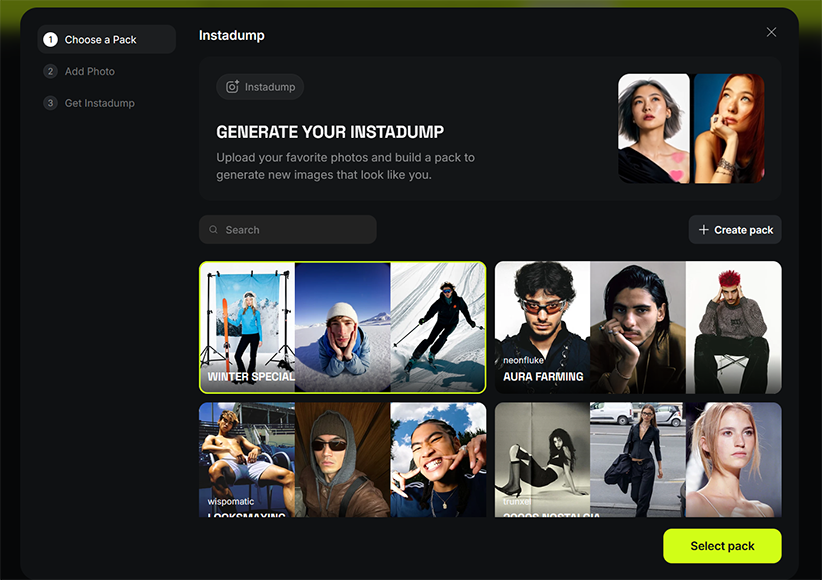
After doing that, all I had to do was head to the Higgsfield AI Instadump page, where I was greeted with this window, inviting me to begin generating my Instadump.
The initial step is to select a “pack” or theme for your photo dump, and there are two ways of going about this.
The simpler option of the two is to just pick one of the curated presets that Higgsfield offers, which include options such as “Looksmaxxing,” “2000s Nostalgia,” and “Editorial Shots.
There are two things to note about these presets: first, they appear to be updated often, with new options added to the mix regularly. Secondly, they tend to be gendered, and Higgsfield recommends picking a pack that matches the gender of the subject in question.
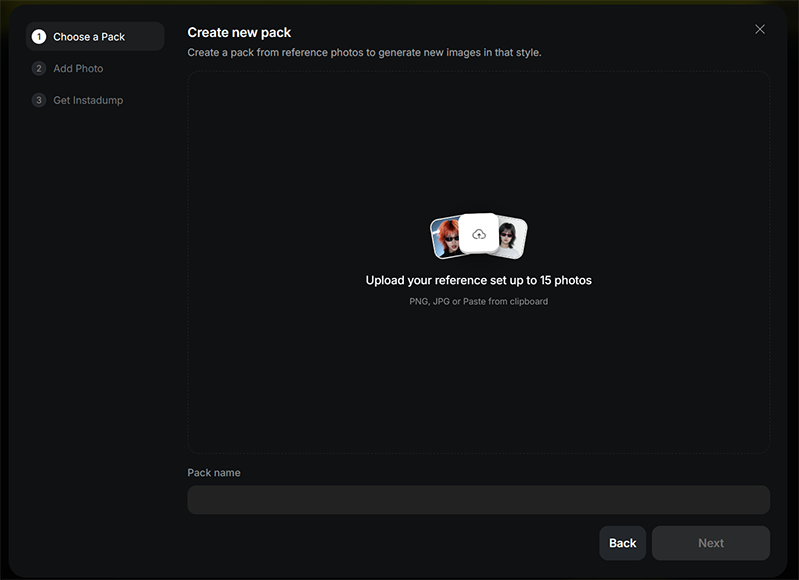
The other option you can choose is to click on the “Create pack” button, on the right side of the window.
At the time of my testing, I could create my own pack by uploading up to 15 reference images.
Let’s say you want to create an “Outdoor Adventure” pack, for example. You could find stock images of people hiking, camping, climbing, cycling, and so on, then upload images you have permission to use to Higgsfield AI, then add your selfie and generate a photo dump that shows you in all of those outdoor settings.
This option naturally takes more time and demands more effort, but it’s arguably the better of the two, as it provides much more customization. Plus, it helps you get much more unique and interesting images to post, rather than relying on presets that many other users may also have chosen.
Whether you opt to choose a preset or make your own pack, once you click to continue, you’ll be taken to the second step of the process: uploading your photo.
This part couldn’t be simpler – all you have to do is click the upload button and choose a single image, which can be in either JPG or PNG format, to use as your reference photo. However, it’s important not to just pick any old picture, as this can have a big impact on the overall quality of your results.
To achieve the very best photo dump, Higgsfield AI recommends using photos that are clear and high resolution, with visible faces and details. It also suggests using photos with simple poses, like standard frontal head-and-shoulders selfies, and neutral lighting.
Avoid using images that are blurry, grainy, cartoonish, or overly edited. The same applies when choosing reference images if you choose to create your own photo dump pack, too; clear images with natural tones and good lighting will give you the best results, every time.
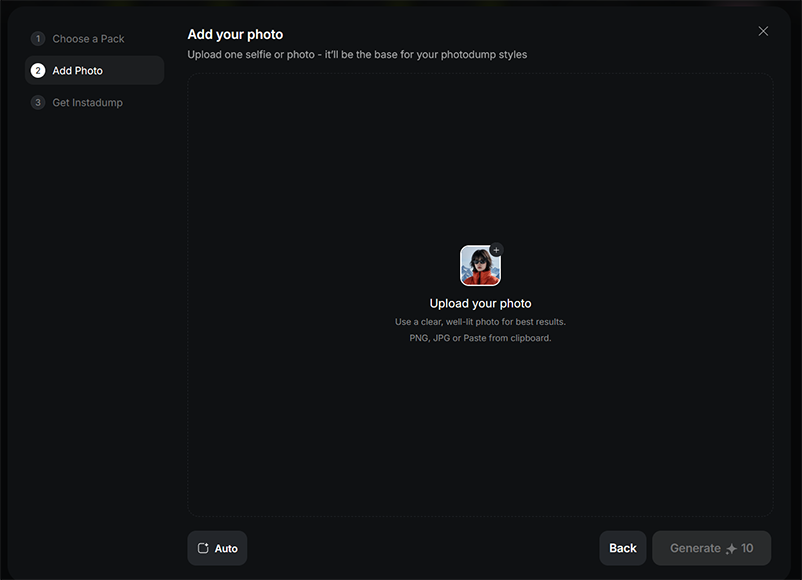
Note that you can click the “Auto” button at the bottom of the window to bring up an array of aspect ratio options for your photos. You can just leave this on the “Auto” setting to let the AI decide, or you can choose a specific setting to match up with how and where you intend to publish your pictures.

Once you’ve added your image and configured the settings, all that’s left to do is click the “Generate” button to create your photo dump.
I’ve found that this process is incredibly fast. In fact, you’ll often have your images within a matter of seconds, and then you’ll be able to download them to your device, share them to social media, edit them with AI, or just start the process over and make a brand new photo dump.
As for the results themselves, they’re generally very impressive, provided you follow the recommendations and choose an appropriate image. I tested with some lower-quality images and the results clearly suffered, so it’s vital to get the reference right.
An Alternative Option: Higgsfield Photodump
If you like the idea of the Higgsfield AI Instadump feature, it’s worth noting that Higgsfield also offers a separate “Photodump” feature, which works similarly.
First, you have to select one of the available presets, which include a range of fun and candid photos with themes like “Sleepy Head” and “Zen.”
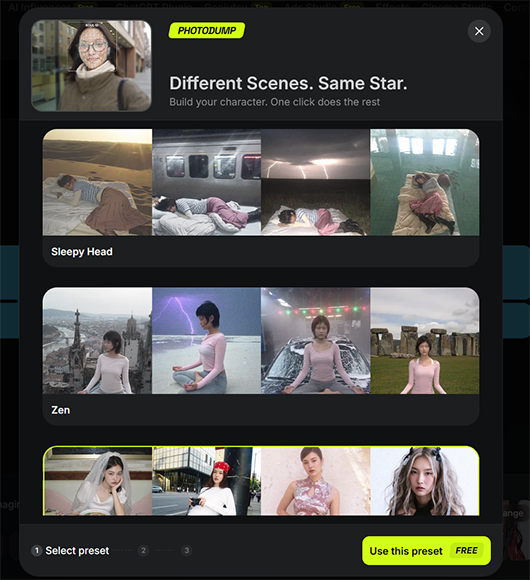
Once you’ve done that, you have to upload your reference images.
Unlike Instadump, Photodump Studio uses a larger set of reference photos to create a consistent character. Higgsfield currently recommends uploading at least 25 photos to train a Soul ID character, which can then be used to generate a 26-shot photodump.

The AI will use your uploaded photos to create a “character” of you that it can then add to your chosen photo dump pack.
Pricing

Like almost every other creative AI platform I’ve tested and worked with in the past, Higgsfield AI operates on a credit-based system; you have to cash in credits every time you want to use any of the platform’s AI features, including the Higgsfield AI Instadump.
The number of credits required can vary, so check the cost displayed on the Generate button before starting a generation. To obtain the credits you need, you’ll have to sign up for one of the platform’s premium plans, with three main options to choose from for individual users:
- Starter: The Starter plan provides 270 credits per month and is aimed mainly at beginners and casual users. It costs $19 per month, regardless of whether you choose to pay monthly or annually.
- Plus: The Higgsfield AI Plus plan gives you 1,200 credits a month, plus unlimited access to seven free generative models, early access to new features, and various other bonuses. It costs $47 per month if you pay annually or $59 if you opt for a monthly plan.
- Ultra: The high-end Ultra plan is a flexible option that allows you to choose how many credits you get each month, starting at 3,000 and going all the way up to 9,000. It also comes with all the advantages of the Pro plan and the lowest overall cost per credit. Prices start at $99 per month (billed annually) or $129 paid monthly for 3,000 credits, but can get much higher if you need the extra credits.
In addition to all of the above, there are also several business plans available on Higgsfield AI, with prices starting at $45 per month. You can also speak with the site’s sales team to build your own custom “Enterprise” plan to suit your exact needs.
While you can create a Higgsfield AI account and get your first few credits for free, the platform doesn’t allow you to use them on the Instadump feature. I understand that this may be an intentional choice to avoid people exploiting the feature, but at the time of my testing, I wasn’t able to use the free credits to test Instadump.
I found Higgsfield AI somewhat more expensive than some of the other generative AI platforms I’ve reviewed. As such, it may not be for everyone, especially those on relatively tight budgets.
The Starter plan, for example, is quite pricey, given the relatively low number of credits it provides, and I feel that the platform effectively pushes users towards the Plus and Ultra plans, which offer significantly better value.
If you’re interested in all or a large part of the many features that Higgsfield AI has to offer, the monthly rates likely won’t seem quite as steep. But if you only want to use the Instadump and a few other features, you might not want to pay such a high monthly or annual rate to access them.
Higgsfield also offers one-time Credit Packs that can be purchased separately from the monthly credit allocation, and these credits are valid for 90 days from purchase. You can buy these packs, but you have to have an active membership to do so.
Subscription credits don’t roll over; unused credits expire when the subscription renews. Credit Pack and Auto-Refill credits have separate 90-day expiration periods.
At the same time, it’s worth noting that the site regularly offers discounts and promos, so you may be able to secure your subscription for less than the prices mentioned above.
The Final Word – Can Higgsfield AI Instadump Truly Fake a Photo Dump?
Overall, as far as the Higgsfield AI Instadump feature itself is concerned, I think it’s a great addition to the platform. It’s easy to use and works incredibly well, for the most part, making it easy to recommend to both AI beginners and more experienced users.
While I personally still prefer to post real photos to my Instagram feed, I can understand that this feature will appeal to plenty of users. The speed with which it delivers its images is incredibly impressive, and if you’re willing to put in the work with reference images, you can create some unique picture sets.
For the likes of content creators, influencers, marketers, or just casual users wanting to have some fun with their photos, it’s a really interesting tool to play around with. I also appreciate that it works so well with just a single selfie, so you don’t have to upload dozens of pictures before you can start generating.
At the same time, there are a couple of issues holding this feature back. I’d like to see a greater variety of preset packs, for example, and it would be nice if there was some way for users to test out the Instadump tool without having to sign up for a full subscription, too.
However, if you can look past those issues, or if you’re already a fan or subscriber to Higgsfield AI, then Instadump is definitely worth checking out and proves that AI can indeed fake a photo dump.
More: 8 Must-Try Sustainable Fashion Photoshoot Ideas That Wow on Instagram

As the General Manager of Shotkit, India Mantle brings with her a lifelong love for photography that she developed during her childhood, watching her father document their family moments with his Nikon EM. In her free time, you find her enjoying the awe-inspiring natural beauty of her home, Northern Rivers, Australia.
👋 WELCOME TO SHOTKIT!
🔥 Popular NOW: