






How to Set Up Your Sony Camera for Flash
Confused about how to set up your Sony camera for flash photography? This step-by-step tutorial takes you through configuring your settings.
Shotkit may earn a commission on affiliate links. Learn more.
Sony may make great cameras, but sometimes their user manuals leave a little to be desired.
Case in point: combined settings. It’s easy to understand the individual settings but nothing really tells you that you have to do A+B+C instead of just A.
When I started using Sony cameras, I had to work my way through many of these combinations in an attempt to get the best results. To save others the same trouble, I’ve put together some of my key learnings here.
This article will dig specifically into how to best set up your Sony camera for use with a flash. My hope is that it will help reduce the learning curve for fellow Sony users.
Note that I’ve tested these instructions on the Sony A7iii and A7riii. As such, I can’t guarantee these settings are available across the entire range of Sony cameras.
How to Set Up Your Sony Camera for Flash Photography
Before You Start: Create a Custom Mode for Flash
Sony cameras have the advantage of allowing you to create custom settings that you can save and switch back over to at any time. This includes settings like the Sony a7III flash settings.
This will make it easier in future to transition between shooting with flash or natural light (though do note that some of the settings we’re about to change are global and not available to save in custom settings).
The above video from Mark Galer runs through how to set up custom modes or memory recalls. I recommend giving it a watch if you want to learn how to do this.
Regardless of whether you choose to save your flash settings for future use, these are the steps I’ve found to work best. So let’s get started.
1. Switch Off Silent Shooting

Silent shooting (electronic shutter) and flash don’t work together – at least not until global shutters get released. This is not a Sony constraint but a general sensor constraint.
An electronic shutter is great to stop the sound of the shutter annoying people at weddings, but it’s terrible for flash.
To turn it off, go to Camera Setting 2 (the icon that has a camera with a 2 next to it) and then click across to the fourth page (page 4/9).
The first option in the list will be Silent Shooting. Switch this to Off.
2. Switch Off Electronic Front Curtain Shutter
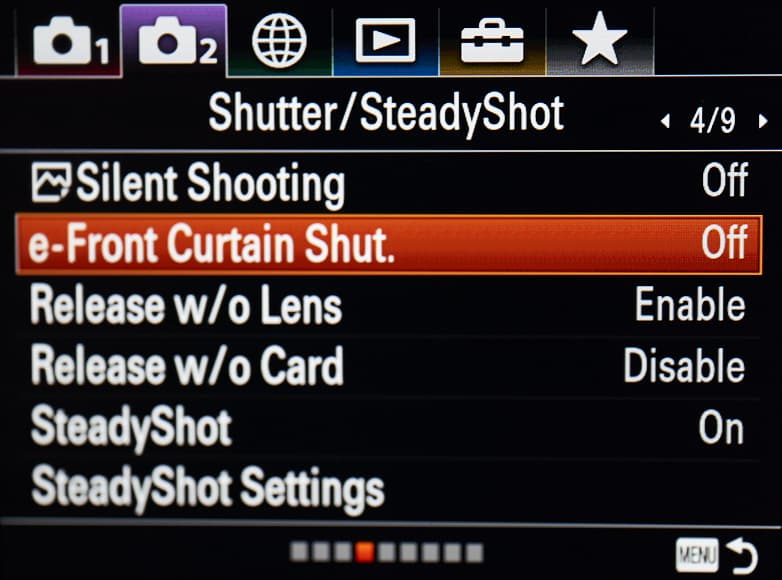
The front curtain shutter causes banding when used with High Speed Synchronization (HSS). It’s recommended that you switch this off and stick to the standard shutter when shooting flash.
e-Front Curtain Shutter is the setting directly under Silent Shooting.
Go back to Camera Setting 2 (the camera icon with the 2 next to it) and over to page 4/9, and switch your e-Front Curtain Shutter setting to Off.
3. Switch Off Wireless
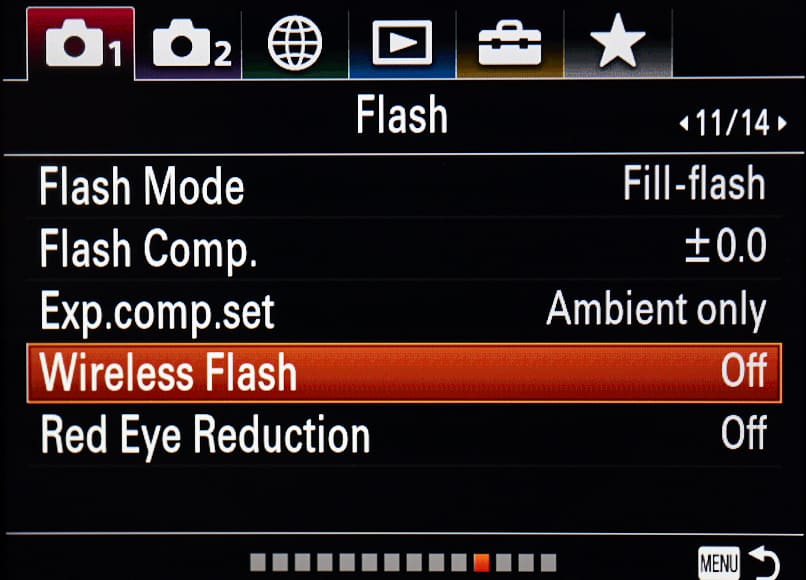
The wireless option is for Sony’s wireless speedlight system. Since most of us are using third party systems like Godox or Profoto, we’re going to turn this off.
Go to Camera Setting 1 (the camera with the 1 next to it), click over to page 11/14 (the one titled “Flash”) and scroll down to the option called Wireless Flash. Set this to Off.
I haven’t picked up any adverse reactions from having this turned on, but I have had speedlight issues – so unless you’re using Sony’s wireless system, it’s best to turn it off.
4. Separate Exposure Compensation for Flash and Ambient
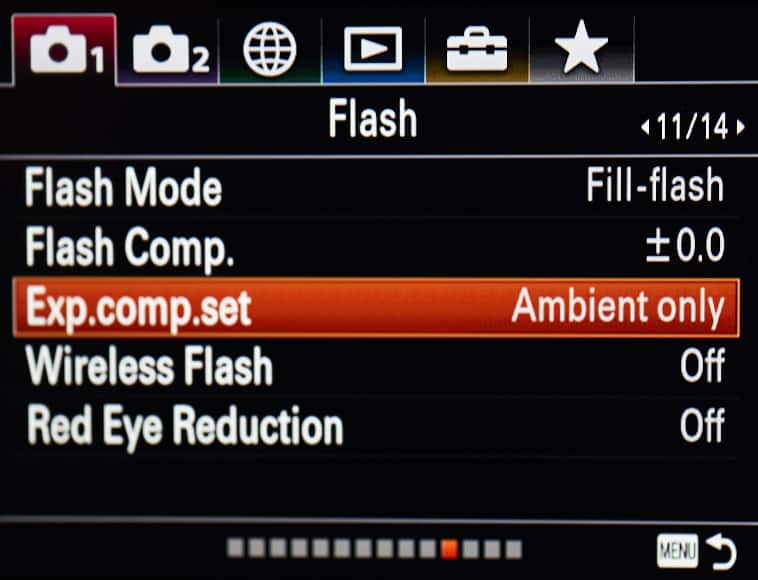
Next, we’re going to separate the exposure compensation for ambient and flash. By doing this, flash can be adjusted using the TTL settings on the flash or trigger and ambient can be adjusted with the exposure compensation dial.
Realistically most professional users would have the ISO set to manual, but I still prefer having them separated.
Go to Camera Setting 1 (the camera with the 1 next to it), go across to page 11/14 (“Flash”) and find the option called Exp.comp.set. Ensure this is set to Ambient Only.
5. Turn Off Anti-Flicker Mode
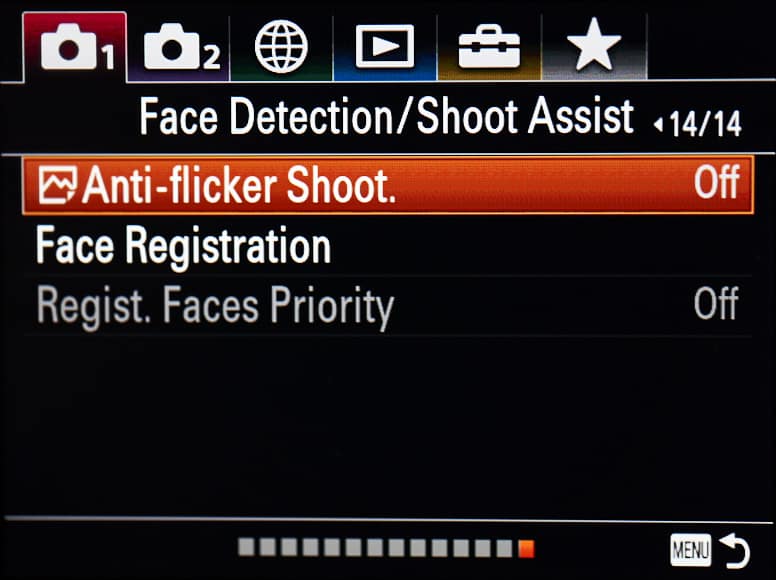
I realise this sounds strange and impractical for the topic, but there is a method to the madness with this one.
When you use the anti-flicker mode, it interferes with the ability of your camera to turn the Shot Result Preview display on.
The reasons why we need this display are covered in the next section in more detail. I highly recommend following this step as this part is fairly critical.
Go to Camera Setting 1, page 14/14 and set Anti-Flicker Shooting to Off.
6. Assign Shot Result Preview to a Button (If You Shoot Flash Regularly)

Shot Result Preview is the functionality in your Sony camera that allows you to see what the exposure looks like when the photo is taken.
If you’re shooting indoors at f/8, 1/250 and ISO100 with flash, the ambient is going to be dark so you won’t be able to see what you’re shooting.
This is obviously a problem for studio portraits – try focusing on a model through a pitch-black viewfinder and you’ll see what I mean!
The smart people at Sony thought of this, so Sony cameras are also smart – when they detect a flash or trigger attached they turn off the live preview.
Great – if that’s the case then why am I even bothering to tell you about this? Sony’s automatic approach is both a good and bad thing…
If you’re shooting purely flash with no ambient, Sony’s approach is fine. The problem is that with flash, this is almost never the case.
If you’re shooting a model in a forest, you still want to see what the ambient areas look like that aren’t getting flash, and to do that you’re going to have to turn off the trigger the whole time. This can be frustrating.
Assigning Shot Result Preview to a button on the camera is a solution. When you hold down the button, it will show you what the ambient will look like. When you let go of the button, it will change back again.
As an added bonus, you won’t have to worry about forgetting to turn your trigger back on.
Go to Camera Setting 2, click across to page 8/9 (“Custom Operation 1”) and select the first option, which is for photos. Assign Shot Result Preview to a button of your choice – I normally use C1 which is right near the shutter button.
7. Set ISO Manually and Understand Your Flash Power
The problem with most flash systems is that TTL doesn’t use the full power of the flash if Auto ISO is on. You can test this easily by leaving Auto ISO on and taking a photo with the flash bouncing off the ceiling.
Set the camera to f/8, 1/250 and Auto ISO and take a photo with TTL. In a largish dark room, you’ll find the ISO rising to around 3200 or 6400.
Then set your camera to f/8 1/250 and ISO100 and take a photo with TTL. The photo will likely be exposed at the same level (unless its a really large room, a small flash or a high ceiling) and yet, you have a much lower ISO.
Now set the flash to manual and conduct the same exercise. If the flash photo is overexposed, it means the flash wasn’t using full power at ISO100. This shows that Auto ISO and flash are a bad combination.
So why wouldn’t you just set it to ISO100? Firstly, because your flash may not be powerful enough for ISO100 all the time. Secondly, because using your flash at full power every couple of seconds causes the speedlight to eventually overheat and kills your battery.
If you’re not sure what ISO value to use, one option would be starting with an acceptable level of ISO as a maximum – ISO800 as an example – and letting the camera push the ISO up to this maximum level. This will allow you some degree of leeway without having to worry about the camera pushing the ISO up too high.
Final Words about Sony Flash Settings
Hopefully you’ve found this article useful for setting up your Sony camera for use with a flash. As mirrorless cameras have become more capable, the ability to customize their capability to meet professional demands adds more complexity.
I’ve tried to cover all of the settings I’m aware of in my use of flash, but if there’s anything I missed in this article, please let us know in comments.
Navigating around the extensive menu system can be a bit daunting at first, but once you get the hang of it you’ll find your way around fairly quickly.
As a final note, I haven’t covered the specifics relating to different speedlight or strobe brands like Godox, Profoto or Sony themselves as this would be too difficult to cover in a single article. The steps covered here relate to generic settings that apply to all brands of speedlights, triggers or strobes.
You should also check out our beginners guide to flash photography.
Athol Hill is a sports and portrait photographer based in Melbourne, Australia
65 Comments
Leave a Comment
👋 WELCOME TO SHOTKIT!
🔥 Popular NOW:

Your article was extremely helpful – thanks. I had no idea about all these settings.
Even though I have learned so much from your article, you at first nearly killed me with the Turn Off Anti-Flicker Mode suggestion! I had taken your advise and set my A7iii to the settings you showed, and had a couple shoots that my A7iii kept having flash sync issues on. One shot the top of the frame would be well lit, and the next shot the bottom of the frame. I was so frustrated! I check all the flash setting on my Camera and Flash multiple times. Looked perfect! Tried switching things to manual and still could not get rid of the heavy banding.
Guess what it was yet? It was the LED lighting of the facility!! Your Shot Result Preview did save me though! When I turned it on, I couldn’t believe it. A band of darkness kept rolling through the shot (about 5 seconds to completely roll from the bottom to the top.) So it had nothing to do at all with the Flash.
Turning Anti-Flicker Shoot fixed it right away!
And on my Sony A7iii with a Godox V1s flash works just fine. The display automatically adjusts somehow, without having to turn off my Godox V1s (which is also my trigger for my other flashes). Maybe it’s a setting, but don’t remember changing anything to make that happen.
Might want to put a note on your recommendation for turning Anti-Flicker Shoot off as it could certainly cost someone some great frustration like it did me. In the end I’m very thankful that I know of these settings now, so thank you!
Can you write some words about using Camtraptions flases in a camera trap with camtraption sensor versjon 3 – and sony A7r3 camera. The conditions is 5-6 hours photolight – the rest of day/night is comlete dark if there is now moonshine. No ambient light except the light from the sky a nd snow itself. I prefer to use auto iso between 100-6400{?}. The temperature will vary from +5 celsius to minus 15. The camera is placed in i standard camtraptions housing. The camera has a dummy battery and lithium gel battery that may give electrisity for 3 or 4 days on fully battery. The camtraptions flashes have ekstern battery monted on the flashes and could be enogh for 1-2 two weeks. The camtraptions trigger is cabled to the camera. The flahes get the signal via treadless comminication and camtraptions transmitter and receivers. I have prepared the pfototrad for days, but the camera setting and the settings ind the flashes are all confusing for me. I am planning for eagles photos, but other wild deers too. I am serving my gests food from wild deers killed along Norwegians small roads in snowy conditions my phototrap will near 1 hours ski tour each way in darkness. Comments and advises?
I have tried both methods–using the (easlily accessible) on/off toggle switch n the Godox flash trigger and using the method shown above. But I find it easier to just use the on/off toggle switch on the Godox flash trigger because, for me, that is easier than having to hold down a custom function button. I would suggest trying both methods to see which works best for you.
Tries doing all of the settings to no avail. still cant get my x2t-s to work with my a7iii. trigger works when you press the test button and camera recognizes the trigger because the flash icon shows and there is a camera icon on the flash. what should i do?
Always a chance of a fault trigger. Have you tested it on another camera?
This is extremely helpful – thanks. I had no idea about all these settings but I followed this step by step and my auto flashes are working great!
Glad to hear it helped. Enjoy your time working with flash
Are these setting appropriate for the sony a7r iva?
I don’t have one unfortunately, but historically the settings within Sony across different cameras have been the same, although found in different locations sometimes
Extremely helpful for a new owner of SonyA7iii and Godox 685II.
I had figured out a few of your settings myself, but your guide covered everything I need to know and I look forward to setting my camera up!
Thanks for your help.
Glad it helped, David. Good luck with the new setup
excellent and helpfull, thank you
Hi Athol
I appreciate your article, really clarified most of my questions about flash settings at Sony alfa 7iii. Let me ask you one more tip: to photograph an event I believe it’s easier to use TTL mode, but I wasn’t sure about which is the best metering mode? Without flash, I’d go with Multi 90% of the time, however when I add the TTL I’m wonder if it gets the center of sensor, so, maybe a different metering mode might be more accurate. What do you think? Thanks In advance.
TTL should still take into account the metering mode but I can’t say this with 100% accuracy. I would say it depends a little on how you want to expose. For example, if you are shooting bounce with the background being lit, you may want to use matrix, if you are using straight flash with a modifier, you may find spot or centre more suited.
Thanks for the info Athol.
I’m using a Sony A7iii with Godox V 860II-s. Set for TTL Auto. Why does the image exposure change when the flash is pointed straight ahead (slightly weaker exposure) to when it is pointed anywhere from 45 to 90 degrees up (increased exposure)? This is in a room with a white ceiling.
In other words, the image is more brightly exposed when using the flash as a bounce flash. This seems counterintuitive. Setting the flash to EV +1 when pointed straight ahead seems to balance things out.
I would hazard a guess that any time you are pointing the flash at the person, there is a much higher risk of over exposure because the flash head is pointed at the subject so this may be an attempt to avoid this problem.
thank you, great instructions, been struggling with my cameras as they never seemed to get the same flash power as others at the same settings, always seemed like the flash was at a lower power, did not know about the flicker setting affecting the shots….
Glad it helped. Sorry for the delayed reply but I don’t get notifications on replies sometimes.
Really appreciate this article! Very helpful.
I’m using an A7R3 with a Neewer RF550D Ring Light/Flash. I’m using your guidelines, and the flash and light work fine. My issue is that after I turn off the flash unit and remove it from the hot shoe of my camera, I cannot turn off the flash in the camera menu. If I switch to AUTO shooting mode, yes, I can turn that menu setting off. But then when I go back to Manual shooting (both with and without auto ISO) the menu re-sets to “Fill mode” for flash. In other words, it seems that when I am in Manual mode, the camera now “thinks” a flash is attached when it is not. Fortunately, that does seem to affect shooting. I had worried that the camera would under-expose, as it “assumes” that a flash would fire. But exposures are fine and the EV is giving me a live view. So, I guess things are working OK, but it bugs me that now the menu will always show that a flash is on in fill mode when I shoot in any mode other than Auto (which I never normally use). Any comments or suggestions? Thanks in advance.
Shouldn’t make a difference leaving it on. The settings on the camera shouldn’t change with flash, the flash should adjust, not the camera.
Go V1-s / Xpro s … with a7riii …for this set up can I use the 3.01 firmware on the camera or do I need 3.10 ?
It should work with both firmwares. I can’t remember having issues with either.
I have Sony a7riii and using godox trigger. As soon as I switch on the trigger I can only see bright evf and live view. I cannot see the changes I make to exposure. Is Sony not going to fix this bug to make this evf to work with flash trigger?
It’s not a bug. It’s addressed in point 5 and 6. The majority of time people are using flash, they need the viewfinder bright as its dark. This is why Sony automatically disables shot preview. Point 5 and 6 will tell you how to view the ambient exposure.
Hi Athol, thanks for your precise guide. Just wondered, are these settings valid for shooting HSS too? I’ve recently upgraded to a Sony A7riv (from Nikon D800) and have the Pro X (for Sony) trigger and Godox Ad400Pro lights. Not sure if shooting HSS will be my thing, but would like to try it, now that I should be able to.
Yes, the same for that. You do need to enable HSS on the trigger although sometimes this is enabled automatically.
HSS is important for overpowering the sun and a great skill to learn, it adds some really dynamic aspects to your photos.
Umm, HSS doesn’t help “overpower the sun”. A full-power flash at the camera’s highest sync speed gives you the maximum possible “sun overpowering” available on your system. Yes, HSS allows you to use higher shutter speeds, but you lose at least 1 stop of usable exposure from your flash each time you halve the shutter speed (eg, 1/250 to 1/500). That’s fine if your goal is to use large apertures outdoors and/or you have plenty of flash power. But it’s in no way “overpowering the sun”—that can be done only with more powerful flashes and leaf shutters that sync at all speeds.
Great tips, very concise. I am using the godox V1S with an A7RM3 , and it appears when I change the flash compensation on the camera or flash, it certainly compensates. However if I set the value on one, that setting is not reflected on the other (i.e. I set flash compensation on the V1S to 1ev, but my A7RM3 displays 0ev, or vice versa). Is this normal behavior since the setting can be input in two locations as opposed to the aperture value that updates on the flash screen when changed on the camera?
Hi Jason
If you separate the flash from ambient in the settings, the camera will adjust ambient and the trigger will adjust flash
Thanks for the tips! In my tests, it does not appear that the exposure compensation dial has any effect on ambient levels or general exposure when set up per your article when using a Flashpoint R2 flash. Maybe I am overlooking something or another setting is inhibiting this function. Thanks!
It should only work with auto ISO which isn’t recommended because the camera boosts the ISO excessively as if there is no flash so it.
Under most circumstances you would shoot manual, check the ambient in the viewfinder and use the TTL +- options to boost the flash.
Hey man, i bought my a7iii brand new last year and bout the x1 trigger + ad200 strobe. Its been over a year and i hvnt been able to get the ad 200 to flash once in manual. I bought the x Pro trigger thinking that was my problem, it still wont work. I bought a brand new ad200 pro today hoping to solve my issues and its STILL the same thing! Cant get the flash to work in Manual mode.
I have watched extensive videos and read numerous websites, all my camera settings follow the guide and still cant get it to work.
Its very frustrating and i urgently need a solution.
Any help wld be greatly appreciated
Hi Chukie. There is a possibility you may have a faulty hotshoe on the camera. Have you checked with a speedlight mounted in the hotshoe?
I had this same problem. I cleaned my hotshoe and it started working.
Hola!
Me salvaste la noche! Ya estaba deprimiendome sin saber porque me deshabiltaba el flash mode en modo manual, no sabia que hacer
Help !
I have just received a Meike MK-320 for my Sony A7iii.
How do I use it in macro in normal daylight conditions? In TTL it does not fire presumably because there is sufficient light already!? I wish to use the flash to freeze the movement of an insect etc. How to do this?!
Cheers
Geoff
Sorry for the delayed reply. My notifications disappeared. Have you tried manual?
Thanks for your reply. I have no changed to a Godox TT350s flash but really do not understand how the flash gun works!
I have followed your steps 1-5 and made these settings but how/when will the flash fire?!
Cheers
Geoff
HI Geoff. What mode is the flash in? Is it M, TTL or slave
Hi,
I have godox ad300pro and godox xpros trigger, I would to know how I have to set the flash mode on sony menu: fill flash is it ok? with HSS as well?
hi!
I have a Sony a7r ii with a Godox ad600 and a x1 t-s trigger. When I set the camera in A mode and I connect the flash to the camera ( at wireless mode) and put in the trigger, the camera only let me set the shutter speed at 1/60 no matter the f aperture I have chosen.
Do I have to change the configuration of the camera? Do you know what could I be doing wrong?
Thanks for your help.
Best regards
Is the trigger seated properly?
I have a Sony a7iii and a Godox 860ii with a XPro S trigger. It’s working perfectly EXCEPT for hi-speed flash. I can’t get it to work correctly. The minute I go over 250 shutter speed, I get the curtain shadow. I can’t figure out what I’ve missed.
Did you switch on HSS on the flash or trigger? The other issue is sometimes it isn’t seated properly.
Hi, this was very helpful information. I have a Sony A7III camera and I’m using it with godox v680ii speedlight and the X2T-s trigger. I am not able to see the TTL mode on my trigger even when it’s selected on the Speedlight (on slave mode). I can only see the M and On (for multi shooting) as options. Please help!
We just bought a Sony a7riii and bought a godox v860ii and it wasn’t working properly. Flash was going off but not with the camera. When trying to change it to manual, it would only allow you to do so off the camera but as soon as it went back on the camera and you took a photo, it changed it back to TTL and still didn’t work properly. We sent it back. Fast forward to today, received a Sony flash, out it on the camera, it’s also not firing at the correct time to work properly. Coming from Nikon, we have no clue what, if anything on the camera, needs changed. Knowing it’s the camera at this point, did we get a dud of a camera or are there settings we can change?
Any chance you have it set to front curtain or rear curtain flash?
Very helpful guide. Thank you!
Thanks, Elif, much appreciated
I’m working with an a7r iii and Neewer speedlight. I’ve followed all of these directions and tried so many other things and I can’t get the flash to fire. I also have this problem when setting up a transmitter and receiver to a Neewer strobe light. The flash test button works and the channels are all the same, but when I hit the shutter, nothing fires.
Hi Brianna
There are a couple of problems it could be:
1. Faulty trigger (pins where it attaches to the Sony)
2. Not seated properly (you have to push it all the way on with Sony as the pins aren’t only under the bottom)
3. Is the strobe you are using TTL compatible? Try a lower shutter below 1/250 and see if this works
Can you indicate which model you have?
Thank Athol, great guide! Although is not flash related, I would like to know what type of focus settings you recommend using with portrait studio flash photography. Please let me know. Thank you!
I actually just tend to use eye AF as 99% of the time, the eye is the priority. Eye-AF has made me pretty lazy but I guess that’s the advantage of technology like that. Majority of the time in the studio, I’m also shooting f/8 or smaller apertures so the depth of field is also pretty wide. Occasionally I may switch to a small single point but that would be unusual.
Really excellent guide thanks
Thanks. Much appreciated.
A7iii Godoc V869ii-S and the flash is going off before the shutter. No flash exposure happening. Also, I can only shoot in TTL, nothing happens in Manual. I have the latest firmware for Sony and Godox, 3.1 and 1.7 respectively. I’m at a loss here. any ideas? (of course I followed this article to the T.
Something sounds strange.
Is the flash seated properly (sometimes they aren’t with Sony as its a little deceptive)? Sometimes you have to make sure the flash is all the way on as the pins for the flash are on the front of the foot, rather than the bottom.
I it possible to test the speedlight on another Sony camera to check whether its the speedlight or your camera?
How will the settings change if we are not using TTL flash or using a manual flash (e.g., https://www.amazon.com/gp/product/B004LEAYXY/)?
The settings wouldn’t change compare to TTL, you’ll just have to manually adjust the flash power for what you want to achieve.
If anyone has any questions, please feel free to post them here and I’ll try answer them
Great article…thank you for the help!
Thanks, Subrina. Much appreciated
Great article Athol, it’s very comprehensive and a great help, particularly for those new to the Sony ecosystem
Thanks, Greg. Appreciate the feedback