






Klick App Review: Can AI Really Teach You Better iPhone Photography?
Klick: AI Photo Pose is an innovative app that helps you learn iPhone photography basics. See how it works in our Klick app review.
AI | Software | By India Mantle | Last Updated: August 27, 2026
Shotkit may earn a commission on affiliate links. Learn more.
When it comes to AI apps for photography, the type that I dislike most is pre-processing transformation: when you snap the photo, the AI automatically makes changes based on what it thinks is best.
Luckily, that type of AI app is few and far between, and Klick: AI Photo Pose goes in the opposite direction, which is precisely why I chose to spend a bit of time fiddling with it.
At its core, Klick is an iPhone camera app that layers AI as a coach over the viewfinder to essentially talk to you and guide you through the shooting process.
The app’s premise is to keep giving you instructions like “Shift left, get closer, your subject is drifting, stabilize” until you feel confident enough to take the shot.
That’s an interesting proposition and arguably more beneficial for long-term growth as a photographer than a one-tap enhancer. So let’s dig into the Klick app review to find out if its advice is any good.
Getting Started With Klick
Klick is a free iPhone-only app that requires iOS 16 or later. It has a relatively chunky installation, meaning that most of the processing is happening on-device rather than requiring a persistent internet connection.
The app doesn’t require you to set up an account, something that I fear might change if it spreads to Android. This is largely a benefit since it streamlines the start-up time, but it also means subscriptions are handled through Apple’s App Store system rather than an independent account.
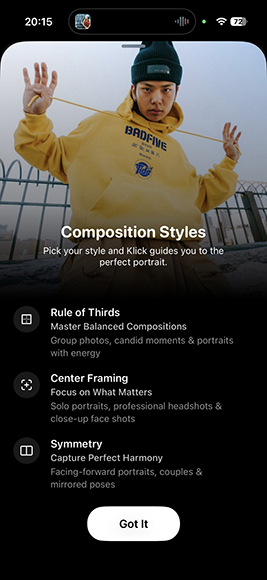
The app opens straight into its own camera view rather than a settings maze, and your first real decision is which composition style you want the overlay to coach you toward: Rule of Thirds, Center Framing, or Symmetry.
Beyond that, the app itself is relatively new, being on version 1.5.0 and having only a couple of public ratings.
I also tracked down the developer, Manase Michael, through the app’s listing and Product Hunt page, which suggests they’re an independent developer. This gives the app more legitimacy as a genuine learning tool made by a photographer for photographers (much like Shotkit).
With that said, the app offers a few features, but each one is thought through to be as streamlined and useful as possible.
AI Composition Coaching
The core of Klick is a live overlay that draws a compositional gridline onto the viewfinder and then reacts as you move.
If you line the subject up on a third, the app tells you things are A-OK. If you drift toward the middle, it nudges you back while telling you and pointing exactly where to go.
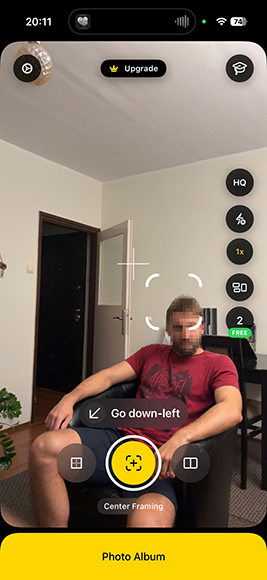
The biggest benefit here is that the app’s feedback is purely geometric rather than aesthetic. Klick reads where things sit inside the frame, but it doesn’t decide whether the photo would be any good at that point.
This also means the guidelines and instructions are broad and somewhat locked onto what composition you chose.
Klick will tell you that your subject is off the gridline, but it won’t recommend a dead-center composition because your subject is staring straight down the lens or that your background is too busy.
When starting, lighting in particular gets far less attention than framing, but the app does occasionally point out that you’re working in a relative shadow.
Despite all this, the repetitiveness itself performs the primary job of the app. Being told 40 times in a week that you are centering everything will eventually stick more than simply reading about the rule of thirds.
Face Detection and On-Screen Alignment
If you turn facial recognition on (and you really should), the overlay tracks people.
Klick locks onto a face, showing you where that face should be positioned relative to your chosen framework, and even prompting you to move closer or step back when the subject is too small or too tight in the frame.
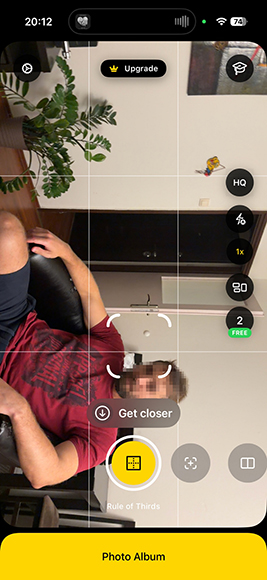
This is the feature most likely to change how a casual user takes photos, because subject distance is where phone portraits usually fall apart. People either stand too far away, crop at an unflattering point, or let the head simply float in a featureless background.
The immediate feedback is particularly useful as the app reads what’s in the frame and tries to improve on it before you take the shot.
One thing worth knowing is that Apple’s privacy listing for the app declares environment scanning along with head and hands data.
These are supposedly collected for analytics and app functionality and stated as not linked to your identity, but I would avoid making repeated portraits at home with a visible landscape in the background.
Klick’s Editing
If you need one thing to take away from this review, it’s that Klick is not an editor, but it never actually advertises itself as such.
You get several editing options, including a framing customizer, filters, and background blur. Of the three, only the third one is really transformative in a way.
The framing settings allow you to crop photos to formats including 1:1, 4:5, 9:16, 3:4, and 16:9. It includes a helpful pinch-to-zoom and drag panning. It’s primarily useful for mapping the image to the requirements of various social media platforms and other formats.
The “filtering” option is fairly decent, but I’ve found that the stock camera on the iPhone does much better by default, and you don’t have to unlock more filters by paying.
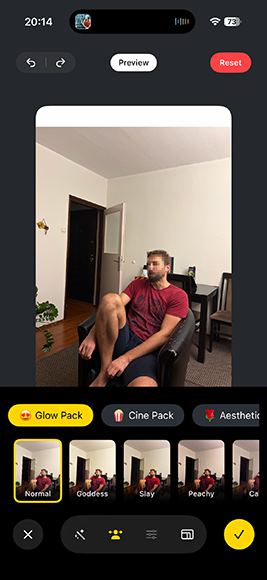
The background blur is also fine, and you can really tell that the app does well at determining where a person ends and a background begins. Settings above 10 are usually good for pure portraiture or product photography.
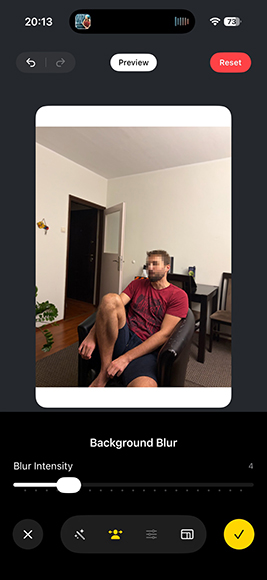
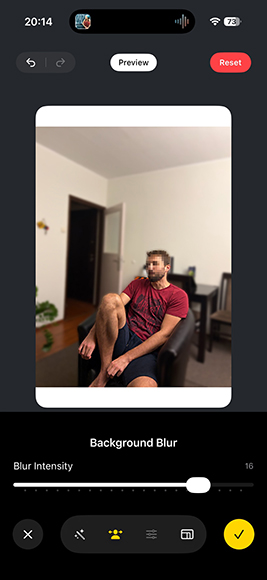
But apart from this, you don’t have any way to customize output. There are no curves, selective adjustments, color grading, generative fill, or object removal. Nothing in the editor transforms the photograph you took into a different photograph.
This is great if you’re starting as a photographer, but even a semi-professional will usually be more realistic about the workflow and still need to edit in the Photos app, Lightroom Mobile, or whatever software you already use. Klick is just the start of the process.
Post-Capture Analysis
The other half of the coaching loop is the review pass. Once you take the photo, Klick looks through it and reports back on how the composition landed.
This is also where it might suggest how background, lighting, and even the pose can be modified for the next shot.
The post-capture analytics are arguably more valuable since live guidance teaches you to obey a prompt while retrospective analysis teaches you to evaluate a frame. You shoot, get told what happened, adjust, shoot again.
It is also the thing sitting behind the paywall, which tells you plainly where the developer thinks the value is. With the free tier, you can be guided but not graded, which helps you learn the basics but not why those basics matter.
The Photo Library and Social Sharing
Klick keeps its own gallery that stores all the finished and “edited” shots you took.
While it’s thematically a cute feature for keeping a history of how you improved, I don’t really see the point of it that much.
Your iPhone already has a photo library, and that one syncs, backs up, searches by face and place, and feeds into every other app on the device. A second siloed gallery that only Klick can see and offload from is just creating more steps.
Where it does get better is the sharing options. As soon as you finish reviewing and editing, Klick prompts you to upload the photo to social media.
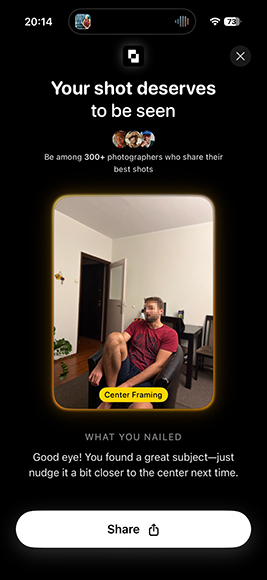
This can make a solid workflow if you’re starting as a prospective influencer or just want to upload your newest picture to the Gram: you get coached on the basics of shooting, the app congratulates you on your progress, and you get prompted to share. It’s a very game-y loop.
What Klick Does Well
The thing Klick gets right is that the AI primarily coaches you rather than automatically transforming the photo. Every piece of intelligence in the app points out at you in the form of a prompt you have to physically respond to by moving around or adjusting the phone’s position.
This active design helps you get active benefits from it, which bypasses one of the most common pitfalls of using AI in the first place: not learning about why changes were made.
Supporting that is a learning center built into the app. It covers the key ideas behind the overlays in plain language with no jargon.
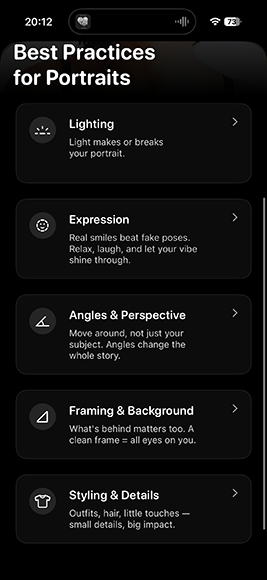
The scope of the learning center is exactly right for the audience the app is chasing. Once you have read through it, you’ll learn the basics, and the AI’s guidance tool helps you perfect them while the post-analysis helps you see what you got right.
That is also the natural handoff point where the app becomes less useful.
Once Klick has spent a week telling you to stop centering your subject, you might understand it, but you might also need to know when to ignore it or how to pick a different style. That’s where Shotkit’s guide to the rule of thirds in photography picks up with real examples in different styles.
Klick Pricing
The app is free to download and gives you a three-photo trial, which sounds brutally short until you realize how the limit is enforced.
The overlay, face detection, and live guidance features all keep working as long as you don’t press the shutter. Only captures count against the limit (regardless of whether you saved them in the library).
In practice, you can open Klick, let it coach you into position, get an idea of what a well-framed version of the shot looks like, then switch to the stock camera and take it.
While that might not be the intended flow, it works, and it’s why Klick is a solid training tool rather than a camera replacement.
Paid features are available through in-app subscriptions. The current U.S. App Store listing shows multiple tiers, including Klick Starter at $2.99 per week, $5.99 per month, and $24.99 per year, plus All Access at $4.99 per week, $6.99 per month, and $39.99 per year. There’s also a lifetime option for $99.99.
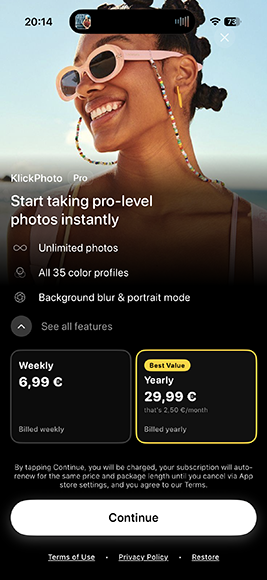
The weekly and monthly prices are much more impactful than the yearly price, as it works out to $155 and $311 per year, respectively. That’s approximately 6.5 and 12 times more the annual price.
There’s really no scenario where a casual shooter should be paying it beyond a genuine trial. So the yearly plan is your best bet, but this might change over time as the app’s development goals settle.
Who Is Klick: AI Photo Pose For?
In the bluntest terms, Klick is an app for new and casual photographers. That’s because the guidance is broad.
Rule of thirds, center framing, symmetry, subject distance, keep the face off the edge of the frame. All of these are among the first things many beginners learn, and Klick drills them well.
But all of this advice works for most social media posts, travel snaps, portraits of friends, and even casual street work, which is where most phone photography actually happens.
Once you get into even semi-professional work, you might stumble. Studio work runs on lighting ratios, modifier placement, and tethered review, while event and wedding coverage runs on anticipation, moving fast in bad light, and directing people who are not looking at you.
None of that is a grid overlay problem, and an app that tells you to step left won’t help when the real issue is a mixed color temperature or a subject who blinks. The “AI Photo Pose” name reflects the app’s post-capture suggestions about how the pose might be improved, but it won’t get you there instantly.
But once you think about it, an annual subscription can still be solid value for a basic photography course, especially when you can take that course with you and have it shout instructions in real time.
Once you get beyond that point, the sensible next step is material that assumes you already know the basics. Shotkit’s rundown of 22 essential photography composition techniques can help you move forward.
Final Verdict
Klick is a small, early app with an unusually honest premise. It won’t magically fix your photos, and its core feature is to coach you rather than simply make the photographic decisions for you.
It just draws lines on your screen, tells you where your subject should sit, and makes you do the work of moving.
As a training tool, it’s a solid investment, and you can try its free features or, if you subscribe, put the app through its paces during a night out with friends.

As the General Manager of Shotkit, India Mantle brings with her a lifelong love for photography that she developed during her childhood, watching her father document their family moments with his Nikon EM. In her free time, you find her enjoying the awe-inspiring natural beauty of her home, Northern Rivers, Australia.
👋 WELCOME TO SHOTKIT!
🔥 Popular NOW:
