






Kling AI Review: Can It Successfully Animate Your Still Photos?
Kling AI is a cutting-edge AI platform capable of turning still pictures into cinematic video clips. Learn more about it in my Kling AI review.
AI | Software | By India Mantle | Last Updated: June 12, 2026
Shotkit may earn a commission on affiliate links. Learn more.
For decades, people dreamed of a world in which they could bring photos to life, to see their subjects move within the frame. Thanks to artificial intelligence, that dream is now a reality, with tools like Kling AI able to animate and almost magically breathe life into any still image, in an instant.
This cutting-edge AI platform is famed for its image-to-video capabilities, and I’d heard many good things about it from fellow photography enthusiasts. So, I decided to take a closer look at what it had to offer for myself. Read on through my Kling AI review for my full thoughts.
What Does Kling AI Offer?
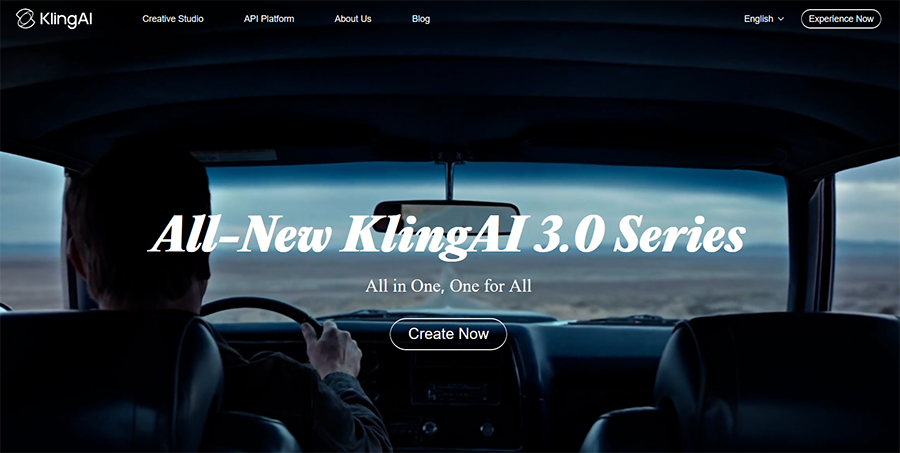
Before I show you how Kling AI works, I understand some of you may not yet be familiar with this platform. With that in mind, here’s a brief primer about what Kling AI actually is, who made it, and the impact it’s had on the AI landscape.
Kling AI is a generative AI platform developed by the Beijing-based company Kuaishou, which specializes in short video content long before the advent of AI. The first version of Kling AI launched in June 2024, though the platform has undergone significant changes and improvements since then.
As the months and years have passed, new and improved versions of Kling AI have been released. During that time, the platform has also earned an impressive reputation for the exceptional quality of its output, as it’s capable of turning even simple images into remarkably lifelike and detailed videos.
The most recent version, Kling 3.0, can even create content in 4K quality and 60 frames per second. It also offers advanced features, such as multi-shot storyboarding and native AI-generated audio in various languages.
Other key features include the ability to generate continuous video clips of up to two minutes using the same characters and references, plus text-to-video generation to allow users to create completely original content, as well.
All of these features and benefits have made Kling AI a smash success in the AI landscape. It often ranks among the better AI platforms available today, alongside other big names like Google’s Veo and Runway. It’s a popular tool with bloggers, content creators, filmmaking and photography enthusiasts, and marketers.
Key Features of Kling AI
As explained above, Kling AI is a generative platform, meaning that its features largely revolve around using AI to create new content. It can do this from reference images (image to video) or text prompts (text to video).
In addition, it offers a range of additional features, like video-to-video generation, lip syncing, and still image generation, too. For this review, however, I’ll focus primarily on Kling AI’s image-to-video capabilities to see how well it can turn a still picture into a short-form video.
Image to Video Generation
When most people think about Kling AI, they focus on its image-to-video generation. It’s what the platform is best known for, and I wanted to see how well it worked with some still photos from my personal collection.
Here’s a step-by-step look at the full process, starting off with the main image to video page. Like other pages and tools on the Kling AI platform, I found this to be neatly laid out and well-designed, for the most part, though some of the buttons and menu options feel a little crammed together.

As you can see in the screenshot, Kling AI offers the ability to add images as start and end frames of the video. If you choose to do so, Kling will generate a video that naturally progresses from the first photo to the second, following your exact prompt in the process.
Alternatively, if you don’t have a suitable end frame, you can simply upload a start frame photo and write in a prompt about how you want Kling to animate it. That’s what I did, and I opted to use a wildlife image of a deer in the woods.
Once my image was uploaded, I was able to customize various settings. There’s a pop-out menu for choosing between different generative AI models, for example, including the state-of-the-art 3.0 Omni model and the slightly older but still impressive O1 model.
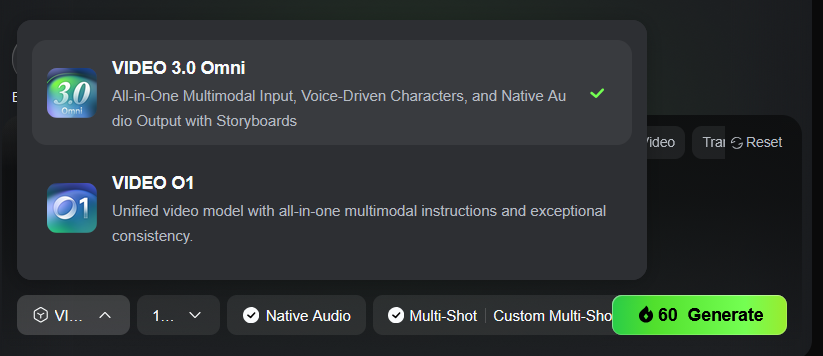
Kling also allowed me to choose my desired resolution, with options ranging from 720p up to 4K, as well as the duration of my video. It offers options for the aspect ratio, too, and you can even choose to generate multiple clips (up to four in total) per session if you want additional content.

Once all of the settings had been confirmed, all that was left to do was click the “Generate” button and wait for my video to appear.
This process can take quite some time, but it all depends on what subscription plan you’re on and which model you’re using. This particular video only took a few minutes to generate, but others I’ve created on Kling AI have taken significantly longer.
When the video is ready, it appears on the right side of the window for you to preview.

I asked for a five-second clip, showing the deer in the photo looking around before being startled and leaping out of the frame.
Kling AI produced exactly what I asked for, and even though I’ve used tools like this before, there’s something particularly magical about seeing a still photo brought to life with Kling. The level of detail is almost unparalleled; it feels like an authentic video, captured on my camera, not something made by AI.
Just as I asked, the video clip shows the deer’s head turning left and right as it looks out around the forest. Then, the video cuts to a second angle, showing a side profile of the deer as it leaps away.

I took the time to freeze the video at various stages to look for any anomalies or inconsistencies, but I couldn’t find any. Even the spots on the deer’s back remain the same throughout the clip and match those seen on the deer in the image I uploaded.
It’s a remarkably precise tool, as every detail remains consistent from one frame to the next. In my other tests, too, I saw the same level of accuracy again and again; while other video models I’ve used sometimes make glaring mistakes, Kling AI didn’t seem to fall into the same kinds of traps.
As you can see in the screenshots, Kling AI also offers the ability to add lip sync audio to your generated videos, if applicable, plus the option to extract individual frames, which you can then use to make more content. You can also download or share your creations with a single click.
Additional Features of Kling AI
In addition to its image-to-video functionality, some of Kling AI’s other features that might interest you include:
Image Generation and Enhancement
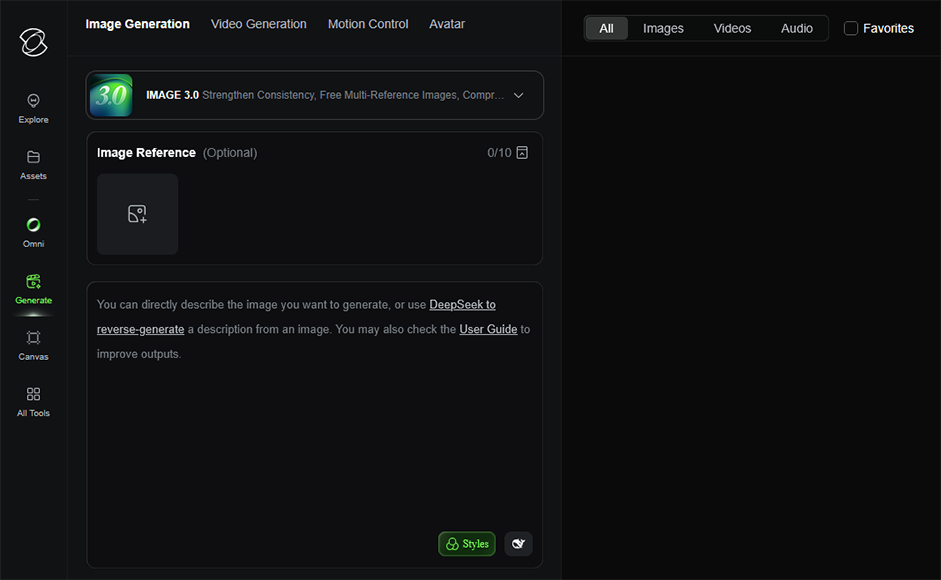
Kling AI allows users to generate images from simple text prompts, similar to other text-to-image generators. Additionally, it offers the ability to upload a reference or source image, which you can then modify with the aid of AI. While it’s not a conventional AI image editor, like Lensa AI, it may prove useful for photography enthusiasts looking to experiment with AI enhancements.
Motion Control

The Motion Control feature is a relatively new addition to the Kling platform that is designed to extract specific motion sequences from a reference video, like a type of dance or style of walking. You can then reapply the extracted motion to a static image. This opens up some interesting opportunities for video creation that may apply to content creators and marketing agents, in particular.
More: 6 AI Video Generators to Try Today (For Free)
Avatars
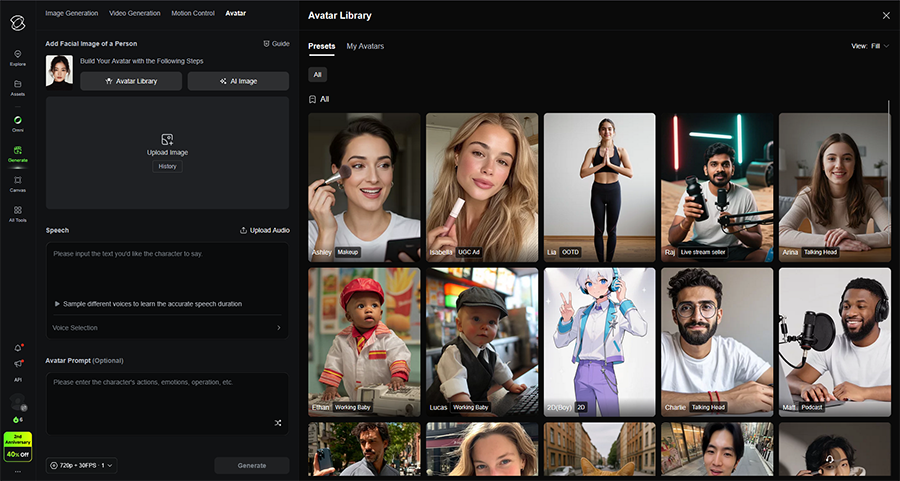
Kling AI also offers the option to create your own avatars, which you can then save in your asset library and reuse in future videos. You can design your avatar to look and act exactly as you wish, either via text prompts or from reference images. Again, this feature offers particular value to marketers, social media users, and brands, allowing them to make mascots, tutorial videos, and build social followings.
Pricing
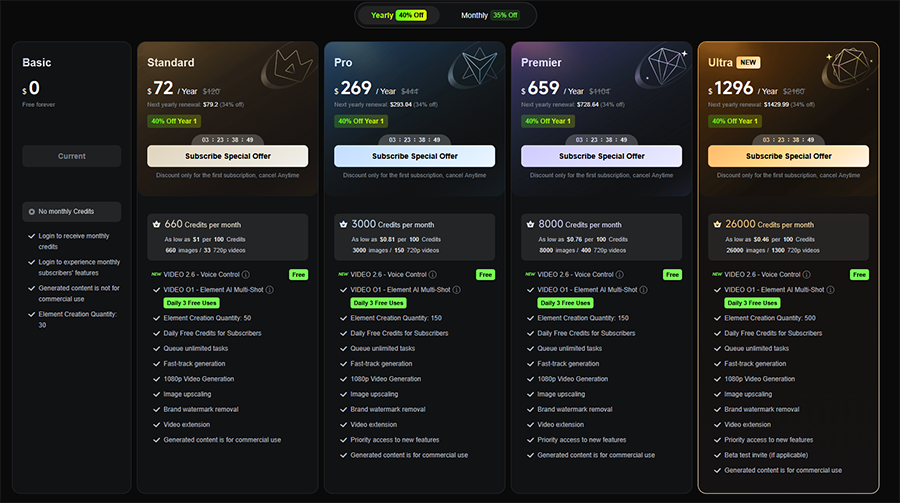
Like other generative AI tools, Kling AI operates on a credit system. You can pay a monthly or annual fee for one of several subscription plans to get a specific amount of credits per month, then you can use your credits every time you want to generate a video.
For reference, the five-second video I made cost 60 credits, but some can cost significantly more. It depends on the model you use, the quality of your output, and the length of the video you want to make, along with other factors.
As far as the subscription plans go, there are four premium choices:
- Standard: Available for $72 per year or $6.49 per month, this plan provides 660 monthly credits, which is enough to generate up to 33 videos in 720p resolution.
- Pro: The Pro plan costs $269 if you pay annually or $23.99 per month. It provides 3,000 monthly credits, enough for approximately 150 videos in total, plus priority access to new features.
- Premier: Premier subscribers pay $659 a year or $59.99 per month for 8,000 monthly credits. That’s enough to generate 8,000 AI images or around 400 videos in 720p.
- Ultra: The highest tier plan costs $1,296 annually or $127.99 monthly and gives you 26,000 credits, which can generate up to 1,300 videos.
It’s worth noting, also, that Kling AI offers a free Basic plan. This gives you a limited number of credits each month, along with access to other features from time to time, but free subscribers can’t use their content commercially. In addition, if you ever need more credits, you can buy them in packs of 330 to 96,000.
There are also separate price lists for developers and API access, which could be of interest to larger photography studios, though I expect most users will stick to the standard membership plans outlined above.
Overall, Kling AI is certainly more expensive than other generative platforms I’ve worked with in the past. However, I feel it’s still good value for money due to the incredible quality of the videos it can produce.
On other platforms, you might pay less for your subscription, but end up with worse content. Or you may have to spend additional credits regenerating a video multiple times to get what you want. Kling AI, in general, provides the videos you want at the first time of asking, making it easier to recommend.
The Final Verdict: Is It Worth It for Photo Animation?
I began this review wondering if Kling AI was as good as people said and whether it could truly turn still images into animated videos without losing something in the process. Overall, I was thoroughly impressed by this platform’s capabilities.
Whether I used images of wildlife, individuals, groups, or even landscapes, Kling AI always delivered great results. It followed my prompts perfectly, from the simpler ones to more complex variations involving multiple angles and movements.
The sheer quality of the output is easily the standout benefit of this application, but I also loved the level of customization it offers. Some platforms impose strict restrictions on the length or complexity of generated content, but Kling AI largely allows the user to feel in control of the entire process.
I appreciate the pricing system, too. It’s good to see such a broad range of payment plans to suit different users with different budgets and needs. Plus, the ability to test out the tool for free and purchase one-off credit packs is also a nice bonus.
With all that said, Kling AI isn’t perfect. The credit cost can quickly spiral if you want to make longer, higher-quality videos. Some videos take a significant amount of time to generate, too, and while I didn’t experience this personally, I’ve heard that Kling’s user support isn’t the most helpful or responsive.
Overall, however, I feel that the pros of this platform far outweigh the cons. It does something that once seemed impossible, and it does it better than almost any other platform in its category. So, if you’ve always wanted to see your photos brought to life, Kling AI is certainly worth looking at.

As the General Manager of Shotkit, India Mantle brings with her a lifelong love for photography that she developed during her childhood, watching her father document their family moments with his Nikon EM. In her free time, you find her enjoying the awe-inspiring natural beauty of her home, Northern Rivers, Australia.
👋 WELCOME TO SHOTKIT!
🔥 Popular NOW:
