






PicWish AI Review: Can It Replace Studio Product Photography for E-Commerce?
Discover PicWish AI, the AI image editor that aims to provide studio-level product pictures without the hassle or expense of a studio shoot.
AI | Software | By India Mantle | Last Updated: November 21, 2026
Shotkit may earn a commission on affiliate links. Learn more.
In e-commerce, photos matter. A good-quality picture of a product can help capture customers’ attention and drive sales. However, historically, it hasn’t always been easy to obtain those kinds of images, due to the costs and complexities involved in studio shoots.
PicWish AI aims to change that. This AI image editing platform aims to turn simple product pictures into professional-looking images you can add to your online listings, elevating your online store and encouraging more people to purchase the items you have to offer.
But can it really live up to the hype and match the standards of a real photography studio? That’s what I wanted to find out, so I decided to put this platform to the test. Read on through my PicWish AI review for my honest impressions, as well as details about the platform’s pricing and features.
What Does PicWish AI Offer?
For those who aren’t yet familiar with PicWish, here’s a brief primer: PicWish is an AI-powered photo editing and image enhancement platform.
It’s web-based, so you can use it in your browser on different devices, without installing separate software. Downloadable applications are also available for Windows, Mac, iOS, and Android for those who want offline access.
PicWish AI launched back in 2021 and has grown over time, embracing AI technology fully to offer a deep suite of tools and features, like AI-powered background removal, image upscaling, enlargement, unblurring, old photo restoration, compression, and object removal.
The heart of this platform, however, is its Product Studio.
Aimed at those in industries like retail and e-commerce, this is an AI-powered product photography and listing tool takes relatively basic product photos (like those you might take on a smartphone) and turn them into studio-grade visuals to add to your online store or marketing materials.
It offers a comprehensive suite of features, including background removal and staging to isolate your products and place them in exciting scenarios, backdrop generation, color variations, and even virtual models to hold or pose with your products.
In a nutshell, the Product Studio is designed to let you get the same sort of results you’d expect from taking your products to a professional photo studio, but for a fraction of the price, and from the comfort of your own home or office.
The platform markets itself as the easiest AI photo editor and can certainly appeal to beginners with its clean, minimalistic interface, but offers enough features and functions to please a more advanced audience, too.
It’s earned rave reviews and attracted plenty of users, and many photos that feature on online stores and product pages are now being made with PicWish AI or tools like it, rather than being taken by actual photographers.
As someone who has both taken and commissioned product photos, I know that it’s not always the easiest process. High-end equipment is required to capture the very best shots, and that sort of equipment is often out of reach for many small business owners.
So, for years, they’ve turned to professional studios, many of which charge quite high rates for their services. At a time when money is tight for so many people, a cheaper and simpler option, like PicWish AI, is obviously quite appealing.
The only question left to answer is whether or not it actually functions as intended.
PicWish AI Key Features
PicWish AI is a feature-rich platform with a wide range of tools to play around with. I won’t review all of them here, but will instead focus on those that are oriented around product photography.
Product Listing Generator
From an e-commerce perspective, arguably the most important and valuable feature on the PicWish AI platform is the Product Listing Generator. It can help you create the pictures you need for product listings on sites like Amazon, Alibaba, Temu, Shein, TikTok Shop, and others.
The way it works is quite simple: you upload one or more images of your product, and the AI generates listing-ready visuals for you to publish. You should still check each image against the platform’s requirements before publishing. It can even add captions, text, and so on, oriented around your product’s features and benefits.
Here’s a look at how it works.
First, I logged into my account and selected the Product Listing Generator, which is easy to find via the dashboard or feature menus.

I was then invited to upload up to five images of my product.
For the purposes of this review, I used a stock image of a simple frog plushie for children. Once I’d uploaded my picture, the AI automatically scanned it and came up with a name and some selling points that it could include in its listing materials.
The content it generated was accurate and quite impressive, though I was free to edit it, as desired.
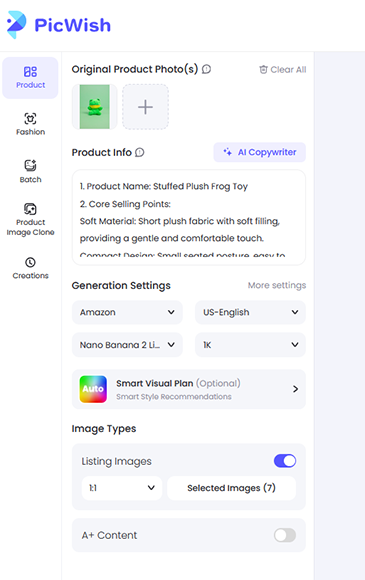
I was also able to choose from an array of different settings to control my output.
I could select different listing styles for popular e-commerce platforms, for example.

I could also choose between content in different languages, which is extremely useful for online store owners who want to market and sell their wares to international audiences.
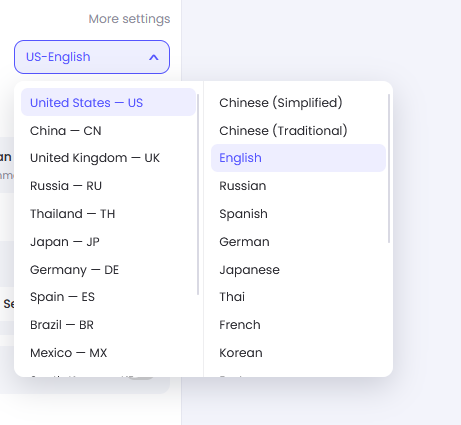
The platform also let me choose between different generative models, including Nano Banana 2 and GPT Image 2.5, with certain models consuming more credits than others. I could choose how many pictures I wanted, their resolution, and other settings, too.

Once I was content with my settings, I clicked “Generate.”
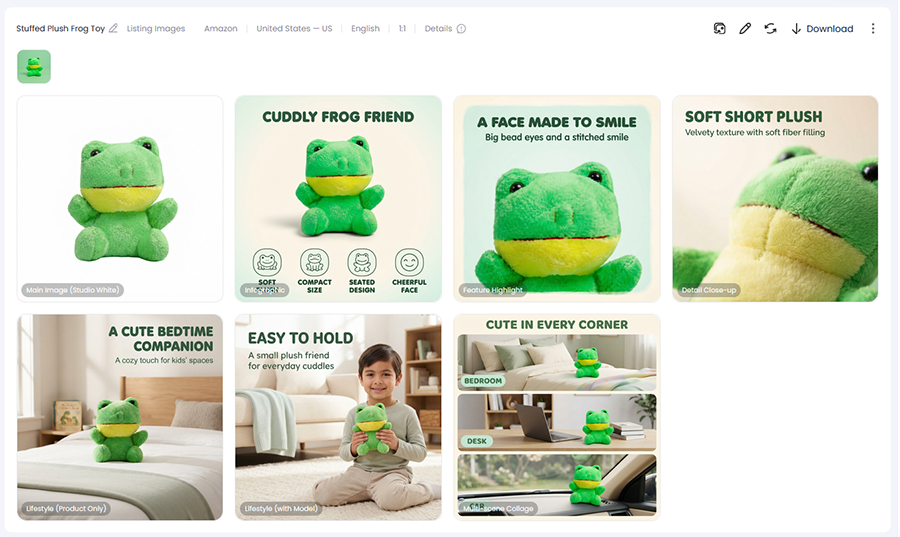
Within seconds, PicWish AI had generated a fantastic array of product pictures I could add to a hypothetical Amazon listing.
There were a couple of inconsistencies I noticed in terms of the sizing of the plushie. It looks much larger in some photos than others. In one of the images, it’s also missing the stitching around the nose, and the eyes aren’t quite the same shape.
Perfectionists or those with extremely high standards will likely be disappointed with these issues, but it’s worth noting that you don’t have to use every single image the AI gives you, and you can improve your results by uploading extra reference images.
Putting the inconsistencies aside, I found the results extremely impressive. The AI managed to place the frog in a range of environments, including in the hands of a young child, with realistic shadows and lighting, every time.
Is it studio-level quality? Not quite, but it’s more than good enough for most online stores and e-commerce businesses, and I believe that most casual customers wouldn’t necessarily be able to tell that these images were AI-generated.
It’s worth remembering, also, that it managed to make all of these pictures from a single medium-quality reference photo. If you add more high-quality images, you’ll get even better results, and you can switch to other platforms, depending on where you sell.
Given that real product photography involves studio space, backdrops, continuous lighting, post-production editing, and so on, it’s quite remarkable to see that an AI platform can produce similar results in a matter of seconds.
Other Product Listing Features
As well as the listing generator, PicWish AI also offers:
- Product Retouching: This allows you to enhance your product images, isolating subjects, removing text and imperfections, blurring or beautifying backdrops and textures, etc.
- Product Image Cloning: This feature allows you to create a library of product images by uploading reference images. The AI then places your product in different settings and scenarios, using the references as a guide.
- Product Backgrounds: This allows you to adjust the backgrounds of your product photos with AI. You can change the color or style of your backdrop to keep things simple, or place your products in settings such as beaches or cities.
Pricing

I’ve tested and reviewed dozens of different AI image editors and other AI-based photography platforms in recent years, and I’ve found that pricing systems can vary quite widely from one tool to the next.
Some of these platforms have quite confusing pricing structures, with four, five, or more plans for users to choose between. Others are more straightforward, with just a couple of plans. I’m glad to report that PicWish AI falls into the latter category.
It has two main pricing plans to pick between: the Pro plan and the Max plan. It’s worth noting, however, that you can choose to pay for these plans either monthly or annually, and I’d recommend opting for the annual option, as it works out significantly cheaper in the long run.
There’s also a weekly subscription, which might be worth it for users who are interested in testing out the platform, but don’t want to commit to a long-term plan until they’ve had time to see if PicWish AI is right for them.
Here’s a detailed breakdown of the options:
- Weekly: For $5.99 per week, you can enjoy 90 credits and up to 100 HD downloads per day. For the vast majority of users, I wouldn’t recommend this plan, as it doesn’t offer great value, but it might be worth it for those who only intend to subscribe for a single week.
- Pro: The Pro plan costs $9.99 per month or $59.99 per year (equivalent to about $4.99 per month when billed annually). It provides 450 credits each month and up to 100 downloads every day when using tools like photo enhancement, background removal, and watermark removal.
- Max: The Max plan costs $29.99 per month or $263.99 per year (equivalent to about $21.99 per month when billed annually). It includes 2,000 credits and up to 15,000 downloads each month, plus extra perks like 30 Nano Banana 2 Lite images and 100 watermark removals per month.
The right plan for you will primarily depend on two factors: how much you’re willing to spend and how many photos you need to process each month. Most users will probably be able to get by with the Pro plan, though those with bigger businesses and more products might need a Max subscription.
However, you don’t necessarily need to sign up for any of these plans to use PicWish AI because it also offers the option to buy one-time credit packs. You can choose between small packs of 300 credits or much larger ones with tens of thousands, and the bigger packs come with bonus credits added on.
However, it’s worth pointing out that subscribers get a discount on these packs, so you may need to do some mental arithmetic to work out which plan or pack gives you the best value before you begin.
PicWish also offers a limited free plan that lets you preview most features, access some tools, and download images in non-HD quality. It’s not much use for professionals but potentially worth a try for casual users.
Overall, compared to other platforms I’ve reviewed, PicWish AI has a decent pricing structure. It’s uncomplicated, flexible, and it offers good value for money, on the whole. However, as with many AI platforms, you need to think carefully about the plan you choose, and you may waste credits while working out how the tools and features work.
The Final Word – Is PicWish AI Worth It?
I began this review wanting to know if PicWish AI could actually replace studio photography. After testing, I can say it’s not quite good enough to replace the studio, but it should be considered a viable alternative for many users and small business owners in the e-commerce space.
If you aren’t too invested in having the absolute best possible pictures of your products, PicWish AI is more than sufficient. It can give you clean, crisp, high-quality images of almost anything, from toys and books to perfume bottles, watches, and clothing.
It does this quickly, cheaply, and efficiently, and it offers a whole host of additional features for you to fine-tune your results, as desired.
At the same time, in my time testing this tool, I found that its results weren’t always as flawless as they first appeared. While most pictures were excellent, especially when using the more high-end AI models, there were still some inconsistencies and visual issues that prevented each set from being perfect.
As I mentioned before, most users and customers won’t necessarily notice these issues, as they’re often quite subtle, but they’re the sort of thing that you wouldn’t see if you actually paid a real photographer to take your pictures for you.
Of course, paying a real photographer would cost much more money, so it’s up to each user to weigh up the pros, cons, and costs involved and ultimately decide if PicWish AI offers better value for their needs, even if it can’t quite produce studio-grade pictures.
More: Top AI Apps for Product Photography Mockups & Pre-Shoot Visualization

As the General Manager of Shotkit, India Mantle brings with her a lifelong love for photography that she developed during her childhood, watching her father document their family moments with his Nikon EM. In her free time, you find her enjoying the awe-inspiring natural beauty of her home, Northern Rivers, Australia.
👋 WELCOME TO SHOTKIT!

🔥 Popular NOW: