






Can Pippit AI Really Script, Edit, and Post TikTok Ads on Autopilot?
Can you create and publish TikTok ads in a few clicks? Pippit AI gets you most of the way there, with helpful prompts to maintain brand consistency.
AI | Software | By India Mantle | Last Updated: November 11, 2026
Shotkit may earn a commission on affiliate links. Learn more.
One of the main issues with trying to manage a social media channel that uses your photos or videos is the constant need for refinement.
After all, social media ads need to be refreshed and curated specifically for that social media platform.
But what if you could use the platform’s built-in AI to help you build ads or promo videos in minutes?
That’s what Pippit AI promises, and the premise is something worth considering if you want to speed up the creation process or even offload it entirely to AI.
Here’s how Pippit AI works, why it might work for you, and what you need to know before diving in with a subscription.
Basics of Pippit AI and Getting Started
One of the most interesting things about Pippit AI is that it actually started out as CapCut Commerce Pro, a dedicated marketing suite that was later rebranded as Pippit.
Because Pippit evolved from CapCut Commerce Pro, it is closely connected with the CapCut ecosystem and can help users create marketing content for platforms such as TikTok.
The tool is freemium and is available for any browser without any downloads. However, despite that lightweight requirement, its canvas operates more like a traditional video editor paired with a chatbot to navigate through its parts.
While it’s technically a “marketing canvas,” Pippit doesn’t have any ability to modify existing video on a per-frame basis. All edits are done by the AI automatically, so you need to either guide it or regenerate an undesirable result.
Pippit TikTok Ad Creation Review
If you want to make a TikTok video or promotional ad from your content, your best bet is to use Pippit’s integrated AI agent and creative canvas.
These two features essentially feed off one another, interpreting textual instructions to generate or modify content and use whatever “skills” the AI has at its disposal to finish the task at hand.
For example, I tested the platform by creating simple, short videos using a sample product photo as the basis for an imagined brand.
Inputting the simple instruction in the Canvas textbox allowed the AI to determine that I want to create a video script or an entire video.
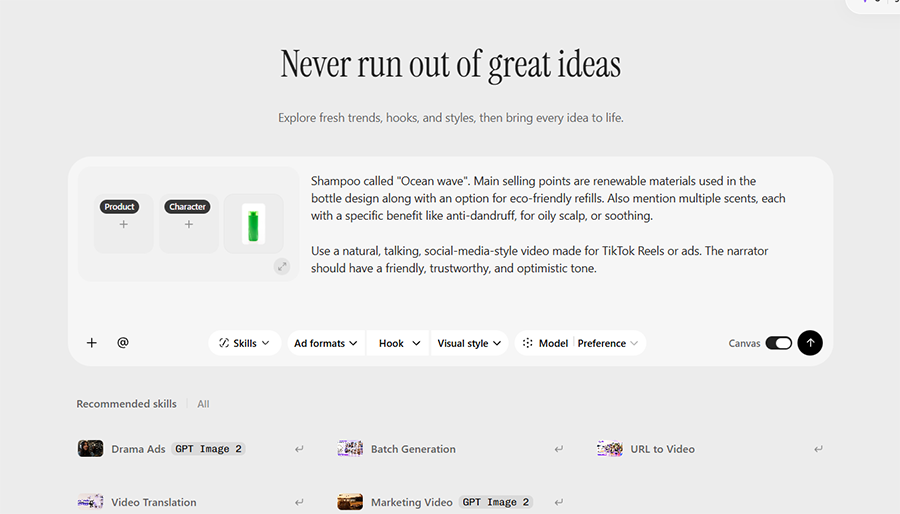
This prompted the AI to bring up the Canvas panel, which comes with a chatbot-style workflow to iterate on the starting prompt. The AI has generally been great at detecting missing details that I needed to fill in.
More importantly, the AI doesn’t want to take any liberties with the product or type of ad you want to create. If something is unclear, it will prompt you to fill in the blank or suggest a generated sample that could be used as a placeholder in the meantime.
Additionally, the AI is careful to frame parts of the ad that could be misleading. For example, when I prompted it to create an ad focused on “eco-friendliness” and “renewable resources,” it asked for clarifying details and wording that had been fact-checked or cleared for use by the brand.
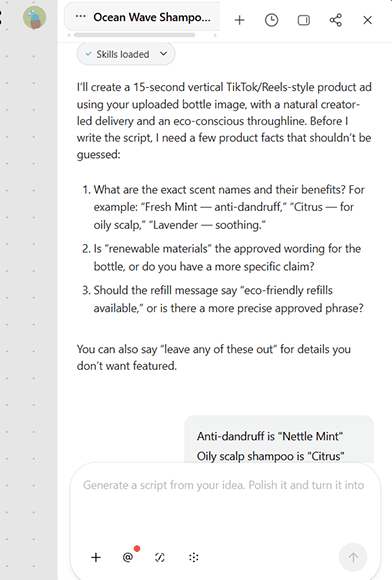
This is a genuinely helpful aspect, since it stops it from accidentally manufacturing facts about your product and negatively impacting your branding. It also allows you to align each video with the specific image or mission you have for the brand, which is the foundation for the sequential generation aspect the tool has (which I’ll cover a bit later).
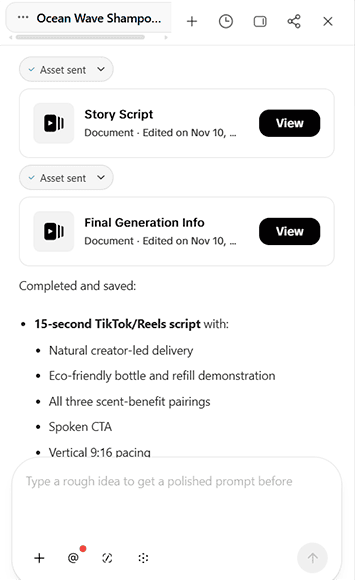
At its core, the AI distills the essentials of your prompt and creates multiple suggestions for the video script. You can then use the chatbot to narrow down your options until the AI settles on a scene that will be converted into the actual script.
With that, the AI’s initial result is usually the ad script and video direction. It won’t generate the video in a single click unless you type a highly specific prompt, including the exact model, script, product image, and a sample from the gallery.
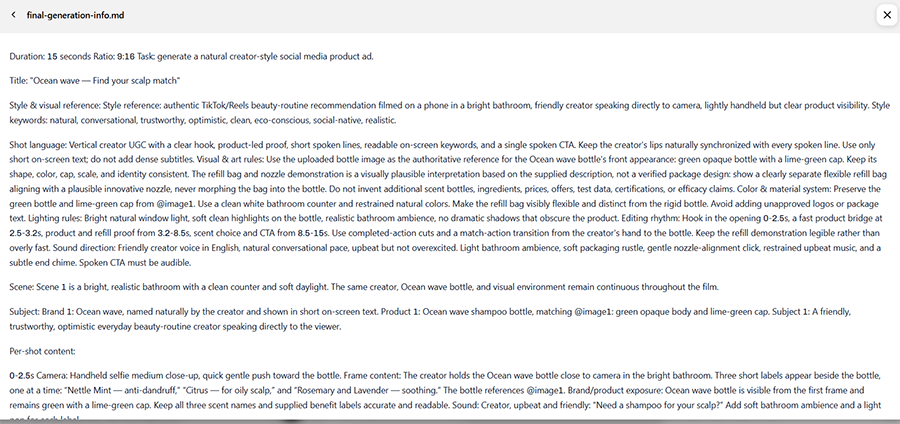
You can use this script to manually film and edit the video for upload. Alternatively, you can use Pippit’s AI video-generation tools to create the ad itself, although the available models and generation credits depend on the plan.
For video generation, the platform uses the Seedance 2.0 and 2.5 models. One quip worth noting is that while CapCut itself uses Seedance, its own model has more options for trialing than Pippit.
In terms of video quality, the AI is extremely adept at creating story-bound ads that have a noticeable hook, explanation, and a CTA or promotion at the end. This helps them stand out from bland product shots or “moving image” ads that might get just scrolled past by users.
And if the AI doesn’t create a viable video at first, you can simply regenerate and try again.
Other Video Creation Skills
If you already have a finished script and image assets in place, the AI can deliver lightning-fast results, possibly even in one click.
These can also be done through URL-to-Video or “Viral Replication” modes, which allow you to insert a starting point and give the AI more matching references.

Alternatively, you can use the “AI talking photo” mode if you’re starting with a still image of a model.
For this, the AI will prompt you to provide a narration script, or you can manually enter a read-out script and choose from one of several narrative models for dubbing.
Then, the prompt box also accepts scripting in terms of how to move the model or what parts of the product to showcase.
However, the amount and “scale” of movement in talking photos is generally much more subdued, which leads me to believe that the AI is isolating the face and the main part of the product for animation rather than the entire figure.

Other Pippit AI Features
As teased in the title, Pippit goes beyond simply making one video at a time. Instead, it can use your existing account data or prompts to create a whole series of video ads.
This can be done in a few different ways, starting with uploading your assets and using the “Batch Generation” model.
With batch generation, the AI will immediately start by processing a few different variations for each option you select. In most cases, this can be simplified by feeding the AI a well-made product photo or URL and a description of what aspect you want to prioritize for each video.
In my testing, batch generation fared well if you had a product that was photographed from multiple angles or had a few different versions. In these cases, the AI could separately animate each option and keep the variations of the script to a minimum, which preserved video fidelity and the intended message.
After that, the fewer details you give to the AI, the more it will try to creatively interpret the prompt and vary the end result.
This can be both good or bad, depending on the AI’s whims. Since it has a solid understanding of viral video trends, it often tries to modify the script to follow one trend at a time, meaning that you’ll get a collage of some of the most popular trends at the moment.
However, there’s also a chance that the result will be a bit bland or reference trends that are no longer relevant.
If you want a slightly different take on mass generation, you can also use “Smart creation” mode. It allows the AI to slowly shift its preferences toward the types of trends, content, and styles you most frequently reference in your chats.
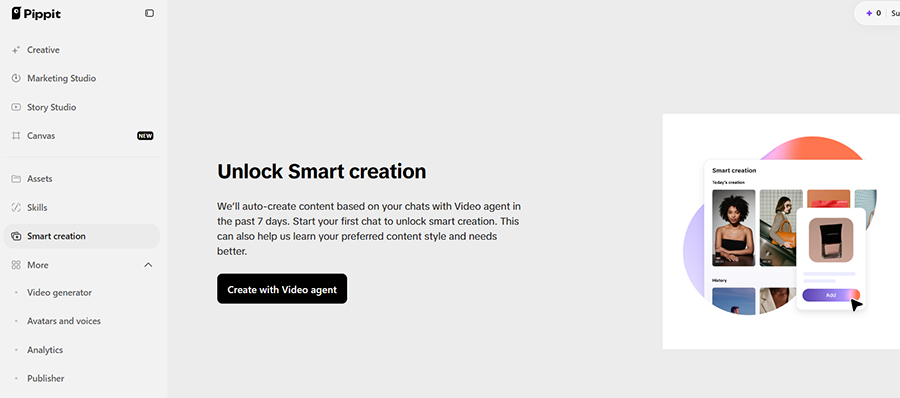
The “Smart Creations” feature is designed to tailor content to your brand, although the exact setup requirements and the amount of time it needs to learn your preferences need to be confirmed in the user interface.
Posting Ads Directly via Pippit AI
Since Pippit is built from CapCut Commerce Pro, it can connect to your TikTok account and publish content directly to it. This essentially allows you to schedule or upload your videos from the platform.
Notably, while you can upload content, you can’t automatically make it into ads. For that, you need to create a separate TikTok Ad Manager account and use it to make your videos into ads and follow that platform’s requirements.
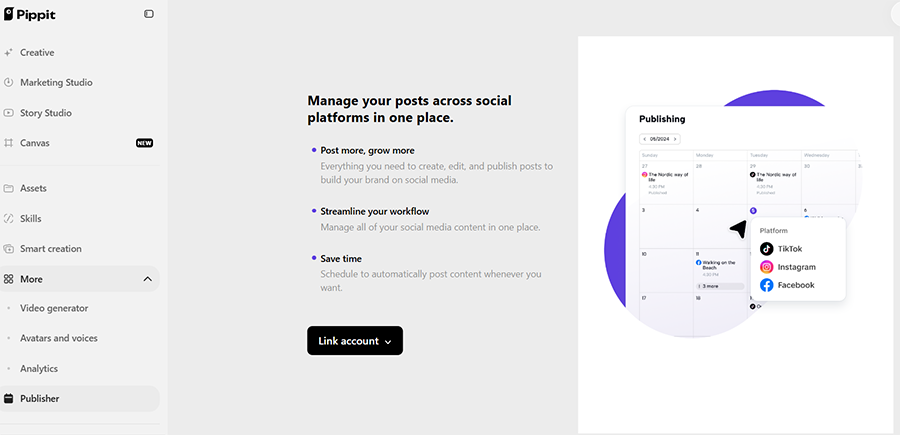
This makes Pippit more of a content publisher than an automated ad-maker, but it’s a distinction that might matter if you’re an entrepreneur looking to sell your product or service.
Pippit won’t be able to fully automate the ad creation process from start to finish, but it gets you most of the way there.
However, if you only want to streamline content creation, then Pippit allows you to set up a content generation calendar. In there, you can ask Pippit to fully generate an ad or prompt you to quickly set up a batch generation, which will then be distributed at predetermined times.
Beyond TikTok, Pippit can provide the same level of partial automation to Instagram and Facebook. Since it specializes in fairly short content, you can use most of the videos it generates straight out of the box without any modifications.
Pippit AI Trial, Pricing, and Modes
One of the more confusing aspects of how Pippit works is the subscription model.
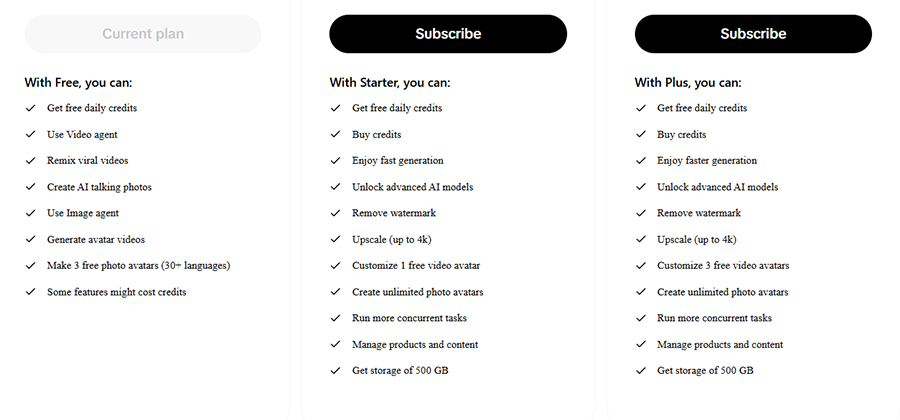
Although Pippit is marketed as a “free AI video generator,” its free plan comes with limitations on the credits and features available for content creation.
The free plan provides access to some visual-generation features, including AI talking photos, but the number of generations and the available tools are limited to free daily credits. This is helpful, but the avatar can’t be used to create a “talking photo” video on a free subscription.
Even some of the marketing claims for the free account options are far-fetched.
For example, the platform suggests it can create an AI talking photo, but it won’t be able to make an actual video out of a photo you choose. You’re limited to using a simple image and overlaying your own spoken script over it or using a sample avatar for a bit of animation.
Instead, what you can do is chat with the AI extensively to brainstorm and streamline the actual video script.
For this, the AI seems to have no limitations on chat size and even comes with a generous memory buffer. Even the Canvas mode works by allowing you to pin multiple text-based sources and image references and save them for later.
With a paid subscription, you get access to additional AI features, more generation credits, and other benefits that can make it easier to create and edit photos and videos.
The “free daily credits” part is also awkwardly handled. Although Pippit advertises daily credits for free users, the amount available limits how much content you can generate. You may need to purchase a subscription or additional credits if you want to create content more frequently.

With that in mind, consider Pippit as a good brainstorming companion that understands TikTok as a platform better than a generic chatbot like Claude or ChatGPT. It can help you narrow down trends and use those as a jumping-off point for more content.
Who Is Pippit AI for and Verdict
So can Pippit AI be used to edit and automate content creation for TikTok?
In a way, yes.
However, that requires you to fully set up your account, pay for a subscription, and work through a potentially confusing Canvas mode to generate multiple videos from your product photos or links. A paid subscription provides additional credits and access to more advanced features.
Even then, it won’t be able to fully automate TikTok ads since it doesn’t integrate with the TikTok Ad Manager. You can only post content on your brand’s account.
Ultimately, the tool is a solid option if you’re already invested in building your audience through TikTok or trying to leverage it as a jumping-off point to Instagram and Facebook.
But since it can’t actually create content for you to preview for free, you should make sure the platform suits your needs before committing to a paid subscription.

As the General Manager of Shotkit, India Mantle brings with her a lifelong love for photography that she developed during her childhood, watching her father document their family moments with his Nikon EM. In her free time, you find her enjoying the awe-inspiring natural beauty of her home, Northern Rivers, Australia.
👋 WELCOME TO SHOTKIT!
🔥 Popular NOW: