






How to Recover Photos from a Formatted SD Card [3 Proven Ways]
Accidentally formatted your camera SD card? Learn how to recover lost photos with three proven recovery methods for Windows and Mac.
Learn | Paid Partnership | By India Mantle | Last Updated: August 26, 2026
Shotkit may earn a commission on affiliate links. Learn more.
I’ve come across many individuals who become extremely stressed out when they format their camera’s SD card, thinking that all their photos have been permanently deleted. But the good news is that in most cases you can recover photos from your SD card.
In this guide, we will be going through a few different ways to recover photos from a formatted SD card. But before we get to the recovery methods, let’s understand why recovery is possible in the first place.
Can Pictures Really Be Recovered Once You Format an SD Card?
A lot of people are mistaken about what happens when formatting a memory card. When you format a memory card using your PC or camera, the file index is cleared – similar to removing the table of contents from a book. Meanwhile, the picture data (the actual content of the book) may remain in place until new files get written over them.
It’s crucial to distinguish between the processes of quick format and full format. The camera performs a quick format when it resets the file system indexes and does not remove any image files from the memory sectors. That said, full format does not necessarily delete files either.
That means recovery is often possible if:
- You stopped using the SD card immediately after formatting
- The SD card is still detectable by your computer
- The card isn’t physically damaged
- You haven’t taken new photos or saved new files to the card
This applies to all major camera brands, including Canon, Nikon, Sony, Fujifilm, and more.
What to Do After Formatting Your Camera SD Card
Here is what you can do after the SD card data loss:
- Stop Using the SD Card Immediately: This is the most critical step. Any new photos or files written to the card can permanently overwrite your formatted data.
- Remove the SD Card Safely: Remember to first turn off your camera and take the card out of your camera to avoid reinserting it unnecessarily.
- Try Another Card Reader: Connect the SD card directly to your computer using a reliable card reader.
- Avoid “Repair” Prompts: If Windows or macOS asks to repair or format the card, click Cancel first.
For most users, SD card recovery software is the fastest and safest option to recover photos from a formatted camera SD card.
How to Recover Photos from a Formatted Camera SD Card
Here are 3 easy ways that may help recover lost photos from a formatted SD card:
Method 1. Recover Formatted Photos with Data Recovery Software
EaseUS Data Recovery Wizard is a recommended tool for restoring photos from formatted SD cards. It can help you restore data from an SD card, microSD card, CFExpress card, camera storage card, formatted memory card, and RAW file formats such as CR2, CR3, NEF, ARW, etc.
Simple Steps to Recover Photos from a Formatted SD Card:
First, plug the SD card that you have formatted into your PC through an intact card reader. Then download and install EaseUS Data Recovery Wizard on your PC.
💡Note: The software should be installed on another drive rather than the formatted SD card itself to prevent any loss of data.
Step 1. Start EaseUS Data Recovery Wizard and choose the formatted SD card from the list of drives. Click on “Search for Lost Data”.

Step 2. The data recovery tool will then perform a quick scan followed by a deep scan. After scanning, you can click to browse the results. You can filter by file type, such as “Pictures” or “Videos,” to quickly locate your lost photos and videos.
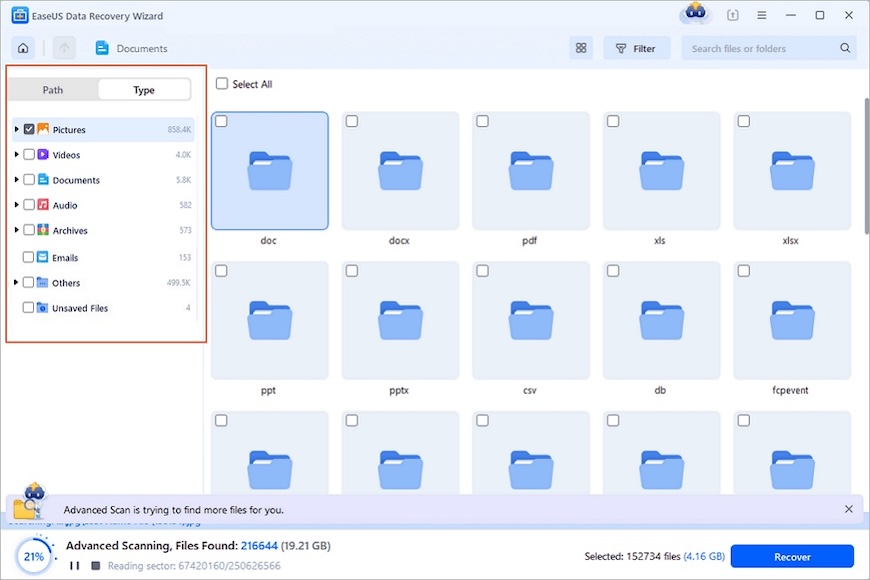
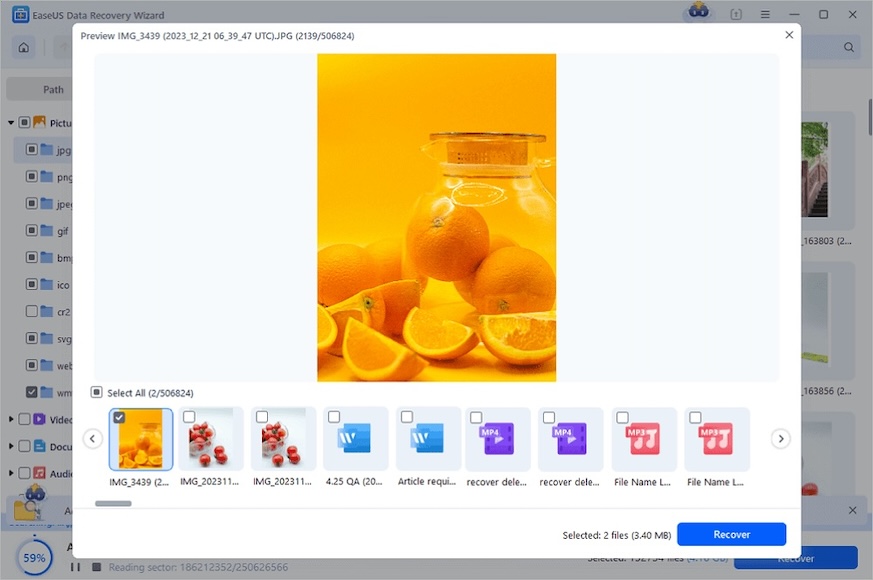
Step 3. Choose the photos you want to recover and tap on the “Recover” button. Remember to save the recovered files to a different drive, never back to the same SD card.
Method 2. Recover Photos from a Formatted Camera SD Card with Backup
If you use cloud or local backup systems, recovering a formatted SD card may be much easier. You can first check the following backups:
- Cloud Storage: Check your cloud storage like Google Photos, Apple iCloud Photos, Adobe Lightroom Cloud, OneDrive, or other cloud drives.
- Local Backups: Check your local backups like external hard drives, NAS systems, or Time Machine backups on Mac.
- Camera Backup Apps: Check the camera backup apps, as some cameras support automatic import via their companion apps.
Method 3. Use System Recovery Tools to Recover Photos from a Formatted Camera SD Card
For advanced users, Windows and Mac offer built-in recovery options. If you’re running Windows, do as follows:
Step 1. Type Command Prompt in the search bar and choose “Open Command Prompt as Administrator”.
Step 2. Type the following command and hit Enter. Always remember to replace X with your SD card drive letter and D with your recovery destination.
attrib -h -r -s /s /d X:\*.*
Here are some other options you can try:
- File History (Windows): If you previously backed up your SD card contents using File History, you can restore them from there.
- Time Machine (Mac): Mac users with Time Machine backups can recover formatted SD card data from saved snapshots.
Common Reasons Camera SD Cards Get Formatted
Photographers usually lose images because of one of these situations:
- Accidental formatting: Pressing “Format Card” in-camera by mistake
- System prompts: Clicking “Format” when Windows or Mac prompts ask to repair a card
- File system corruption: Camera shows “Card Error” or “Need to Format” because your SD card is physically damaged or corrupted due to wear and tear
- Using an SD card in multiple devices: Metadata conflicts can damage files
- Virus or malware: Hidden or inaccessible images caused by a virus attack
Many photographers, especially professionals, format their SD cards regularly between shoots. A single hasty button press can lose an entire day’s work – which is why understanding recovery is so important.
Final Words
It’s perfectly fine to recover photos from a formatted SD card from your camera in the real world in many cases, as long as you move fast and don’t use the storage anymore.
When it comes to accidental formatting, fast formatting, or RAW image recovery, EaseUS Data Recovery Wizard still remains one of the easiest solutions for everyone who takes pictures.
The worst thing one can do in such a situation is to keep shooting or storing new files on the storage. It’s always better to stop immediately once you’ve noticed the problem, as there is a chance you can recover your photos with a reliable data recovery solution.
FAQs: Recovering Photos from a Formatted Camera SD Card
Can I get my pictures back that were permanently deleted after the formatting process?
Yes. However, it is worth noting that your pictures will remain on the SD card until they are overwritten by new data even after formatting, hence you should employ the right procedure to retrieve them.
What is the best software to recover photos from a formatted SD card?
EaseUS Data Recovery Wizard is widely recommended because it supports RAW camera files, all memory card types, and provides effective dual-mode scanning.
Is it possible to restore permanently deleted photos after formatting?
Yes. Moreover, your photos are still present in your SD card until they are overwritten by new data despite quick and complete formatting, so they will be restored only when using the appropriate software and technique.
Is it possible to restore photos from a physically damaged SD card?
Not always. Quick formatting (the default on most cameras) usually leaves recoverable image data behind. A full format or overwriting with new data reduces the chances of recovery.
How to recover photos and videos from a corrupted SD card?
To begin with, one should be sure to stop using the SD card to prevent overwriting of any further data on it. One can use a computer and software such as Recuva, EaseUS, and PhotoRec to recover data that has been deleted from the SD card. However, if the SD card is physically damaged, then one will have to refer to local data recovery facilities.


Check out these 8 essential tools to help you succeed as a professional photographer.
Includes limited-time discounts.

As the General Manager of Shotkit, India Mantle brings with her a lifelong love for photography that she developed during her childhood, watching her father document their family moments with his Nikon EM. In her free time, you find her enjoying the awe-inspiring natural beauty of her home, Northern Rivers, Australia.
👋 WELCOME TO SHOTKIT!
🔥 Popular NOW:
