






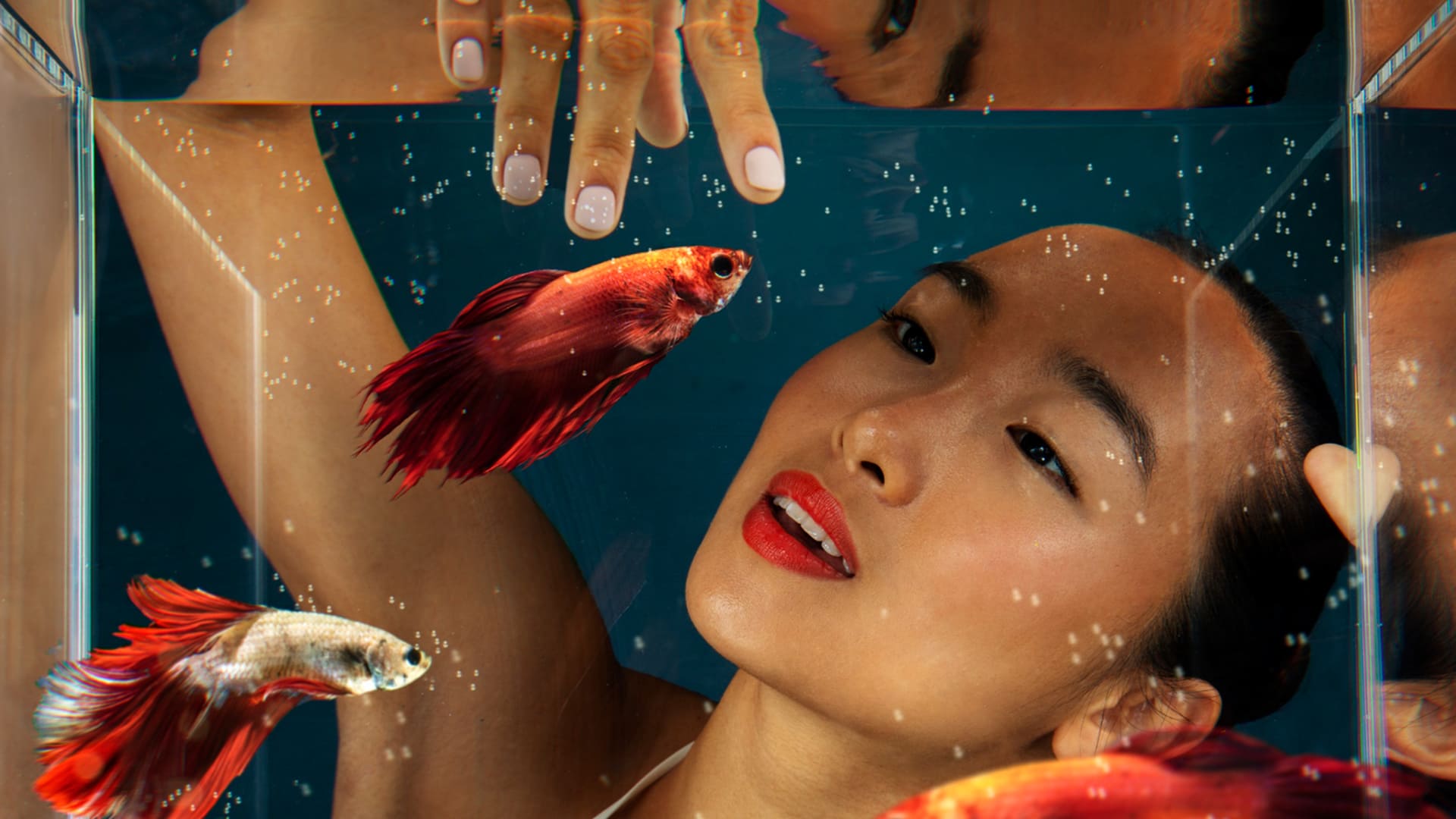
SeaArt AI’s Lens Simulation Review: Can AI Accurately Replicate Premium Glass?
The SeaArt AI creation platform offers the ability to generate images in the style of real photographic lenses. Find out how it works in my SeaArt AI review.
AI | Software | By India Mantle | Last Updated: July 27, 2026
Shotkit may earn a commission on affiliate links. Learn more.
Generative AI tools allow users to create images of almost anything in a matter of seconds, and while the technology has steadily improved, even the best AI models have never quite been able to match the work of a professional photographer using premium equipment.
SeaArt AI aims to change that. This generative platform encourages users to write detailed, complex prompts to help them recreate popular photography styles and imitate premium lenses and authentic filters.
I heard positive reviews of this platform from fellow photography enthusiasts, so I decided to test it out for myself. Read on for my full thoughts and impressions, plus a detailed, step-by-step demonstration of SeaArt AI’s generative capabilities.
What Does SeaArt AI Offer?
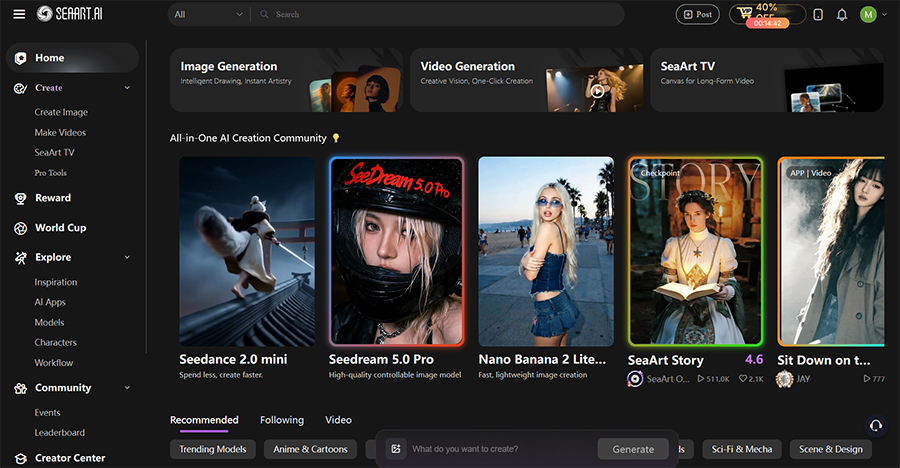
Later on in my SeaArt AI review, I’ll show you exactly what this platform can do, with a step-by-step demonstration of its lens imitation capabilities. Before we get to that, however, here’s a quick introduction to SeaArt AI for those who might not know much, or anything, about it.
Put simply, SeaArt is a generative AI platform for creating AI art, images, videos, and characters. It’s a highly community-oriented site, so users are encouraged to share and engage with one another’s creations, though you can choose to keep your content private if you prefer.
Like similar sites, SeaArt provides access to a wide range of generative AI models that you can switch between on the fly. Examples include Google’s Nano Banana, Veo, Sora, Seedream, Wan AI, Kling AI, Pixverse, and Vidu.
Unlike other sites, however, SeaArt aims to differentiate itself from its rivals by supporting more detailed prompts, producing higher quality images, and offering faster processing times, on average. This, combined with its community features, makes it feel unique in a sea of similar platforms.
SeaArt also stands out for its versatile nature. It’s relatively easy to work with for casual users, but there’s still plenty here for advanced, experienced users, too; you can even create your own apps and AI models via SeaArt AI’s “Pro Tools,” for example.
In addition, this site offers plenty of quick-use tools and templates to help you create and edit both image and video content in a range of specific styles. Again, many of these templates are created by SeaArt community members and shared for the benefit of others.
As far as downsides are concerned, I personally found some aspects of SeaArt to be a little cluttered and confusing. The community tabs, in particular, tend to bombard the user with excessive amounts of information, which can feel overwhelming for beginners.
The pricing system can also feel a little confusing at first, due to the sheer amount of information associated with each pricing plan. I’ll discuss that in more detail during the “Pricing” section of my review, further down the page.
Key Features of SeaArt AI
There’s a lot you can do with SeaArt AI, from generating images and videos from scratch to editing your own photographs and even creating consistent characters you can reuse in multiple scenes and stories. For this review, however, I’ll focus primarily on SeaArt’s “Lens Simulation” capabilities.
AI Lens Simulation
The big question I wanted to have answered when testing SeaArt AI was “Can it actually replicate the kinds of lenses and equipment I use on my professional shoots?”
To find out, I had to make sure I was using the right terms and phrases in my prompts. Fortunately, SeaArt has provided a helpful “AI Photography Guide,” detailing the exact terms that users should use to recreate certain angles, lenses, filters, and other characteristics.
For fisheye-style photography, for example, SeaArt’s developers invite users to add this phrase to their prompts: “180-degree fisheye distortion, spherical reflection captured.” Or, if I want to replicate a specific lens, camera, or filter type, I can use prompts like “Phase One IQ4 150MP detail.”
Let’s see how this works in action.
To begin, I logged into the platform and clicked the “Create Image” button, which took me to this screen.
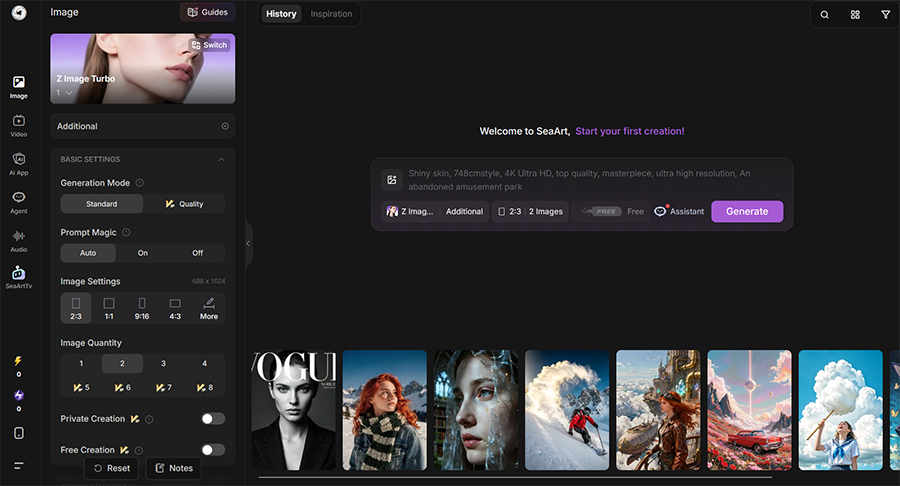
Here, I could adjust a range of settings, selecting the resolution of my image, choosing how many images I wanted to generate, switching between thousands of different AI models, and even reviewing some recent user creations for ideas and inspiration.
Since I only had a limited number of credits to work with, I decided to start with one of the simpler AI models: Z Image Turbo. I asked it for an action shot of a skateboarder performing a kickflip, captured on a Canon EOS R5 with an f/2.8 lens, fast shutter speed, and golden hour side lighting.
Within less than a minute, SeaArt had produced the following:
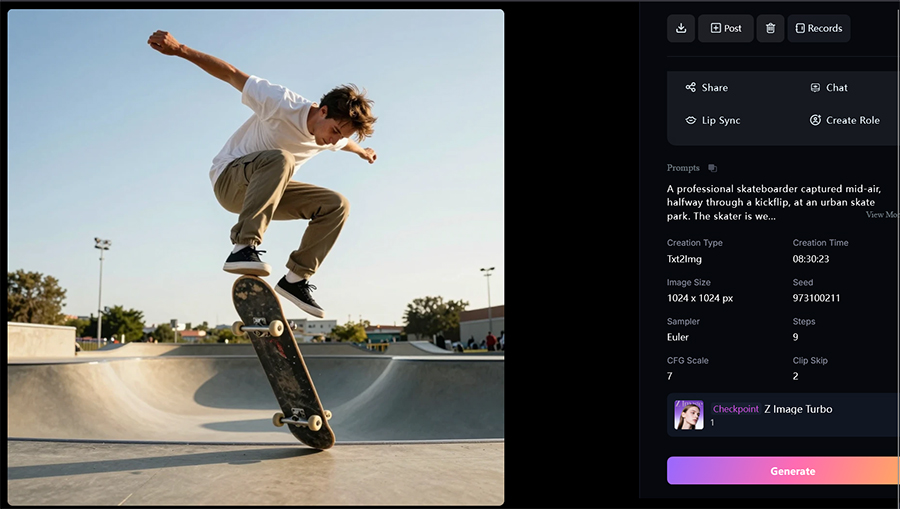
There’s no doubt that this is a high-quality image. It looks extremely realistic; there are numerous details, and even when I zoom in on various parts of the picture, I struggle to find any inconsistencies or anomalies to clearly identify that it was made with AI.
The model also followed my prompt quite well, capturing the action pose I asked for and the kind of detail one would expect from a high-end Canon lens. The golden hour lighting is also present, though I feel the overall image is still perhaps a little too bright.
I then reused the prompt with the more advanced SeaArt Infinity model, which gave me this:

Again, the overall detail and quality levels here are exceptional, and I feel that this model adhered to my prompt’s requests even more tightly. It perfectly recaptured the golden hour look I was going for, and this looks like the kind of image I would love to have captured myself on my own camera.
Then, to mix things up, I switched to one of the high-end models, which costs much more to use: Seedream 5.0 Lite. I also wrote a whole new prompt, asking for an image of a small brown bird captured on a Sony E 70-350 mm f/4.5-6.3 G OSS Super-Telephoto lens with bokeh-style background blur.
Here are the results:

I’ve used the exact lens specified in this prompt, and this feels exactly like the kind of image it could capture. The hyperrealism is extremely impressive, especially in the bird’s eye, beak, and feet, and I love the bokeh effect, as well.
This was by far the most impressive image I obtained during my testing with SeaArt AI, but there are literally hundreds of thousands of AI models to try, and I’m sure that with enough testing, I could reproduce almost any lens or filter imaginable.
The only problem is finding which models work best and learning the exact prompts you need to use to achieve those goals. That could take weeks or even months of experimentation, as well as vast amounts of “Credits.”
Other SeaArt AI Features
Along with its remarkably advanced AI image generation features, SeaArt AI also offers the following:
- Model Training: Users can train and customize their own AI models, uploading reference images to fine-tune their responses.
- Video Generation: SeaArt supports the creation of video content in various ways, including image to video, text to video, and video to video.
- Editing: Once you’ve created a piece of content on SeaArt (or uploaded one), you can use AI to edit it, changing colors, backgrounds, removing objects, etc.
- Batch Generation: Depending on your subscription tier, you can potentially generate numerous pieces of content at the same time, even with different models.
- Community: SeaArt lets you “Remix” other users’ creations, copying and adjusting their prompts, for example, or turning their still images into short animations.
Pricing
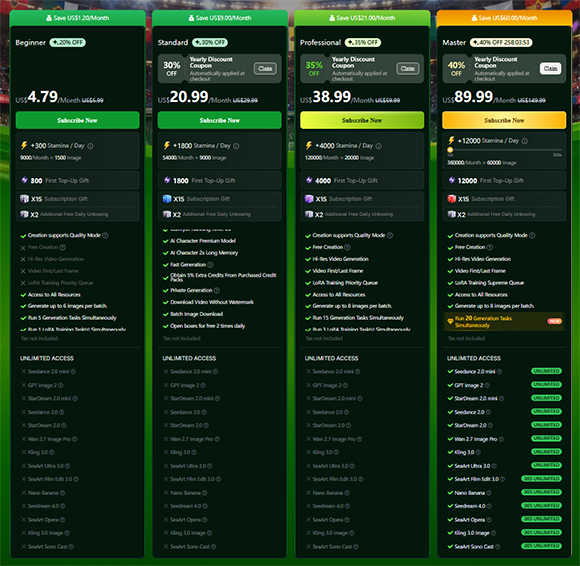
I mentioned earlier how certain parts of SeaArt AI’s website can feel a little cluttered and confusing at first glance, and the “Pricing” page is most certainly one of them. Unlike other sites, which may offer just a couple of payment plans to keep things simple, SeaArt AI has numerous options to choose from.
To be precise, it has four separate pricing plans, with different prices depending on whether you pay monthly or annually. It also offers a limited free trial for new users, and it regularly offers sales and discounts, so the price you pay may differ depending on when you sign up.
It’s important to note that the pricing plans differ quite extensively, with various features only available to those who are willing to pay higher monthly or yearly prices. As such, it’s important to review the plans before subscribing to make sure you get the correct one for your needs.
Another complexity of SeaArt AI is that it has two different currency systems: Credits and Stamina. You can use both of these currencies to perform AI features, and the big differences are that Stamina resets each day and is always used first when performing tasks, whereas Credits have to be purchased.
- Beginner: Starting at $4.79 per month, the Beginner plan is an entry-level option aimed at casual users of the platform. It provides 300 Stamina per day, which works out at around 9,000 per month, which is enough for 1,500 images. This plan also gives you an introductory gift of 300 Credits, plus access to SeaArt’s Quality Mode for higher quality image generation.
- Standard: The Standard plan begins at $20.99 per month and provides 1,800 daily Stamina, which equates to 54,000 per month. This plan also offers the Free Creation mode, which lets you generate images without spending Stamina or Credits, and Hi-Res Video Generation, among other features and a 1,800 Credit gift.
- Professional: The Professional plan provides 4,000 daily Stamina (120,000 per month) from $38.99 per month. Subscribers also get a 4,000 Credit gift, plus all the features and benefits from the previous plans and access to SeaArt AI’s LoRA (Low-Rank Adaptation) training queue, which may be of interest to advanced users.
- Master: The most expensive and fully-featured plan starts at $89.99 per month, but can cost much more, depending on how much Stamina you want. Options range from 12,000 to 100,000 daily Stamina points, plus an equivalent Credit gift. This plan is also the only one to provide unlimited access to SeaArt’s full AI model range, including Seedance 2.0 mini and Kling 3.0.
In addition to all of the above, SeaArt AI also offers the ability to buy credit packs, which range in size from 700 credits up to more than a million. You can also purchase “Super Value Packs,” which can contain various rewards, including bonus Credits, Stamina, “Lucky Boxes,” and “Decorations.”
Lucky Boxes are similar to the loot boxes found in many popular video games; they can also be purchased separately and may contain a variety of surprise items, while Decorations are decorative add-ons you can use to dress up your profile or your AI creations.
With all of these different currencies, plans, and purchasable items, SeaArt AI’s pricing system can easily overwhelm new users. Even after using the platform for several days, I was still a little confused about how Credits and Stamina worked, and I imagine I’m not the only one.
The prices themselves are relatively fair, especially when compared to some of the more expensive AI generation sites I’ve worked with in the past. However, I strongly believe the system could benefit from being either simplified or better explained.
The Final Verdict: Can SeaArt Replicate Real Lenses?
I’ve worked with a large number of generative AI models and platforms in recent years, and I’ve often been able to spot flaws in the images they produce or felt that the vast majority aren’t able to compete with real photography hardware.
SeaArt feels different. Having tested it extensively and tried numerous prompts to imitate various styles, effects, filters, and lenses, I was consistently impressed with the results it generated. It regularly managed to achieve a level of realism and detail that many other platforms struggle to reach.
It’s certainly not perfect because, as I mentioned, I feel the site itself is heavily cluttered and confusing. Its pricing system is complex, and the sheer quantity of models can easily overwhelm even experienced users, forcing them to waste time and money searching for the models that suit their needs.
However, once you manage to find models that align with your expectations and begin fine-tuning your prompts the right way, you can create some truly jaw-dropping images on this platform. AI still isn’t the same as taking a real camera out into the world to capture authentic images, but SeaArt proves that it’s getting closer.

As the General Manager of Shotkit, India Mantle brings with her a lifelong love for photography that she developed during her childhood, watching her father document their family moments with his Nikon EM. In her free time, you find her enjoying the awe-inspiring natural beauty of her home, Northern Rivers, Australia.
1 Comment
Leave a Comment
👋 WELCOME TO SHOTKIT!
🔥 Popular NOW:

Interesting test of whether a lens description in a prompt can really mimic premium glass. For anyone experimenting with that, LensPrompts is a free library of 1,000 tested AI image and video prompts for Nano Banana, Midjourney, GPT Image, Seedream, Veo and Kling, each shown next to its real result.