







StagerAI Review for Real Estate Photographers: Can AI Replace Traditional Home Staging?
Is StagerAI worth it for virtual staging and real estate listings? Read our full StagerAI review to find out.
AI | Software | By India Mantle | Last Updated: August 14, 2026
Shotkit may earn a commission on affiliate links. Learn more.
Photographers can usually control the conditions in their studio. Real estate photographers rarely have that luxury.
Instead, what you might get are images that came out just slightly “off.”
The weather was just a touch too cloudy or dour. The neighbor’s bins managed to sneak into the wide-angle shot.
Or the rooms themselves are just not “perfect” enough to show off as-is and retain that clean appeal that every real estate listing seems to have these days.
StagerAI proposes that you can solve all these issues in a single browser tab, alongside removing furniture or even swapping entire color or styling palettes.
Whether that claim holds up comes down to two separate questions: how good the individual tools are, and whether you’re comfortable with what the finished images imply about a property. To learn whether Stager checks these boxes, read on for our StagerAI review.
What Is StagerAI?
StagerAI is a browser-based AI media platform for real estate. There’s nothing to install, and you can start by uploading images to the platform.
Getting started is about as simple as these things get. You drop a photo onto the main page of the dashboard and it generates a staged preview automatically. Best of all, registering an account doesn’t require a credit card, just a simple e-mail verification process.
Once you’re in, there are three ways to get images into the platform: direct upload, a Dropbox link, and the in-app library. The library is arguably the best part, because it’s organized around listings rather than files.
This allows you to create an entry for a property, tag it with the address, and every edit, staging variant, and export for that entry is under that “folder.” If you’re a photographer juggling six shoots in a week, that’s practically a ready-made filing system.
File support is generous. It accepts JPG, PNG, and HEIC alongside the major RAW formats, which matters because the platform’s HDR pipeline is built to take multi-exposure brackets straight off the card, group them automatically, and merge them without you opening Lightroom.
The toolset itself is split into two logical halves. You can use the editor to fix what’s in the photo or use generative features to add what isn’t.
Key AI Editing Features
AI Photo Editing
This is the closest thing StagerAI has to a headline feature for photographers specifically.
You upload the RAWs, enter the text for what you want to do, and the tool implements basic editing changes alongside the guide.
Most edits will complete in under 60 seconds, and in practice the turnaround genuinely is fast enough that you can process a full gallery while packing up gear.
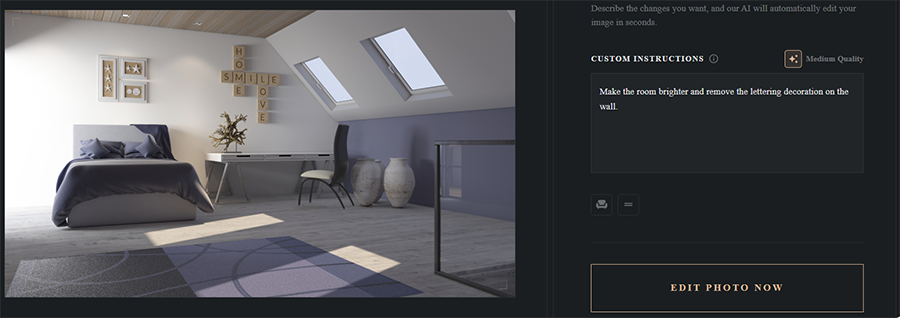
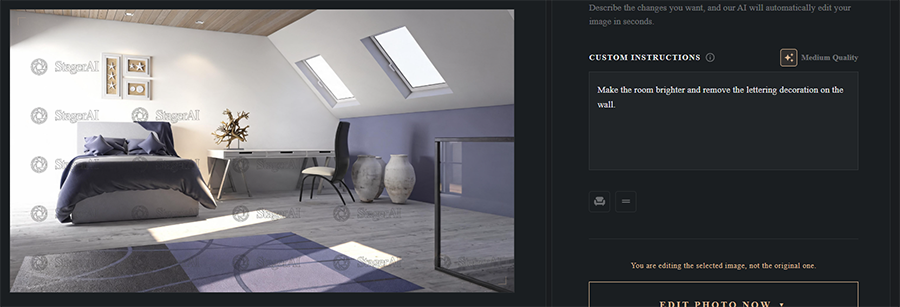
The trade-off is that the tool usually has one look that it applies uniformly. You don’t have per-image grading control, direct brightness settings, or the ability to upload a house style to enforce for other listings.
Practically all the output tends toward the bright, high-key, slightly flat look that dominates real estate photography. This is fine if that’s what your clients want, but it will clash with some niche styles, especially if you’ve built an audience around them.
You do get the ability to upload custom furniture to reference and a rather unwieldy tool for trying to place it into the room. But the tool actually works and will even sometimes correctly remove items that collide with the new edit.
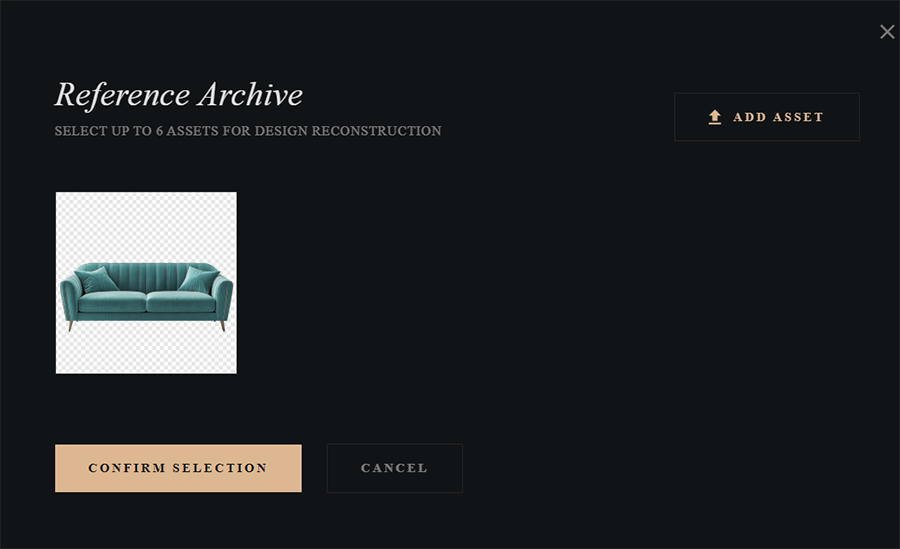
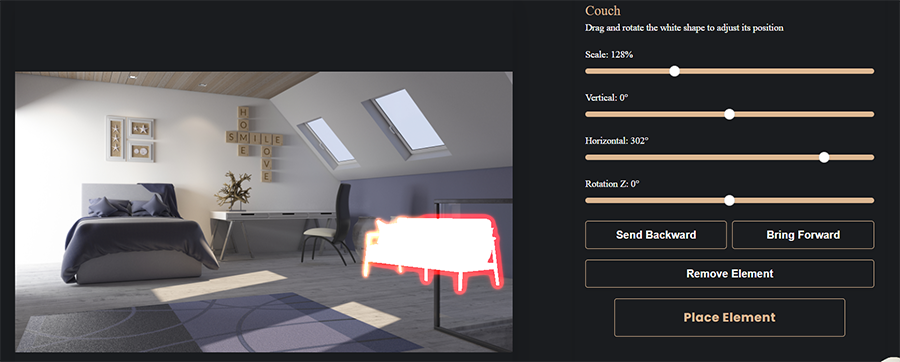
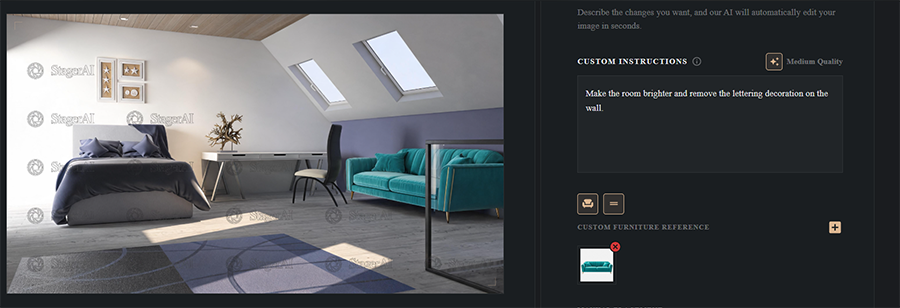
Think of it as replacing an outsourced editing service rather than replacing your own editing. It wins purely on speed and cost rather than the exact quality. For anything better, it’s more worthwhile to learn tips on interior photography.
Magic Eraser
The eraser does what the name suggests: you brush over something you don’t want, and generative inpainting fills the gap.
Of the things it’s designed for, it’s reliable: bins, cables, a garden hose coiled on a patio, a car parked at the curb, a stray person in the shot.
The tool works best when you’re trying to remove isolated objects sitting against a reasonably uniform background, and for most of these, you can export the image without a second look.


Where the tool struggles is with structure or texture. If the background is patterned tile, brickwork, a bookshelf, or even anything reflected in a window or a floor, the tool can occasionally fail.
With the example above, it didn’t correctly spot that the background has long planks and incorrectly ended a plank too early.
In most cases, the fill invents plausible-looking texture that doesn’t line up with the pattern around it. The problem is that the failures might be subtle enough to miss at thumbnail size, but suddenly become obvious at full resolution.
As such, make sure to zoom generously before you mark an image as done and use the free re-renders if needed.
Land Annotations
This one sits slightly apart from the rest of the toolkit, because it isn’t really generative.
It lets you overlay boundary lines and labels onto exterior and aerial shots, which is how lot lines, outbuildings, and acreage usually get communicated on rural and land listings. It also automatically desaturates the rest of the composition.
It’s a useful inclusion and saves a trip to a separate graphics tool. However, it’s also the feature where the AI is doing the least work, and you’re carrying the most risk.

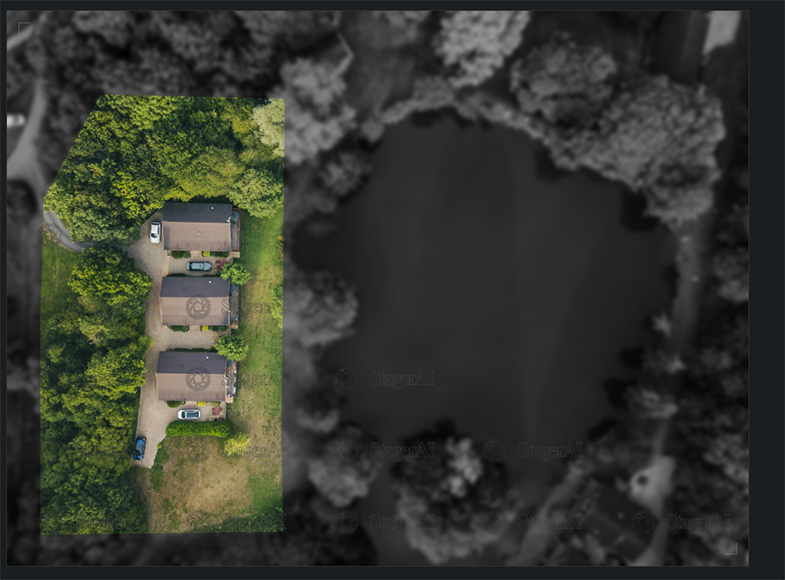
The software simply draws the line where you put it, and a boundary sketched by eye onto a drone photo is a marketing illustration. Make sure to properly state that in fine print and show the image only as a reference.
Water Enhancer
This is a one-click tool that turns pools and water features a clean, saturated blue.
It works, and it works consistently, which is more than can be said for trying to color-correct a green pool by hand. Edges around steps, ladders, and pool tile held up better than I expected.
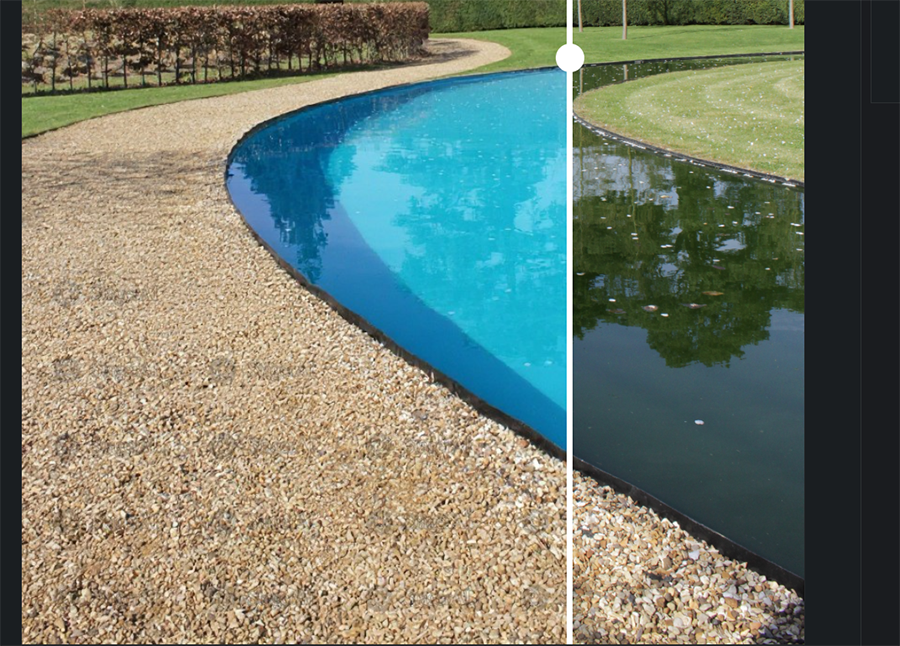
It’s also the first feature on the list that can stop being a correction and start being a change. Brightening an underexposed pool is one thing, but converting an algae-tinted pool into a resort blue is presenting a condition that doesn’t actually exist.
Wall and Floor Changing
These are two separate tools that behave similarly, where the wall painter previews new paint colors while the floor replacement swaps flooring for wood, tile, or carpet.
Both are convincing so long as you don’t look too hard. Skirting boards, door frames, and thresholds can be a bit murky, and reflective flooring might not work at all, because the reflection in the original floor doesn’t get regenerated to match the new material.
In the worst cases, you may end up with polished concrete reflecting furniture that was standing on hardwood. The best-case scenario is changing similar textures, such as hardwood for similar hardwood, just making it a tad more polished or in a different direction.
Consider this one of the “what-if” tools rather than something that accurately displays the listing.
Decluttering
Virtual decluttering is the magic eraser applied wholesale, clearing an occupied room of its contents in one pass rather than object by object.
The results can range from impressive to unreliable. What the tool might not do well is triangulate the proper position of corners or skirting boards when they’re behind large pieces of furniture, so you end up with a room that’s too small or too big.
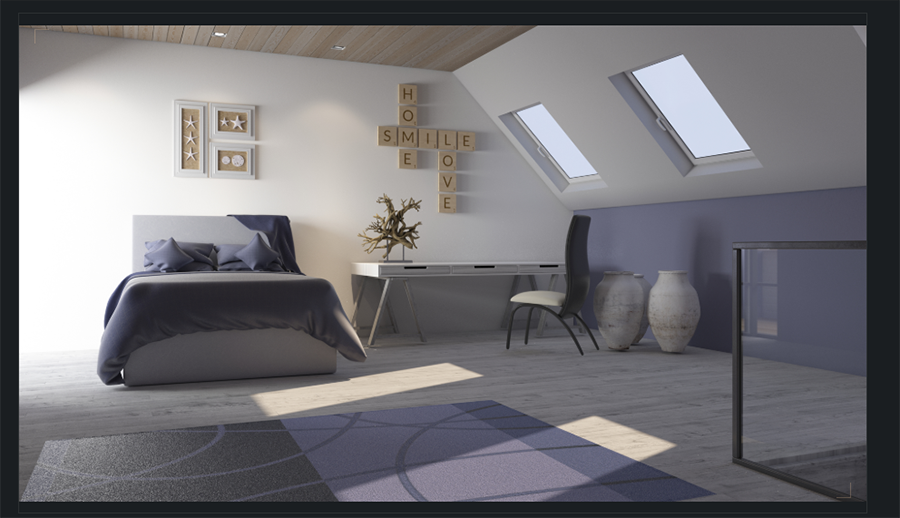
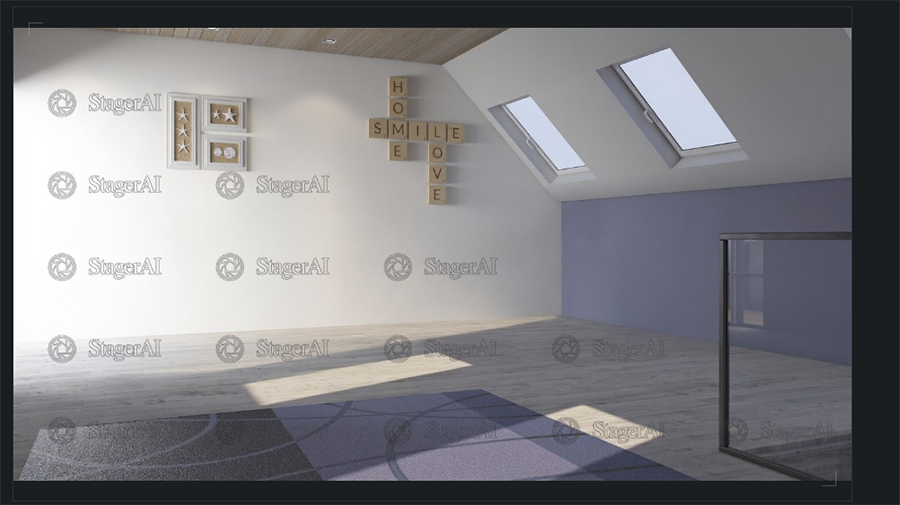
The “declutterer” might also miss decoration or other elements like railings, which means you have to go back and specifically add them to textual instructions.
There’s also a practical caution here that has nothing to do with output quality. Common guidance across MLS boards is to stage vacant rooms rather than digitally remove a seller’s existing furniture, making this tool a bit unnecessary.
AI Staging Features
Virtual Staging
This is arguably the core premise of the tool. You upload an empty room, pick a room type from a list of options, choose a design style, and get a furnished version back in well under a minute.
The style library on the site currently offers eleven options, from Scandinavian, Boho Chic, and Japandi to Urban Industrial or Modern Luxury.
You can also choose colors, make the image from another angle, or put the same custom furniture as in the AI editor or get them from a mood board (like on Pinterest).
The pricing model here is the best thing about it. Your monthly quota counts uploaded photos, not renders, and each uploaded photo can be restaged as much as you want.
In theory, that means you can cycle through every style and room type on a single image without burning anything.
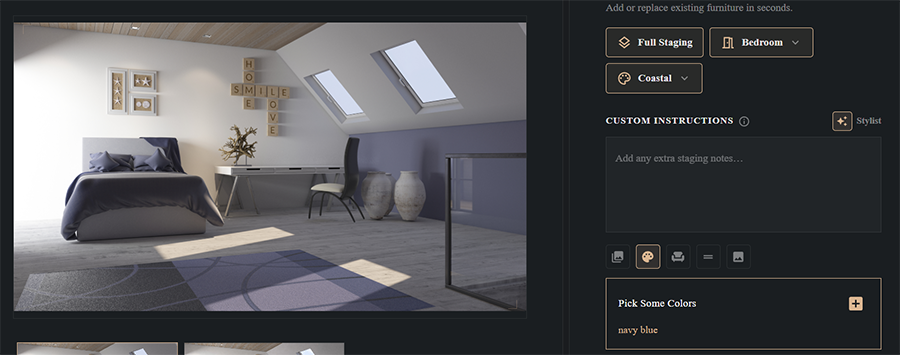
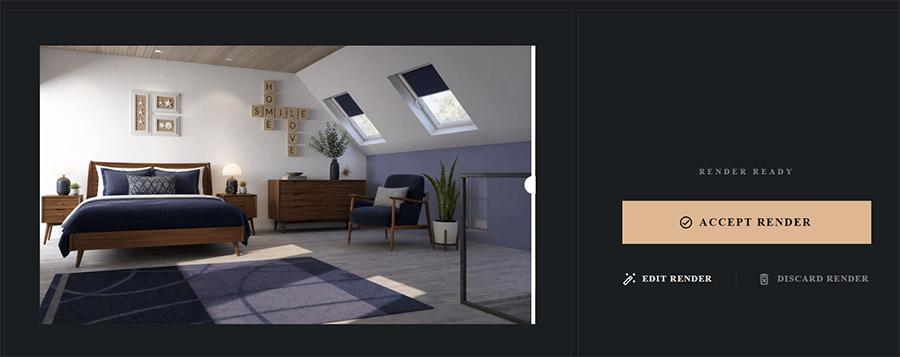
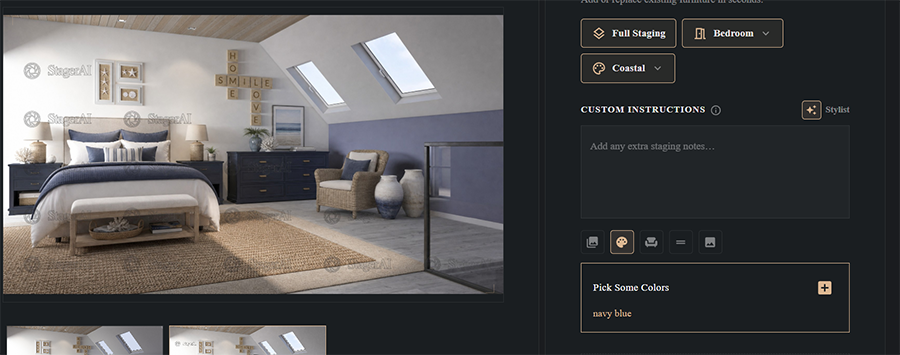
As for the quality, the resulting staging is usually ok, but not exceptional. The furniture is most often correctly placed and doesn’t float off the floor, and the actual layout of the room is functional most of the time.
The main issue I’ve found is scale, where small bedrooms might get beds meant for much larger rooms. The tool might also produce a layout that an actual person wouldn’t propose, but both of these can be fixed by regenerating the result.
Renovation Preview
Virtual renovation goes further than staging, applying full finish upgrades to a dated space. It works on both unfinished surfaces (meaning bare walls) and rooms that have outdated furniture or textures.
This is arguably one of the most generatively heavy options, as the tool reinterprets the room based on what it might look like solely by dimension and the room type (bedroom, bathroom, kitchen, etc.) rather than any existing contextual clues.
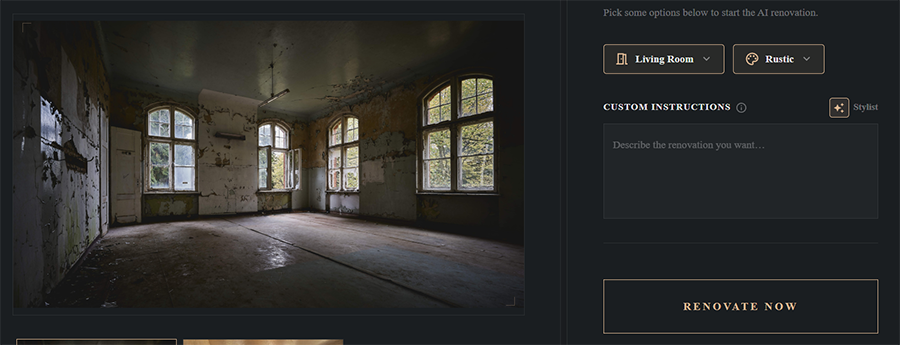

I’d also consider this a feature with the highest capacity to mislead, because it changes permanent structural and finish elements rather than adding movable furniture.
The tool can also get structural elements wrong, such as trying to add fireplaces to walls that can’t have them (as in the example above).
Background Replacement
This part of the tool is laughingly simple, consisting of three distinct tools:
- Lawn regenerator that makes patchy, dry, or brown grass become uniformly green
- Sky replacement that changes clouds or general brightness
- Day-to-dusk that introduces or changes shadows
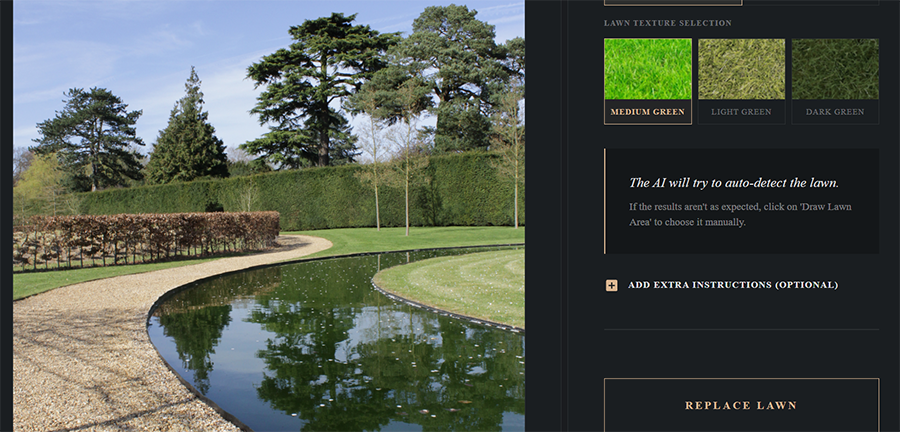

All of these tools generally work well, particularly because the textures it introduces are less likely to reveal obvious AI artifacts (such as grass). They also take care of a major issue where the look of the real estate changes based on something you can’t control, like weather or season.
Additional Features
The tool also offers a “perspective correction” option, but that’s a part of the internal pipeline rather than a standalone tool. It makes all the images centered, which can make a difference if you’re using the app and snapping photos on the phone for quick listings.
The tool will make slight corrections look effortless, but any larger perspective changes are basically impossible to overcome.
One of the other options that you may appreciate is the AI video generator, which takes up to 15 photos and sequences them into a listing video with transitions and synced music. It can export at 16:9, 9:16, or 1:1 for MLS, Reels, and TikTok, respectively, all in a few minutes.
However, you need to temper your expectations on the word “video.” The result is an animated slideshow with motion effects and a few transition presets rather than a generated walkthrough of the property.
Then there’s the floor plan situation, which is the oddest thing about the platform.
“AI Floor Plans” has its own item in the site’s main navigation. There’s a full homepage section explaining how the architectural AI reads a 2D sketch or CAD export and returns a furnished 3D isometric render, complete with a “Convert Floor Plan” button and an animated status readout. The company’s comparison pages list 3D floor plans as a feature and even quotes a price-per-render.
StagerAI also now offers an AI floor-plan feature. Its Dimensional AI tool accepts a standard 2D floor plan, builder’s sketch or CAD export and generates a furnished 3D isometric render. The current site lists 3D floor plans as one of its available features.
Pricing and What You Get
Stager AI runs on a free preview or on monthly subscriptions with a direct photo quota attached to each tier rather than the more common credit policy.
Notably, you do get unlimited renders per uploaded photo, which means you can technically get dozens of generations per image. Additionally, unused credits roll over from month to month.
At the time of our testing, StagerAI’s pricing ranged from $1.50 per image if you choose the smallest per-month plan for only 10 photos a month. On the other end, the price goes down to only 47 cents a photo for the Studio option when you need 2,000 or more images monthly.
(StagerAI is operated by Spain-based Tramontana Tech S, and payments will be automatically converted to U.S. dollars if needed)

At those rates, the value proposition is straightforward for anyone with volume, and doesn’t work at all for an agent with two vacant listings a month who might pay.
The bigger problem I found with the website was trust signals.
The comparison page for the site advertises a 4.9 out of 5 rating from over 1,800 “verified” reviews, but I couldn’t find those reviews anywhere. Across the independent directories that list the tool, the review counts are close to zero, with Trustpilot having a single negative review (that inexplicably put the “average” at 3.2 stars).

The internal numbers don’t line up either. The homepage claims 25,000-plus agents, while the comparison pages say 12,000-plus professionals. The homepage advertises throughput of 10,000 images per hour, while the comparison page lists 50,000 per hour.
And when I scrolled down to the testimonials, the portrait images were served under filenames that don’t match the names printed beside them. A photographer credited as “Thomas Müller” is illustrated by a file called “juan.jpeg,” and a “Priya Nair” is “sarah.jpeg.”

None of that means the underlying software is bad, per se. The tool works from a technical standpoint. However, it suggests that the marketing is working overtime for a tool of its size and that it might be better to start small to determine the long-term prospects of the tool and the company behind it.
The Ethics of AI-Generated Listing Images
So, can AI replace traditional home staging? The answer is, sometimes.
Physical staging changes what a buyer walks into. Virtual staging changes what a buyer sees before they arrive, and then the front door opens onto an empty room. What Stager AI actually replaces is the virtual staging vendor and the retoucher.
The harder question is where the line sits between illustrating potential and misrepresenting a property.
If you’re in the U.S., that actually comes with a sort of answer.
Under Article 12 of the National Association of REALTORS®’ Code of Ethics, realtors have to present a true picture in their advertising and marketing, and the settled interpretation is that digitally altered listing images must be disclosed as altered. That’s the baseline for that specific association.
California went further. Assembly Bill 723, which became effective January 1, 2026, started requiring any broker or salesperson (or a person acting on their behalf, which may include a photographer working on the listing) to state on or next to a digitally altered listing image that it has been altered. They have to provide a link, URL, or QR code to a publicly accessible copy of the original unaltered image.
This covers editing with software or AI to add, remove, or change furniture, fixtures, appliances, flooring, walls, paint colors, hardscape, landscape, facade, floor plans, and elements visible from the property.
In simpler terms, common adjustments such as exposure, white balance, color correction, sharpening, cropping and straightening generally fall outside the definition if they don’t change the representation of the property. Changes that add, remove or alter property elements – such as furniture, flooring, walls, landscaping, etc. – fall within the law’s definition of a digitally altered image and trigger the disclosure requirements.
On its own, StagerAI describes itself as MLS compliant. But that claim doesn’t really mean much. The platform has no watermarking option, no paired-original export, and no disclosure workflow of any kind.
So, by itself, StagerAI is genuinely a useful tool, but you’ll need to check whether the market you’re in or the platform where you’re uploading to actually allows it.
Who Is StagerAI For?
StagerAI makes the most sense for working dedicated real estate photographers with a steady volume.
For these, the unlimited-renders model and rolling credits make it comfortable to actually experiment, and the API is there if you’re at agency scale.
For individual agents or photographers who occasionally do real estate work, the value proposition plummets. The price-per-image shoots up drastically, especially if you take on a larger estate where you might have dozens of images to work with.
If you’re just starting and want higher-quality photos, you might be better off using a better camera for real estate photography. It will get you a better “base” image that requires less editing overall.
It’s also unlikely to be the tool for luxury or architectural work either. The uniform automatic editing and generically styled furniture will practically ruin a property whose whole selling point is that it doesn’t look like everything else on the market.
If you do think you fit the profile, the free preview costs nothing. Make sure to run the images that are hardest on the AI, such as bare-bones construction or cluttered bedrooms.

As the General Manager of Shotkit, India Mantle brings with her a lifelong love for photography that she developed during her childhood, watching her father document their family moments with his Nikon EM. In her free time, you find her enjoying the awe-inspiring natural beauty of her home, Northern Rivers, Australia.
👋 WELCOME TO SHOTKIT!
🔥 Popular NOW:
