






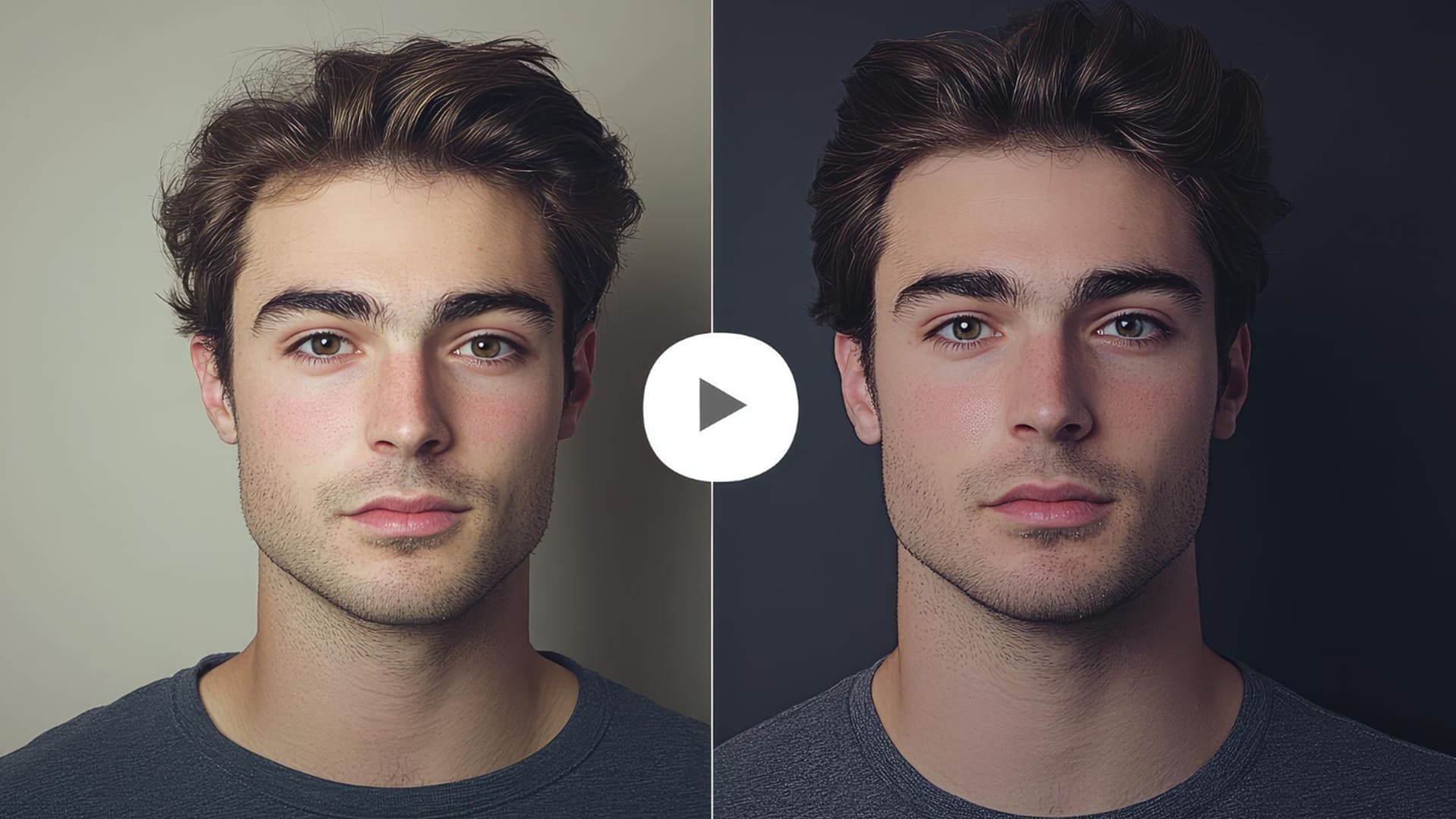
Winxvideo AI Review: Can It Successfully Restore Old or Shaky Footage?
Winxvideo AI uses AI technology to bring old videos back to life. Find out how it works and how effective it is in my Winxvideo AI review.
AI | Software | By India Mantle | Last Updated: June 22, 2026
Shotkit may earn a commission on affiliate links. Learn more.
Artificial intelligence (AI) has changed the editing landscape forever. It’s not merely capable of working wonders with still images, like correcting colors, fixing blemishes, and even changing backgrounds in the blink of an eye, but can also prove equally impressive when editing video content, too.
In the past, for example, if you had some old, shaky, or grainy footage, you might have to spend hours in an editing app to make even the most minor of improvements. Now, with AI tools like Winxvideo AI, you can bring old videos up to modern standards in no time.
I’d heard from fellow photographers and editing enthusiasts how good Winxvideo AI was, so I had to test it out for myself. Read my Winxvideo AI review for my full thoughts and a detailed, step-by-step demonstration of how it works.
What Does Winxvideo AI Offer?
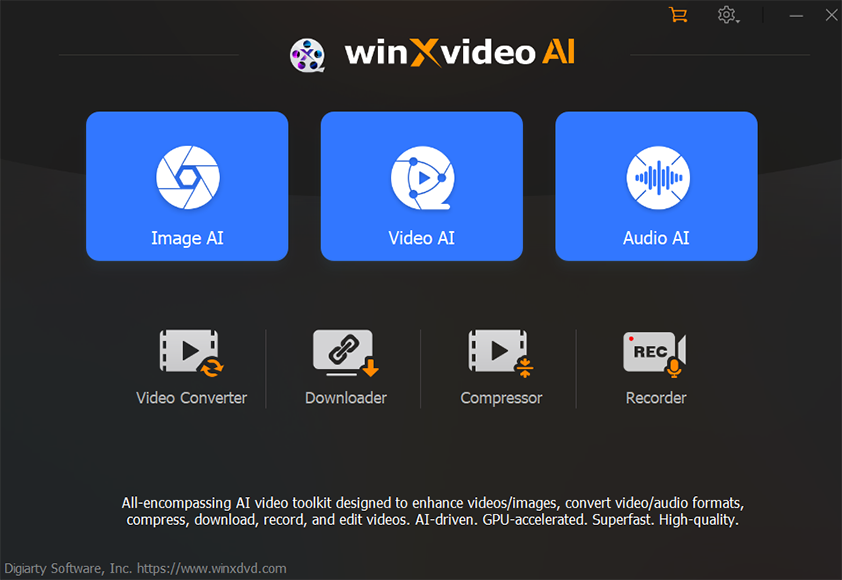
If you’re not yet familiar with Winxvideo AI, here’s all you need to know.
Winxvideo AI is a comprehensive, AI-powered video and image enhancement app, designed to help users improve, upscale, and convert their digital media. It was developed by Digiarty Software, the same company behind WinX DVD Ripper and VideoProc Converter AI.
Serving as a veritable “Swiss Army knife” for video editors, this program lets you upscale low-resolution video footage, stabilize shaky footage, and even increase the frame rate of your videos to make them play more smoothly, with seamless transitions from frame to frame.
It also provides the typical editing functions one would expect from an app of this kind. You can use Winxvideo AI to cut, crop, trim, merge, and even rotate your video files, for example, so it can quickly become your all-in-one editing application.
Winxvideo AI also offers still image enhancement features, along with AI-powered audio enhancement. For example, it can sharpen or denoise distorted images or get rid of unwanted background noise from your audio recordings.
The primary focus for most users, however, is video enhancement. Winxvideo AI uses advanced AI algorithms to scan video files, find distortions and inconsistencies, and fix them, and it’s capable of generating some remarkable results.
Thanks to this, the platform has attracted millions of users already, and is available on both Windows and Mac devices. However, performance is generally better on systems with modern GPU acceleration, especially when processing high-resolution footage.
Key Features of Winxvideo AI
Winxvideo AI offers dozens of different features, literally, from relatively rudimentary video editing tools to much more advanced capabilities. I won’t list all of them, but will instead focus on those that are most useful when working with video content.
AI Video Enhancement
The most important feature I want to focus on in this review is Winxvideo AI’s video enhancement. It’s arguably the standout feature of this application and one of the main reasons why so many users choose it over alternative options.
But just how good is it? To find out, I put Winxvideo AI’s video enhancement to the test using some of my own clips.
I’ll guide you through the process, step by step, showing you what I did and how well it worked.
As you’ll see, it’s astonishingly easy to enhance old or low-quality videos using Winxvideo AI. The first step is to simply open up the tool, head to the AI Video section, and click the “Add Video” button in the bottom left corner to select a video to work with.

For this review, I used a simple video of two women talking on a city street.
The original clip was filmed on a relatively outdated smartphone camera, which meant that the broad picture was reasonably clear. Still, individual details were a little hazy, and edges weren’t especially sharp.
I hoped that Winxvideo AI would be able to fix those issues for me.
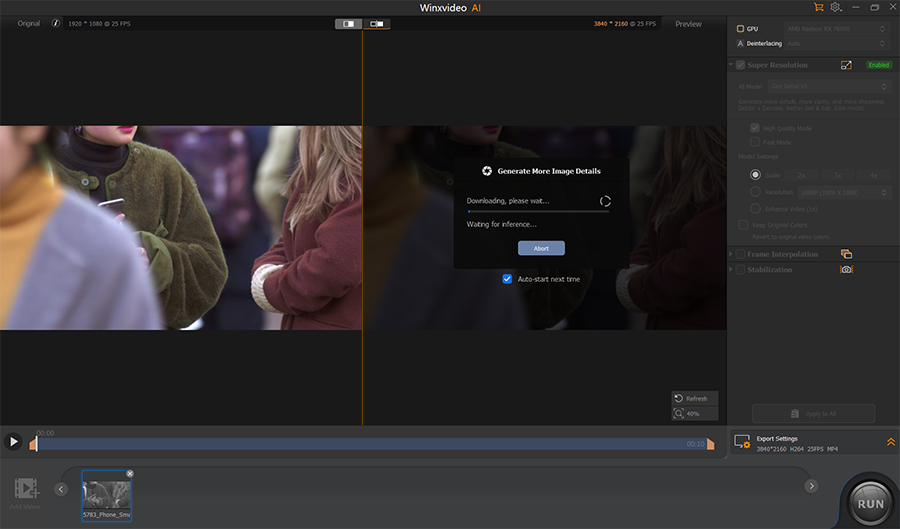
As soon as I uploaded the video, Winxvideo AI got to work. It began processing the clip and instantly divided the preview window into a split-screen “before and after” display, showing the original video on the left and the upgraded version on the right.
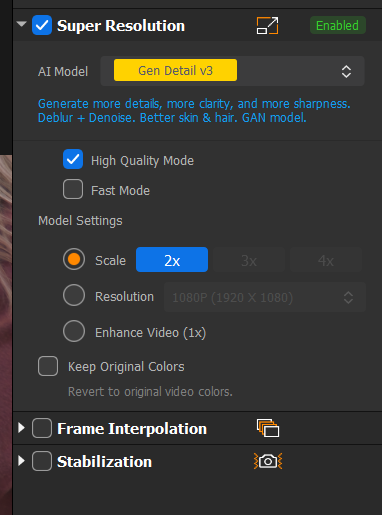
The app also automatically uses its “Gen Detail v3” AI model to make the necessary enhancements, though you can choose other models using the menu in the sidebar on the right.
You can also switch between “High Quality Mode” and Fast Mode.” I opted for “High Quality Mode” as I wanted to see just how good this app could be, but if you’re on a weaker or slower device, “Fast Mode” may be a better option, as processing times can vary widely from machine to machine.
Next, let’s see how well it worked.
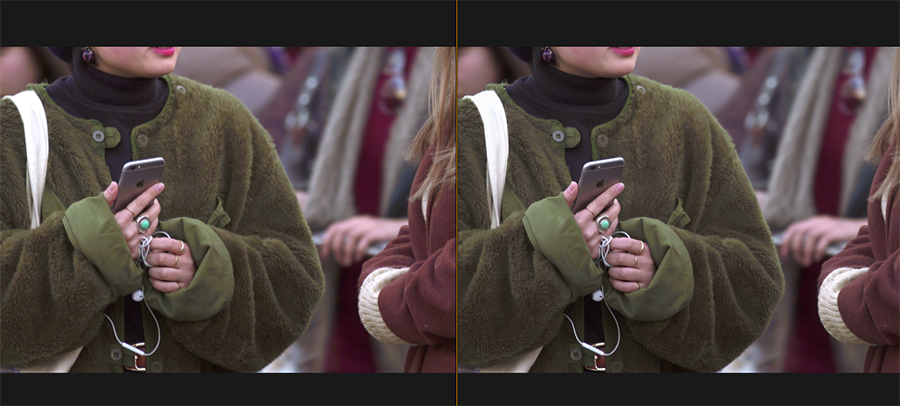
The screenshot above shows a broad view of the video before and after editing, with the enhanced version on the right.
The differences are subtle at first glance, but become more noticeable when I zoom in:

As you can see, in the original clip, the jewelry on one of the woman’s hands was somewhat blurry. The viewer couldn’t make out any details, and the closer I zoomed in, the more distorted the image became.
In Winxvideo AI’s enhanced version, however, the difference is staggering. The gemstone ring on the subject’s finger is clear to see in all its glory, and the headphone cable wrapped around her fingers is also much sharper.
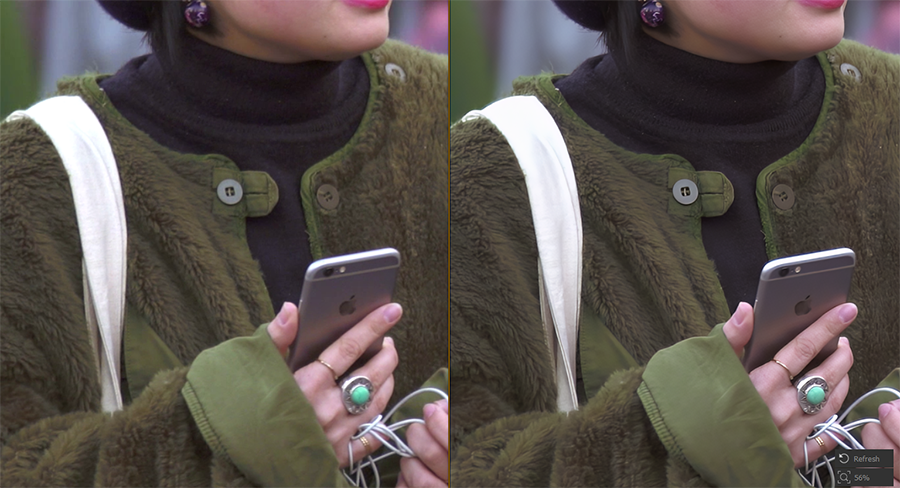
This comparison also shows how much crisper the enhanced video looks.
Everything is sharper, from the fine fibers of the woman’s coat to the edges of the iPhone in her hands and even the buttons on her collar.
I tested this tool with other videos, too, and enjoyed similar success.
Even with very low-grade clips, Winxvideo AI wasn’t able to bring them up to HD or 4K standard, but still made significant improvements, sharpening edges and removing artifacts efficiently.
AI Video Stabilization
Another of the major features of Winxvideo AI is its AI-powered video stabilization.
This is designed to help you improve shaky cam footage that might have been captured using a mobile device, a handheld camera, or a GoPro-like device, for example.
Again, the way it works is straightforward, as the AI does the hard parts for you. You can simply upload your clip, select the stabilization feature, and let the AI make the necessary changes.
I tested this tool with some clips from my phone and was, once again, impressed with the results. It was able to stabilize the footage and remove motion blur without heavily cropping the content.
The stabilization tool also offers a range of stabilization modes and presets, as you can see here:
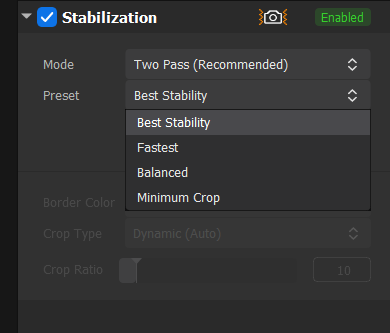
The “Two Pass” mode tends to produce the best results, though it takes longer to process than the “One Pass” option.
Regarding the different presets, I found that “Best Stability” usually worked best, but you may want to opt for the “Minimum Crop” option if you want to preserve as much of your content as possible.
Video Editing Features
As mentioned earlier, Winxvideo AI also offers more conventional video editing features, which include:
- Rotating videos by 90, 180, or 270 degrees
- Flipping videos either vertically or horizontally
- Removing fisheye distortions
- Adjusting video speed to create slow-motion or more dynamic content
- Cropping, trimming, and merging clips
AI Frame Interpolation
Yet another way that Winxvideo AI can help you enhance your videos is via its frame interpolation feature.
This essentially lets you improve the frame rate of your videos, turning a 30FPS clip into a 60FPS one, for example.
It uses AI to scan and generate new frames to fill in the gaps, resulting in smoother and more satisfying playback, with minimal distortion.
You can improve frame rate by up to five times, and this feature is great for making slow-motion versions of existing video clips, too.
More: 30fps vs. 60fps: Differences & What’s Better
Conversion and Compression
Finally, it’s worth noting that Winxvideo AI is also a powerful video compression and converter tool.
It can compress your hefty 4K and 8K video clips into much smaller versions without compromising quality, and also offers the ability to convert file types like MOV, HDR, HEVC, AAC, and AV1.
Pricing

Winxvideo offers a free trial version, which is ideal for new users who simply want to test out this tool and explore its features without any financial commitment. However, the trial version has strict limits:
- You can only output videos of up to five minutes.
- You can only process a maximum of five images.
- You only get access to basic AI video and image enhancement tools.
- Any content you create will have a Winxvideo watermark on it.
As a result, if you want to use this tool seriously or even professionally, you’ll need to pay for the premium, fully-featured version.
Digiarty Software offers three options for buyers. They all provide access to the same features and resources, but differ in terms of price and flexibility:
- 1 Year Plan (3 Devices): At $34.95, this is technically the cheapest option of the three. However, it only provides one year of access, and you’ll need to pay an additional $34.95 (or more, if the rate increases) for each additional year of usage.
- Lifetime Plan (1 Device): For a one-time payment of $54.95, you can have lifetime access to Winxvideo AI on any single device (PC or Mac). As with other plans, this comes with a 30-day guarantee, and the developer often offers discounts or bonus add-ons for buyers to enjoy.
- Family Plan (Up to 5 Devices): This is just like the lifetime plan, except it lets you use Winxvideo AI on up to five devices. It costs $79.95, so you’ll pay $25 more than the single device plan, but you can use the software on four more devices.
Overall, I think these prices are more than fair, though they were accurate at the time of testing but may change. In fact, compared to other video editors I’ve worked with in the past, some of which have license fees of well over $100, Winxvideo AI’s pricing offers fantastic value for money.
As for which plan you should get, the best option will vary depending on your exact needs. In general, I think it’s better to pay the one-off fee for lifetime usage, so that you don’t have to worry about auto-renewing costs each year, and the family plan is particularly appealing for families or small teams.
The Final Verdict: Is Winxvideo AI Worth It for Restoration?
I began this review with a single question: Can Winxvideo AI successfully restore old or shaky footage, bringing low-resolution video up to modern standards? The answer, as you have seen in the screenshots above, is a resounding “yes.”
During my time testing this tool, I uploaded a wide range of video clips. Some of them were more recent and reasonably high resolution already, while others were significantly older, filmed using basic mobile cameras with clear noise and artifacts in every frame.
Time and time again, even with older and grainier footage, Winxvideo AI was able to enhance this content. Its AI technology scanned each image, spotted the issues, and successfully resolved them; the best part is that it did it all automatically, without me having to do anything aside from uploading each clip.
The ease of use and efficiency of this tool are second to none, and its results speak for themselves. The fact that it also includes AI image and audio capabilities, all for a low one-time license fee of just $54.95 (again, at the time of writing), is another huge selling point.
At the same time, it’s not perfect. Some users may long for more advanced editing tools, for example, or the ability to make more manual, precise adjustments to individual frames. I also encountered some instances where the tool’s improvements weren’t quite as visible.
On the whole, however, Winxvideo AI does exactly what you would hope for; it almost magically takes old, shaky, and low-resolution video footage and makes it look much cleaner and crisper, with sharper details and far less distortion.

As the General Manager of Shotkit, India Mantle brings with her a lifelong love for photography that she developed during her childhood, watching her father document their family moments with his Nikon EM. In her free time, you find her enjoying the awe-inspiring natural beauty of her home, Northern Rivers, Australia.
👋 WELCOME TO SHOTKIT!
🔥 Popular NOW:
