






Aftershoot vs Narrative: AI Culling and Editing Compared
Aftershoot vs Narrative compared: AI culling speed, editing, retouching, workflow, features and pricing for wedding and portrait photographers.
Software | Paid Partnership | By Jeff Collier | Last Updated: November 18, 2026
Shotkit may earn a commission on affiliate links. Learn more.
Both Aftershoot and Narrative use AI to take the repetitive slog out of selecting and editing large RAW shoots.
They just go about it in different ways. Aftershoot is trying to be a complete post-production platform, with culling, editing, retouching and client galleries all in one app.
Narrative, on the other hand, is a more focused culling and AI-editing tool built to slot into a Lightroom, Capture One or Photoshop workflow.
For this comparison, I tested both using 794 Sony a7 III RAW files (18.23 GB), shot by my son-in-law at a wedding in New Zealand.
Comparison 1: AI Culling
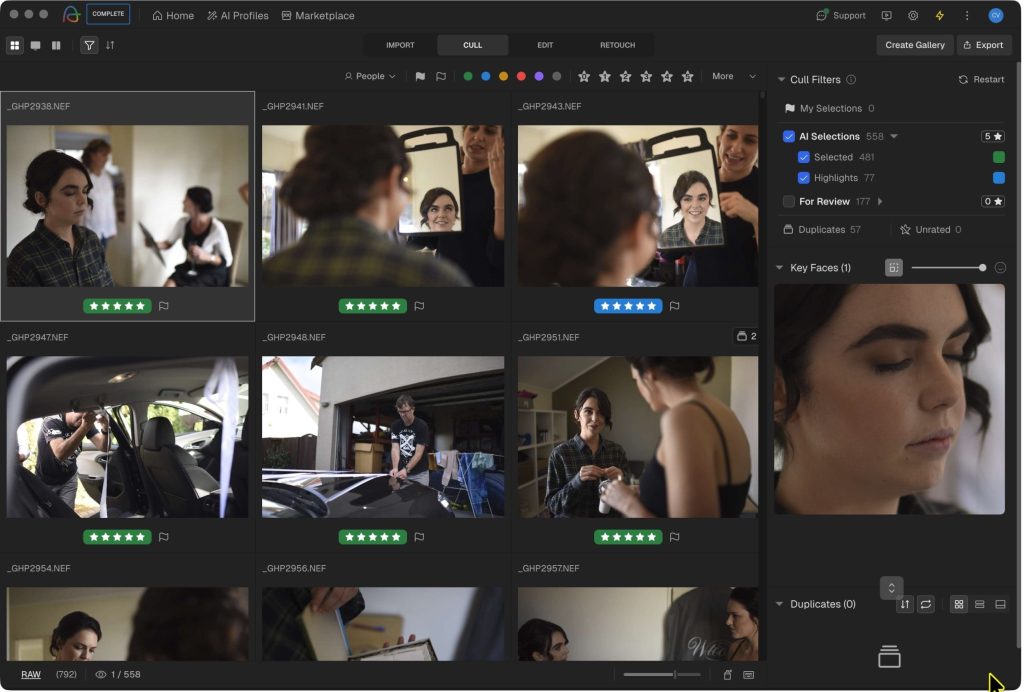
Culling in Aftershoot
Both Aftershoot and Narrative make AI culling considerably faster, but they approach the process differently.
Aftershoot offers more settings and control over how images are selected, while Narrative takes a more guided, scene-based approach. Although Aftershoot has more options to fine-tune the process, I personally preferred Narrative’s workflow once I got used to it.
Aftershoot completed the AI cull eight seconds faster: 3m 53s versus Narrative’s 4m 1s. On a 794-image shoot, that’s basically a tie. Both turn a job that could easily take hours into the time it takes to make a coffee.
Obviously, your results will vary depending on your computer, file types and the kind of work you shoot. Think of these timings as a useful real-world reference, rather than a lab benchmark.
One small win for Aftershoot: it shows a clear on-screen countdown while it’s working. Narrative does show an estimate too, but I had to hover over the AI First Pass button to find it. At first, it wasn’t immediately obvious what was happening.
Aftershoot gives you two ways to cull. AI Assisted Culling lets you make the decisions yourself with a bit of AI help, while Automated Culling makes suggested selections based on the preferences you set.
There’s plenty to tweak too. You can adjust blur tolerance, duplicate grouping and selection volume, set ratings and colour labels, preserve existing in-camera ratings, and re-run the cull with different settings if you’re not happy with the first result.
The filtering options are also more extensive in Aftershoot. Along with the usual ratings, labels, dates and camera metadata, you can filter by lens, orientation and whether an image contains faces.
If you like having lots of control over how the AI behaves, Aftershoot is the more configurable option.
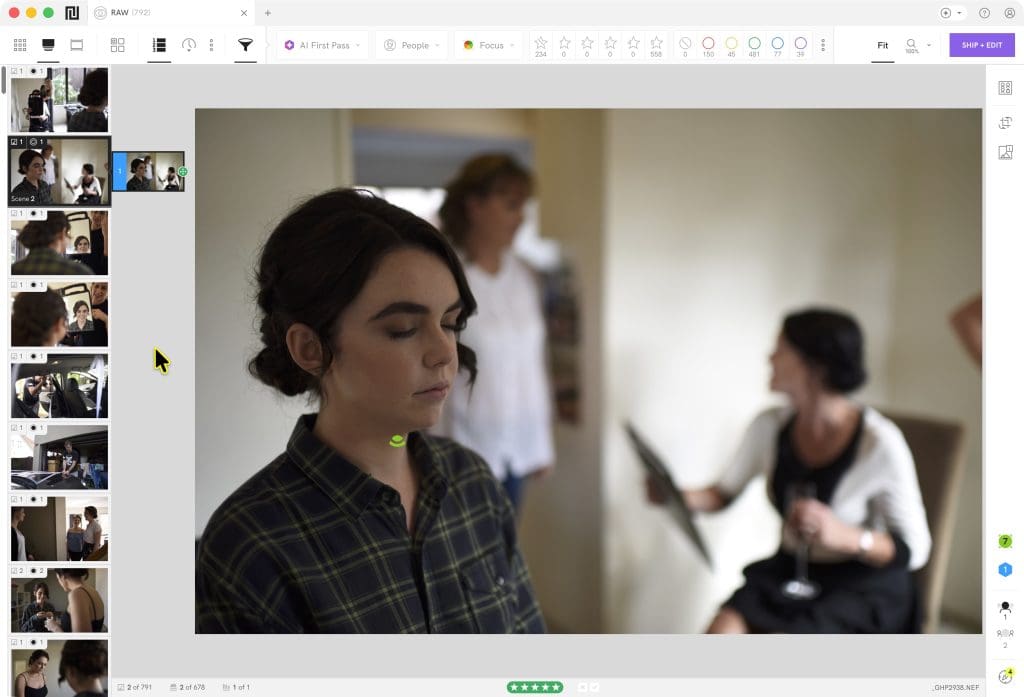
Culling in Narrative
Narrative takes a more guided approach. It took me a few minutes to fully get my head around it, but once I did, I have to say I preferred it.
Its AI First Pass gives every image a relative assessment within a scene, from Best in Scene through to Undesirable. It then groups similar moments together in Scenes View and ranks the likely keepers at the top.
I like that because it gives the AI’s suggestions some context. A photo isn’t simply called “bad”; it’s being shown as a weaker option than other frames from the same moment.
Narrative also has several tools for checking image quality more closely. Smart Zoom helps you inspect important details quickly, while Face Assessments and Focus Score help you evaluate facial details and sharpness. You can also rank images by focus to identify the sharpest shots.
The Close-ups feature makes it easier to compare details across images without repeatedly zooming in and out, and it works with objects as well as faces.
Narrative also has a duplicate-stacking feature, which I thought was a nice touch. It helps clean up the view without permanently hiding anything, and you can review or undo the stack whenever you want.
This scene-first workflow is one of Narrative’s strongest features. It encourages me to review a moment as a set, rather than jumping through similar thumbnails one by one.
Aftershoot will probably suit photographers who want explicit rules, settings and filters. Narrative feels more attractive if you want the AI to organise the review intelligently, while still leaving the final decision with you.
Both products offer comparison views, face and focus review, and the ability to export selections into mainstream editing software.
Narrative can ship to Lightroom, Capture One and Photoshop/Camera Raw. Aftershoot supports Lightroom Classic, Capture One, Photo Mechanic and Adobe Bridge.
Comparison 2: Interface and Workflow
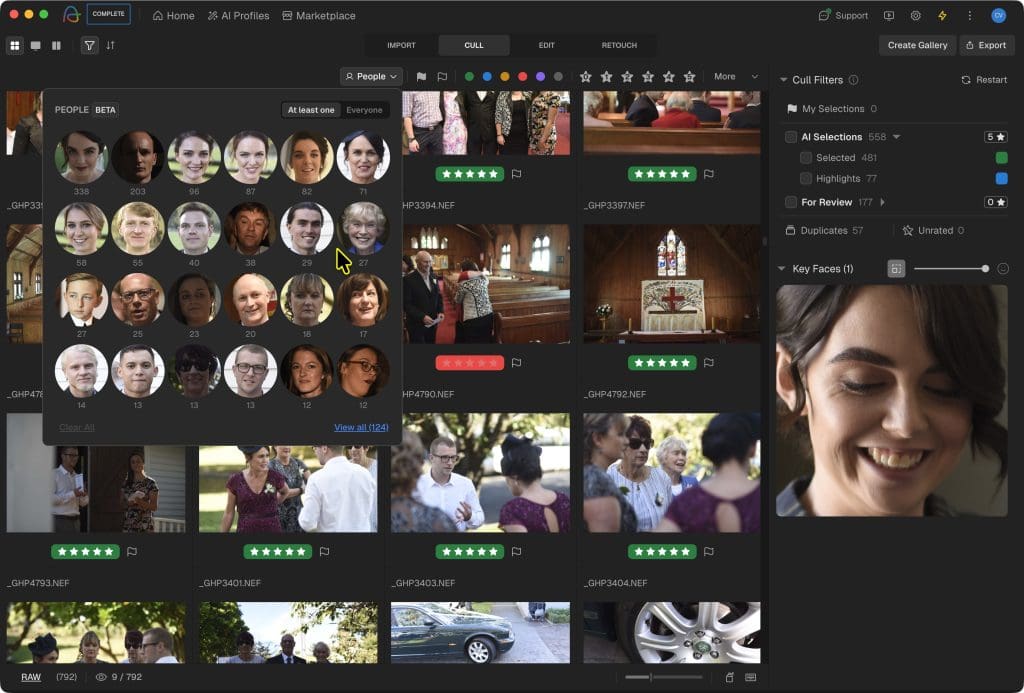
People View in Aftershoot
Aftershoot feels more polished to me, and closer to a native Mac app. The interface is generally clearer, the workflow is easier to follow, and it just looks a little more refined overall.
That said, the dark interface can make smaller controls harder to spot. The scrollbar, for example, was easy to miss.
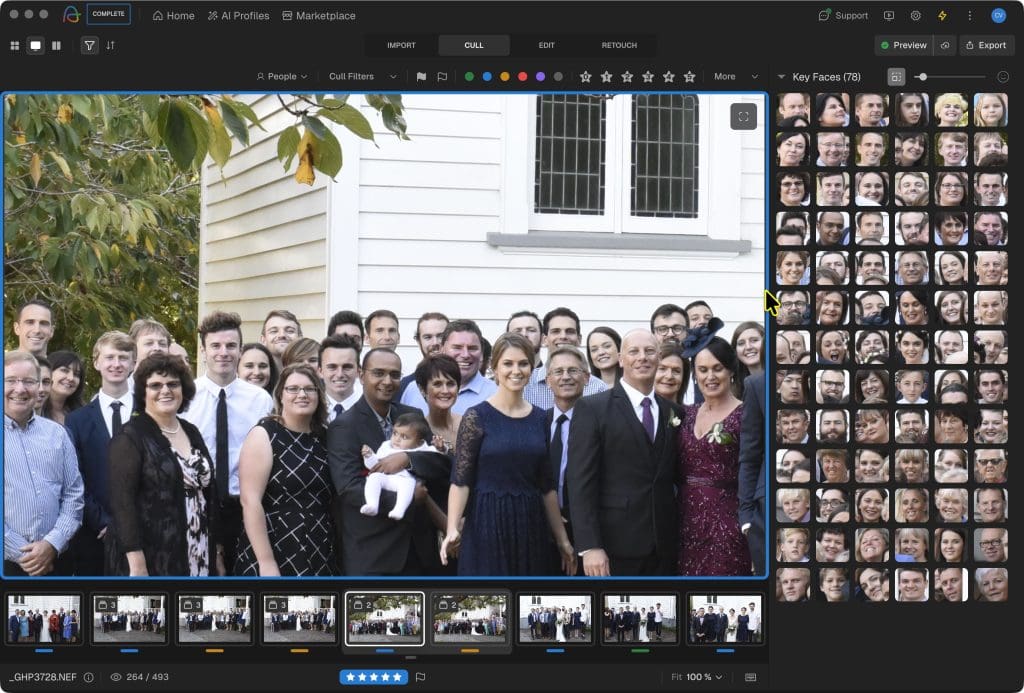
Key Faces in Aftershoot
Narrative offers both light and dark modes, giving photographers the flexibility to choose their preferred interface.
However, I initially found the interface a little more basic and icon-heavy. I found myself hovering over a few buttons to work out what they did.
Terms such as “AI First Pass” and “Ship + Edit” took a little getting used to as well. Fortunately, Narrative’s help centre is excellent, so it didn’t take long to figure things out.

People View in Narrative
The bigger difference here is really one of workflow philosophy.
Aftershoot wants to keep you in its app: import, cull, edit, retouch and potentially deliver the gallery, all without needing to jump elsewhere.
Narrative wants you to cull, apply an AI preset, then ship everything back to Lightroom or another editor you already know.

Closeups in Narrative
Neither approach is automatically better. Aftershoot reduces app-switching, while Narrative doesn’t ask you to replace the editing environment you’re already comfortable using.
Comparison 3: AI Editing

Ship & Pre Edit in Narrative
Narrative was noticeably quicker in my test, completing the AI edit in 2m 31s compared to Aftershoot’s 4m 12s.
That doesn’t automatically mean the results are better, but for high-volume photographers, it’s still a meaningful workflow advantage.
Aftershoot offers pre-built styles, profile-based editing and an in-app RAW editing environment. I can see the appeal for photographers who want to get as much done as possible without opening Lightroom.
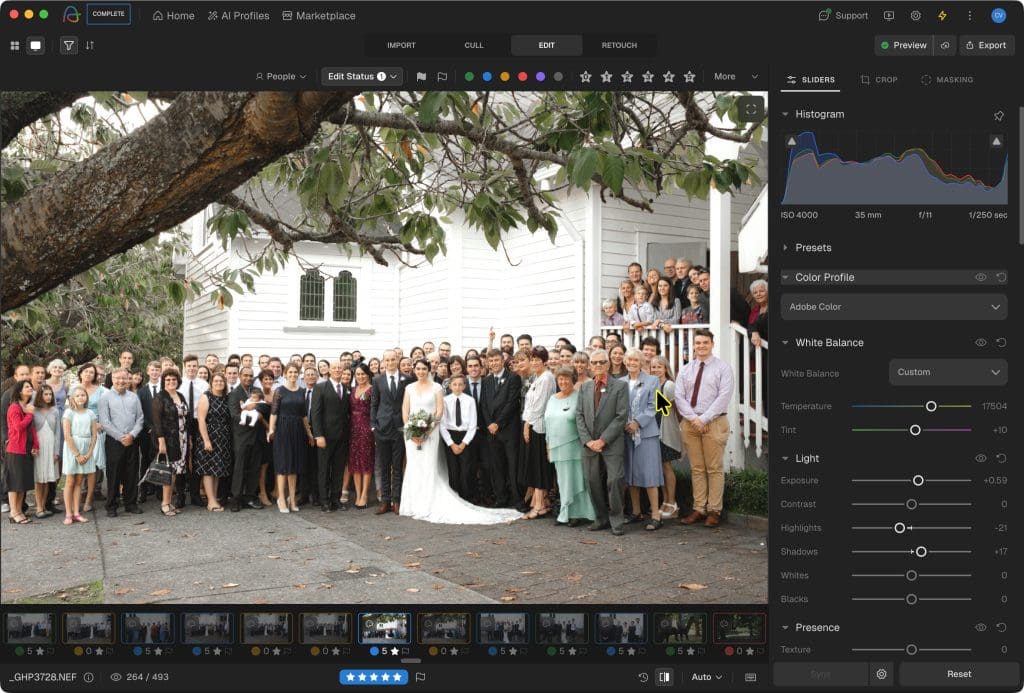
Editing in Aftershoot
Its editing tools include AI crop, straighten and masking. However, in my hands-on testing, it didn’t replicate Lightroom’s familiar copy-and-paste workflow or its broader AI masking tools.
That’s an important distinction. Aftershoot has solid editing tools, but Lightroom is still the more complete finishing environment for many wedding photographers.
Narrative’s AI Presets work differently. They apply an edit, then send the images directly to Lightroom, where I can finish them with the full Lightroom toolkit.
Core and marketplace presets are available on Standard and above. Personal AI Presets, trained from your own Lightroom edits, require Premium or Ultra.

Pre-edited photos from Narrative shipped to Lightroom.
Narrative says you’ll need at least 1,500 edited images to train a personal preset, with at least 500 consistently edited images recommended for the best results.
If your workflow already revolves around Lightroom, Narrative’s approach is very appealing. It handles the repetitive base edit without forcing you to learn another editing ecosystem.
Aftershoot is the more self-contained option for photographers who want to minimise hand-offs between applications.
Retouching, Delivery and Other Additional Features
Aftershoot has some useful capabilities beyond culling and base editing:
- AI retouching for skin, blemishes, flyaway hair, glasses glare, teeth, wrinkles and background distractions.
- RAW retouching, custom backgrounds and clothing de-wrinkling.
- Batch-syncable retouch settings and presets.
- Client galleries with proofing, favourites, face detection, downloads and print sales.
These are real advantages for portrait, headshot, newborn and wedding photographers who want delivery-ready images or client galleries without paying for extra services.
Aftershoot’s gallery product is currently promoted with included storage, although standalone gallery pricing is still being introduced. It’s worth checking the current terms before building your business workflow around it.
Narrative doesn’t try to match these features. The lack of built-in retouching will be a drawback if you want one subscription to handle every part of post-production, but it may not matter at all if you already use Lightroom and Photoshop for those jobs.
Where Narrative stands out is its focused culling experience, transparent scene ranking, quick AI editing and genuinely helpful support documentation.
Both products support offline core work and keep normal image processing on your computer.
Narrative processes images locally for culling and analysis. Personal AI Preset training involves uploading data for cloud-based training, but Narrative says your images and edits aren’t used to train models for other users or shared with them. Your Personal AI Preset is created exclusively for your own use.
Pricing
All prices below are in US dollars, before tax, and were checked on 16 September 2026.
Both companies offer unlimited images and projects rather than charging per photo.
Narrative was running a time-limited 30% promotion when I checked, so it’s worth confirming those discounted figures at checkout.
| Aftershoot | Narrative | |
|---|---|---|
| Culling only, annual billing | Select: $10/month ($120/year) | Lite: $10/month list price ($120/year); displayed promo: $7/month |
| Culling only, monthly billing | $15/month | $15/month |
| Culling + AI editing, annual billing | Select + Edit: $40/month ($480/year) | Standard: $20/month list price ($240/year); displayed promo: $14/month |
| Culling + personal AI style, annual billing | Check the current Edit/profile entitlement carefully | Premium: $40/month list price ($480/year); displayed promo: $28/month |
| Full culling, editing and retouching suite | Complete: $45/month annual, or $55 month-to-month | No like-for-like retouching/gallery bundle |
| Larger team option | Verify current seats/profile add-ons | Ultra: $60/month list price; displayed promo: $42/month, up to four users |
Aftershoot’s modular pricing makes sense if you only need culling, or if you’ll genuinely use its retouching and all-in-one workflow.
Its Complete plan is competitively priced if you’d otherwise be paying for separate culling, editing and retouching tools.
Narrative offers particularly good value for Lightroom-focused photographers.
Standard is substantially cheaper than Aftershoot’s culling-and-editing combination if core or marketplace presets are all you need.
Premium reaches the same US$40/month list price as Aftershoot Select + Edit, but includes Narrative’s personal AI preset route and a more Lightroom-native workflow.
Narrative also offers a free Ultra trial with no card required.
Final Assessment
After using both, I found Aftershoot to be the broader product. It has more culling controls, a more polished app, built-in retouching, gallery delivery and a strong argument for photographers who want one platform from card to client.
Narrative is the more focused product, and I think that focus is often its advantage. Its Scenes View and relative First Pass assessments make the culling process easier to understand. Its AI editing was faster in my test, and it deliberately sends me back to Lightroom instead of competing with it.
If your existing workflow already centres on Lightroom, Narrative feels less like another app to manage and more like a capable assistant sitting alongside the software you already trust.
Ultimately, this comes down less to which tool is “best” and more to where you want the work to happen.
Aftershoot makes the most sense if you want an integrated post-production and delivery platform, especially if built-in retouching or galleries matter to you.
Narrative makes the most sense if you want intelligent scene-based culling, quick AI base edits, excellent help resources and a Lightroom-first workflow.
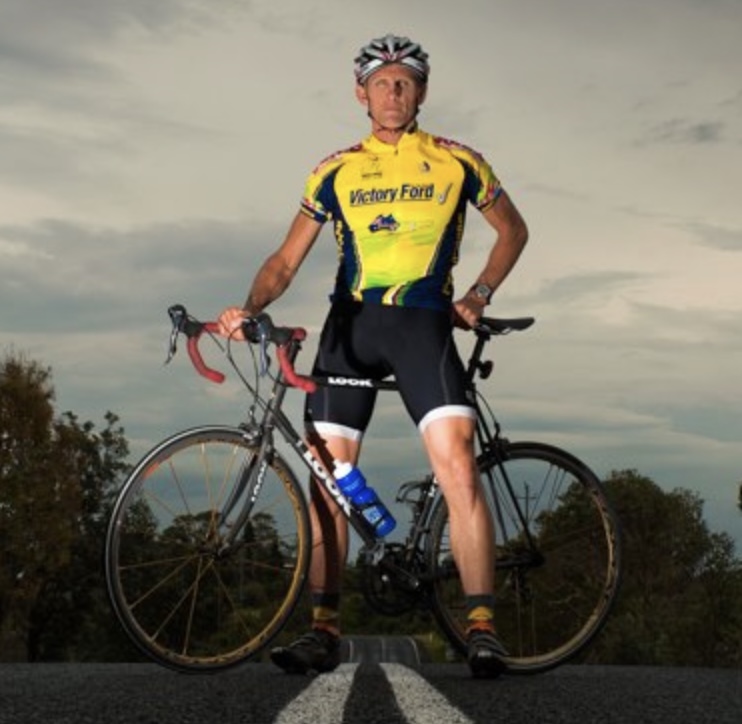
Jeff Collier is an experienced film photographer who enjoys experimenting with modern digital photography equipment, software and apps. He’s also an ex-world champion triathlete and avid cyclist, clocking hundreds of km each week in the beautiful Tweed Valley of northern NSW, Australia.
👋 WELCOME TO SHOTKIT!

🔥 Popular NOW: