







Opus Clip Review: Can AI Really Turn Long Videos Into Viral Shorts?
Discover Opus Clip, the AI tool that can turn a single long-form video into multiple short-form, social-ready clips.
AI | Software | By India Mantle | Last Updated: October 14, 2026
Shotkit may earn a commission on affiliate links. Learn more.
Short-form video is popular across platforms such as TikTok, Instagram Reels, and YouTube Shorts. People like to be able to consume quick snippets of content, and a single viral clip can help brands multiply their audiences in the span of a single day.
For this reason, many brands and creators have started clipping their content, publishing short clips taken from larger videos, in order to enhance their appeal and reach a different crowd. But doing this manually can be quite a challenge, which is where Opus Clip comes in.
This AI tool is designed to take long-form videos and extract multiple clips from them. It can identify sections that its AI considers promising for engagement and help you share the resulting clips across your social accounts.
Read on through my Opus Clip review to learn more about how it works.
What Does Opus Clip Offer?
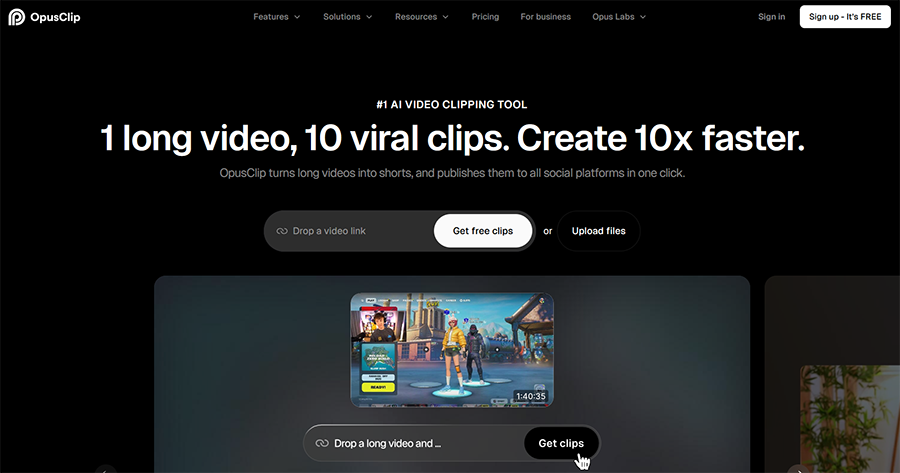
Opus Clip is an AI-powered video repurposing and editing platform aimed at creators, marketers, podcasters, and brands across industries. It offers quite a broad range of features, including AI video editing, AI B-roll generation, AI video dubbing, animated captions, and AI reframing.
However, one of its most popular features is its AI video clipping tool, ClipAnything. The way this works is quite simple: you can upload a video or simply share a link to one that has already been published, and the Opus Clip AI will extract multiple short clips from it.
Depending on the length and content of your video, Opus Clip can extract multiple short clips from it. What’s more, it then allows you to publish them instantly across your social media profiles on sites such as Instagram, YouTube, LinkedIn, TikTok, etc.
It can even stitch and rearrange multiple short, engaging clips together into viral-worthy shorts, as well as adding dynamic captions, transitions, and other extras in order to make your short-form videos as attention-grabbing as possible.
While other AI clipping tools like this do exist, most of them are just for podcasts or “talking head” style videos. Opus Clip markets ClipAnything as a multimodal clipping tool designed to handle a wide range of video genres, including vlogs, gaming, sports, interviews, and explainers.
As such, you can upload almost any video to this service and get high-quality clips in no time, and there are plenty of ways to control and customize your experience; you can use natural language prompts, for example, to tell the AI exactly which parts of your video you want it to focus on.
Once the AI has extracted clips, as long as you’re on an eligible subscription plan, it will also assign “Virality Scores” to each one. These scores, numbered from 0 to 99, essentially tell you how much chance your clips have of going viral and gaining likes, shares, and comments on social media.
Opus Clip says its platform is used by millions of creators and businesses, including well-known creators with large audiences.
Key Features of Opus Clip
Now you know what Opus Clip is all about; let’s take a closer look at how ClipAnything works. I’ll also introduce you to a few of the other features you can find on this platform to help you get a better idea of whether or not it’s a good fit for your needs.
ClipAnything
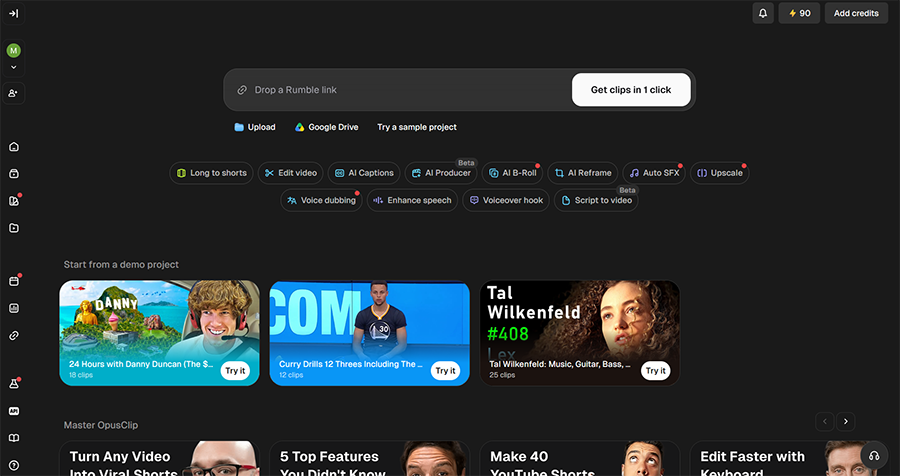
After creating my account and logging into the Opus Clip platform, I was taken to the screen below, which provides instant access to the ClipAnything feature.
As you can see, I was invited to either upload a video or paste in a link from a site like YouTube or Rumble.
Opus Clip also offers the ability to share videos from Google Drive links, and it’s good to see that so many different options are supported here.
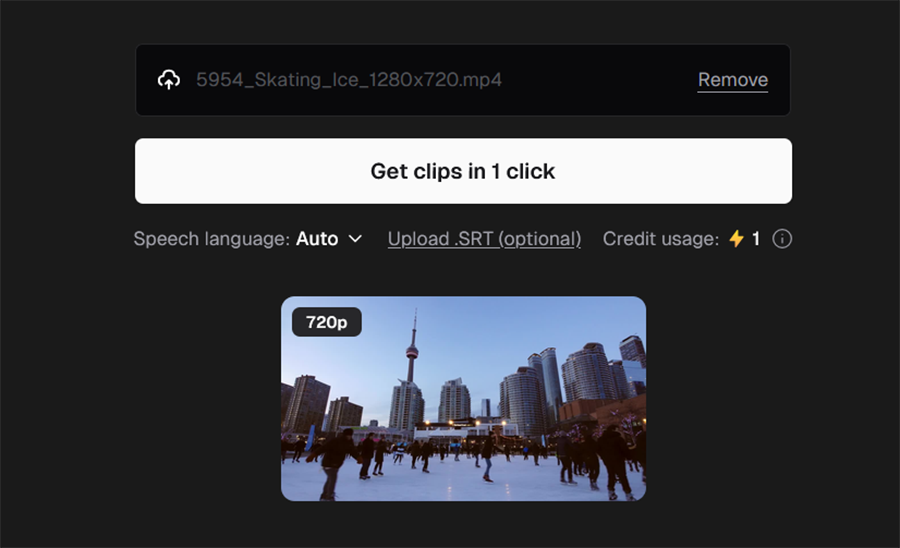
I uploaded a stock clip of ice skating footage, and Opus Clip immediately showed me how many credits it would cost to process the video. It also offered options to upload a subtitle (SRT) file and to select which language was being spoken in the video, or let the AI figure it out for itself.
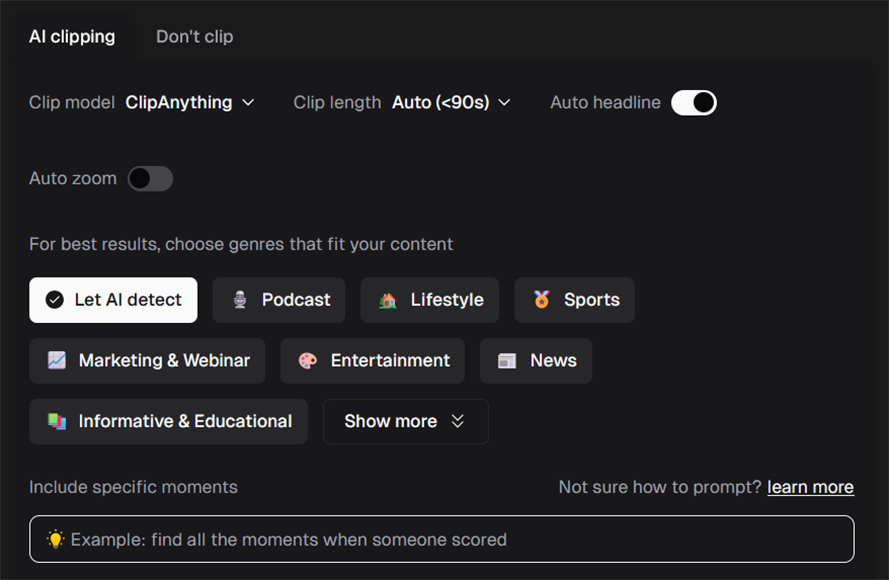
The tool also provided me with a wide range of customization options to help me control the content of my clips.
I could choose between several different AI models, for example, and set my desired clip length. There were also options for zooming and adding AI-generated headlines to each clip.
To help improve results, the platform also recommends selecting one or more genres that match your video’s vibe, with options like “Podcast,” “Lifestyle,” and “Entertainment.” Or you can choose “Let AI detect” to allow Opus Clip’s AI algorithms to scan the video and figure out what it’s about on its own.
There’s also a text box in which you can type a natural language prompt, telling the AI what to focus on or which specific moments you want to clip. You could upload a video of a soccer game, for example, and ask it to clip all of the goals or the best shots.
The platform also offers demo projects that allow you to see how ClipAnything works, without using your own credits.
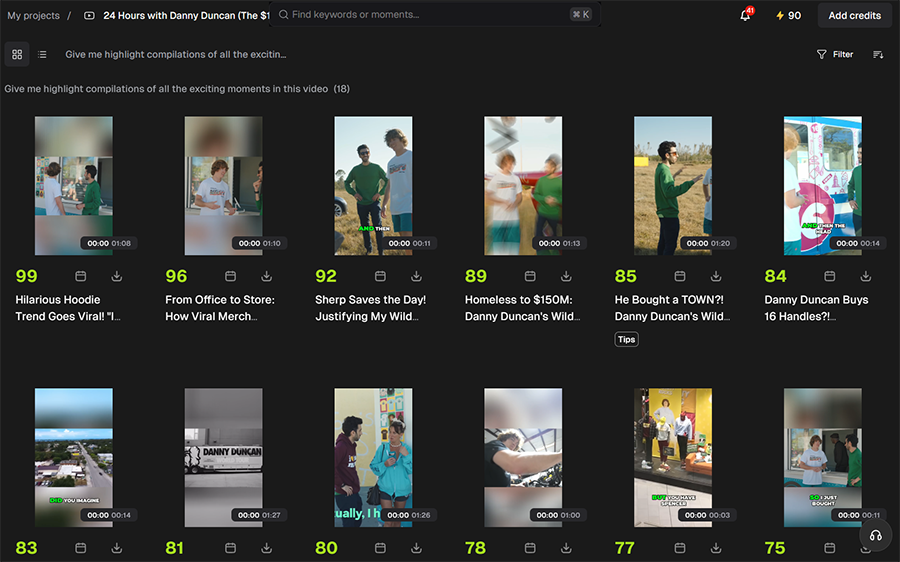
I selected one of them and was instantly given a selection of 18 clips that the AI had taken from the demo video. The clips have all been assigned their own titles and vary in length from just a few seconds to more than a minute.
As you can see, each one has also been given its own “Virality Score,” which is designed to help you quickly identify the clips that have the most potential of going viral, so you can focus on those first and potentially spend a little less time worrying about the others.
I’m not sure how reliable this feature actually is, as I feel that some of the higher-rated clips don’t appear to be any more or less engaging than some of the lower-rated ones. However, Opus Clip claims that the AI takes multiple aspects into account to generate the most accurate scores possible.
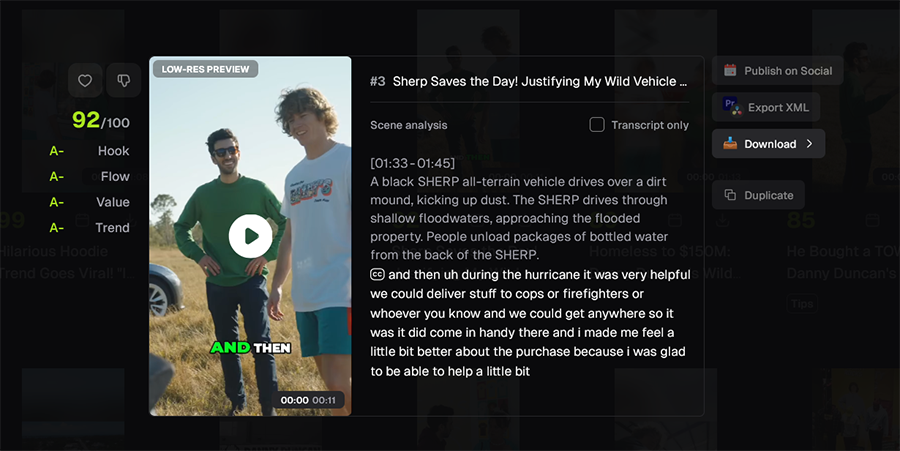
I was able to click on any of the videos to see them in more detail. I could play each one in my browser window, view the transcript of what was being said, and get a closer look at the Virality Score, with each clip getting a “grade” for its “Hook,” “Flow,” “Value,” and “Trend.”
There are also one-click options to download, export, and share individual clips to various social sites.
In terms of the overall quality of the results, I tested Opus Clip with a few different videos and found that it generally produced decent clips. However, some of the clips may miss the intended narrative or end abruptly, so the results still need to be reviewed.
As a result, you may need to edit the clips in Opus Clip or another video editor before sharing them on social media.
Other Features of Opus Clip
Along with the ClipAnything AI video clipper, Opus Clip also offers the following:
- AI Producer: This ChatGPT plugin helps edit uploaded talking-head footage using natural-language instructions. It can create a polished cut with captions, B-roll, motion graphics, and music.
- AI B-Roll: This generative tool creates B-roll footage that you can edit into your larger projects or use for scene transitions.
- Animated Captions: This will add bold, brightly-colored, easily legible captions onto your video clips for more engagement.
- Editor: The fully-featured AI video editor allows you to clip, reframe, and adjust your videos in various ways before sharing/publishing them.
Pricing
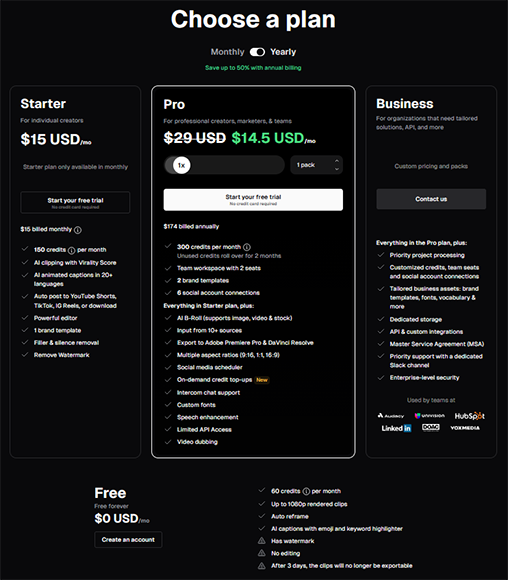
For pricing, Opus Clip offers four different plans: one free plan, two premium plans for individual users and small teams, and a business plan for bigger teams. Like other AI platforms, each plan gives you a certain number of “credits” each month, and you’ll have to spend them as you use Opus Clip’s AI features.
The Free plan includes 60 credits per month, which can be useful for testing the platform or processing a modest amount of footage. Each credit is worth around a full minute of video processing, so this may actually be enough for relatively light workloads. However, there are some caveats to keep in mind.
Free users will have watermarks added to their videos, for example, and have a resolution cap of 1080p. Advanced features, like the video editor, are also unavailable on the free plan, and all of your clips will be automatically removed after three days, so you have to remember to download them beforehand.
However, despite those downsides, this is still one of the better free plans I’ve seen on a site like this, as others only give you a handful of credits and often block most of the main features behind the paywall. So it’s good to see that Opus Clip offers a decent option for users who want to test the platform.
If you do decide to commit to a paid plan, your options are:
- Starter: Priced at just $15 per month, regardless of whether you pay monthly or annually, this plan gives you 150 monthly credits and access to many of the platform’s key features, like AI clipping, editing, animated captions, and auto posting.
- Pro: Costs $29 per month when billed monthly or $14.50 per month with annual billing. It includes 300 monthly credits, a team workspace, additional social integrations, AI B-roll, a scheduler, and other advanced features.
- Business: Finally, the Business plan has a custom pricing system, so you can negotiate with Opus Clip’s sales team to get a price that works for you, based on your needs. It offers all the Pro features, plus various business-oriented extras like API access and enterprise-level security.
Overall, I feel that Opus Clip’s pricing system is quite fair and logical. There’s a good mixture of plans for different types of users, but the platform doesn’t try to be overly complicated by offering too many tiers or options.
New users can also try the Pro plan for seven days. Unused credits roll over for Pro members for up to two months, according to the platform’s current plan information. There’s also a two-month limit on rolled-over credits, so you will need to use them before they expire.
The biggest drawback is that credits can run out quickly when you process long videos or work with a large volume of footage. A 30-minute video can use a substantial portion of the Free plan’s monthly allowance, especially if you process several videos or use additional credit-consuming features.
For that reason, unless you have quite a sizable budget to work with, it’s important to think carefully about the length of your videos and which features you really need. It’s also vital to ensure your settings are all set correctly before you activate any of the features to avoid wasting credits.
The Final Word – Is Opus Clip Worth It?
Overall, if you regularly make long-form content and want to break it down into viral-worthy short-form clips to help you expand your audience or build your brand, Opus Clip is absolutely worth taking a closer look at.
It can take hours of manual effort to go through a long video, find the moments that work best as clips, extract them, edit them, and then publish them. Opus Clip’s ClipAnything can do all of that for you in a matter of minutes.
It’s quick, reliable, and well-presented, with a neat and clean interface, menus that are easy to navigate, and buttons that are clear and beginner-friendly.
At the same time, it’s important to note that Opus Clip can’t guarantee that your videos will go viral. It can only work with the content you give it, and while it may be able to extract some of the most engaging moments, your mileage may vary in terms of how much engagement those moments get.
Given the costs involved, I feel that it’s important to keep that fact in mind, as users shouldn’t sign up to this platform expecting it to help them go viral with ease. It can help you take steps towards that goal, but ultimately, it all depends on how good your original videos actually are.
More: Can Pollo AI Successfully Turn Your Stills Into Viral Video Reels?

As the General Manager of Shotkit, India Mantle brings with her a lifelong love for photography that she developed during her childhood, watching her father document their family moments with his Nikon EM. In her free time, you find her enjoying the awe-inspiring natural beauty of her home, Northern Rivers, Australia.
👋 WELCOME TO SHOTKIT!
🔥 Popular NOW:
