






Can Pollo AI Successfully Turn Your Stills Into Viral Video Reels?
Is Pollo AI worth it for AI video and image generation across multiple models? Read our full Pollo AI review to find out.
AI | Software | By India Mantle | Last Updated: July 22, 2026
Shotkit may earn a commission on affiliate links. Learn more.
Most AI video tools ask you to pick a model and stick with it. Pollo AI takes the opposite approach.
It puts a dozen generative models on a single platform, so you can create the same shot through three different engines without opening three different tabs.
That’s an appealing pitch if you’ve ever burned an afternoon comparing outputs or trying to figure out how to make your content sparkle.
The catch is that aggregators live or die on how well they handle the parts they don’t control: the credit economics, the interface, the moment a model’s quirks leak through the abstraction layer. So that’s what I’ll dig into in this Pollo AI review.
What Is Pollo AI?
Pollo AI is a browser-based creative platform built around three main areas: a Creative Studio for general image, video, avatar, and audio generation, a Marketing Studio for ad and UGC-style video production, and a Commerce Studio for product visuals and video listings. Layered on top of all three is Pollo Agent, a newer, more guided mode that strings together scene generation, sound effects, and character consistency into a single request rather than a raw prompt box.
The company says it has over 10 million users, which alone should be a solid sign that at least its marketing is good.
But how does it work? Rather than training its own models for video, Pollo AI licenses and integrates other providers’ models, including Google’s Veo, OpenAI’s Sora, Kuaishou’s Kling, ByteDance’s Seedance, and other models.
It also offers its own Pollo models alongside third-party ones like Nano Banana, GPT Image, Seedream, and Flux.
Video Generation Across Multiple Models
At its core, the platform works pretty seamlessly. All you have to do is pick a category of content to create or revamp, such as text-to-video, image-to-video, or reference-to-video.
Then, you can write a prompt or upload a starting image and choose which underlying model handles the generation. Some models are tuned for cinematic realism, others for stylized motion or social-style effects, and the interface generally recommends a model based on that.
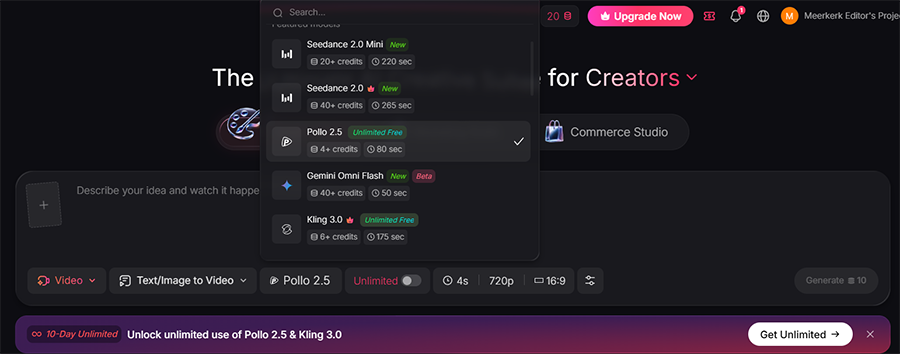
I also tested a handful of the same prompts across different models to see how much the choice actually mattered. A simple product rotation shot came out cleanest through the more literal, camera-like models.
As you might expect, the more expensive models (in terms of credits per second or quality) offer the most advanced effects and allow for more options.
Can Pollo AI Successfully Turn Your Stills Into Viral Video Reels?
Image-to-video – animating a still photo into a short clip – is the feature most people landing on Pollo AI actually want, since it’s the fastest route from a phone photo to something that looks native on TikTok or Reels. I spent a good chunk of testing time specifically on this question rather than treating it as a footnote to the broader video toolset.
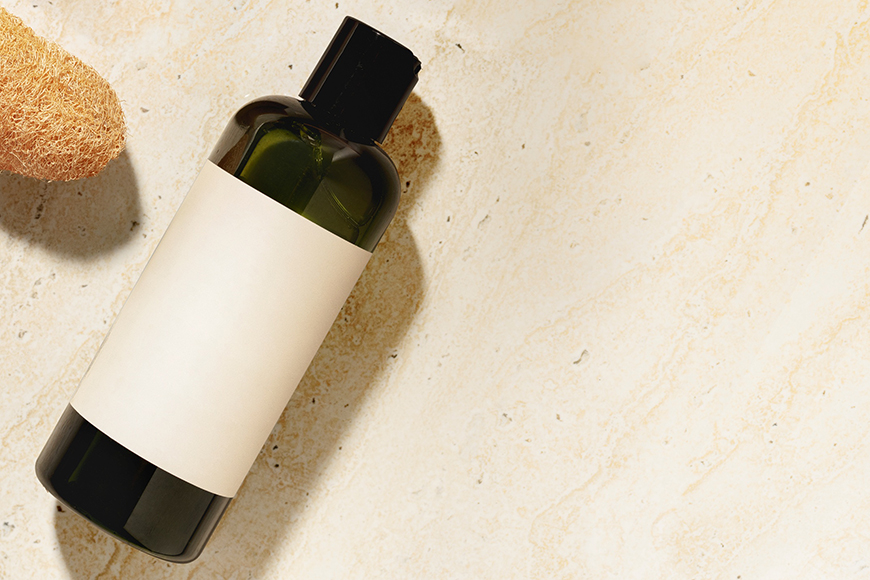
For reference, I uploaded a test image containing a shampoo bottle.
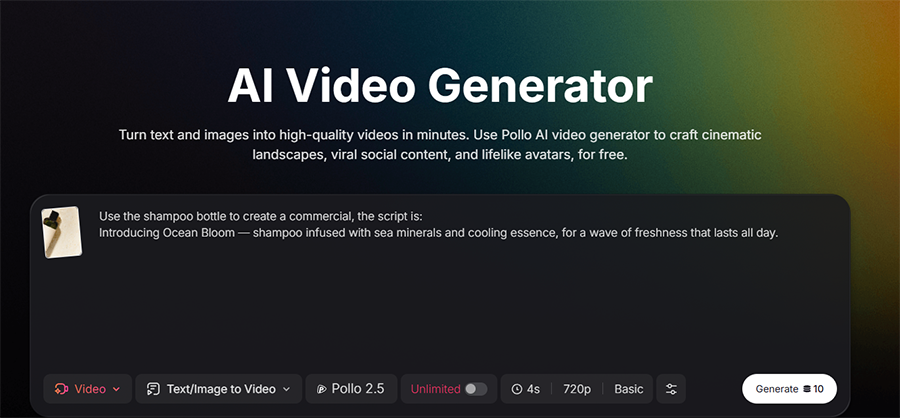
When prompted to add detail from the script, the AI added motion and elements of the prompt (sea and foam), creating a fairly simple yet effective motion.
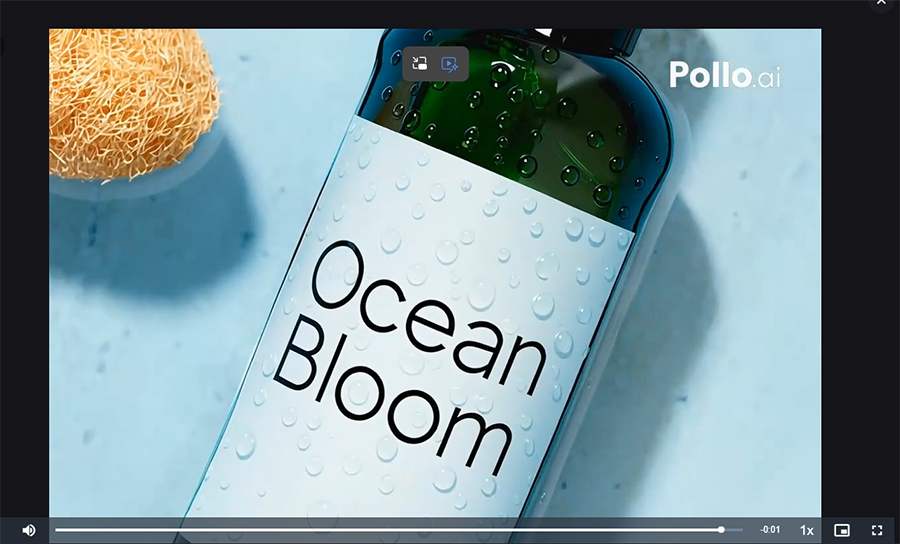
With this in mind, you should be as descriptive as possible with prompts, because motion instructions are properly implemented and look decent.
What Works: Subtle Motion and Ready-Made Formats
Pollo AI does best with restrained movement. It can be a slow push-in on a product shot, a gentle head turn or blink on a portrait, hair or fabric drifting slightly, or background elements adding a bit of depth.
All of these held up well and kept the original subject clearly recognizable. Paired with the built-in aspect ratio presets and the short-form templates, a single still can go from a flat photo to something with the right shape and pacing for a reel in a couple of minutes, without needing to open a separate editor to crop or format it.
The platform also has a nifty “cloning” option to mimic the movements of the provided reference. This essentially allows you to upload your still image and create a reel in just a couple of minutes based on current viral trends.

Where It Breaks Down: Detail Drift and Batch Consistency
While the platform is fast and the near-instant video creation is promising, there are still some limitations.
For one, text and logos will sometimes shift slightly between frames or not match between frames. On a few generations, the product labels warped slightly mid-rotation.
The worst problem I found was when faces drift just enough by the end of a five-second clip to look like a subtly different person from the start frame. That isn’t unique to Pollo AI, but it means a “viral-ready” clip on the first pass is the exception rather than the rule, especially with any readable text in frame.
Another issue for anyone planning an actual reel series rather than a one-off clip is consistency. Turning five stills into five separate videos, expecting the same subject, lighting, and style to hold across all of them, took real trial and error.
Longer or more complex scenes – multiple characters, specific camera choreography, a story with several beats – will usually need more iteration across the board, regardless of which model handled it. Pollo AI is at its best with a single subject and a clear, simple motion, and it starts to strain once you ask for more than that in one generation.
However, I discovered the motion cloning tool does make up for some of these shortcomings by allowing you to “staple” a template to follow across your creations.
Image Generation and Photo Editing Tools
Alongside video, Pollo AI runs a full set of image tools: a general AI image generator with access to several underlying models, an image-to-image editor, a background remover, an object remover (labeled Magic Eraser), a watermark remover, an image upscaler, and a face swap tool for photos.
The image generator benefits from the same multi-model setup as video, since you can run the same prompt through Nano Banana, GPT Image, Seedream, or Flux Kontext and compare results before committing to one.
I tested a prompt similar to the shampoo above to see how the AI would handle it.
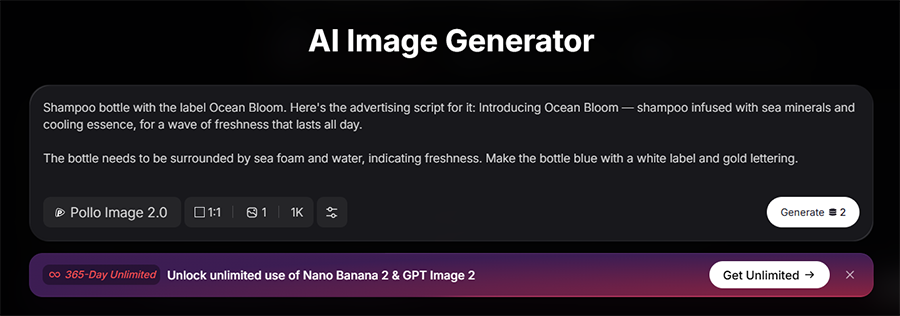
The platform followed the prompt pretty well, making a solid pass at the outlined elements while keeping the style looking relatively photorealistic. Notably, I used the Pollo Image 2.0 model, which is actually the cheapest in terms of credit usage and resource requirements.
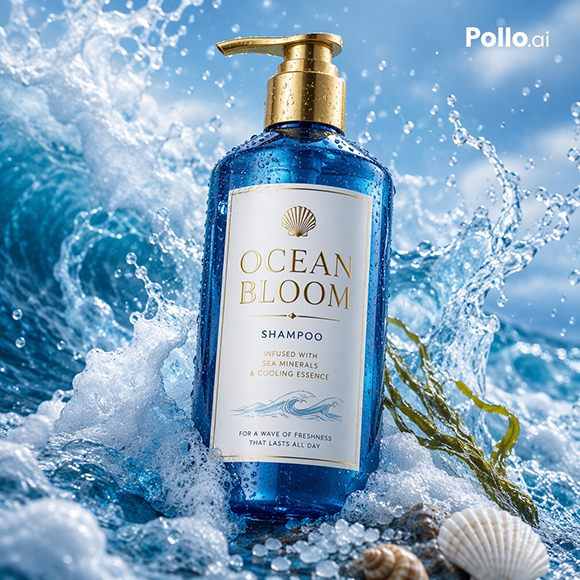
With further testing, it’s safe to say that detailed prompts produced noticeably stronger results than vague ones. The AI is usually quite literal if you want it to create a label with text or implement a particular marketing tactic, so making more adjustments will lead to better results.
The editing tools – particularly background and object removal – are competent, though not best in class. They’re built to slot into a larger workflow where you’d clean up a background before turning a still into a video.
For reference, here’s how removing the background from the image generator looked.
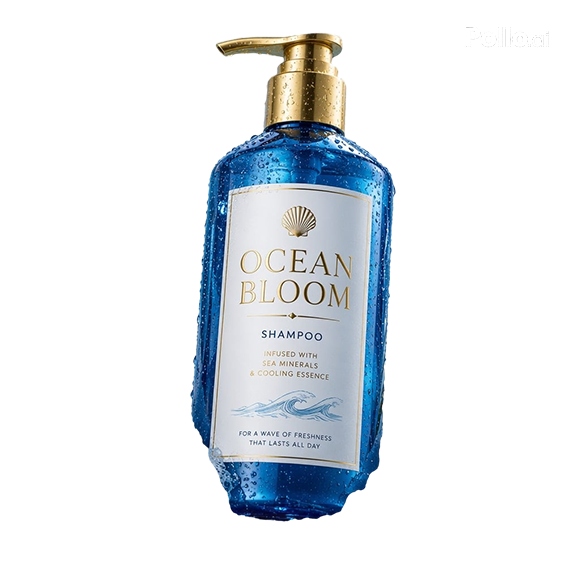
The tool technically removed the background well, but I ran into an issue where the inpainting tool is much more credit-intensive than the image generator. As such, it’s actually more worthwhile to just try to regenerate an image with a different prompt and work from there than spend credits trying to fill in the missing detail.
Marketing Studio and Commerce Studio
The Marketing Studio is where Pollo AI starts to look less like a general creative tool and more like a purpose-built ad production line.
It includes dedicated flows for turning a product URL, a script, or a photo directly into a finished ad video, with formatting presets for Facebook, TikTok, YouTube, and Instagram baked in. The platform can once again clone the structure of an existing high-performing ad while adding the content you want.

Commerce Studio narrows that further into product-specific use cases: listing image sets, product showcase videos, virtual try-on photos, and category-specific ad generators for things like skincare, pet products, and jewelry.
These are clearly aimed at sellers on Amazon, Shopify, Etsy, and similar platforms who need a steady output of listing assets without commissioning a full shoot for every SKU.
Both studios are built around the same underlying models as the Creative Studio, so the quality ceiling doesn’t change; what you’re getting here is workflow scaffolding, not a different or better generation engine. For a seller who already knows they need “a 15-second TikTok ad for this product,” that scaffolding saves real setup time.
For someone just wanting to experiment with AI video like me, Creative Studio’s raw tools are the more direct route.
More: What Video Editing App Do TikTokers Use?
Pollo Agent
Pollo Agent automates much of the generation workflow, including prompt refinement, scene planning, and multi-step creation.
Instead of a single prompt-and-generate step, you describe what you want at a higher level and Agent handles scene breakdown, sound effects, and character consistency across a sequence of shots, aiming for a more finished video that might even be ready out of the box.
The tool is clearly trying to solve character consistency across numerous videos or advertisements – in practice, results were more polished than a single raw generation. But I had to make a couple of attempts to get scene transitions that felt intentional rather than just stitched together, and the process took a lot of credits.
Mobile App
Pollo AI has a mobile app for iOS and Android that mirrors the core generation tools from the website: image generation, image-to-video, effects, and a browsing feed of trending prompts and templates.
It’s a reasonable way to kick off a quick generation from your phone or check on a render that’s still processing, and it fits naturally with how a lot of short-form content actually gets made these days: on a phone rather than at a desk.
It’s not a substitute for the desktop experience if you’re doing anything more involved than a single quick generation; model selection and the more advanced Marketing and Commerce Studio flows are easier to navigate on a larger screen. The app is better thought of as a companion for starting or checking on work rather than a full production environment.
Ease of Use
Given how much is packed into Pollo AI, the core generation flow itself stays fairly simple: type or upload, pick a model, generate, download.
The learning curve here mostly comes from the sheer number of tools and studios on offer rather than the difficulty of any individual one. New users may need a few minutes just to figure out which of the Creative, Marketing, Commerce, or Agent sections actually fits what they’re trying to do, but once that’s done, it’s usually drag-and-drop or chatbot-like systems all the way.
The bigger condition I came across for learning to use the tool is monitoring credit usage. Since credits are consumed per generation and different models cost wildly different amounts, using Pollo AI well means developing a sense for when a cheap, fast model is good enough for a test pass and when it’s worth spending more credits on a premium model for a final render.
Pricing
Pollo AI has a fairly small free tier plus several paid subscription levels, all denominated in monthly credits that don’t roll over when unused. The free plan gives a small allowance of 40 credits (if you subscribe to all of the tool’s social media as indicated), watermarked exports, and the output is slower.
The Lite plan is the natural entry point for anyone who wants no-watermark exports and 300 monthly credits, priced at $15 a month or $10 a month if paid annually. The Pro plan more than doubles the credit allowance to 800 per month, along with priority processing, at $29 monthly or a significantly lower rate paid annually. The number of monthly credits can be increased significantly by moving up to the Ultra plan ($139 per month for 5,000 credits).
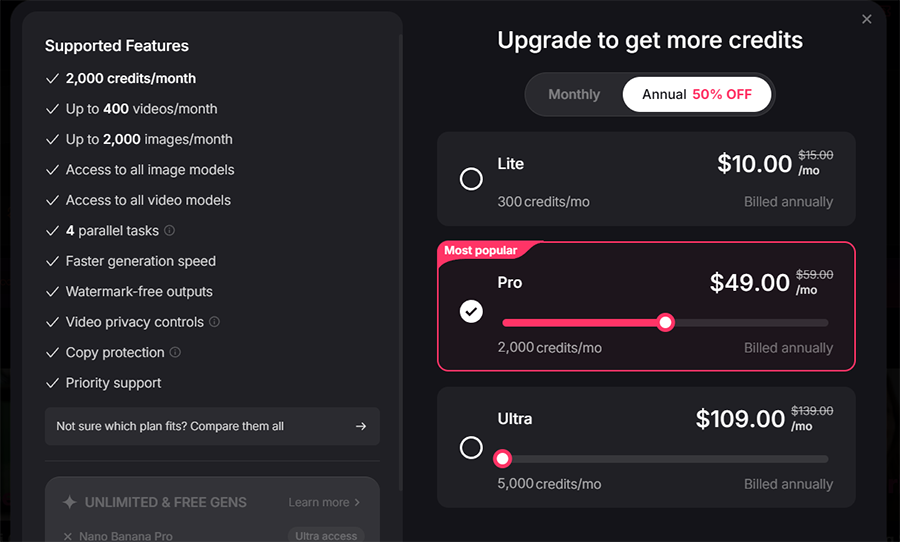
The UI suggests that you can save “up to 50%” with an annual subscription, but this isn’t the case at the highest tier (Ultra), where you only get a 23% discount at best, depending on how much you’re willing to pay.
Again, that credit cost is per generation, which varies enormously by model. A basic image using Pollo’s own lighter model costs only two credits compared to at least four credits required by Veo or Sora to consume for the same fast processing and low resolution.
So, the “X videos per month” figure on any given plan really only holds if you stick to the lower end of the generation spectrum. Premium models generally produce higher-quality results, though the cheaper models are often sufficient for drafts and simpler projects.
Who Is Pollo AI For?
Pollo AI makes the most sense for agencies serving clients with different quality or style requirements and anyone who’d otherwise be paying for two or three separate subscriptions just to access a specific model occasionally. The Marketing and Commerce Studios are the real value here, and those require a significant investment due to how costly even short videos are to generate.
However, the platform is simply too broad if you already have a single video creation suite that you’re using. A direct subscription to any individual model will usually be either cheaper or have more features.
But overall, the combination of features, convenience, and the ability to create a template based on sample videos from an impressive library means that if you’re willing to spend a month’s subscription on just testing it out, you definitely should. Just use your credits with the same care you’d give an actual production schedule.

As the General Manager of Shotkit, India Mantle brings with her a lifelong love for photography that she developed during her childhood, watching her father document their family moments with his Nikon EM. In her free time, you find her enjoying the awe-inspiring natural beauty of her home, Northern Rivers, Australia.
1 Comment
Leave a Comment
👋 WELCOME TO SHOTKIT!
🔥 Popular NOW:

Jumping poses seem simple at first, but getting a natural looking result takes practice. The timing between the photographer and the subjects is what makes the final images stand out!