







How to Use a Light Meter in Photography (+ 3 Pro Tips)
Unlock the secrets to achieving perfect exposure in every shot by learning how to effectively use a light meter in photography.
Learn | Lighting Guides | By Ana Mireles
Shotkit may earn a commission on affiliate links. Learn more.
Mastering a light meter can transform your photography, ensuring every shot captures the light as it appears in your scene.
This guide will teach you the basics of using a light meter and share three professional tips to refine your technique.
Whether you're aiming to improve studio portraits or enhance outdoor landscapes, understanding light metering is key to achieving the perfect exposure.
Let's dive in and learn how to use this essential tool to elevate your photography skills.
What Does a Photography Light Meter Do?
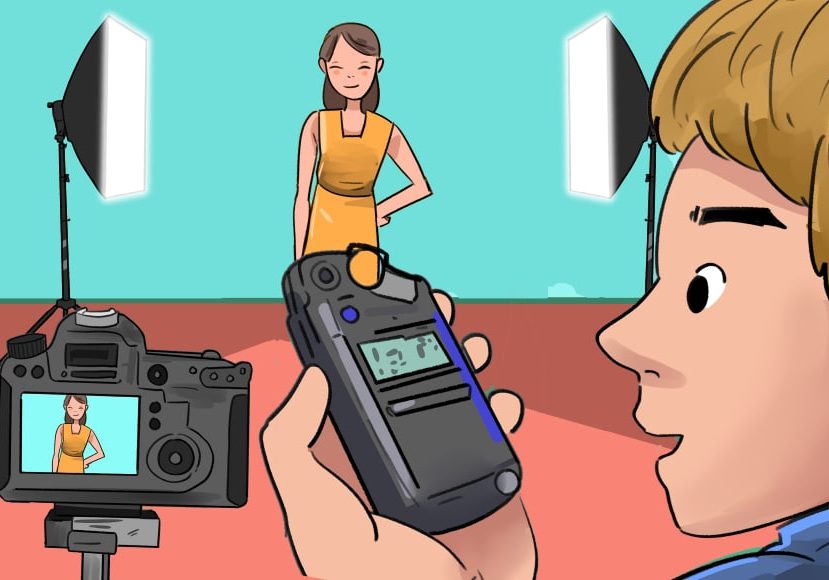
Photographic light meters, as the name suggests, measure light.
Depending on the type of meter you're using, it will measure the incident light or the reflected light.
Once it knows the light intensity will tell you the correct shutter speed, aperture, and ISO.
This allows you to achieve correct exposure when taking photographs.
The Types Of Light Meters for Photography
There are two ways of categorizing light meters: by the type of light they read and by the type of device.
As I already told you about the different light readings they can do, I'll focus here on the devices.
There is a wide range of light-measuring devices out there. Here are the most popular types of light meters.
- In-camera light meter. Most modern cameras have a built-in meter. They work on reflective metering; often, you can choose from spot metering mode, center-weighted, evaluative, and others.
- Spot meter. These are the more expensive options – they're also larger and heavier. You can use them for incident metering or reflective. Photographers who work with the zone system or difficult light conditions often use spot metering.
- Digital handheld meter. Most modern meters have the alternative to make a reflective or incident light reading. They use batteries – usually AA. You can use it with ambient light and flash exposure. They are the most versatile.
- Analog handheld meter. These light meters work with photo-sensitive cells. It's not so easy to find them new, as most modern light meters are digital. However, you can find a wide variety of options on second-hand markets. The great advantage is that they don't use batteries.
- Hotshoe light meter. You can mount them on the hotshoe of your camera. They're compact, lightweight, and inexpensive. They're a good solution when your camera doesn't have a built-in meter. They do a reflective metering.
- Light meter app. There are many light meter apps for Android and iPhone. Some are free, and the ones that cost usually have a low price. They rely on light sensors and may work as an incident light meter or measure reflective light.
Handheld Light Meters vs In-Camera Meters

Credit: Billy Freeman (left) / KediÇobanı, CC BY-SA 4.0, via Wikimedia Commons (right)
The in-camera meter is very handy because you don't need to carry extra accessories with you. They work on reflective light because it measures light that's coming in through the lens.
Most modern digital cameras have different metering modes. So, you can choose between evaluative, center-weighted, and spot metering.
A handheld meter has more options. There are analogue and digital meters, they can do spot, reflective or incident light metering.
The price range varies according to the type of light meter and its portability.
Reflected Light Metering vs Incident Light Metering: Which Is Better?
Incident light meters ensure the correct exposure regardless of the surface's color and material.
Instead, a light meter that reads reflective light will try to balance it to 18% grey regardless of whether you want the black to be black and the white to be white.
This isn't a problem if you have various tone values—the camera makes an average reading. It also works with spot meter readings.
However, it can underexposed images that are predominantly bright and overexposed dark scenes.
To fix this, you could use exposure compensation. However, determining exposure in this situation with film photography, where you don't have a live preview, could be very difficult.
So, there's no right or wrong here—it depends on the situation and how many exposure adjustments you can make.
Are Light Meter Apps Accurate for Photography?

Credit: https://www.lightmeter.dev/
Many light meter apps can give you an accurate measurement of how much light is available.
However, they have limitations compared with the versatility of a handheld light meter – especially a digital one.
The accuracy of an app depends on the app itself and on your device.
If you have one, you can test its accuracy by comparing the reading you get with the in-camera meter from your digital camera.
You can also take some test shots and see how well the app works.
If you want to know some of the best light meter apps out there, check out our roundup of the best light meter apps.
How to Use a Reflected Light Meter

Credit: Annie Spratt
Many handheld meters include a reflected light meter that measures the light reflected from the subject.
However, you can also use the one in your camera as it will read the light coming through the lens.
Step 1
Place the handheld light meter in the camera position, pointing at the subject.
Step 2
Set the exposure meter to ambient light.
Step 3
Make the reading and use the exposure value to adjust the camera settings.
How to Use an Incident Light Meter

Credit: Tima Miroshnichenko
An incident meter is a handheld light meter. This is because you need to place them close to the subject as they measure light falling on the subject.
Step 1
Turn on your handheld light meter and set it to ambient light.
Step 2
Place the handheld meter close to the subject. Make sure the white dome covers the light sensor and point it toward the light source.
Step 3
Measure the light to determine the exposure settings needed for optimal exposure.
How to Use a Light Meter for Flash Photography
Handheld light meters can determine the flash exposure and use them for incident or reflective metering.
Using flash meters for reflective metering is called TTL (through the lens), which is why using the built-in meter in your camera is easier.
However, not all the images will be properly exposed as it will try to balance things to middle grey.
So, this is how you can do incident light meter readings when using flash lighting, which should ensure any scenario is properly exposed.
Step 1
Ensure the camera and flash are in manual mode, not TTL.
Step 2
Turn on the handheld light meter and set it to flash mode.
Step 3
Place the light meter close to the subject and point at the flash.
Step 4
Using a remote trigger, make a flash burst and make the reading.
Step 5
If you're using more than one flash, you'll need to do multiple readings. So, repeat steps 3 and 4 for each light source. This way, you can also meter the lighting ratios.
How to Use a Light Meter App
Many apps allow you to use phones as handheld light meters. Each one may work slightly differently. This is how you can use the Light Meter app by WBPhoto.
Step 1
Download and install the app.
Step 2
Launch the app and choose the correct function. The Camera Meter works like an exposure meter for any photographic camera. It uses the phone's camera to calculate the exposure settings based on reflective light.
Instead, choose Sensor Meter to calculate the exposure value of the ambient light falling on the phone.
Step 3
If you want to change any of the camera settings, tap and hold in the desired value – for example, shutter speed. Once it's red, you can adjust the value.
This allows you to calculate the exposure if you're using aperture or shutter speed priority.
Step 4
Use the manual adjustments if you need to use the exposure compensation.
Which Way Do You Point a Light Meter?
The direction in which the light meter should be pointed depends on your reading type.
When you use an incident meter, you need to point it towards the light source. Instead, a reflective one should be pointed towards the subject.
Do I Really Need a Light Meter for Photography?

Credit: Nancy Hughes
The short answer is yes; using an exposure meter will help you save time and effort to ensure the correct exposure every time.
You probably already use it, but don't think about it. Many people think only about handheld meters, but your camera most likely has one, and you're probably using it every time you shoot.
However, whether it's essential for you or not depends on the type of photography you do.
Why Use a Light Meter for Film Photography
In digital photography, you can immediately see the photo and make the necessary adjustments to the exposure until you get it right.
However, in film photography, you can't see what you're doing until you go home and develop your film – by then, it's too late to fix any mistakes.
You could use exposure bracketing to ensure you take at least one photo with the correct exposure. However, each photo you take in film photography costs money, so it's not the most cost-effective method.
Why Use a Light Meter for Flash Photography
Using an exposure meter when working with flashes allows you to use multiple light sources and balance the exposure ratio between them.
Why Use a Light Meter for Digital Photography
While digital photography is easier to do through trial and error when you don't use a meter, it may not be as accurate.
When you're shooting in bright daylight, you won't see much on the screen in the back of your camera. Also, the LED screen is calibrated to vivid and saturated colors – which might not be how your final image looks.
You could use the histogram to get the correct exposure. However, the light meter will save you time and ensure a correct exposure every time.
How to Choose the Right Light Meter for Your Photography

Credit: Lawrence Aritao
When buying a light meter, you should consider its reading type. The one that you need depends on what you shoot.
Studio photographers are better off with incident handheld meters. While doing street photography, you're often OK with a reflective one.
Most light meters of a certain price level actually offer both solutions. This brings me to the second factor – your budget.
To start with a low budget, a second-hand analog meter will be fine. However, if you can afford it, get a more versatile digital.
If you want to explore this subject, check out our roundup of the best light meters.
3 Tips and Best Practices When Using a Light Meter
Now that you know the basics, it's time for some tips to help you get better results when using a light meter.
Tip 1 – Using a light meter outside
Spot meters are wonderful for contrasted landscape photography. You can measure the sky and the foreground separately and calculate the dynamic range to see if your camera sensor can capture details in both.
Tip 2 – Using a light meter with film
If you're shooting a film, you should input the film's ISO as a fixed value. The meter can tell you your film's correct aperture and shutter speed.
Tip 3 – When in doubt, use an incident meter
Incident metering is a better starting point if you're unsure what reading type you need. More often than not, this type of reading will give you more accurate exposure.
FAQs on How to Use a Light Meter
What are the settings on a light meter?
Most meters can be set to incident, reflective, and spot metering. They also offer a flash metering mode.
What do the numbers on a light meter mean?
The numbers on a meter represent the camera exposure settings. So, you'll find the ISO value, the aperture, and the shutter speed.
How do you use an exposure meter to set a light?
To set a light using an exposure meter, you can take a reading of the subject's exposure. Then, adjust the angle and distance of the light source until it reaches the desired exposure.
How can I use a cheap light meter for photography?
If you're looking for a cheap light meter, you can download an app on your phone – they're either free or very inexpensive.
Then, use your phone as a handheld light meter. Alternatively, you can get a secondhand analog meter.
How do I use my phone as a light meter for photography?
You can download a light meter app. Then, choose the mode you prefer, depending on whether you want to read the light reflected or the ambient light. Next, input the exposure settings on your camera.
How do you use a light meter for street photography?
Most street photographers prefer the sunny-16 method over the light meter. However, the ones who measure light usually prefer the in-camera light meter.
Do I need a light meter for landscape photography?
Using a light meter is helpful when taking landscape photos, especially in complex light conditions such as backlit scenes.

Check out these 8 essential tools to help you succeed as a professional photographer.
Includes limited-time discounts.

Ana Mireles is a Mexican researcher that specializes in photography and communications for the arts and culture sector.
👋 WELCOME TO SHOTKIT!
🔥 Popular NOW:
