







How to use Picsart for Photo Editing & Design
From thumbnails to billboards, create your content with Picsart’s online photo editor and mobile app. We take a closer look at how to use Picsart.
Mobile Apps | Software | By Judyth Satyn
Shotkit may earn a commission on affiliate links. Learn more.
Picsart is the bomb when it comes to creating engaging fresh visual material to captivate an online audience, for business or pleasure.
It has a vast array of awesome photo and video editing options and is incredibly easy for even the novice to use.
Picsart can make your own memes, add intrigue to dated photos, or edit videos.
One thing I love best about PicsArt, making it stand apart from the crowd of editing apps, is the Picsart community and network platform.
Let's take a look at how Picsart can help you.
What is Picsart?
- Easy to use on a mobile
- Free version available
- Picsart network for sharing work
- Option for multi-layer editing
- Extensive array of editing options
- PicsArt's camera offers a preview of filters
- Intuitive and easy for the beginner
- Takes up a lot of storage space
- Slight lag when applying effects
- Overwhelming at first
- No auto object select
- Requires internet connection to work
- Ads on the free mobile version
PicsArt is a powerful online video and photo editor tool, available for mobile devices and desktops.
You can use it for traditional edits, to add some modern punch to a retro image with stickers, to elevate visual interest with freestyle drawings, and much more.
You can sign up for a monthly subscription or use the free version, all plans offer a substantial amount of editing features and tools and are definitely worth investigating.
There are some differences between the online desktop version and the mobile app.
The desktop version gives you the comfort of a larger workspace from which can still share to all your social media platforms and website.
The app gives you the freedom to edit when you are away from home with time to kill, making it easy to knock out some great content from your phone.
The mobile free version is unfortunately ladened with advertisements, whereas the desktop version is free from ads.
The mobile app version has more options for drawing than the desktop version, including the smudge tool, more brush options, and AI Replace.
It is super easy to learn even if you are new to PicsArt and want to reap the benefits of this powerful video and photo-editing tool.
Read on to learn how to edit videos and photos using PicsArt.
Getting started with Picsart
Before you download or sign up for Picsart decide which monthly subscription will suit your design needs best.
Are you printing, using for business, an avid social media marketer, or do you create fun posts to share with family and friends?
Picsart currently offers three subscription options, Gold, Team, and Free.
The Free Picsart plan gives you access to thousands of free templates, images, and powerful editing tools.
The Gold Picsart plan gives you cross-platform access between your mobile app, and website, access to royalty-free stock images, extra storage, use of the background remover, no watermarks, and more.
The Team Picsart subscription includes all the Gold subscription has to offer plus team management.
If unsure which Picsart subscription to choose start with the free version and upgrade if you find you need more.
And if you sign up for a paid subscription and find you don't need it, no stress you can cancel at any time with no extra cost.
To start using PicsArt on your desktop simply head to the Picsarts website and hit the Login or Sign up button in the top right-hand corner.
You will be prompted to enter your email and a password, and almost immediately you will have access to Picsarts powerful online editing tools.
To use on your device head to the Apple store for iPhones or Google Play for Android users and download the app onto your device.
To personalize your Picsart account you can upload a photo and add a short bio.
The Picsart user interface is remarkably easy to navigate and clearly laid out for smooth intuitive editing.
Hit the Plus icon at the bottom of the screen in the app or hit the New Project button on the desktop version to open the image editing workspace.
In both desktop and mobile versions the editing options will be laid out across the screen.
Read on and we will explore Picsarts editing tools to add visual dynamite to your images.
Editing Photos in Picsart
Picsart has a huge range of powerful editing tools, filters, and effects, and absolutely no previous knowledge of photo editing is needed to start.
Erasers, brushes, masks, frames stickers, cutouts, filters, you name it and you'll have it at your fingertips or for your design purposes.
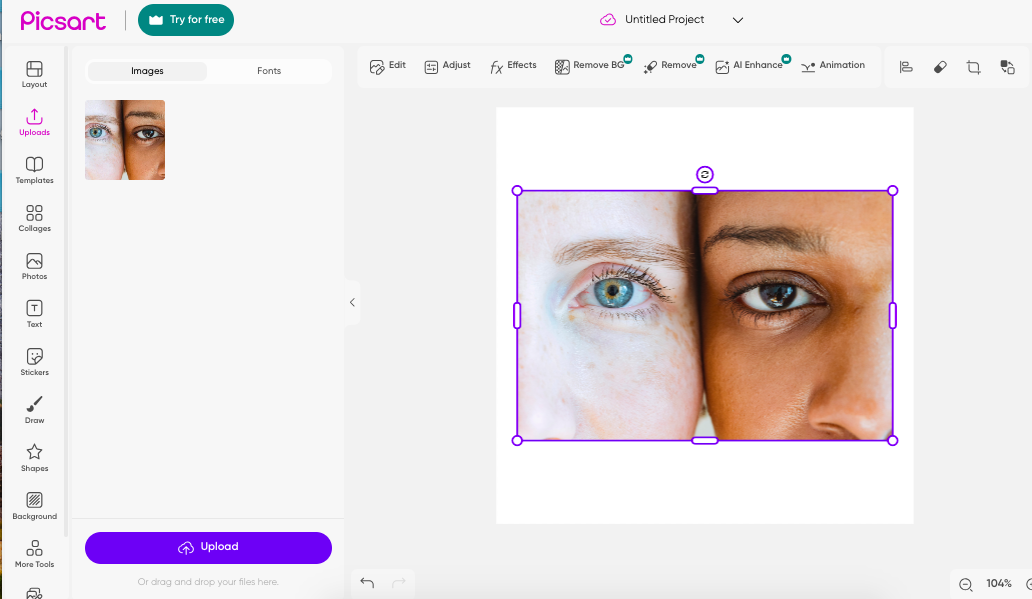
To begin editing in Picsart press the Uploads button in the left-hand vertical menu, when pressed the Uploads panel will open.
Here you will find any previously uploaded images, upload a new image by pressing the Upload button at the bottom of the workspace.
Once uploaded simply click on the photo you wish to select and it will appear in the workspace.
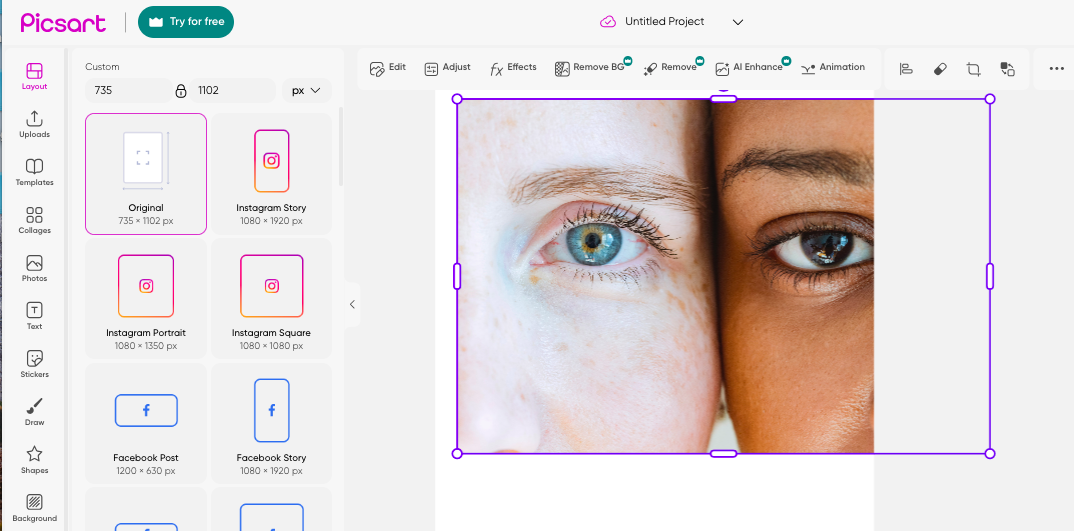
Click the Layout button in the left-hand menu to choose the dimensions for your design, simply click on the dimension you need and your workspace will automatically be changed to this dimension
Resize
Adjust and resize the photo in the new dimensions by dragging the sides of its bounding box with your cursor.
Crop
To crop the image click the Crop icon positioned to the right of the top menu bar, and drag the crop bounding box to crop.
You do not need to save your edit, Picsart will do this automatically for you.
Retouch
Retouch images to bring back vibrance and revive, and hit the Edit button to open Opacity and Blend Modes.
Chose Blend Mode, Normal, Darken, Multiply, Color Burn, or Lighten from the dropdown menu and preview the effect in the preview window.
Adjust the brightness, contrast, or color balance of your image by clicking the Adjust button.
Effects
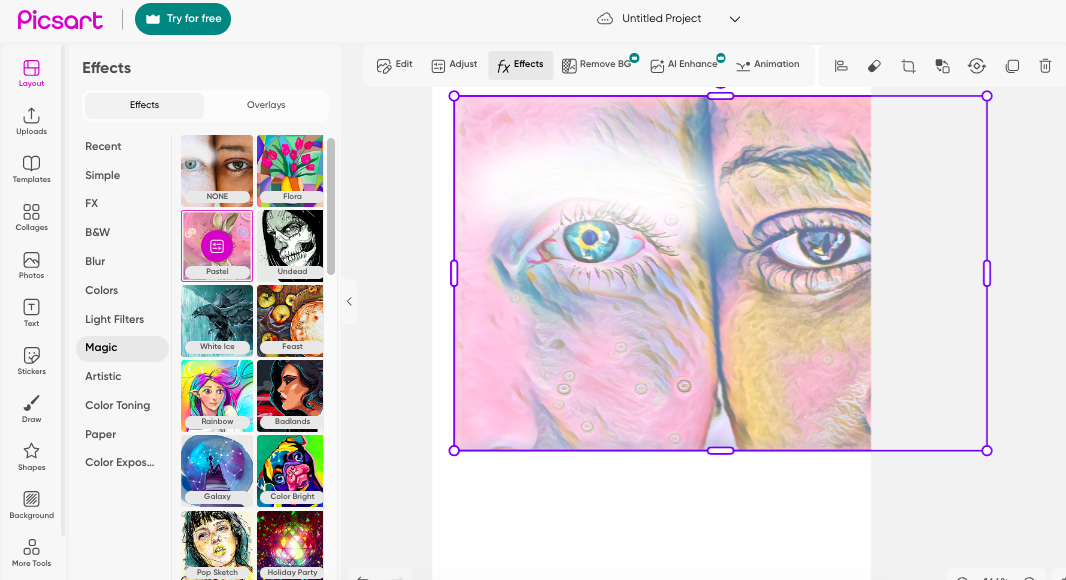
To add effects click the Effects button, this will open a panel of effects and filters, scroll down through them to find the one you want, then simply click your choice to automatically apply to your photo.
You will find Picsart's popular effects such as Magic, Sketch, Canvas, Drip, and Glitch.
Erase
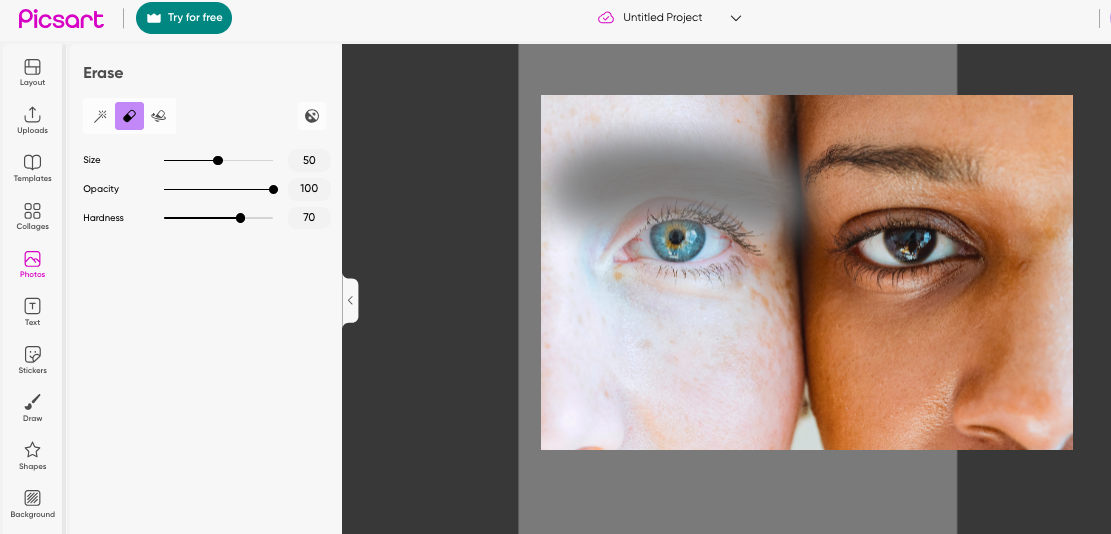
To erase parts of the photo click on the Eraser icon, this will open the eraser tool workspace.
Here you can choose either the Magic Wand or Eraser tool by clicking on an icon.
The Magic Wand will give you the choice of Auto, Person, Clothes, Sky, Hair, or Background, and will automatically remove your selection.
You can set the opacity, size, and hardness of the Eraser tool, then use your cursor to erase sections of your image in the preview window.
Using the Eraser tool or Magic Wand to remove unwanted objects, subjects, or blemishes from your photos.
Text
To add text hit the Text button in the left-hand vertical menu.
Once clicked the text editing panel will appear, click on the text option that suits your design purposes, heading, subheading, or text body.
You can adjust the text size by dragging its bounding box and reposition it by dragging and dropping.
Above the workspace, the text editing menu bar will appear, with options to change the font style, opacity, color, or alignment.
You can also bend the text, or change the spacing, Picsart has covered everything.
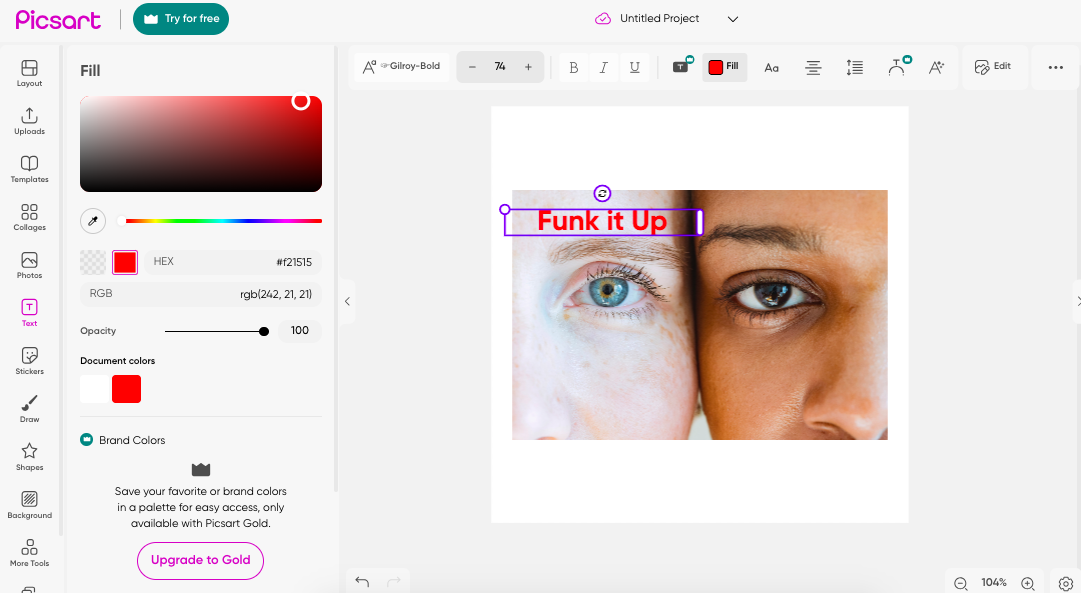
The amazing thing about editing in Picsart is that it is so simple and straightforward, every edit is only a click away while live previews make it easy to avoid mistakes.
When finished editing export and share by clicking the Export button in the top right-hand corner of your screen.
Creating collages in Picsart
It is easy to elevate interest and add intrigue by combining contrasting images in a collage.
The collage tool can create collages of up to ten photos.
First, have all the images you wish to add to the collage uploaded and ready to go in your Upload folder.
Then hit the Collages button in the left-hand menu.
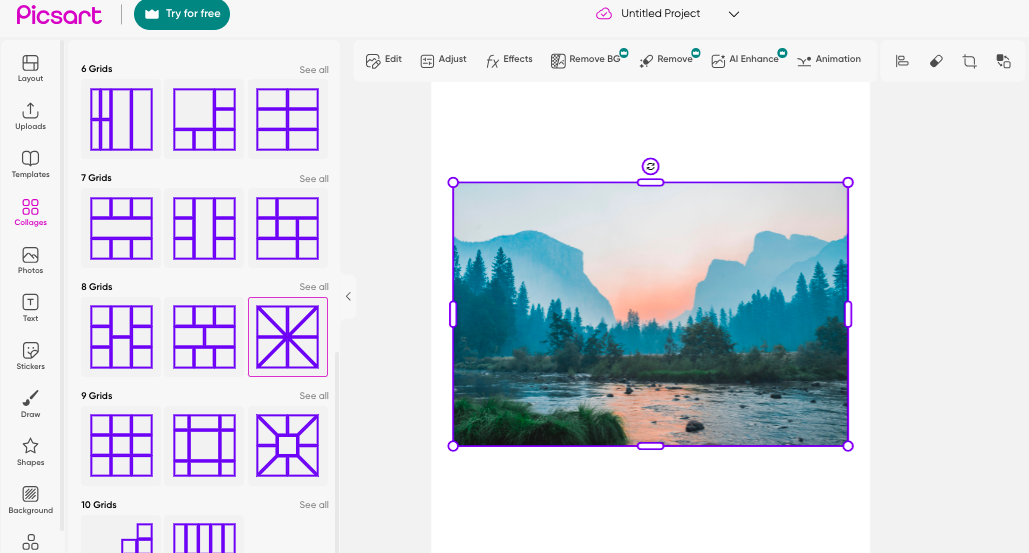
When the Collages button is clicked the collage options will open in a panel, scroll down to pick your preferred collage grid.
Return to your images by clicking the Uploads button in the left-hand menu.
To add images to the collage simply drag and drop each image into the collage grid.
Drag the image from the upload panel, hover the image over the location you wish to position it in, then release it.

When you have dropped the image into place you can resize it to fit the collage by dragging the corners of the image's bounding box.
Drag and drop all images and viola you have your collage, so unbelievably super easy.
When finished hit Export to download or share.
Drawing and Painting in Picsart
Drawing is a fun way to boost engagement with your posts, it is fresh, funky, and great for gaining followers.
One of the best ways to grab attention and make your photos stand out is to add unique personalized drawings.
To add freestyle drawing in PicsArt have your image open and ready in the Picsart workspace then click on the Draw tool in the left-hand menu.
Once clicked a selection of brush tools will be opened in your workspace, click a brush to select your tool of choice.
You can adjust the color, the size, and the flow of the brush by hitting the options in the menu bar above the image in the preview window.
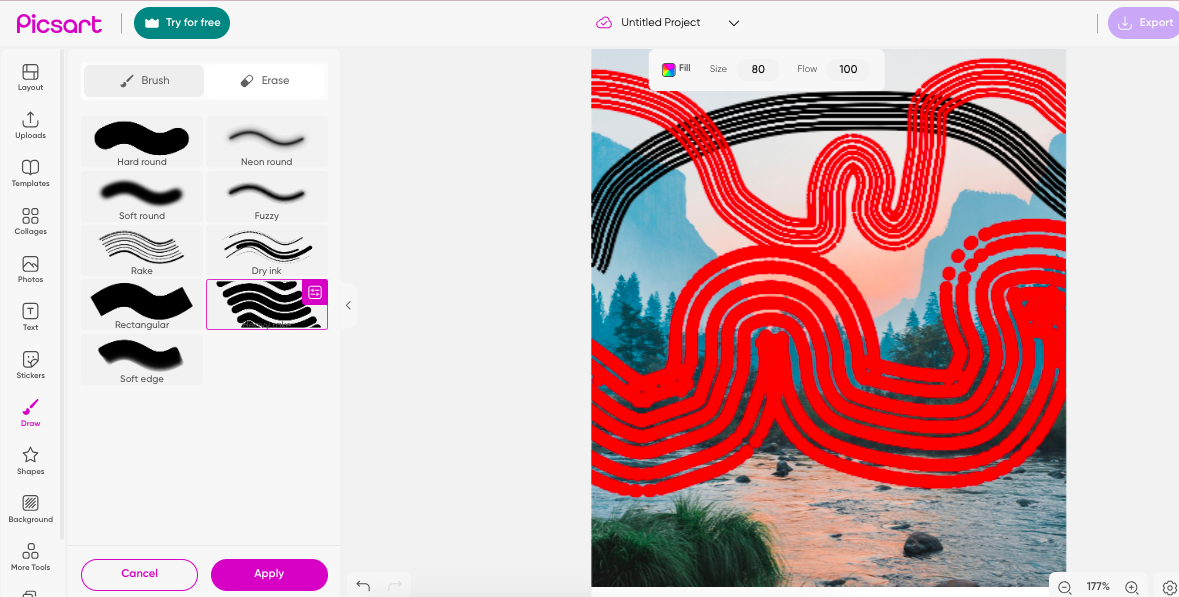
When you click the Fill icon a color panel will open to the left of your workspace.
To change your brush's color simply click on your color preference in the color box with your cursor.
Click Size and a slider will appear, slide to the left or right to increase or decrease the size of your brush.
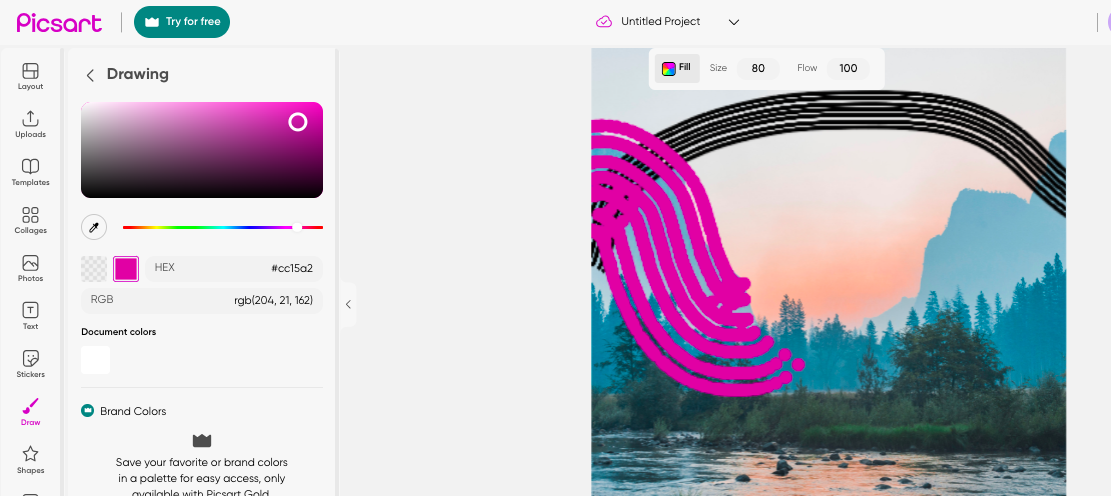
When you have set your brush preferences you can draw freely using your cursor to create an amazing work of photo art.
To remove any unwanted brush strokes click Eraser above the brush panel.
Using the menu options above the preview window you can change the size and flow of the Eraser tool.
Your cursor will now act as an eraser.
When you are finished hit Apply below the brush tool panel to save your edits, if you don't hit Apply and leave the drawing preview window your edits will be lost.
Adding stickers and clipart in Picsart
Stickers are no longer restricted to the realm of childhood, now it's an activity for all ages so why not use stickers to add some modern punch to a retro image?
Go for it, shamelessly cover your image in quirky stickers or select one that represents your branding.
Ok, let's get to it, how do you add stickers and clip art to photos using Picsart, first upload and open your image in the Picsart workspace.
Upload the image you want to edit to PicsArt by clicking on the Upload button.
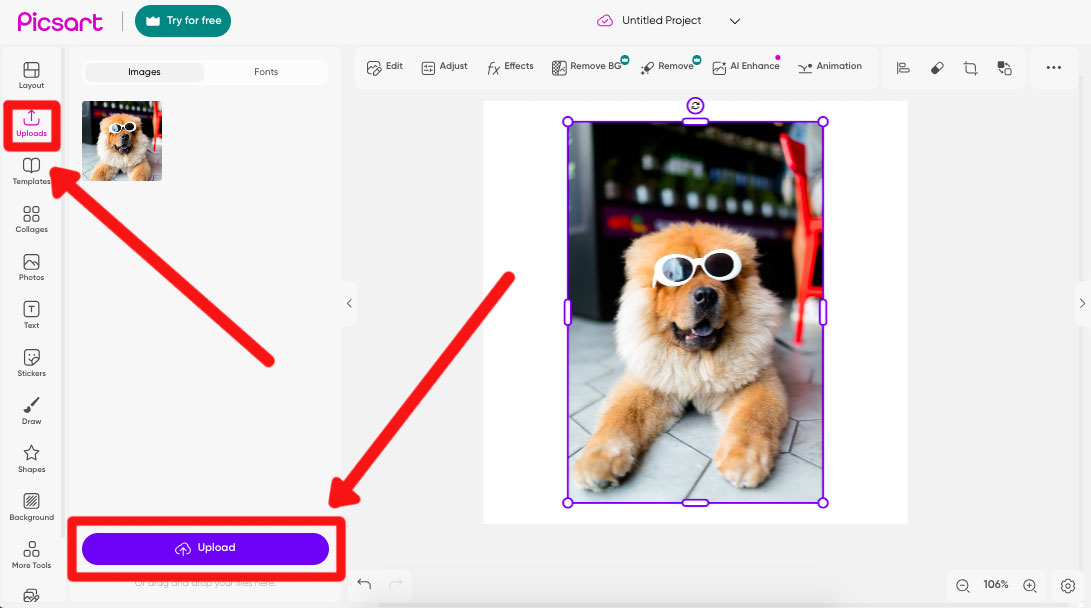
Once uploaded drag the image into the Picsart workspace.
Click the Stickers button in the vertical panel to the left of your workspace.
Once clicked the sticker library will appear you can scroll down through the library to view all available Picsart stickers.
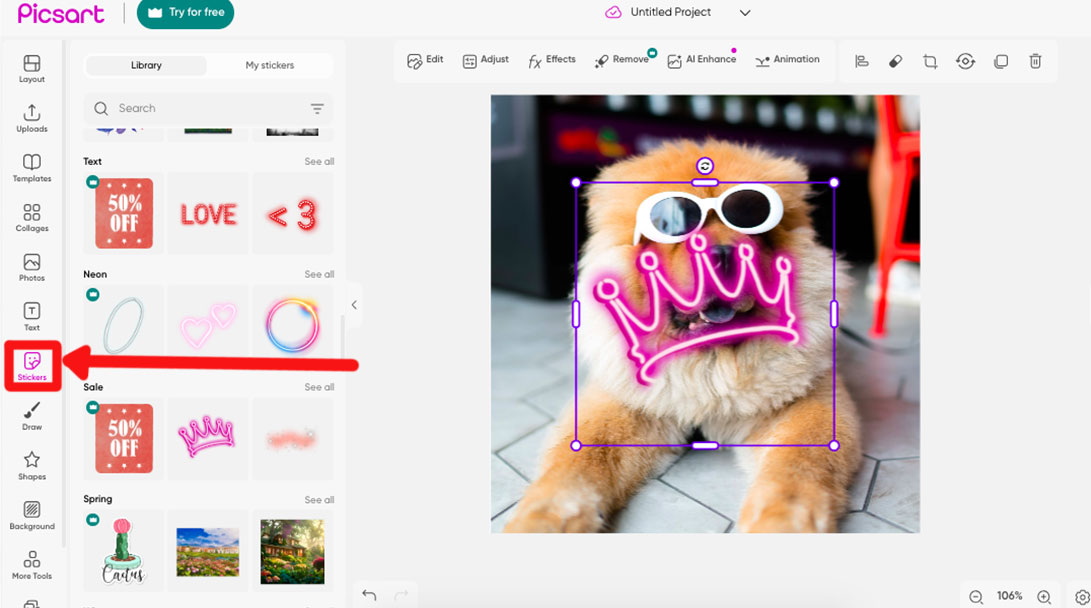
To search for a specifically themed sticker enter a keyword in the search bar above the sticker library.
To add a sticker to your workspace simply drag it from the library onto your image.
You can adjust the position and size of the sticker by dragging the edges of its bounding box.
At the top of the workspace an edit bar will appear, click the Effects button to open the Effects panel.
Here you can change the color, toning, and other properties of the sticker.
To animate the sticker click the Animate button and the Animate panel will open.
To select an animation simply click on your choice of animation, such as Enlarger, Spin, or Elevator.
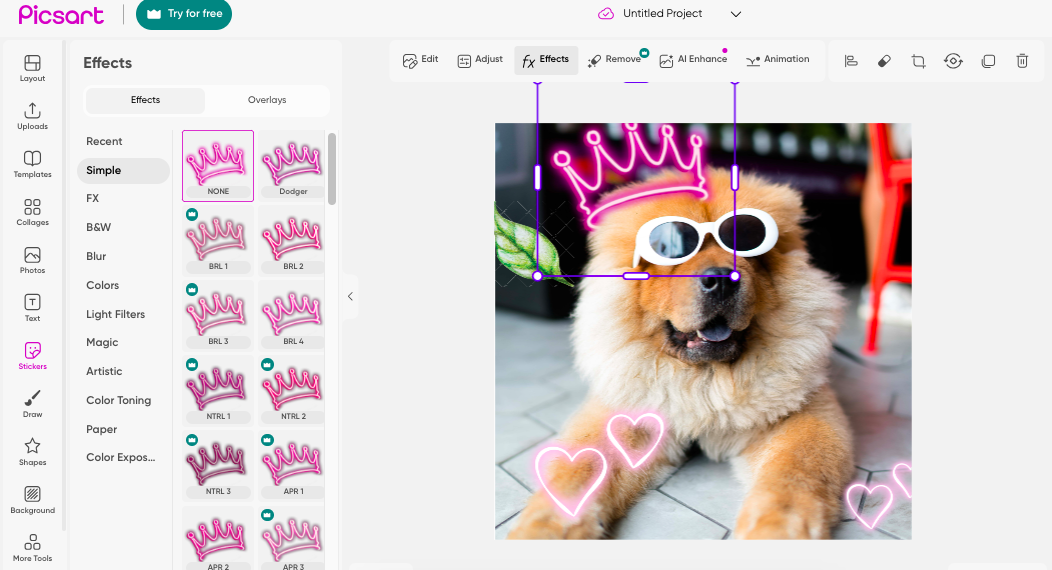
You can save customized stickers to the My Stickers library and they will be easily available for you to use whenever you are editing in PicsArt.
Any stickers you have previously posted to PicsArt will also be stored in the My Stickers library.
To delete a sticker, select the sticker and then click the trashcan icon in the top right-hand corner of the workspace.
Once the trash can has been clicked the sticker will be removed.
Picsart allows you to add up to 30 stickers to your image.
When you are more familiar with Picsart you can create your own custom stickers and use them like you would a logo to brand your images.
Stickers are also very useful for emphasizing an emotion with a cute emoji or adding a direction to help followers, navigate your website.
People can switch off when they see text, it's a laborious task reading through endless jargon on websites, so opting to add an animated sticker direction instead is a huge plus in your favor.
Using Picsart for Social Media
With Picsart as your editing buddy, you can be sure you will be free to create wild and wonderful social media posts.
Picsart not only gives you the tools to use, the ideas with vast amounts of templates, stickers, and images at your disposal but they make the transition from editing workspace to virtual world smooth.
If you want to share to a specific platform Picsart helps you hone your craft by offering templates with the exact dimensions for each platform.
Nothing is worse than working on an image for hours only to realize that huge swads of it will be cut off by the platform as it isn't the correct dimensions.
Picsart makes it easy just click on the template of choice for TicToc, Instagram, or FaceBook, be it for a story, reel, or post and the dimensions will be exact.
Creating your unique branding and keeping a consistent theme is also important when sharing on social media.
This way people will recognize you and your branding, making you stand out in the mish-mash of endless images.
Branding your images can be as simple as always adding a distinctive border, filter, sticker, or using the same color combination.
Other ways to create consistency are to always use the same style and theme.
If you are a horse fanatic and suddenly start sharing pictures of cats, you will lose followers.
Keep text to a minimum, people switch off when there is too much text, it is better to use animated commands.
Using Picsart you can animate stickers or photos to create fun commands that will entice people to follow.
Don’t add too much information, less is more.
If you want to optimize your images be mindful of why you are sharing, are you sharing just to put content on the board or is there a reason?
You might need to tweak your image for different social media platforms, so be mindful of this.
Think about the content and how it will be received on different platforms.
Who wants to see what and when, why do you log in to Facebook rather than Linkedin, for a different purpose, to see different content?
The content and posts that you share on Linkedin will not be received in the same way as what you share on TicToc.
But generally, you can share similarly themed posts on Facebook, Instagram, and Pinterest.
Tweaking your image for a different platform could be as simple as changing the dimensions, FaceBook favors landscapes, while Pinterest likes either vertical or portrait.
Another way to optimize your images for social media platforms is to add alt tags, know your keywords and use them in the captions.
Picsart has its own community and network, so why not give it a go and share your work with the Picsart community?
Similarly to Instagram, you can scroll through the feed, like, and comment on people's images.
You can follow and be followed, get known for your work, or simply interact with people for social pleasure.
A fun aspect of the Picarst community is you can tick the free-to-edit box and allow others to edit your photo, to see how your photo evolves as people add their own artist edits to your photos.
Advanced Features and Techniques in Picsart
Picsart doesn't know where to stop, they offer countless editing options and then they throw in some more.
The Magic Effects tool is a powerful effect (and magical) that will elevate and add intrigue to any old or outdated photo.
The options are vast, using Picsart you can preview each effect before applying.
Each photo will respond differently to each Magic effect so it is worth trying out a few before settling on your Magic effect of choice.
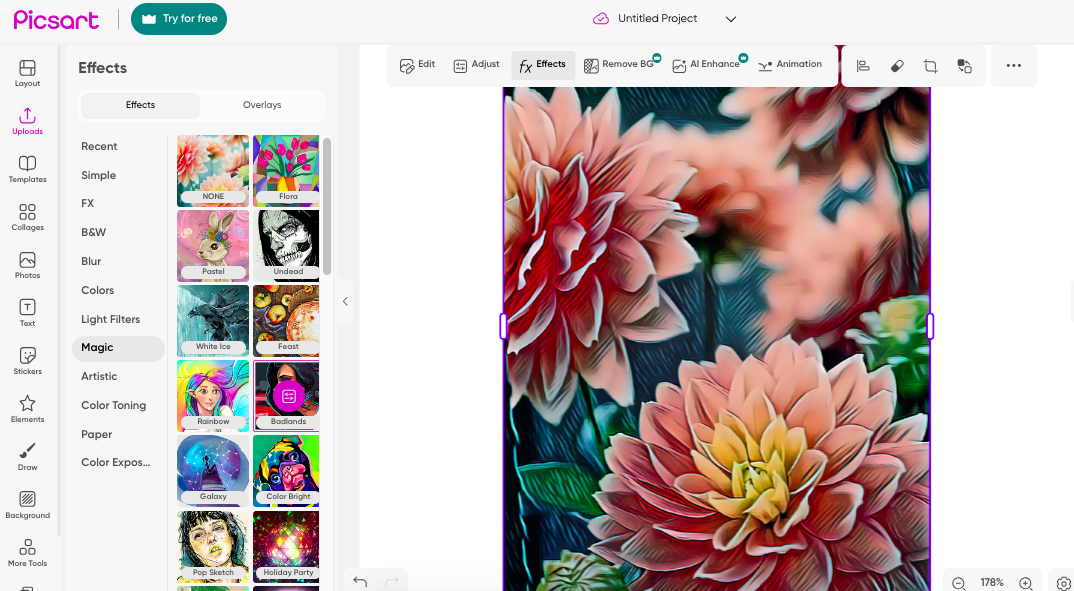
To use the Magic Effects tool have your image open in Picsart and click on the Effects button in the menu bar above the workspace.
Once clicked a panel will open to the left of your workspace, scroll down the options and select Magic.
The Magic effects will open and you can click on any effect to preview it.
Picsart has many Magic effects to choose from, such as Flora, Undead, Rainbow, Galaxy, and more.
Each and every one will be applied to your photo in seconds, giving it a completely unique visual.
There's nothing like having the option to remove a background from your subject and replace it with something otherworldly.
Wham bam who needs a green screen when you can use a background remover tool?
Picsart has incorporated a Background Removal tool for this purpose.
If you have a fantastic subject that just begs to be seen you can now place them on an impressive backdrop improving the image a billionfold.
Picsarts Background Removal tool is only available to paid subscribers, it you want to give it a try without paying hop on and sign up for a 7-day free trial.
Using Picsarts AI-powered Background Remover tool you won't have to spend hours picking apart and erasing the background of an image.
It's easy, first, have your image ready in the Picsart workspace then click on the Remove BG button above the workspace.
The Remove BG preview window will open and the AI-powered tool will work its wonders, quickly removing the image's background.
When the background is removed you can swap it over with any background, another photo, a drawing, or a giant sticker.
Now that you have the Background Removal tool at your disposal give it a shot, and create a bright and bold vibe to all your images.
Final Words on Picsart
Whether you use the Picsart mobile app or the desktop web version, I hope you found this tutorial helpful.
We live in exciting times when you can use photo editors like Picsart for free in this way.
Leave me a comment below with your thoughts and creations, and have fun!

Judyth is an experienced studio photographer and glass artist. When she isn’t Photoshopping comedians into the bellies of sharks, you can find her cooking delicious treats for her guests.
112 Comments
Leave a Comment
👋 WELCOME TO SHOTKIT!
🔥 Popular NOW:

The demand for professional video content continues to rise across digital platforms. Filmora Premium Resources is commonly searched by users looking for editing-related information and creative inspiration.
I enjoyed the angle on how use picsart. The post has a nice balance of explanation and practical detail, which makes it easier to remember the main point after reading rather than just skimming past it.
Thanks for sharing
This edit looks really good! I love how clean and creative the final result looks. The details and overall style make it really eye-catching. ✨
Well explained, Judyth! Picsart is an excellent editing app, especially for anyone who wants to create eye-catching YouTube thumbnails. Thank you for sharing such a high-quality and informative article!A&W Menu
Nice Photo Editing Application!
Amazing photo editing Application .much thank for sharing
Thanls you so much for sharing this such a amazing content love it so much helpful
Such a great website,goood effort.Thanks you so much for sahring
Well explained by Judyth. I was finding it difficult to color tone some stickers and this explanation side by side with pictures helped me create really good gif images for my gb whatsapp group. Thanks to the team!
The article is very well written, thank you for sharing, I have been using this tool, I hope it can help you.
thanks for sharing this such an amaziing content love it so much helpful
Well explained by Judyth. Picsart ia an amazing editing app especially for those who want to make their thumbnails for youtube. Thank you for sharing quality article.
PicsArt is way to powerful and the ai feature is amazing its a gamechanger
Hi [Thomas],
Loved your PicsArt guide — great depth and visuals. I represent Bombitup (we publish app safety & reviews). I’d like to propose a short guest post or sponsored sidebar about safe APK sourcing and checklist items for non-technical users. It would complement your article and provide actionable steps for readers. Happy to share draft and discuss compensation. Thanks for considering
Really excellent walkthrough — this guide makes using Picsart so much less intimidating! I especially appreciate how you broke down the basic steps (resize, crop, retouch) and then moved into more creative features like drawing and stickers. The tips for social-media-ready dimensions and branding consistency were super helpful. Thanks for making what could be a complex tool feel totally accessible for beginners.
This app is good for making thumbnail pictures.
Great post! It’d be even more helpful if you could include a quick tutorial on downloading and using the Boothcool app on Android — it’s quite similar to Picsart and would be fun to try!
Awesome breakdown of PicsArt features. I like how you showed practical editing steps that beginners can follow. Alongside PicsArt, I’ve been using piczartapk.com which comes with extra options like advanced background remover, AI effects, and premium filters unlocked. It makes creative editing much more flexible and fun.
Really helpful breakdown! 🙌 Picsart truly stands out because it combines professional-grade tools with simplicity, making it accessible even for beginners. I especially like how you highlighted the community aspect — it’s not just about editing, but also about creativity and sharing ideas.
I’ve used other editing apps before, but Picsart’s mix of filters, collage tools, and AI features makes it a complete package. The fact that you can create everything from social media posts to professional designs in one place is a huge advantage.
Thanks for this detailed guide — it definitely inspires me to experiment more and push creativity further.
Loved how simply the guide breaks down picsart tools, from effects to quick edits it feels easy to get creative, honestly making edits for reels of the mobile game stumble guys is an aesthetics feeling.
Picsart is such a powerful and easy-to-use tool for editing! 🎨✨ From quick touch-ups to creating unique designs, it makes creativity super simple. I love how versatile it is—you can make professional-looking edits right from your phone.
It’s amazing when it comes to editing pictures using PicsArt; there’s no other choice left for you to opt for. I really enjoyed using PicsArt, which features premium features that no other tool can provide.
Great breakdown for anyone starting out with PicsArt! It’s always inspiring to see how powerful mobile tools have become.
yea but on PC picsart is alot better, on mobile its not easy to edit complex images.
It’s amazing when it comes to editing pictures using PicsArt; there’s no other choice left for you to opt for. I really enjoyed using PicsArt, which features premium features that no other tool can provide.
When it comes to editing pictures using PicsArt, there’s no other choice left for you to opt. I really enjoyed using PicArt, which features premium features that no other tool can provide.
amazing app
Picsart is the best app Create stunning photos, videos, and collages with Picsart – your all-in-one creative studio. Add filters, text, effects, and AI-powered tools to level up your edits in seconds. Unleash your creativity, no design skills needed!
Wow, this is such a comprehensive breakdown of Picsart! I’ve been using it casually for photo edits, but this post opened my eyes to just how powerful and versatile the platform really is. From the collage maker to AI-powered tools and even animation for stickers—it’s amazing how much creative freedom it offers.
I especially appreciate the side-by-side comparison between the desktop and mobile versions. The community aspect is a major bonus too—makes the whole experience feel more connected and inspiring. Definitely going to explore more features now. Great write-up! Shadow Fight 2 Mod
Great guide! It would be awesome if you could also add a tutorial on how to download and use the Boothcool app on Android (it is the similar app to picsart).
This guide on how to use PicsArt is super helpful—especially the step-by-step breakdown for beginners! The app has so many features, and your tips make it easier to unlock its full creative potential. I often edit screenshots from mobile games, and tools like Picsart are perfect for enhancing visuals.
If you’re wondering how to use PicsArt to make your photos stand out, it’s actually super easy — even for beginners. From background removal and photo retouching to adding trendy effects and filters, PicsArt offers powerful tools in just a few taps. Whether you’re editing travel photos or creating eye-catching social media posts, PicsArt gives you complete creative control. Pro tip: You can also pair your edits with trendy video formats using tools like the Ical CapCut Template to create scroll-stopping content for Instagram Reels and TikTok.
Awesome guide on using PicsArt! It’s such a versatile app for mobile editing. If anyone’s looking to take their creative edits even further, I highly recommend trying https://faceswaponline.ai/es/multi-faceswap/ it’s a fantastic tool for swapping multiple faces in photos and makes your projects even more fun and unique!
Sf2 geeks is amazing video editing app where you can play with your thoughts.
“Thank you for this clear and helpful guide on using Picsart! The step-by-step tips and visuals made everything so easy to understand. Perfect for beginners and creative minds alike. Great job!”
Always love your content this one’s another gem, Good job.
Such a well-written and informative piece, thank you.
Great insights really enjoyed how clearly everything was explained.
Amazing app! Have been using since last 3 years!
Wink and Picsart is the ultimate alternative to traditional editing apps. But Wink With all premium features unlocked for free, it offers powerful tools for both photo and video editing. From HD filters to advanced customization, Wink gives you pro-level results—totally ad-free also on iOS devices. Give it a try today
Installation of Remini APK from Play Store
Open the Google Play Store and search for the Remini app.
First-rate the app from the exploration fallouts.
Knock on the Install button.
Pause a scarce instant for the fitting to wide-ranging.
Funding the obligatory consents when provoked.
Nowadays you can start using the app!
Thanks alot!
Picsart is a powerful tool for creativity, letting users design and edit with ease—just like the IESCO online bill system, which brings convenience to managing electricity bills. Both platforms simplify tasks that once took time, making life more efficient and user-friendly.
Thanks for sharing!
Great guide on using Picsart for photo editing! If you’re looking for more resources and tips on enhancing your digital presence, check out Wiinca – an excellent platform for all your business and creative needs. Highly recommend it!
PicsArt is a great editing app, but Wink is a more powerful alternative with advanced tools and premium features unlocked for free. Whether you’re editing photos or videos, Wink provides in-depth customization, high-quality effects, and an ad-free experience. Try it now
PicsArt is way to powerful. I love using PicsArt! By the way, Great efforts
PicsArt truly is a powerhouse for creative edits! For those looking to take their visuals even further, pairing it with Remini’s latest version can work wonders—enhance blurry shots, revive old photos, or add stunning clarity to your projects. Perfect for polishing your PicsArt creations! Check out the newest features here: https://iremiai.com/.
PicsArt Premium APK offers advanced photo and video editing tools, including exclusive filters, AI-powered effects, background remover, and an ad-free experience. It’s perfect for creators looking for professional-grade edits without limitations. Download PicsArt Premium APK today and unlock your creativity!
Nice Website.
merci d’avoir partagé de belles informations. j’aime ton message ❤: voirdrama
Such an awesome guide! 😍 I love how easy PicsArt makes editing and creating. Can’t wait to try out these tips and experiment with new effects!
Thank you for providing such valuable information! I truly appreciate the effort you’ve put into sharing these insights. Your post is not only up-to-date but also highly informative. I’ll be bookmarking this page to revisit and explore more of your content in the future.
Keep up the excellent work! dramacool
Want to edit like a pro? With Capcut Premium Apk, you can create stunning videos just like you enhance photos in PicsArt—easy, creative, and watermark-free!
Whether you use the Picsart mobile app or the desktop web version, I hope you found this tutorial helpful. We live in exciting times when you can use photo editors like Picsart for free in this way. After editing your photos, why not sit back and enjoy a great movie? Freecine Version
offers a seamless way to stream films and unwind after a creative session. Leave me a comment below with your thoughts and creations, and have fun!
PicsArt is a solid tool for making visuals pop! I love pairing my edits with the CapCut video editor to create eye-catching video content. This guide was super useful!
PicsArt is a powerful photo editing and design app that allows users to enhance images with filters, effects, stickers, and text. You can easily edit photos, create collages, and design unique graphics with its user-friendly tools. Whether you’re a beginner or a pro, PicsArt makes creative editing simple and fun.
For those who enjoy customizing content, you might also be interested in http://ressopremiumapks.com , which enhances your music experience while you edit and design stunning visuals!
Your article is fantastic! 😍 Thanks for sharing! PicsArt is truly an amazing and user-friendly app with a wide range of tools.
PicsArt is an amazing editing app that offers powerful tools, creative filters, and AI-driven effects to transform your photos into stunning masterpieces. But if you’re looking for a sleek and modern alternative with advanced AI enhancements, Wink APK is the perfect choice! With its easy-to-use interface and high-quality editing features, Wink takes your photos to the next level effortlessly. Whether you’re adding artistic filters or refining details, Wink is your go-to for next-level creativity! ✨📸🔥
Picsart is an incredible tool for creative editing, but if you’re looking to restore and enhance old, blurry, or low-quality photos, Remini Apk is the perfect companion. Using advanced AI technology, Remini sharpens details, enhances colors, and revives faded images with just a tap. Whether you’re bringing old memories back to life or improving new shots, experience the magic of AI-powered photo restoration with Remini.
Best and Amazing Photo Editing Application!
Great explanation by Judyth! Picsart is indeed an excellent editing app, especially for creating eye-catching YouTube thumbnails. For those who want to explore more advanced video editing tools, I’d also recommend checking out VN Video Editor. It’s a powerful yet user-friendly tool that’s perfect for creating professional-quality videos and thumbnails directly from your WordPress site.
Thanks for sharing this insightful article—it’s always helpful to discover new tools that can elevate our content creation game!
Great guide! PicsArt is such a powerful tool for editing photos and creating stunning visuals. The step-by-step instructions make it easy to follow, even for beginners. Thanks for sharing!
“PicsArt is a powerhouse for crafting eye-catching visuals! Whether you’re a newbie or a pro, its intuitive interface and rich editing features make it a breeze to use. You’ll also find a vibrant community to inspire and share your art. Although the mobile app includes ads, it’s a handy tool for editing on the go. If you haven’t tried it yet, it’s definitely worth exploring!”
“PicsArt is fantastic for crafting stunning visuals! It’s user-friendly, even for beginners, with a wide range of editing tools and a supportive community to share your work. Just a heads-up, the mobile version has ads, but it’s perfect for editing on the go. Definitely worth trying out!”
“PicsArt is incredibly powerful, and I absolutely love using it! Great job on the article—thanks for sharing this valuable content!”Adrian Blake
“Great guide on using Picsart! It’s such a versatile tool for editing photos on the go. I’ve been using it to create some stunning visuals for my projects, especially for promoting apps and entertainment content. If anyone’s interested in exploring apps for streaming and entertainment, I’ve written about some cool ones on my website: Baixar YouCine. Thanks again for sharing these helpful tips—Picsart really is a game-changer!”
Thanks for sharing such valuable information on PicsArt. its really gonna help me.
Loved these tips. thanks for such valuable information.
Picsart Pro is a premium version of the popular photo and video editing app, offering advanced tools, filters, effects, and an ad-free experience.
“Great guide on using PicsArt! I’ve been exploring creative tools like this for enhancing visuals, especially for streaming content and app tutorials. If anyone is into streaming apps, I’ve found Magis TV to be a fantastic platform for accessing a variety of content on multiple devices. Would love to hear more about how PicsArt can be used for creating thumbnails and promo images for streaming apps like this!”
This guide on using PicsArt is super helpful, especially for beginners looking to enhance their photo editing skills! For those who love exploring creative apps like PicsArt, you might also enjoy checking out https://baixarfreecine.com/ for entertainment APKs or https://bombitup.in/ for unique tools and resources. Both sites offer fantastic options to level up your digital experiences. Thanks for sharing such a detailed tutorial.
This guide is super helpful for anyone looking to get started with Picsart! The step-by-step instructions make it easy to explore all the creative features, from photo editing to collage creation. Thanks for sharing such a detailed resource!
Picsart is a versatile tool for editing and creating stunning visuals. If you’re looking to elevate your media content, it’s a great choice. Pair it with a film app to create seamless videos with eye-catching effects and edits, taking your creative projects to the next level!
PicsArt is a top app for quick and creative photo and video editing. Download this app: https://picsartnew.com/
picArt is amazing video edting app i am using it for long time
Amazing App
I truly enjoyed and appreciate your article. I’m eagerly looking forward to reading more of your work!
PicsArt stands out as a top-tier platform for creating engaging visual content, offering an array of easy-to-use photo and video editing tools, while fostering a vibrant community for creative collaboration.
Well explained by Judyth. Picsart is an amazing editing app but if anyone want to download a video editing app then visit InShot video editor Latest Version.
“Canva and PicsArt are both excellent tools for creative editing, but they serve slightly different purposes. Canva is ideal for graphic design projects like social media posts, presentations, and flyers, offering a vast library of templates and an easy drag-and-drop interface. It’s perfect for professionals and beginners looking to create polished, design-forward visuals.
On the other hand, PicsArt shines in photo editing and artistic customization. With its advanced editing tools, filters, and effects, PicsArt is great for enhancing photos, adding unique touches, or creating highly stylized images.
If you’re focused on creating designs for work or social media, Canva might be your go-to. But if you’re all about photo manipulation and detailed edits, PicsArt could be the better fit. Both are excellent in their own right, depending on your creative needs!” here is a full guide on how to use it for free https://canvasapk.pro/use-canva-pro-for-free/
Picsart is very good editor, like capcut apk and i am using capcut since 2022 this is awesome app. you can explore more about video and photo editing https://capapkcutpro.com/
Thank you for providing such valuable information! I truly appreciate the effort you’ve put into sharing these insights. Your post is not only up-to-date but also highly informative. I’ll be bookmarking this page to revisit and explore more of your content in the future.
Keep up the excellent work! Dramacool
Hello Friends!
Are you a video creator looking to enhance your projects effortlessly? If you’re like me, you often find amazing videos online, but sometimes they come with backgrounds that just don’t fit your vision. For my projects, I use VN For iOS, a fantastic video editing app with all the premium features unlocked!.VN For iOS
Your article is fantastic! Thank you for sharing it.
CapCut allows offline editing, enabling users to work on their projects without an internet connection.
Source: https://capcutmod.download/
PicsArt is a great tool for both beginners and experienced users. It’s packed with features like photo editing, collage making, and a variety of artistic effects. If you want to take your photo editing skills to the next level, it’s worth exploring. For more advanced options and additional video editing tools, click here. This will help you enhance your content with an easy-to-use background remover for a polished result!
amazing ai photo edititor i love picsart
PicsArt is way to powerful. I love using PicsArt! By the way, Great efforts! thanks for sharing such type of article.
Learning how to use Picsart opens up endless possibilities for creative editing! If you need to refine your images further by removing unwanted objects, try now to try a simple and effective tool that makes your visuals look flawless and professional.
PicsArt is way to powerful and the ai feature is amazing
amazing AI photo editor, I love this app
Also explore this video and photo editing app. https://thecapguru.com/
This guide on using PicsArt is fantastic! The step-by-step instructions make it so easy to follow, and I learned a lot of new tips for creating standout edits. PicsArt has so many features that it can feel overwhelming, but your breakdown really simplifies things. For anyone looking to up their photo editing game, this is a great resource. Thanks for sharing
Picsart is amazing for creating eye-catching visuals! It’s super easy to use, even for beginners. I love the variety of editing tools and the community vibe for sharing creations. Just a heads-up—the mobile version has ads, but it’s great for editing on the go. Definitely worth checking out!
It is best alternative app for the wink
yes i totally agree, there is nothing like this app. i love working on that app
Amazing app i used it to edit wish girls hostel images
Your article is amazing 😍 Thanks for sharing! Really PicsArt is a fantastic and user-friendly app having a wide variety of tools.
Your article is amazing! Thanks for sharing. Really! PicsArt is a fantastic and user-friendly app, that allows users to edit photos into masterpieces. This app is beneficial for professionals as well as for beginners.
Editing on Photoroom turns photos into animated masterpieces! It’s my go-to for unleashing creativity and making every photo pop.
Editing on PicsArt turns photos into animated masterpieces! It’s my go-to for unleashing creativity and making every photo pop.
PicsArt is hands down one of the most incredible creative platforms out there! Whether you’re a professional artist or just someone who loves to dabble in creativity, PicsArt offers an unparalleled array of tools and features to bring your imagination to life. From photo editing and collage making to drawing and digital art, there’s something for everyone. What I love most about PicsArt is how it fosters a vibrant and supportive community of creators from all around the world. It’s not just an app; it’s a creative ecosystem where ideas flourish and inspiration knows no bounds. Thank you, PicsArt, for empowering us to unleash our creativity and make art that truly speaks to the soul!
Well explained by Judyth. I was finding it difficult to color tone some stickers and this explanation side by side with pictures helped me create really good gif images for my gb whatsapp group. Thanks to the team!
Amazing editing app especially for those who want to make their thumbnails.
Also wordbox is an awsome game
Amazing Photo Editing Application!
Well explained by Judyth. Picsart ia an amazing editing app especially for those who want to make their thumbnails for youtube. Thank you for sharing quality article.
Does Picarts has option for AI generation when editing the pics via app?
PicsArt is way to powerful. I love using PicsArt! By the way, Great efforts! thanks for sharing such type of article.
nice focus on how-to-use-picsart, such a lovly comment!